
Kubelet Metrics: How cAdvisor and CRI Collect Kubernetes Stats
May 2026
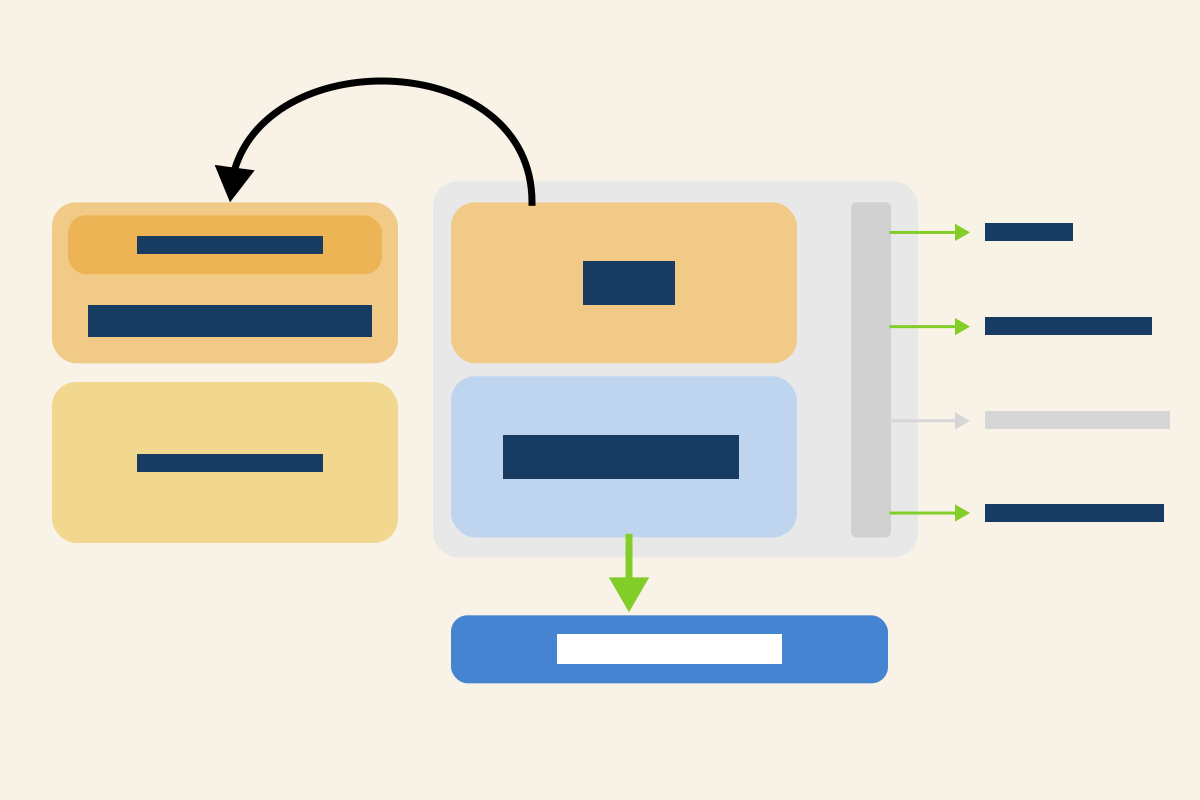
TL;DR: This article dissects the Kubernetes metrics pipeline through kubelet, cAdvisor, and CRI to show where your metrics actually come from and what breaks when the defaults change.
This article breaks down how Kubernetes collects container, pod, and node metrics, starting with cAdvisor and the Linux kernel, then shifting to a CRI-native model powered by gRPC.
You’ll see how kubelet exposes this data, what happens when you flip PodAndContainerStatsFromCRI, why container metrics on /metrics/cadvisor can be sourced from CRI instead of cAdvisor, and how to trace each metric back to its origin.
It also explains how kubelet talks to the CRI over gRPC, and why understanding this matters if you rely on Prometheus, Grafana, or any observability stack.
Table of contents
- Table of contents
- How Kubernetes Monitoring Layers Stack Up
- Where Metrics Originate
- cgroup v1 with cgroupfs: The Legacy Baseline
- At the crux of how cgroup hierarchy is shaped
- How Kubernetes Creates and Manages the Cgroup Hierarchy
- Kubernetes QoS Classes and cgroup Placement
- Auto-Detecting cgroup Drivers via KubeletCgroupDriverFromCRI
- cAdvisor: Embedded Resource Monitoring in Kubelet
- Kubelet’s Metrics Endpoints
- From cAdvisor to CRI: How Kubelet Collects Metrics Today
- Validating CRI-Based Metrics Collection in Kubelet
- Summary
- References
How Kubernetes Monitoring Layers Stack Up
Kubernetes metrics are the lifeblood of observability in your clusters.
While tools like Prometheus and Grafana often dominate the monitoring conversation, it's worth understanding the native mechanisms that Kubernetes uses to collect, expose, and leverage metrics before they ever reach those external systems.
Kubernetes monitoring works as a multi-layered system which provides insights that span from bare metal to application workloads.
Each layer builds upon the previous one to create a comprehensive picture of your cluster's health.
At the foundation sit node-level metrics.
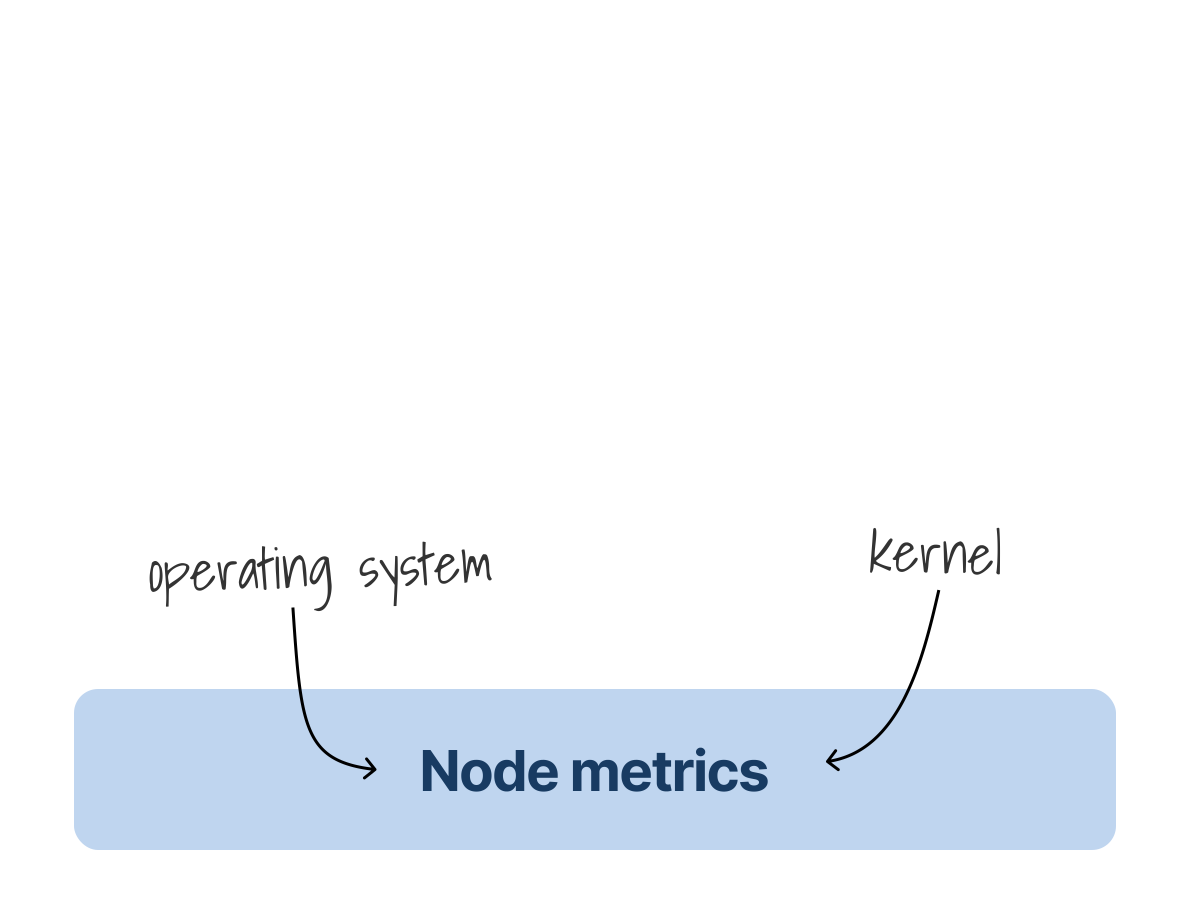
These reveal the utilization of physical and virtual resources like CPU, memory, and disk I/O.
The Prometheus Node Exporter is commonly used to collect these fundamental metrics, but they originate from the operating system itself.
One layer up are Kubernetes component metrics.
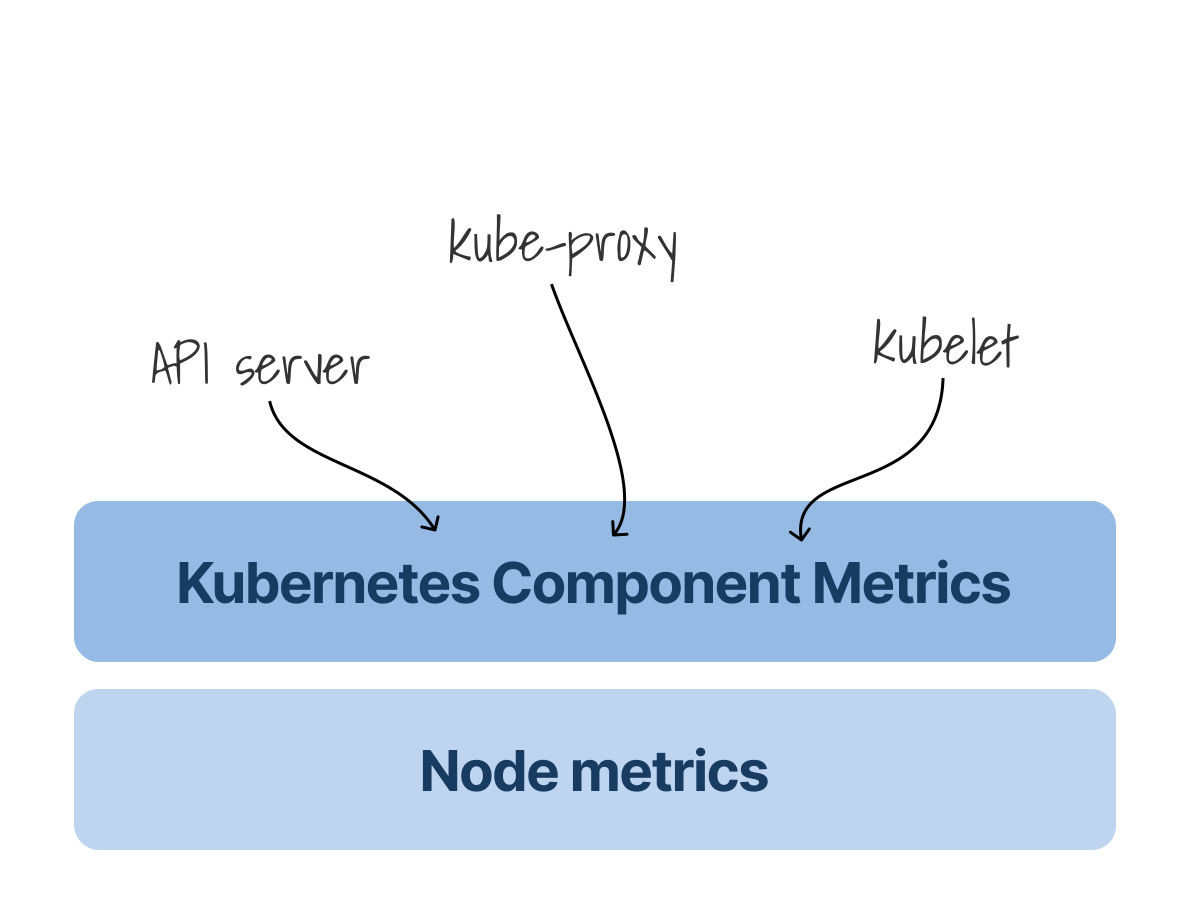
These expose the health and performance of core services such as kubelet, kube-proxy, and the API server.
Metrics like pod startup latency or API request throughput can tell you whether your control plane is running efficiently and reliably.
Zooming out to the object layer, API resource metrics, often surfaced by tools like kube-state-metrics, offer visibility into Kubernetes objects.
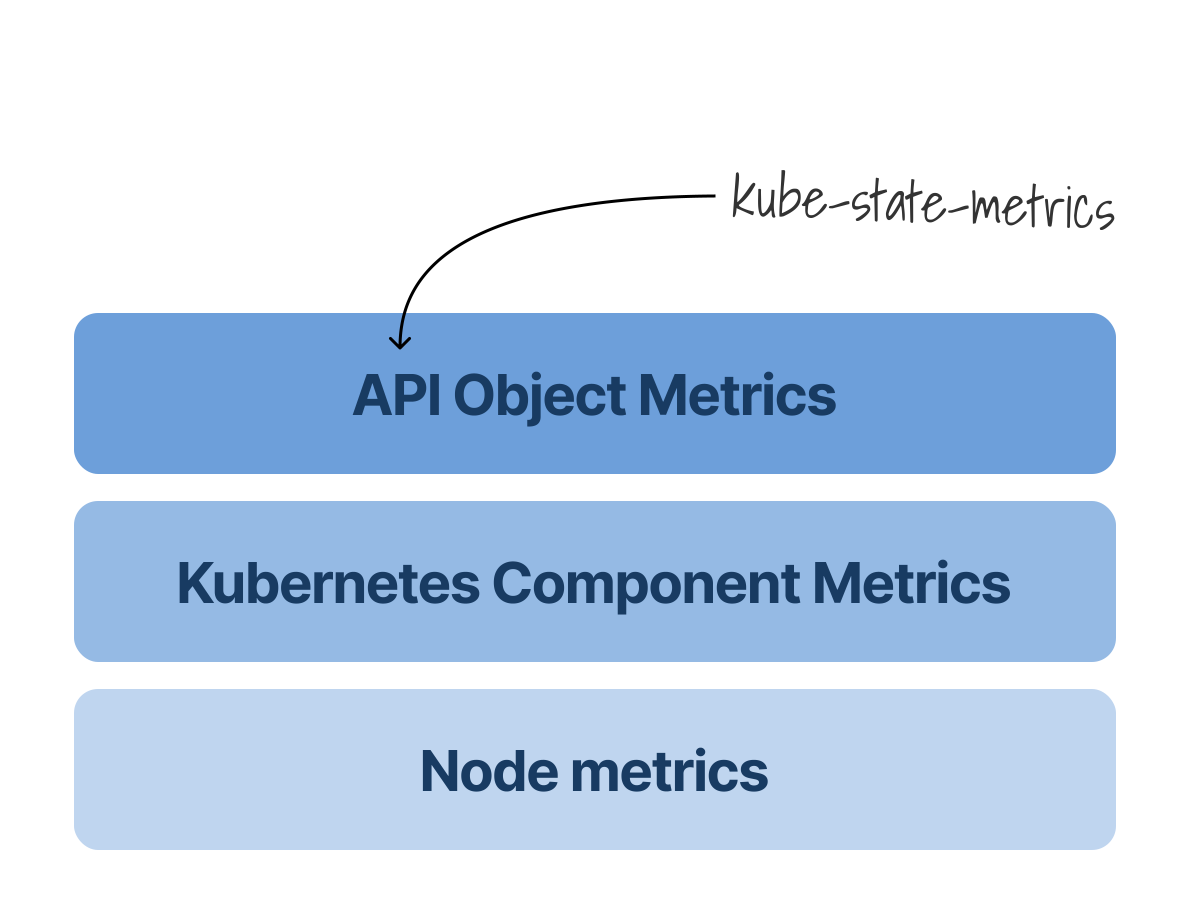
They track details such as the number of pods in a namespace, deployment status, or the number of services running across your cluster.
Finally, at the top layer are pod and container workload metrics.
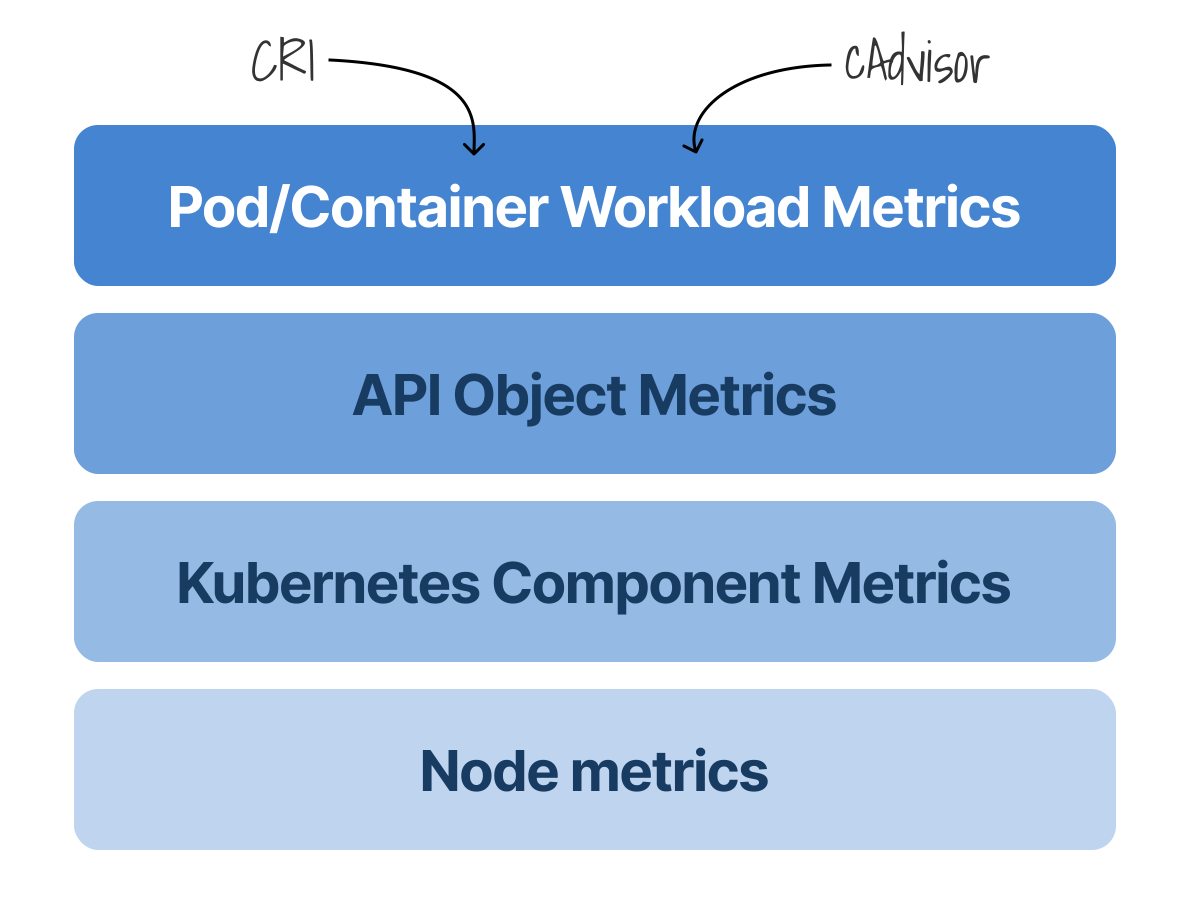
These focus on the actual performance of your applications.
This is where critical signals like CPU throttling come into play.
For instance, knowing how often a container is blocked from using CPU because it's hit its limit can reveal performance bottlenecks that might otherwise remain hidden.
Where Metrics Originate
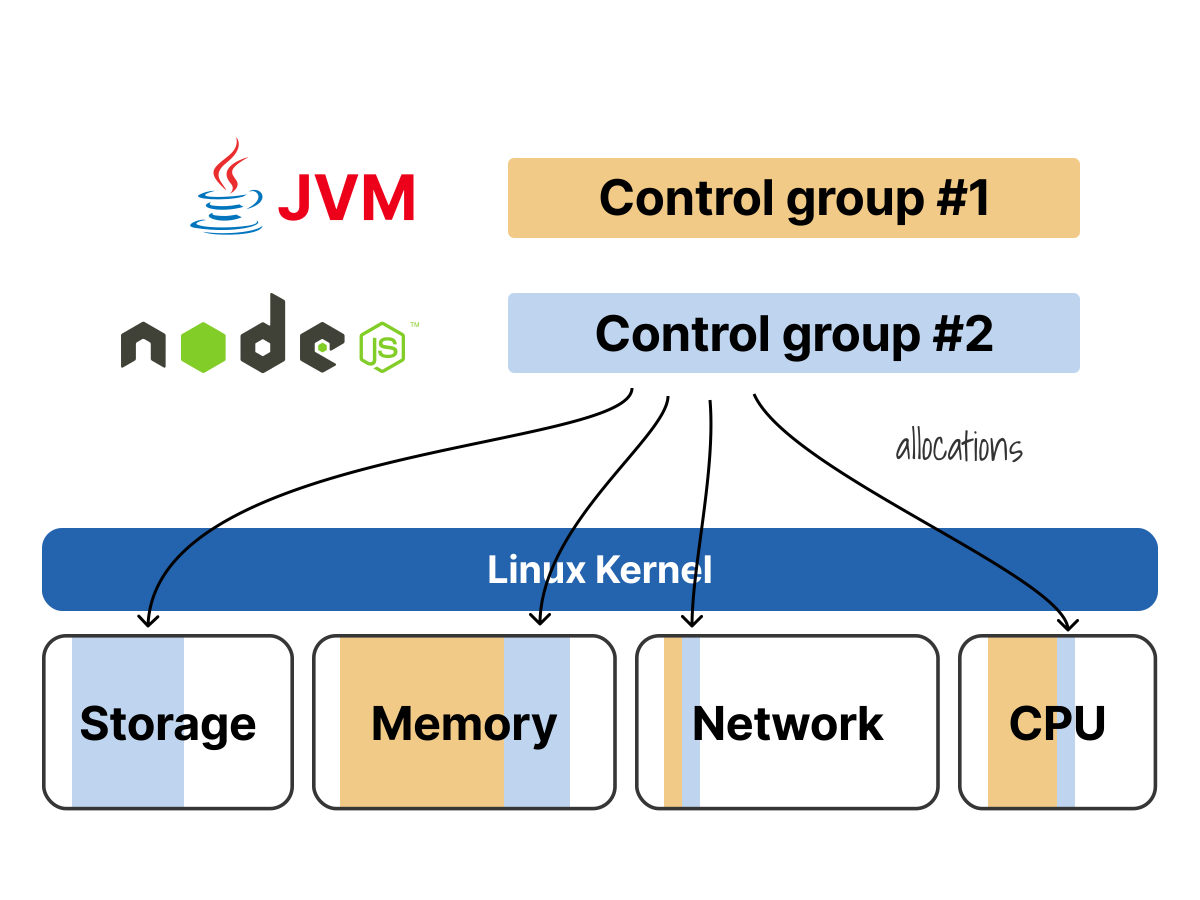
Kubernetes defines resource requests and limits, but the kernel does the actual enforcement.
It relies on the Linux kernel’s control groups, known as cgroups, to apply those rules.
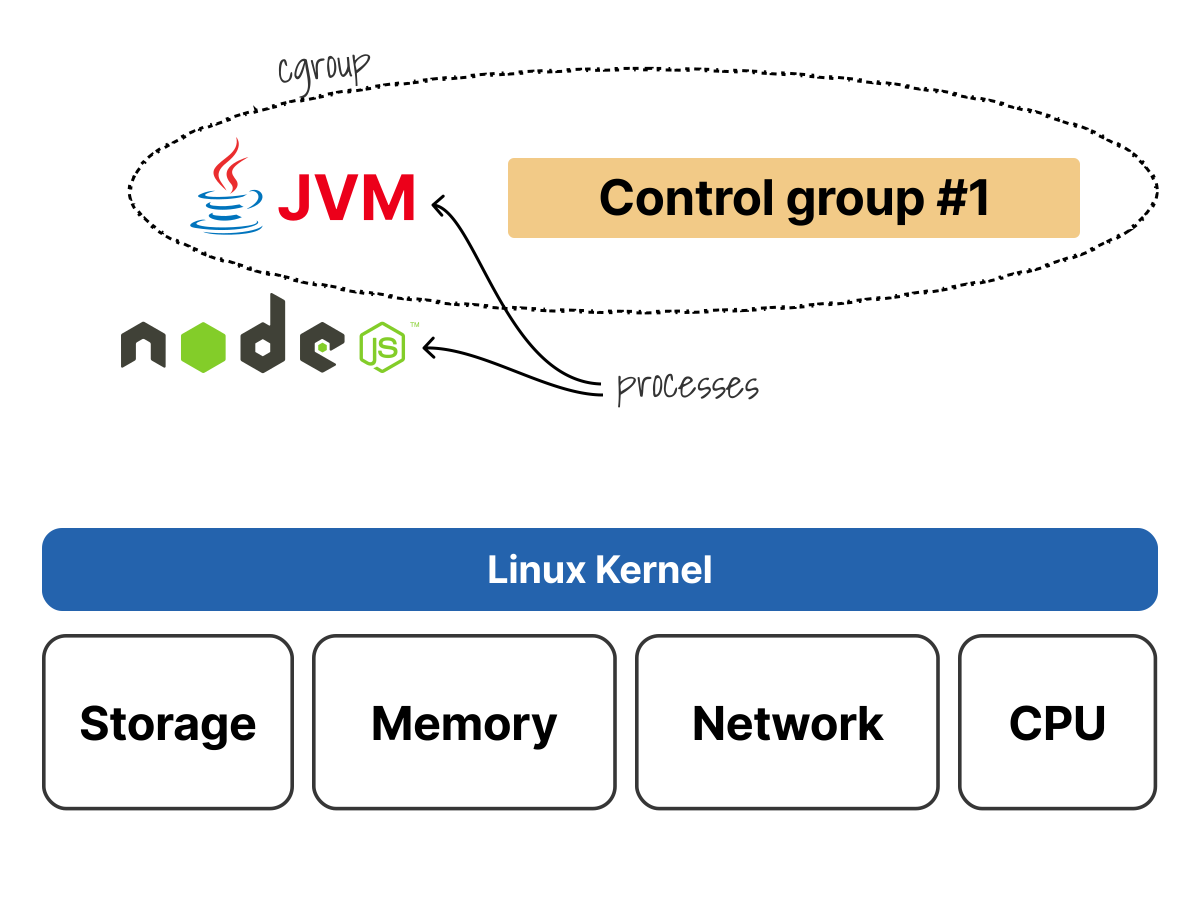 1/4
1/4In this case, I have a control group for the JVM.
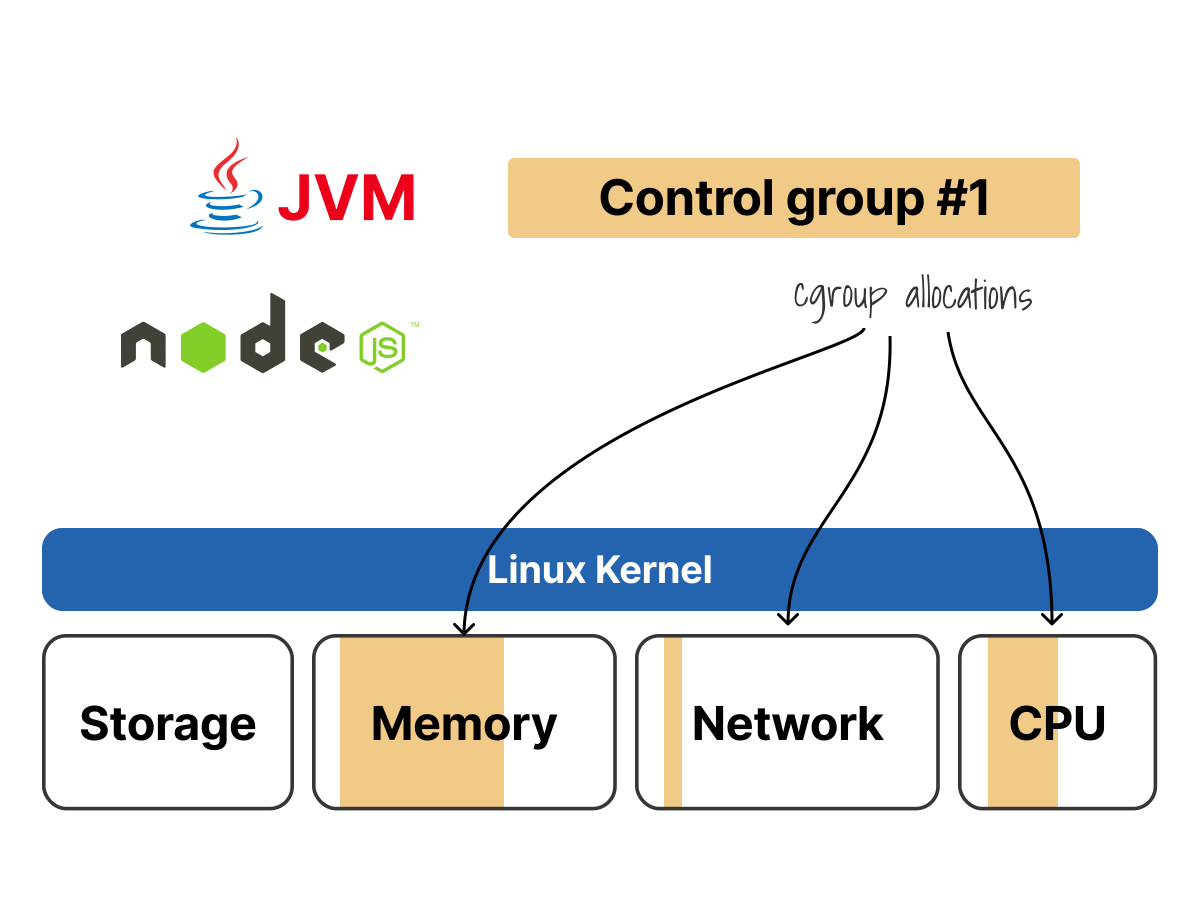 2/4
2/4I can create a control group that limits access to CPU, memory, network bandwidth, etc.
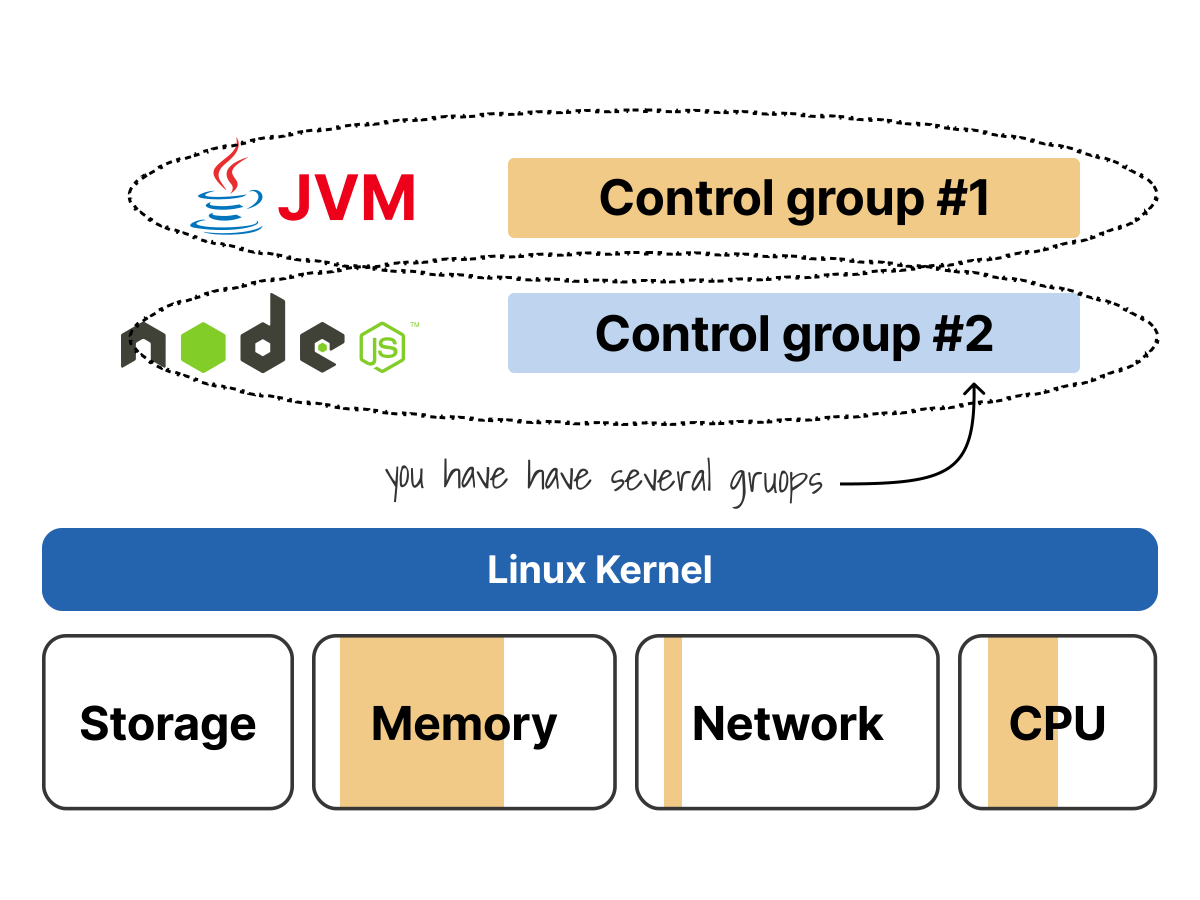 3/4
3/4Each process can have its control group. I could create a second control group for the Node.js app.
 4/4
4/4I can fine-tune the settings for the new control group and further restrict the available resources for that process.
Cgroups are directories in the /sys/fs/cgroup/ virtual filesystem.
They are a live view of resource allocation and enforcement at the kernel level, exposed as files you can read and write.
These directories define how much CPU time, memory, or I/O bandwidth a process is allowed to consume.
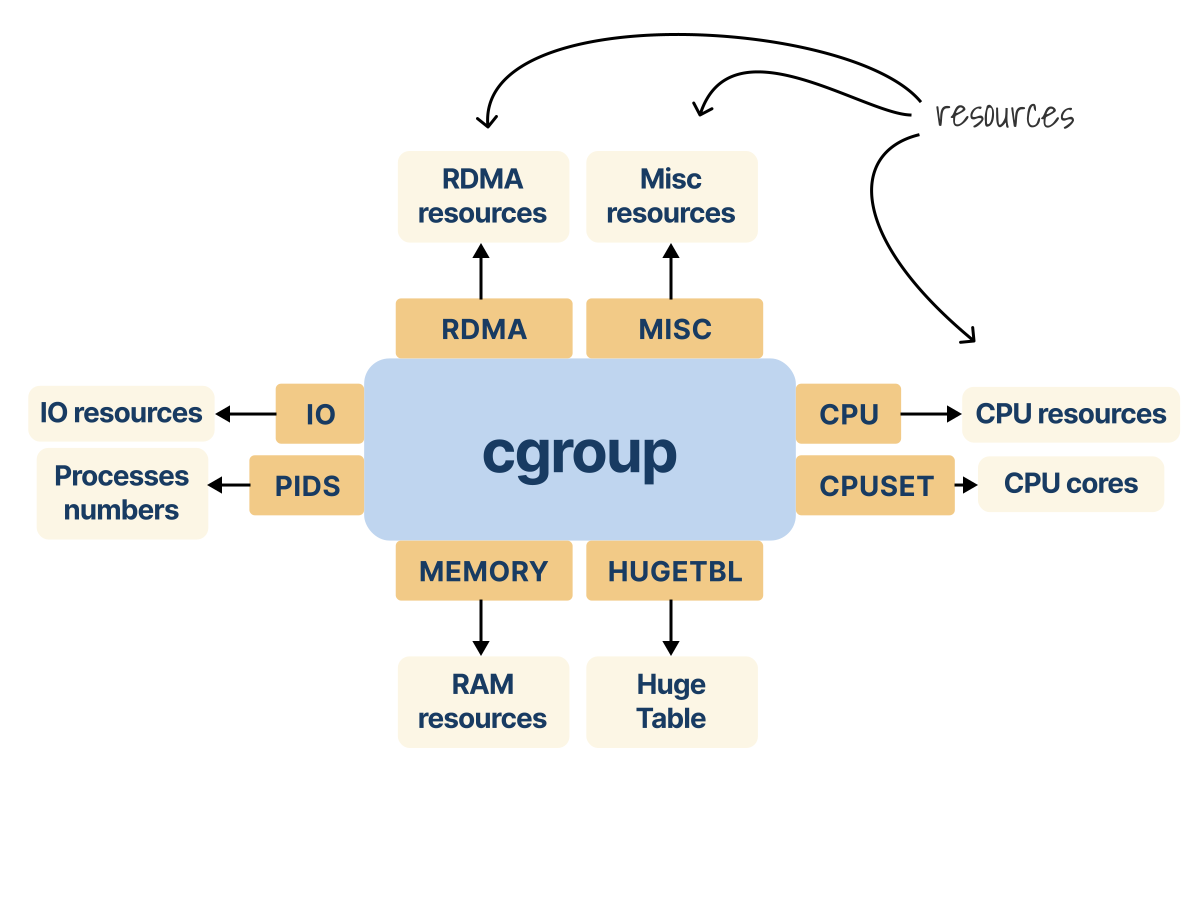
In this context, a resource is anything the system can allocate, limit, and monitor: CPU cycles, memory usage, disk throughput, network bandwidth, even the number of process IDs a container can spawn.
But defining resources is only half of the story.
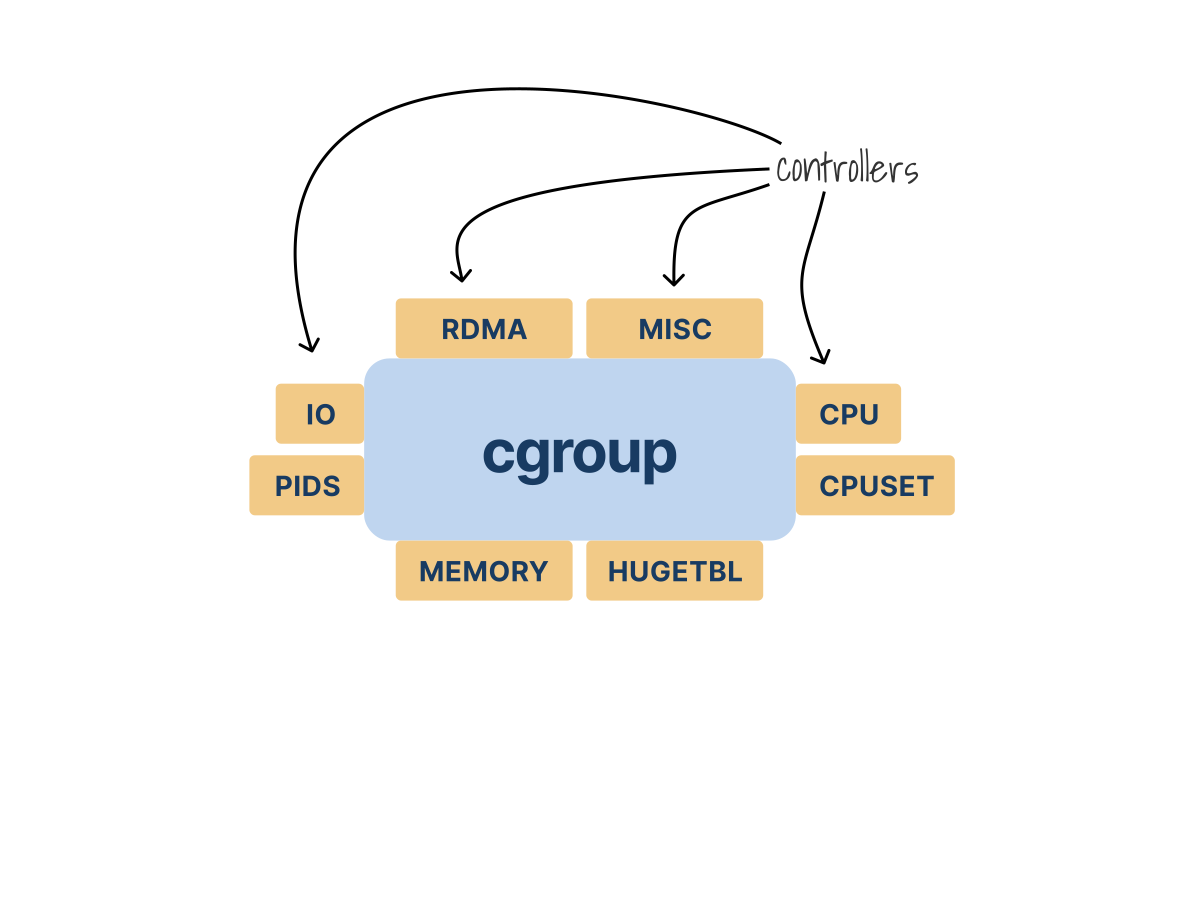
That’s where controllers make all the difference.
A controller is a kernel component that enforces resource policies and monitors usage for a specific type of resource.
For every resource, there’s a controller in cgroups that governs it.
 1/2
1/2A cgroup can be governed by multiple controllers, such as CPU, CPUSET, MEMORY, PIDS, IO, RDMA, HUGETLB, and MISC.
 2/2
2/2Each controller maps to a concrete resource class: CPU time, CPU cores, RAM, process IDs, IO bandwidth, RDMA resources, huge pages, or miscellaneous kernel-managed resources.
The kernel reads them, applies the rules they define, and keeps every container within its resource boundaries.
Let's start a Minikube cluster with containerd as the container runtime, and deploy a Python pod to see this in action:
bash
minikube start -c containerd
kubectl create deployment python \
  --image=ghcr.io/learnk8s/python-metrics \
  --port=8080 \
  -- /usr/local/bin/python3 -m http.server 8080

kubectl get po -o wide
NAME                      READY   STATUS    IP
python-66dc9f5c8b-w6x4b   1/1     Running   10.244.0.5
The Linux cgroup API has two versions: cgroup v1 and cgroup v2.
Each version structures resource management differently.
To understand why cgroup v2 and the systemd driver matter, it helps to start with the older model first: cgroup v1 with the cgroupfs driver.
cgroup v1 with cgroupfs: The Legacy Baseline
In this model, Kubernetes and the container runtime manage cgroups by writing directly to the cgroup filesystem.
That works, but it also means the hierarchy is shaped by separate controller trees rather than one unified resource tree.
In cgroup v1, kubelet and the container runtime can still be configured to use either systemd or cgroupfs, as long as both sides use the same driver.
Now let's step into a cgroup v1 environment and see how Kubernetes builds its QoS-based hierarchies when it uses the cgroupfs driver.
We’ll delete our existing Minikube cluster and reboot into a system where cgroup v1 is enabled:
bash
minikube deleteThere are several ways to switch a Linux system back to cgroup v1.
You might pass kernel boot parameters like systemd.unified_cgroup_hierarchy=0 or disable cgroup v2 entirely, depending on the environment, whether it’s bare metal, a VM, or WSL2.
Once the node boots into cgroup v1, Kubernetes automatically detects it and adjusts its resource management behavior.
First, confirm the system is operating under cgroup v1:
bash
stat -fc %T /sys/fs/cgroup/
tmpfs
Now start a fresh Minikube cluster with the containerd runtime:
bash
minikube start -c containerd
kubectl create deployment python \
  --image=ghcr.io/learnk8s/python-metrics \
  --port=8080 \
  -- /usr/local/bin/python3 -m http.server 8080
And deploy the Python pod:
bash
kubectl get po -o wide
NAME                      READY   STATUS    RESTARTS   AGE   IP
python-66dc9f5c8b-4248r   1/1     Running   0          42s   10.244.0.4
Now we focus on how Kubernetes structures the cgroups under cgroup v1 with the cgroupfs driver.
Kubernetes enforces QoS-based resource isolation by creating separate hierarchies for each QoS class under every controller.
We confirm the kubelet configuration to verify this setting:
bash
kubectl proxy --port=8001 &
curl -X GET http://127.0.0.1:8001/api/v1/nodes/minikube/proxy/configz | jq . | grep -i qos
"cgroupsPerQOS": true,
Per-QoS hierarchy creation is enabled, but which driver is kubelet using to manage these hierarchies?:
bash
minikube ssh -- "sudo cat /var/lib/kubelet/config.yaml | grep -i cgroupDriver"
cgroupDriver: cgroupfs
In cgroup v1 with cgroupsPerQOS: true, kubelet’s use of the cgroupfs driver results in Kubernetes creating and managing separate cgroup subtrees for QoS classes under each controller.
Let's inspect the CPU controller directory structure:
bash
minikube ssh -- "ls -la /sys/fs/cgroup/cpu/kubepods/"
drwxr-xr-x 5 root root 0 Mar 20 12:10 besteffort
drwxr-xr-x 7 root root 0 Mar 20 12:11 burstable
drwxr-xr-x 3 root root 0 Mar 20 12:12 guaranteed
Each QoS class gets its own directory under each controller.
Since our Python pod was deployed without resource requests, we can locate it under the besteffort QoS class:
bash
minikube ssh -- "ls -la /sys/fs/cgroup/cpu/kubepods/besteffort/"
drwxr-xr-x 4 root root 0 Mar 20 03:51 pod23e59e27-abe5-4529-bf9c-581516ae0c0b
drwxr-xr-x 4 root root 0 Mar 20 03:51 pod9f874003-a948-425d-a072-f389dc21bdff
drwxr-xr-x 4 root root 0 Mar 20 03:51 podc1d8cd50-b50a-4b3c-a33d-8963242c60ef
We find multiple pod directories, named by their UID.
To correlate the pod directory with the actual python pod let's retrieve its UID from the Kubernetes API:
bash
kubectl get pod python-66dc9f5c8b-4248r -o jsonpath='{.metadata.uid}'
c1d8cd50-b50a-4b3c-a33d-8963242c60ef
This matches the directory podc1d8cd50-b50a-4b3c-a33d-8963242c60ef under the besteffort class.
Inside this pod directory, each container has its own cgroup, named after the container ID:
bash
minikube ssh -- "ls -la /sys/fs/cgroup/cpu/kubepods/besteffort/podc1d8cd50-b50a-4b3c-a33d-8963242c60ef/"
-rw-r--r-- 1 root root 0 Mar 20 12:16 cpu.shares
-rw-r--r-- 1 root root 0 Mar 20 12:16 cpu.cfs_quota_us
drwxr-xr-x 2 root root 0 Mar 20 03:52 ef455b35bf7e2afa0942e25b58cd10858d40ed1d97fffe7f0b6a664d2e64aa54
-rw-r--r-- 1 root root 0 Mar 20 04:22 tasks
For example, we can inspect the pod’s memory limit in the memory controller:
bash
minikube ssh -- "cat /sys/fs/cgroup/memory/kubepods/besteffort/\
podc1d8cd50-b50a-4b3c-a33d-8963242c60ef/\
memory.limit_in_bytes"

9223372036854771712
This very large value is an effectively unlimited memory ceiling, which is expected for a BestEffort pod.
At this point, kubelet decides where the pod belongs in the QoS hierarchy, the container runtime helps create and configure the container cgroups, and the kernel enforces the resulting cgroup settings for the processes attached to them.
At the crux of how cgroup hierarchy is shaped
In cgroup v1, each controller operates in its own separate hierarchy.
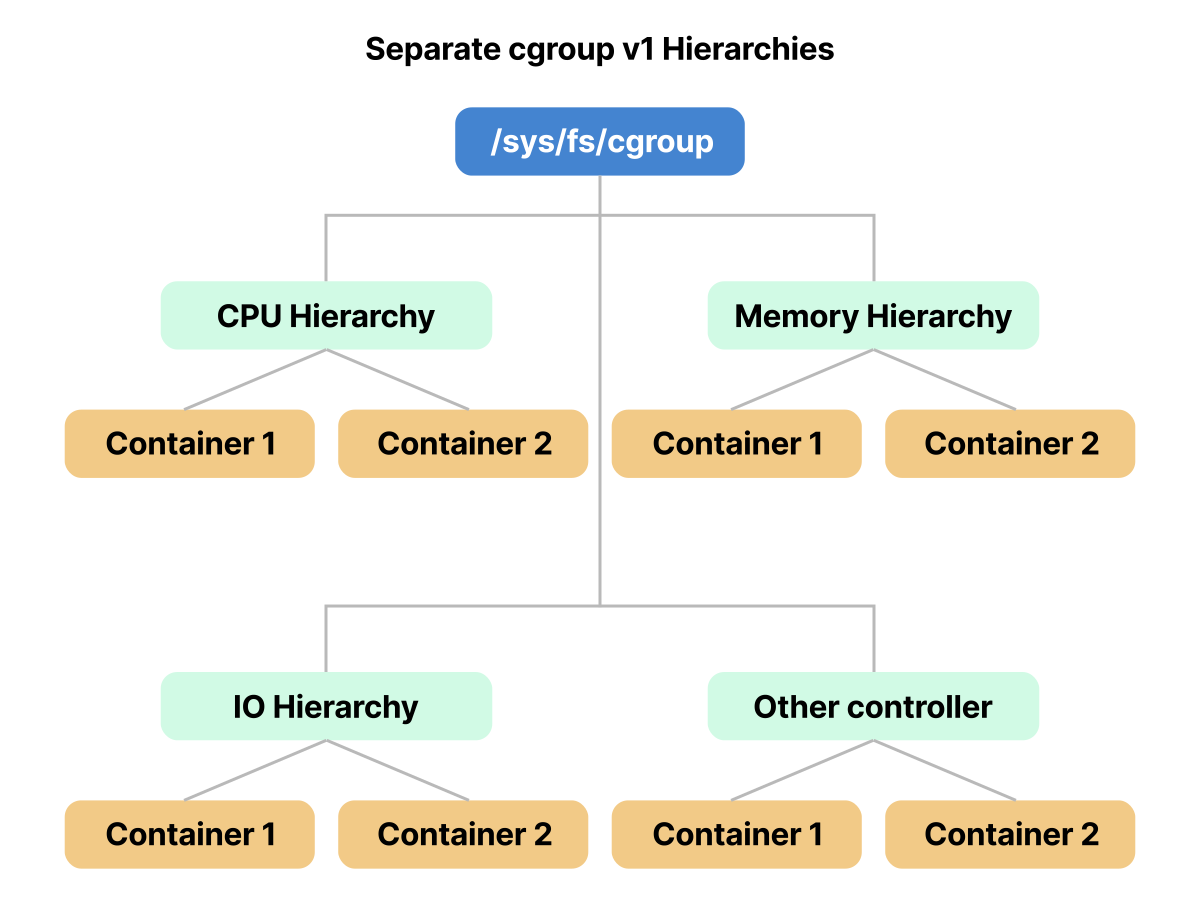
When we list the mounted cgroup controllers in cgroup v1, we see each one mounted independently as its own filesystem:
bash
minikube ssh -- "mount | grep cgroup"

cgroup on /sys/fs/cgroup/cpu type cgroup (rw,relatime,cpu)
cgroup on /sys/fs/cgroup/memory type cgroup (rw,relatime,memory)
cgroup on /sys/fs/cgroup/pids type cgroup (rw,relatime,pids)
This indicates that each controller, whether CPU, memory, or pids, has its own mount point and hierarchy.
We can confirm this separation by checking /proc/cgroups:
bash
minikube ssh -- "cat /proc/cgroups"

#subsys_name    hierarchy    num_cgroups    enabled
cpuset          1            34             1
cpu             2            52             1
cpuacct         3            34             1
When we check the filesystem type of /sys/fs/cgroup/ in cgroup v1, it reports tmpfs instead of cgroup2fs:
bash
minikube ssh -- "stat -fc %T /sys/fs/cgroup/"

tmpfs
The cgroup fs structure looks like the following:
bash
minikube ssh -- "ls -la /sys/fs/cgroup/"

drwxr-xr-x 15 root root   0 Feb 23 05:17 blkio
drwxr-xr-x 15 root root   0 Feb 23 05:17 cpu
drwxr-xr-x  2 root root  40 Feb 23 05:17 cpu,cpuacct
drwxr-xr-x 23 root root   0 Feb 23 05:17 cpuacct
drwxr-xr-x 23 root root   0 Feb 23 05:17 cpuset
drwxr-xr-x 18 root root   0 Feb 23 05:17 devices
drwxr-xr-x 23 root root   0 Feb 23 05:17 freezer
This is the core limitation of cgroup v1: CPU, memory, pids, and other controllers can each have their own hierarchy, so resource management is split across multiple trees.
cgroup v2 fixes that part by moving controllers into a single unified hierarchy.
Now let's switch to a cgroup v2 system and examine the structure of the cgroup filesystem.
bash
minikube ssh -- "ls -la /sys/fs/cgroup/"

-r--r--r-- 1 root root 0 Apr 28 10:51 cgroup.controllers
-r--r--r-- 1 root root 0 Apr 28 10:58 cgroup.stat
-rw-r--r-- 1 root root 0 Apr 28 10:51 memory.high
drwxr-xr-x 5 root root 0 Apr 28 10:51 kubepods.slice
...
All resource controllers are managed together in a single tree rooted at /sys/fs/cgroup/.
To confirm that cgroup v2 is active, we can inspect the mounted cgroup filesystem:
bash
minikube ssh -- "mount | grep cgroup"

cgroup on /sys/fs/cgroup type cgroup2 (rw,nosuid,nodev,noexec,relatime,nsdelegate,...)
We can list the active controllers that the kernel has attached to this unified hierarchy by reading /proc/cgroups.
In cgroup v2, all controllers operate within a single hierarchy, and the hierarchy column reflects this by showing 0 for each controller:
bash
minikube ssh -- "cat /proc/cgroups"

#subsys_name    hierarchy       num_cgroups     enabled
cpu     0       208     1
cpuacct 0       208     1
blkio   0       208     1
devices 0       208     1
To verify the filesystem type for /sys/fs/cgroup/, we can run the stat utility.
In cgroup v2, this command reports cgroup2fs:
bash
minikube ssh -- "stat -fc %T /sys/fs/cgroup/"

cgroup2fs
If it shows cgroup2fs, we know we’re running cgroup v2.
So cgroup v2 cleans up the kernel-side hierarchy, but it does not answer the ownership question by itself.
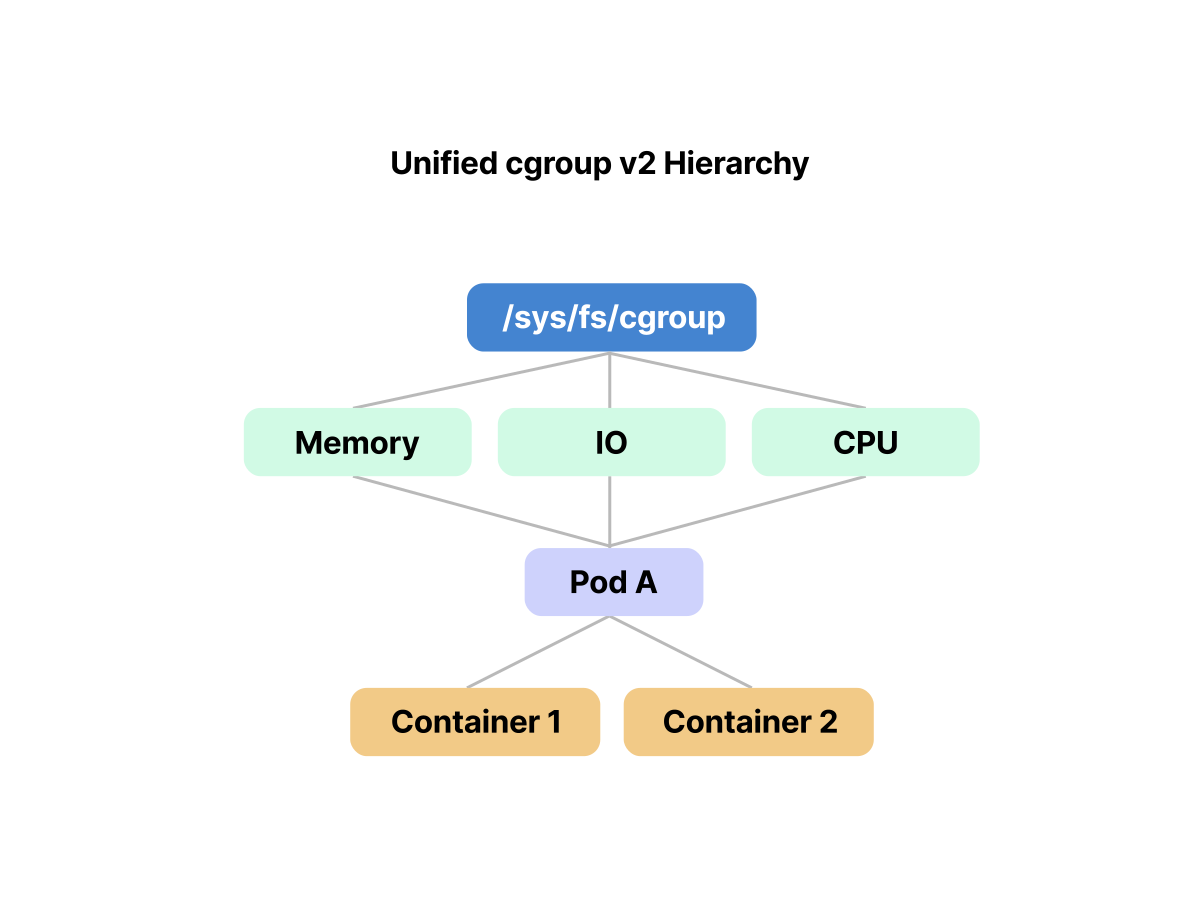
On a systemd-based node, Kubernetes still needs to decide who owns and manages the cgroup tree: systemd or direct filesystem writes through cgroupfs.
cgroup v1 is now only relevant for legacy systems, and its days are officially numbered.
Modern distributions such as Ubuntu 22.04+, Fedora 31+, and RHEL 9+ enable cgroup v2 by default.
Kubernetes has supported cgroup v2 as stable since v1.25, and cgroup v1 has been officially deprecated since Kubernetes v1.35 as part of KEP-5573.
Starting with Kubernetes v1.35, kubelet no longer starts on cgroup v1 nodes by default unless failCgroupV1 is explicitly set to false.
If you’re running production clusters that still use cgroup v1, you should plan a migration to cgroup v2 and define an upgrade or rollback strategy in advance.
So far, we've seen how cgroup v1 and v2 shape the filesystem layout, and we've learned how to verify which mode the node is using.
But to understand how Kubernetes actually turns that kernel structure into pod and container boundaries, we now need to look at the two decisions kubelet makes next: which cgroup manager it initializes, and which cgroup driver owns the tree.
And that is where the cgroup driver comes in.
How Kubernetes Creates and Manages the Cgroup Hierarchy
On a Kubernetes node, kubelet and the container runtime collaborate to build and maintain the cgroup hierarchy used for enforcing pod-level resource constraints.
Before either component can create or manage any cgroups, kubelet needs to resolve one fundamental question: is the node running cgroup v1 or cgroup v2?
That answer comes early.
At startup, kubelet queries the kernel to determine the active cgroup mode.
If it detects cgroup v2, it initializes a v2-specific manager built for the unified hierarchy.
If the node is using cgroup v1, it falls back to a legacy manager.
This decision locks in the way kubelet will interact with kernel-level resource controls for the lifetime of the process.
But the cgroup version is only half the equation.
The other part is who is responsible for actually managing the cgroup tree within /sys/fs/cgroup/.
This is called the cgroup driver.
Kubelet supports two drivers: systemd or cgroupfs.
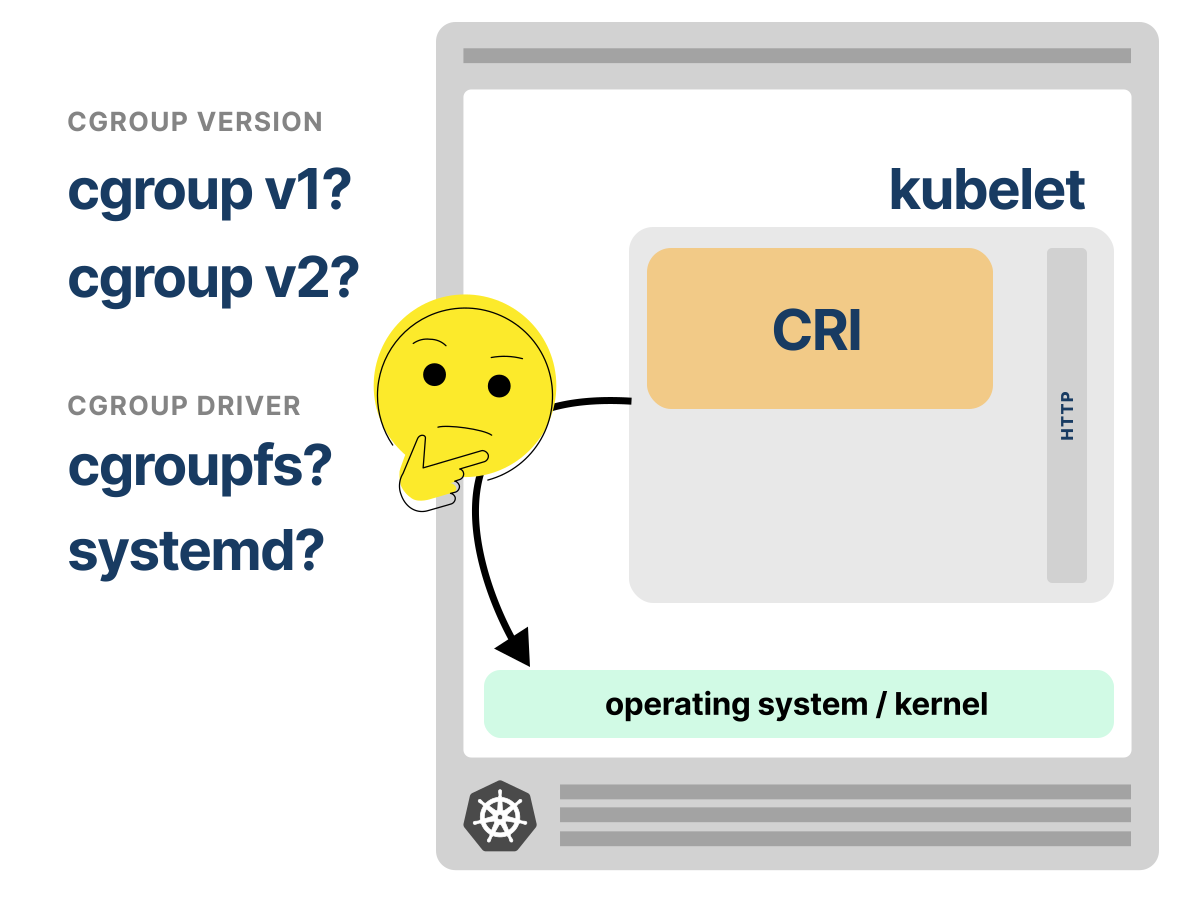
It picks one or the other, never both at the same time.
In cgroup v2, the unified hierarchy makes the systemd cgroup driver the recommended choice on systemd-based Linux distributions.
Kubelet can still be configured to use cgroupfs, but Kubernetes recommends avoiding a setup where systemd and Kubernetes manage cgroups separately.
If the driver is systemd, kubelet hands cgroup creation to systemd; instead of writing directories itself, it generates logical slice names like kubepods.slice or kubepods-besteffort.slice.
These slices represent pod resource groups.
After generating the slice names, kubelet asks systemd to instantiate and manage the cgroup structure beneath /sys/fs/cgroup.
This is the part cgroup v2 does not solve alone: ownership of the tree needs to be consistent.
From that point on, all resource controls for pods are expressed through systemd’s unit model.
Why systemd?
Because when you boot a modern Linux system, systemd is the first userspace process the kernel runs.
It becomes PID 1.
As PID 1, systemd takes ownership of process supervision and resource control for the entire system.
Rather than using shell scripts, systemd defines behavior through typed units.
Units are structured configuration objects like .service, .scope, and .slice.
A slice is how systemd partitions the system for resource control.
In Kubernetes slices are automatically created by systemd based on pod QoS classes.
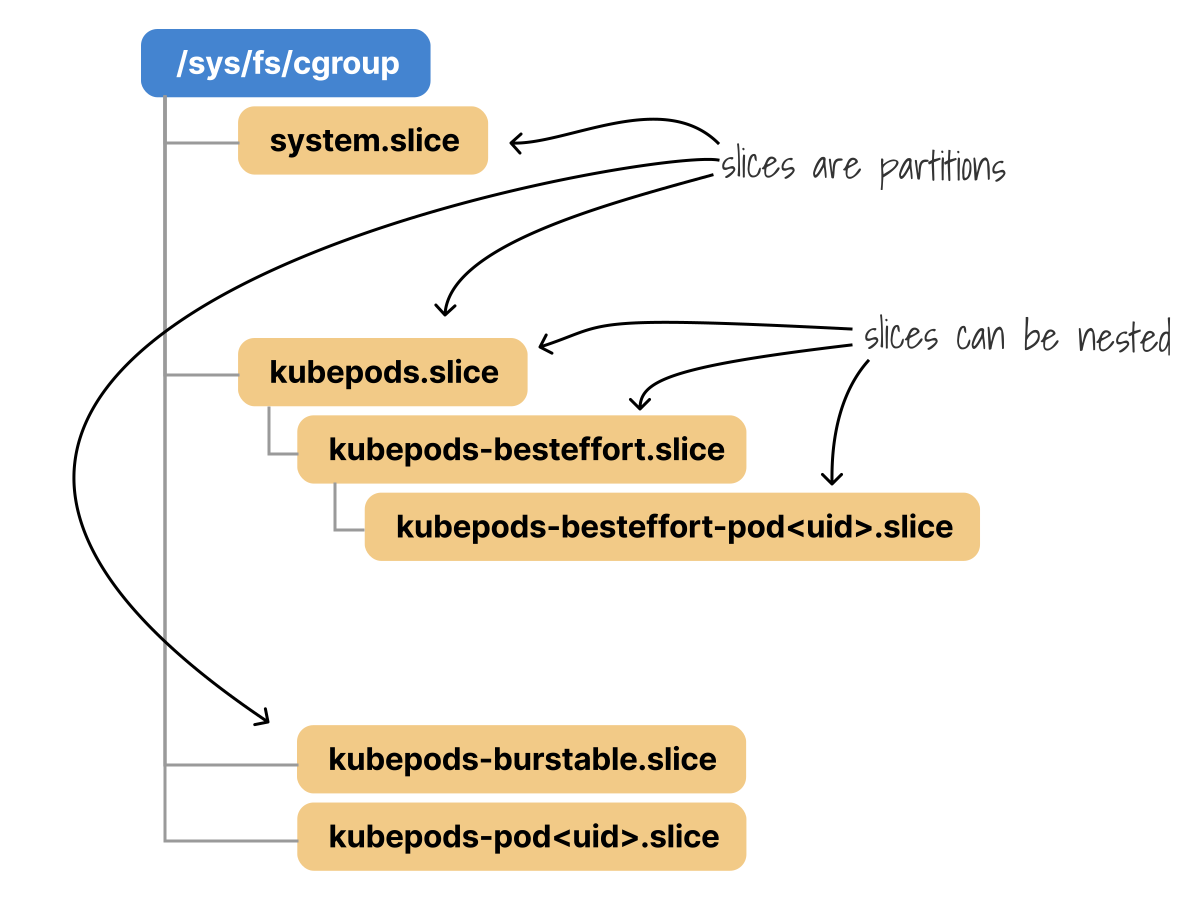
Think of slices like namespaces for CPU and memory budgets, managed for you behind the scenes.
What matters is you can apply limits at the slice level.
Services are the more familiar systemd unit type.
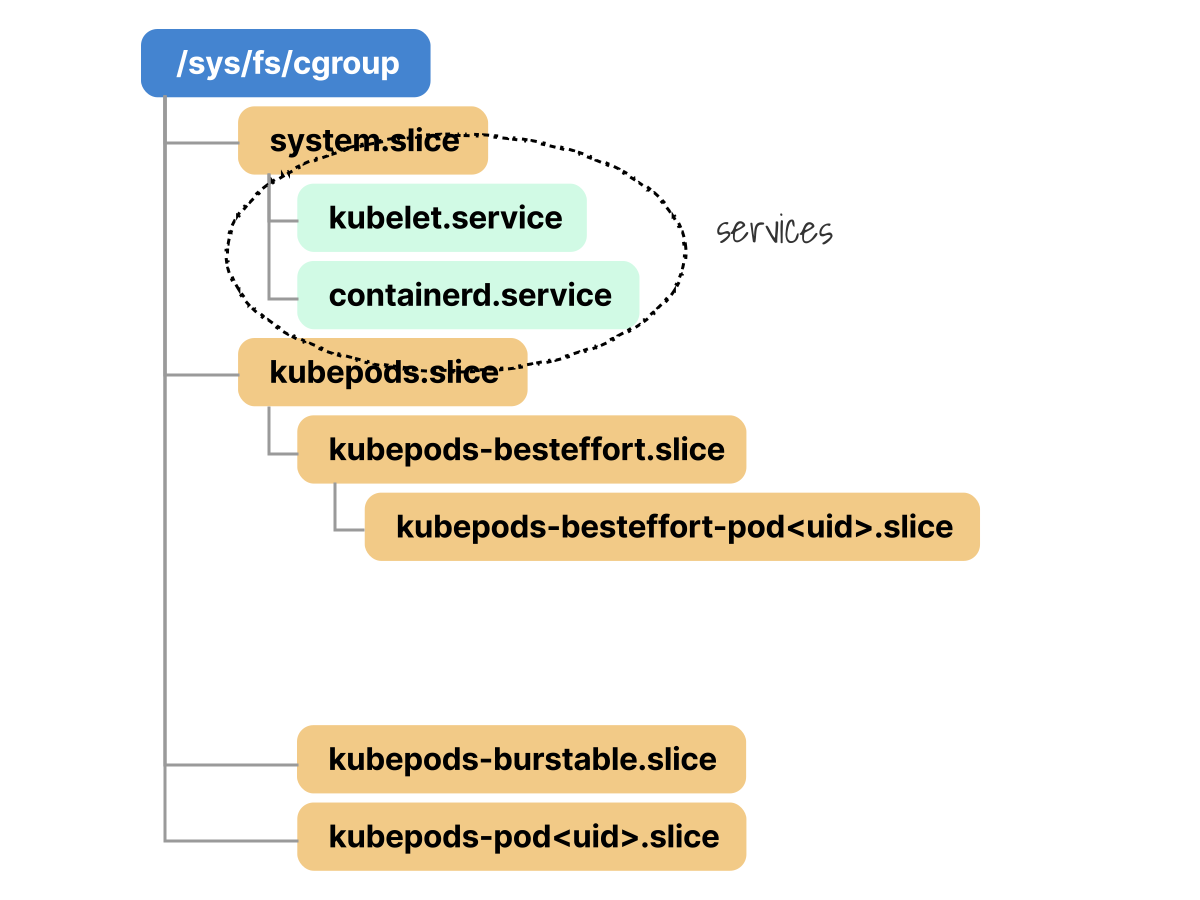
A .service represents a process that systemd starts and supervises directly.
On a Kubernetes node, kubelet and containerd usually run as services:
kubelet.servicecontainerd.service
These services live under system.slice, not under kubepods.slice.
That distinction matters: kubelet and containerd are host daemons that coordinate pod placement and container startup, but the containers themselves do not become children of containerd.service.
The actual container processes are placed into Kubernetes pod cgroups under kubepods.slice.
Scopes are different.
Scopes are used when systemd needs to manage a process it inherits from another launcher and still wants to control.
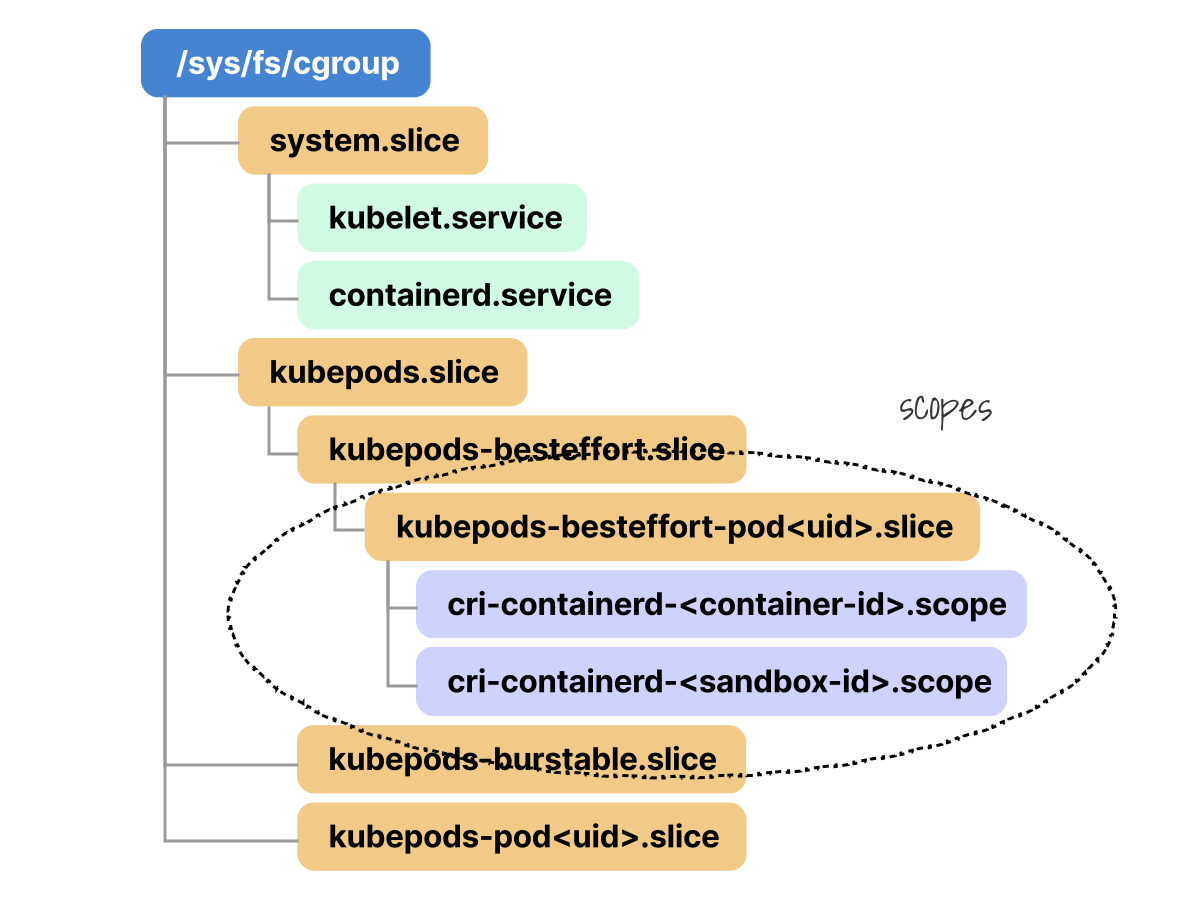
For example when the runtime launches a container, systemd can still take over and manage it.
It does this by wrapping the container process in a .scope unit.
Then systemd creates a .scope unit (such as cri-containerd-<container-id>.scope) and places it inside an appropriate slice determined by the pod’s quality of service (QoS) class.
But this only works if both kubelet and the container runtime agree on the cgroup driver.
If kubelet generates systemd slice names but containerd uses cgroupfs, the contract breaks.
If the cgroup driver is cgroupfs, kubelet goes back to the older model: direct filesystem ownership.
Kubelet interacts with the kernel’s cgroup API through the filesystem to create and manage cgroup directories.
Let’s step back into our Minikube cluster running cgroup v2 with containerd as the runtime.
Containerd handles its end of the driver selection agreement through its configuration file in /etc/containerd/config.toml through the SystemdCgroup parameter:
bash
minikube ssh -- "sudo cat /etc/containerd/config.toml | grep -i -C2 'SystemdCgroup'"
runtime_type = "io.containerd.runc.v2"
  [plugins."io.containerd.grpc.v1.cri".containerd.runtimes.runc.options]
    SystemdCgroup = true

  [plugins."io.containerd.grpc.v1.cri".cni]
This is the config version 2 format used by containerd 1.x.
Once kubelet and the runtime align on both the cgroup version and the driver, kubelet can safely take ownership of building the pod-level cgroup hierarchy.
But in systemd with cgroup v2, which scope unit goes into which systemd slice?
That’s determined by the pod’s QoS class, which kubelet calculates based on the pod’s resource requests and limits.
Kubernetes QoS Classes and cgroup Placement
Based on the pod’s resource requests and limits, Kubernetes assigns it to one of three Quality-of-Service (QoS) classes, which influences where the pod is placed in the cgroup hierarchy.
- A pod is classified as Guaranteed only when every container has CPU and memory requests and limits set, and each request exactly matches its corresponding limit.
- A pod is Burstable when it defines at least one CPU or memory request or limit but does not meet the stricter Guaranteed rules.
- A pod is BestEffort when none of its containers define CPU or memory requests or limits.
This QoS-to-cgroup hierarchy behavior is controlled by kubelet’s --cgroups-per-qos flag, which defaults to true.
When cgroupsPerQOS: true and systemd manages cgroups on a cgroup v2 node, systemd organizes pods under kubepods.slice and further into slices based on QoS classes.
Let's inspect the root qos directory:
bash
minikube ssh -- "ls -d /sys/fs/cgroup/kubepods.slice/*/"
/sys/fs/cgroup/kubepods.slice/kubepods-besteffort.slice/
/sys/fs/cgroup/kubepods.slice/kubepods-burstable.slice/
/sys/fs/cgroup/kubepods-poded2df55a_639e_4beb_aee3_5db422c35910.slice/
Notice the third entry.
It is not a QoS slice like kubepods-besteffort.slice or kubepods-burstable.slice.
This is a pod-level cgroup.
The pod... part maps back to ed2df55a-639e-4beb-aee3-5db422c35910 Kubernetes UID:
Let's verify which pod owns that UID:
bash
kubectl get pods -A \
  -o custom-columns='NAMESPACE:.metadata.namespace,NAME:.metadata.name,UID:.metadata.uid' \
  | grep ed2df55a
kube-system   kindnet-qkqvh   ed2df55a-639e-4beb-aee3-5db422c35910
So the third cgroup entry belongs to the kindnet-qkqvh pod in the kube-system namespace.
Now let's verify its QoS class from the Kubernetes API:
bash
kubectl get pod kindnet-qkqvh -n kube-system -o jsonpath='{.status.qosClass}{"\n"}'
Guaranteed
Now, if we print the QoS class and UID together:
bash
kubectl get pod kindnet-qkqvh -n kube-system -o jsonpath='QoS={.status.qosClass}{"\n"}UID={.metadata.uid}{"\n"}'
QoS=Guaranteed
UID=ed2df55a-639e-4beb-aee3-5db422c35910
We see the mapping is the cgroup for this pod and that pod is classified by Kubernetes as Guaranteed.
Now let's look inside that pod cgroup:
bash
minikube ssh -- "ls -la /sys/fs/cgroup/kubepods.slice/kubepods-poded2df55a_639e_4beb_aee3_5db422c35910.slice/"
cri-containerd-7ae5ffd3996a6ac09031cbf283d6bd9727a24bc723a06e76141132a8e57f1716.scope
cri-containerd-d24246f29f54f7adced123bc6194d9e0f15fd3a15c54326cd8c96d39961760c0.scope
The two cri-containerd-*.scope entries are the container-level systemd scope units running inside the kindnet-qkqvh pod.
We have traced a Guaranteed pod all the way down from the Kubernetes API to its pod slice and container scopes on disk.
Simplified to the branch we just inspected, the mapping looks like this:
tree
/sys/fs/cgroup/
└── kubepods.slice
    └── kubepods-poded2df55a_639e_4beb_aee3_5db422c35910.slice
        ├── cri-containerd-7ae5ffd3996a6ac09031cbf283d6bd9727a24bc723a06e76141132a8e57f1716.scope
        └── cri-containerd-d24246f29f54f7adced123bc6194d9e0f15fd3a15c54326cd8c96d39961760c0.scope
Now let’s do the same for our Python workload, which lands in a different part of the hierarchy because it has a different QoS class.
Inside the root slice, systemd further organizes pods into separate slices based on their QoS classes.
Since our Python pod was deployed without any CPU or memory requests or limits, its resources are managed under kubepods-besteffort.slice.
Let's confirm the QoS classification of the pod:
bash
kubectl get pod python-66dc9f5c8b-2kktd -o jsonpath='{.status.qosClass}'
BestEffort
Let's map our python pod and containers to their systemd-managed cgroup slices and scopes.
To achieve this we will get the pod UID to map it to the slice name:
bash
kubectl get pod python-66dc9f5c8b-2kktd -o jsonpath='{.metadata.uid}'
b60baa0b-1e66-4990-8670-93c5919f09cb
Each pod gets its own slice under the qos slices and systemd translates hyphens into underscores when creating pod slice directories (kubepods-{qos class}-pod{pod UID with underscores}.slice).
List the available pod slices under kubepods-besteffort.slice:
bash
minikube ssh -- "ls -d /sys/fs/cgroup/kubepods.slice/kubepods-besteffort.slice/*/"
/sys/fs/cgroup/.../kubepods-besteffort-pod740242e7_85e5_4369_a8a0_d6101719e386.slice/
/sys/fs/cgroup/.../kubepods-besteffort-pod857495d4_07b5_45a2_895b_0298f68797d8.slice/
/sys/fs/cgroup/.../kubepods-besteffort-podb60baa0b_1e66_4990_8670_93c5919f09cb.slice/
The last pod slice corresponds to our Python pod (its UID matches b60baa0b-1e66-4990-8670-93c5919f09cb).
The other entries are other BestEffort pods on the node, such as kube-system pods like CoreDNS or kube-proxy.
Within this pod slice, systemd organizes each container into separate .scope units.
These scopes are named after the containerd runtime and container ID.
List the contents of the specific pod slice:
bash
minikube ssh -- "ls /sys/fs/cgroup/kubepods.slice/\
kubepods-besteffort.slice/kubepods-besteffort-podb60baa0b_1e66_4990_8670_93c5919f09cb.slice/ | grep scope"
cri-containerd-b21e881ca9d6228281aa32cb1e2ebba5537f2a7b90e860a2f0cc6afec3305229.scope
cri-containerd-b8609ccf36f85b5a4fc652317358950861a6f0a538e6c4b4c4243241189fbc11.scope
The long hex strings above are the container ID, as assigned by containerd.
Systemd appends them to the .scope unit it creates for each container.
So now the question is: which one of these is your Python container?
We query containerd to match the container ID:
bash
minikube ssh -- "sudo crictl ps --name python"
CONTAINER           IMAGE          NAME              POD ID            POD
b21e881ca9d62       bdbec6b439339  python-metrics    b8609ccf36f85     python-66dc9f5c8b-2kktd
The container ID b21e881ca9d62 matches the first .scope unit above.
The other one (b8609ccf36f85...) is the pod sandbox, which is the pause container we will inspect next.
bash
minikube ssh -- "\
ls -la \
/sys/fs/cgroup/kubepods.slice/kubepods-besteffort.slice/\
kubepods-besteffort-podb60baa0b_1e66_4990_8670_93c5919f09cb.slice/\
cri-containerd-b21e881ca9d6228281aa32cb1e2ebba5537f2a7b90e860a2f0cc6afec3305229.scope"
cpu.max
hugetlb.2MB.events
memory.high
memory.stat
At this point, the hierarchy for the Python pod looks like this:
tree
/sys/fs/cgroup/
└── kubepods.slice
    └── kubepods-besteffort.slice
        └── kubepods-besteffort-podb60baa0b_1e66_4990_8670_93c5919f09cb.slice
            ├── cri-containerd-b21e881ca9d6228281aa32cb1e2ebba5537f2a7b90e860a2f0cc6afec3305229.scope
            │   └── python-metrics container
            └── cri-containerd-b8609ccf36f85b5a4fc652317358950861a6f0a538e6c4b4c4243241189fbc11.scope
                └── pod sandbox / pause container
We can now dig into its cgroup resource metrics like memory usage statistics.
bash
minikube ssh -- "cat /sys/fs/cgroup/kubepods.slice/\
kubepods-besteffort.slice/kubepods-besteffort-podb60baa0b_1e66_4990_8670_93c5919f09cb.slice/\
cri-containerd-b21e881ca9d6228281aa32cb1e2ebba5537f2a7b90e860a2f0cc6afec3305229.scope/\
memory.stat" | head -5
anon 9601024
file 13496320
kernel 1056768
kernel_stack 16384
pagetables 94208
Great!
But what about the other scope?
In this setup, even a Pod with a single application container has two active container scopes under the pod slice: one for the application container, one for the pause container.
Once the sandbox is running and holding that shared environment, Kubernetes starts the Python container inside that namespace.
Let’s inspect the pod sandbox b8609ccf36f85 to confirm the pause container:
bash
minikube ssh -- "sudo crictl inspectp b8609ccf36f85 | grep image"
"image": "registry.k8s.io/pause:3.10.1",
The pause container maps to the other .scope unit, but how can we verify it?
We inspect the pod sandbox to retrieve the pause container's PID:
bash
minikube ssh -- "sudo crictl inspectp b8609ccf36f85 | grep -E '\"pid\"'"
"pid": "CONTAINER",
    "pid": 1647,
PID 1647 corresponds to the pause container.
We correlate the PID with the running process and its parent shim:
bash
minikube ssh -- "sudo ps -e -o pid,ppid,cmd | grep -E '\\b1603\\b|\\b1647\\b'"
1603       1 /usr/bin/containerd-shim-runc-v2 -namespace k8s.io -id b8609... -address /run/containerd/containerd.sock
1647    1603 /pause
1694    1603 /usr/local/bin/python3 -m http.server 8080
The second scope is the pause container.
PID 1647 is the /pause process, and it shares the same containerd-shim-runc-v2 parent, PID 1603, with the Python process 1694.
Auto-Detecting cgroup Drivers via KubeletCgroupDriverFromCRI
Kubernetes addressed some of the coordination challenges with the KubeletCgroupDriverFromCRI feature gate, introduced as alpha in v1.28 and graduated to GA in v1.34.
At startup, kubelet asks the runtime which cgroup driver to use through the CRI RuntimeConfig RPC.
On Kubernetes 1.34+, the feature gate no longer needs to be set explicitly.
If the runtime lacks the RuntimeConfig RPC, kubelet falls back to the cgroupDriver value in its own configuration only in Kubernetes versions that still support this fallback.
Let's start a new cluster using CRI-O as the container runtime:
bash
minikube start -p test-driverfromcri --container-runtime=cri-oWhen we inspect the /var/lib/kubelet/config.yaml file, the kubelet config still shows the configured fallback driver:
bash
minikube ssh -p test-driverfromcri -- "sudo cat /var/lib/kubelet/config.yaml | grep -A2 cgroupDriver"
cgroupDriver: systemd
clusterDNS:
- 10.96.0.10
If the CRI runtime does not implement the RuntimeConfig RPC, kubelet falls back to the configured cgroupDriver:
bash
minikube ssh -p test-driverfromcri -- "sudo journalctl -u kubelet | grep -E 'RuntimeConfig|CRI implementation'"
"RuntimeConfig from runtime service failed" err="rpc error: code = Unimplemented desc = unknown method RuntimeConfig"
"CRI implementation should be updated to support RuntimeConfig. Falling back to using cgroupDriver from kubelet config."
Finally, once kubelet settles on a cgroup driver, it uses that driver consistently when placing pods and containers into the node’s cgroup hierarchy.
The container runtime then passes the resulting cgroup placement into the OCI runtime layer, where runc/libcontainer applies it by writing to the kernel’s cgroup interfaces.
Whether the hierarchy is represented through systemd slices and scopes or raw cgroupfs directories, the end result is the same: the Linux kernel enforces the configured CPU, memory, and other resource limits.
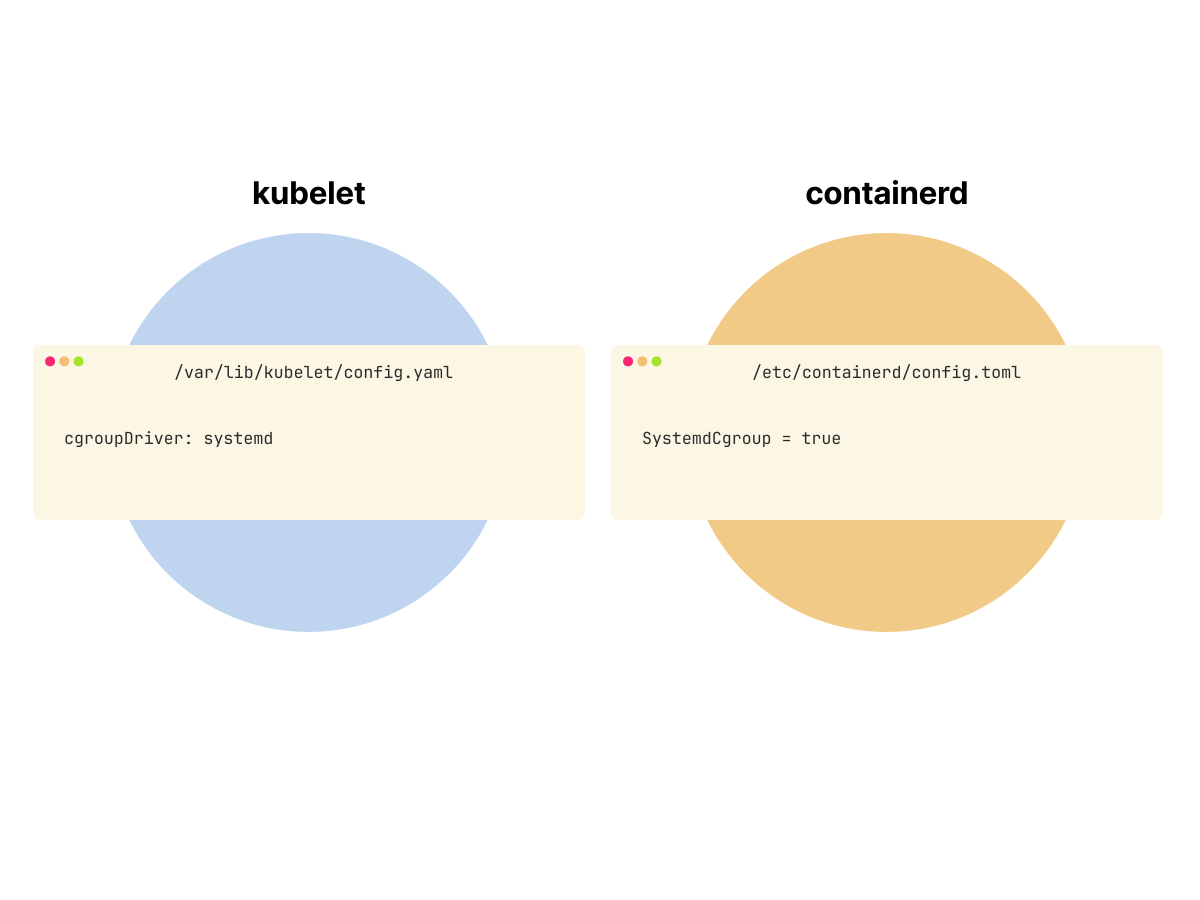 1/2
1/2Without RuntimeConfig discovery, kubelet uses its configured cgroupDriver and the runtime uses its own configuration, so both files must be kept in sync.
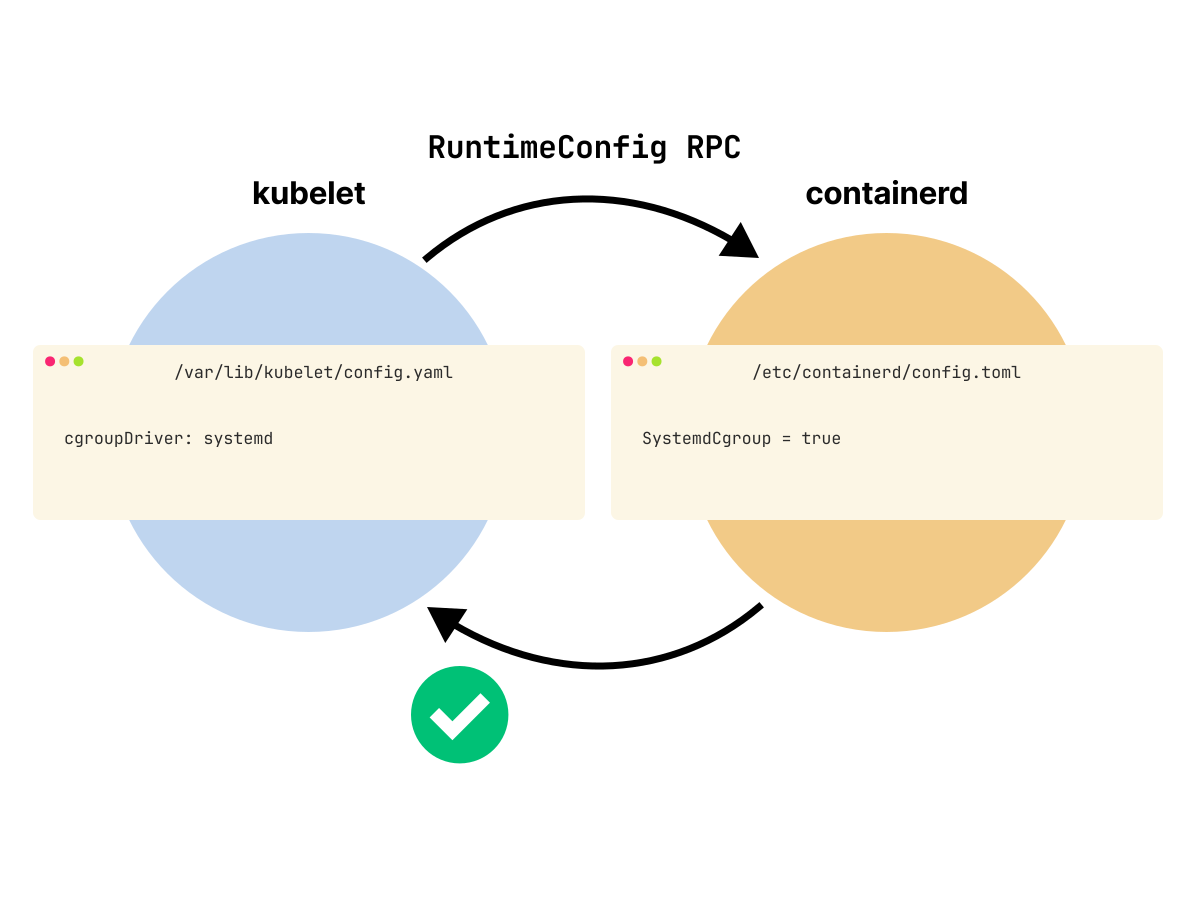 2/2
2/2When the runtime supports the RuntimeConfig RPC, kubelet asks containerd which cgroup driver it uses and can align its own behavior with the runtime.
At this point, we have seen both sides: cgroup v1 with direct filesystem-managed hierarchies, and cgroup v2 with systemd-managed slices and scopes.
But enforcement is only half of the story.
The kernel exposes raw counters, limits, and events through the cgroup filesystem, but Kubernetes still needs a component that can read those low-level files and turn them into useful container and pod-level metrics.
That is the visibility gap cAdvisor was designed to fill.
cAdvisor: Embedded Resource Monitoring in Kubelet
Container Advisor, or cAdvisor, is the default kubelet-integrated path for collecting container resource usage statistics on Kubernetes nodes.
It runs as an embedded component inside the kubelet process and is initialized automatically when kubelet starts.
Once initialized, it reads resource usage from the cgroup filesystem.
cAdvisor reads low-level resource data from the cgroup filesystem and attaches labels such as pod, namespace, container, and image.
Kubelet then exposes the collected metrics through its own HTTP endpoints: the Summary API and cAdvisor metrics endpoint.
If PodAndContainerStatsFromCRI is enabled and the container runtime supports stats through CRI, kubelet fetches pod and container metrics from the runtime instead of cAdvisor.
Kubelet’s Metrics Endpoints
Kubelet exposes several distinct metrics and stats endpoints on its HTTP server.
Each serves a specific purpose and differs in data granularity, format, and source.
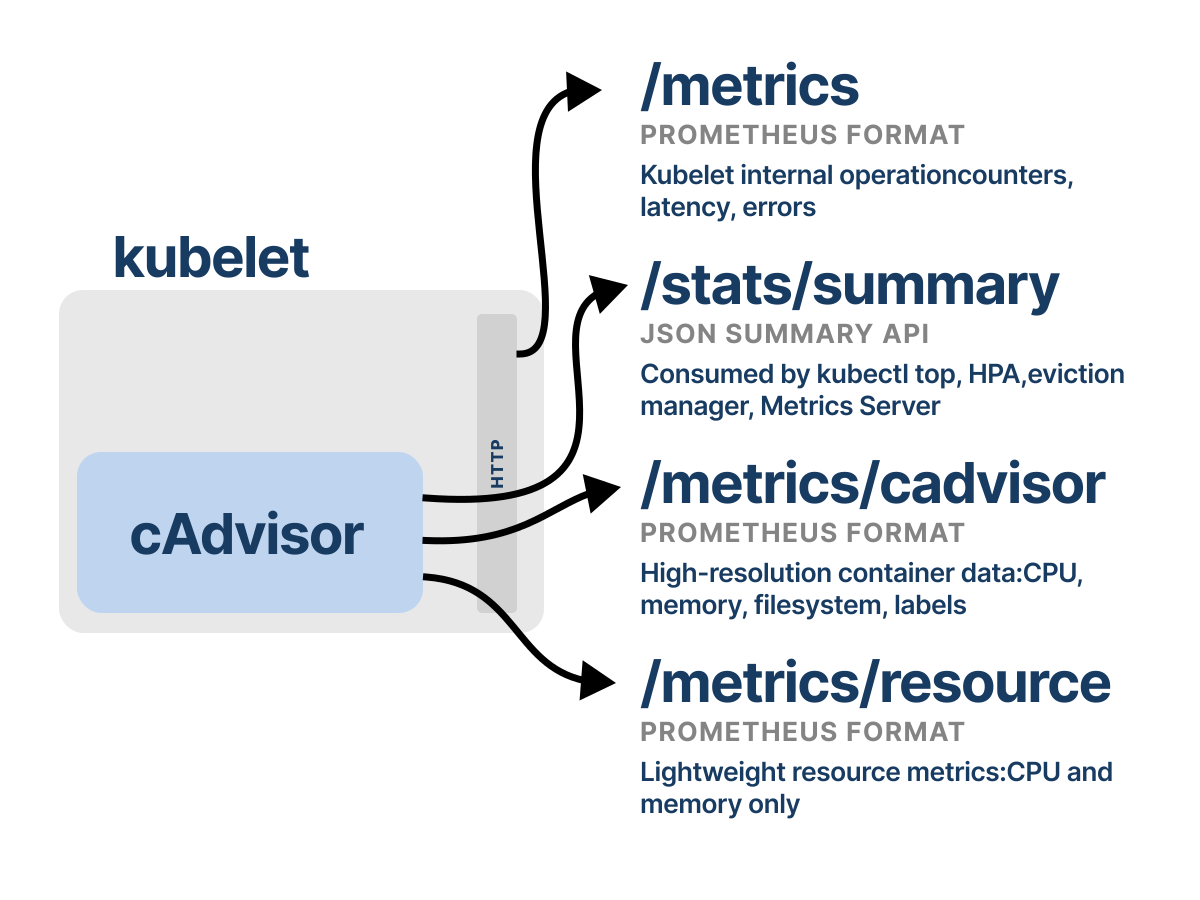
The /metrics/cadvisor endpoint exposes high-resolution container metrics in Prometheus format.
These metrics come directly from cAdvisor, and kubelet passes them through as-is to the scraper.
Prometheus typically scrapes this endpoint to collect detailed per-container metrics such as CPU time, memory usage, and I/O statistics.
These metrics are useful for low-level monitoring, fine-grained alerting, and capacity planning.
To query the kubelet’s /metrics/cadvisor endpoint, we first need to establish a local proxy to the Kubernetes API server.
Run the following command and leave it running on another terminal:
bash
kubectl proxy --port=8001Once the proxy forwards local HTTP requests to the kubelet’s API on the node, we can access kubelet HTTP endpoints through http://localhost:8001.
bash
curl -sS http://localhost:8001/api/v1/nodes/minikube/proxy/metrics/cadvisor

container_cpu_usage_seconds_total{container="python-metrics",cpu="total",pod="python-66dc9f5c8b-2kktd"} 0.105818
container_memory_usage_bytes{container="python-metrics",pod="python-66dc9f5c8b-2kktd"} 2.5870336e+07
container_fs_reads_bytes_total{container="python-metrics",pod="python-66dc9f5c8b-2kktd"} 1.49504e+07
container_processes{container="python-metrics",pod="python-66dc9f5c8b-2kktd"} 1
container_spec_cpu_shares{container="python-metrics",pod="python-66dc9f5c8b-2kktd"} 2
container_spec_memory_limit_bytes{container="python-metrics",pod="python-66dc9f5c8b-2kktd"} 0
Related node, pod, container, and volume stats are also available through kubelet’s Summary API on /stats/summary, which returns structured JSON instead of Prometheus-formatted metrics:
/stats/summary exposes node, pod, container, and volume stats. Metrics Server v0.6.0 and later use /metrics/resource for CPU and memory metrics instead.
For example, to inspect our pod’s resource consumption, we can run:
bash
curl -sS \
  http://localhost:8001/api/v1/nodes/minikube/proxy/stats/summary \
  | jq '.pods[] | select(.podRef.name == "python-66dc9f5c8b-2kktd")'
{
  "podRef": {
    "name": "python-66dc9f5c8b-2kktd",
    "namespace": "default",
    "uid": "b60baa0b-1e66-4990-8670-93c5919f09cb"
  },
  "containers": [
    {
      "name": "python-metrics",
      "cpu": {
        "usageNanoCores": 151695,
        "usageCoreNanoSeconds": 226134000
      },
      "memory": {
        "usageBytes": 25870336,
        "workingSetBytes": 22114304,
        "rssBytes": 9596928,
        "pageFaults": 3346,
        "majorPageFaults": 136
      },
      "rootfs": {
        "usedBytes": 122880
      },
      "logs": {
        "usedBytes": 8192
      },
      "swap": {
        "swapAvailableBytes": 0,
        "swapUsageBytes": 0
      }
    }
  ]
}
If you only need simplified, high-level metrics, /metrics/resource serves that role.
It exposes CPU and memory usage in Prometheus format, optimized for lightweight node monitoring.
We can query this endpoint for aggregated container and pod metrics:
bash
curl -sS http://localhost:8001/api/v1/nodes/minikube/proxy/metrics/resource | grep python-metrics
container_cpu_usage_seconds_total{container="python-metrics",pod="python-66dc9f5c8b-2kktd"} 0.298696 1777623311728
container_memory_working_set_bytes{container="python-metrics",pod="python-66dc9f5c8b-2kktd"} 2.2114304e+07 1777623311728
container_start_time_seconds{container="python-metrics",pod="python-66dc9f5c8b-2kktd"} 1.7776221060112867e+09
container_swap_limit_bytes{container="python-metrics",pod="python-66dc9f5c8b-2kktd"} 0 1777623324188
container_swap_usage_bytes{container="python-metrics",pod="python-66dc9f5c8b-2kktd"} 0 1777623324188
These metrics provide a point-in-time view of how much CPU and memory the pod and its containers are consuming.
What about if we need to debug kubelet’s performance or runtime interactions?
kubelet exposes its own internal metrics at the /metrics endpoint.
These metrics include runtime operation durations, event counters, and error rates that reflect how kubelet interacts with the container runtime and manages node resources.
For instance, if pods take longer to start or containers fail to stop cleanly, reviewing kubelet_runtime_operations_duration_seconds can reveal latency bottlenecks between kubelet and the runtime:
bash
curl -sS \
  http://localhost:8001/api/v1/nodes/minikube/proxy/metrics \
  | grep kubelet_runtime_operations_duration_seconds \
  | tail -n 3
kubelet_runtime_operations_duration_seconds_bucket{operation_type="version",le="+Inf"} 152
kubelet_runtime_operations_duration_seconds_sum{operation_type="version"} 0.12228928199999994
kubelet_runtime_operations_duration_seconds_count{operation_type="version"} 152
The four kubelet metrics endpoints fit together like this:
Historically, cAdvisor was Kubernetes’ primary mechanism for container resource monitoring.
It provided an efficient mechanism for exposing container metrics when workloads were simpler and observability requirements were limited.
But as Kubernetes matured, a question appeared.
If kubelet already talks to the container runtime through CRI, why should it always ask cAdvisor to rediscover the same containers from the host filesystem?
To answer that, we need to look at cAdvisor’s design first.
From cAdvisor to CRI: How Kubelet Collects Metrics Today
Originally, cAdvisor collected container metrics by observing the Linux host directly.
That model worked well for the classic Linux container path, where containers were visible through the host’s cgroup hierarchy.
But Kubernetes later standardized kubelet-to-runtime communication through the Container Runtime Interface (CRI).
CRI is a gRPC-based API that lets kubelet talk to different container runtimes without being tied to a specific runtime implementation.
So a natural question appears.
If the runtime already created the containers and already tracks their state, why should kubelet always rely on cAdvisor to rediscover that information from the host?
That is the design reason behind the CRI stats path.
With this path, kubelet gets pod and container stats directly from the runtime.
That path avoids collecting the same data twice when the runtime already has it.
It also helps with runtimes where cAdvisor cannot easily see containers from the host.
But how does kubelet achieve that?
We can verify the exact method names directly from the CRI protobuf definition:
bash
curl -sSL https://raw.githubusercontent.com/kubernetes/cri-api/master/pkg/apis/runtime/v1/api.proto \
  | grep -E 'rpc (ContainerStats|ListContainerStats|PodSandboxStats|ListPodSandboxStats)'
    rpc ContainerStats(ContainerStatsRequest) returns (ContainerStatsResponse) {}
    rpc ListContainerStats(ListContainerStatsRequest) returns (ListContainerStatsResponse) {}
    rpc PodSandboxStats(PodSandboxStatsRequest) returns (PodSandboxStatsResponse) {}
    rpc ListPodSandboxStats(ListPodSandboxStatsRequest) returns (ListPodSandboxStatsResponse) {}
The runtime exposes stats through CRI RPC methods.
These calls return structured Protobuf messages containing resource usage data such as CPU, memory, network, process, IO, and per-container stats, depending on the platform and runtime implementation.
With PodAndContainerStatsFromCRI enabled, kubelet can use CRI stats methods such as ListPodSandboxStats, PodSandboxStats, and ListContainerStats to collect pod and container metrics from the runtime.
Kubelet sends these gRPC requests to the runtime endpoint configured on the node.
For containerd, that endpoint is commonly /run/containerd/containerd.sock.
For CRI-O, it is commonly /var/run/crio/crio.sock.
Once kubelet receives stats from the runtime, it converts the CRI Protobuf responses into kubelet’s internal stats structures and then exposes the resulting stats.
But did we bypass cAdvisor completely?
No.
Even on the CRI stats path, kubelet can still rely on cAdvisor for node-level and filesystem-related stats that are outside the pod and container stats returned by CRI.
The two stats paths look like this:
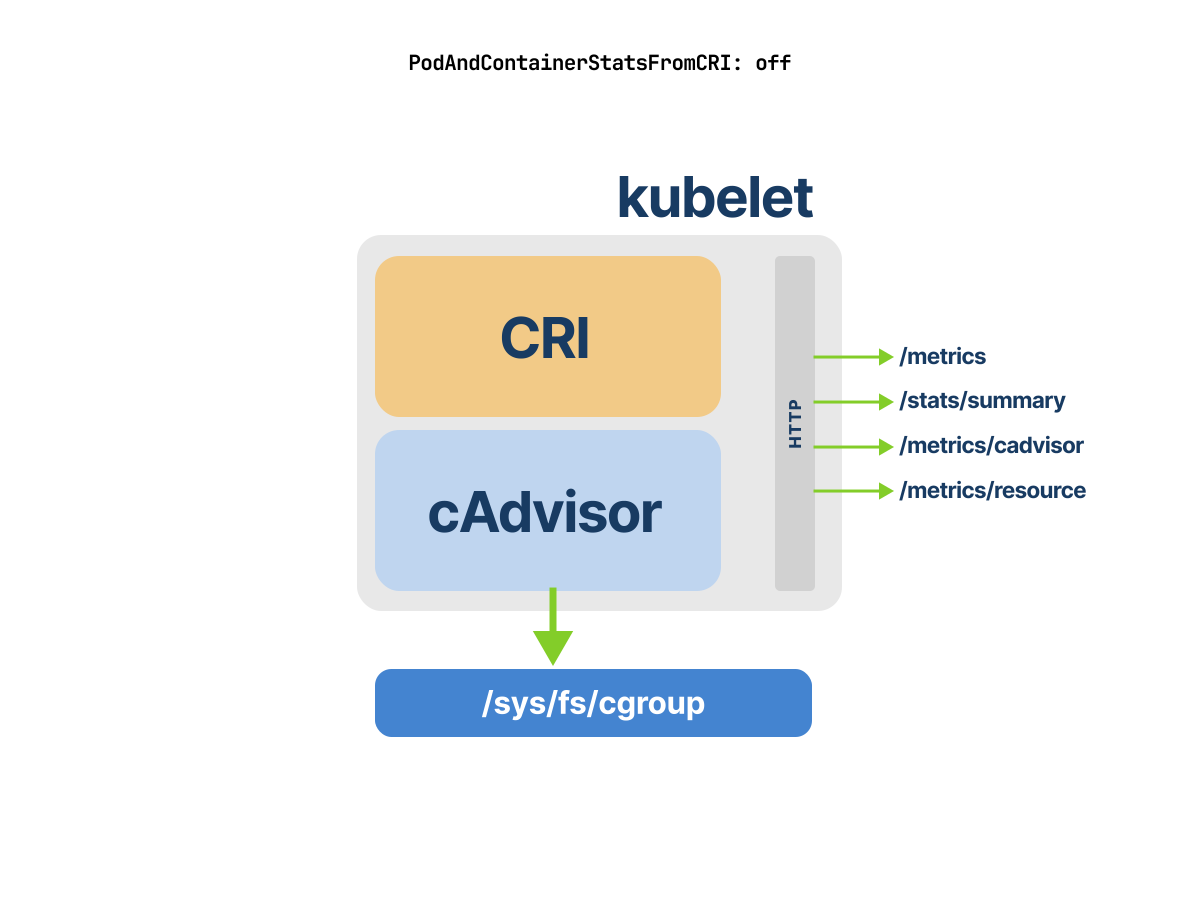 1/2
1/2With PodAndContainerStatsFromCRI disabled, kubelet relies on cAdvisor to read pod and container usage from the cgroup filesystem before exposing the stats endpoints.
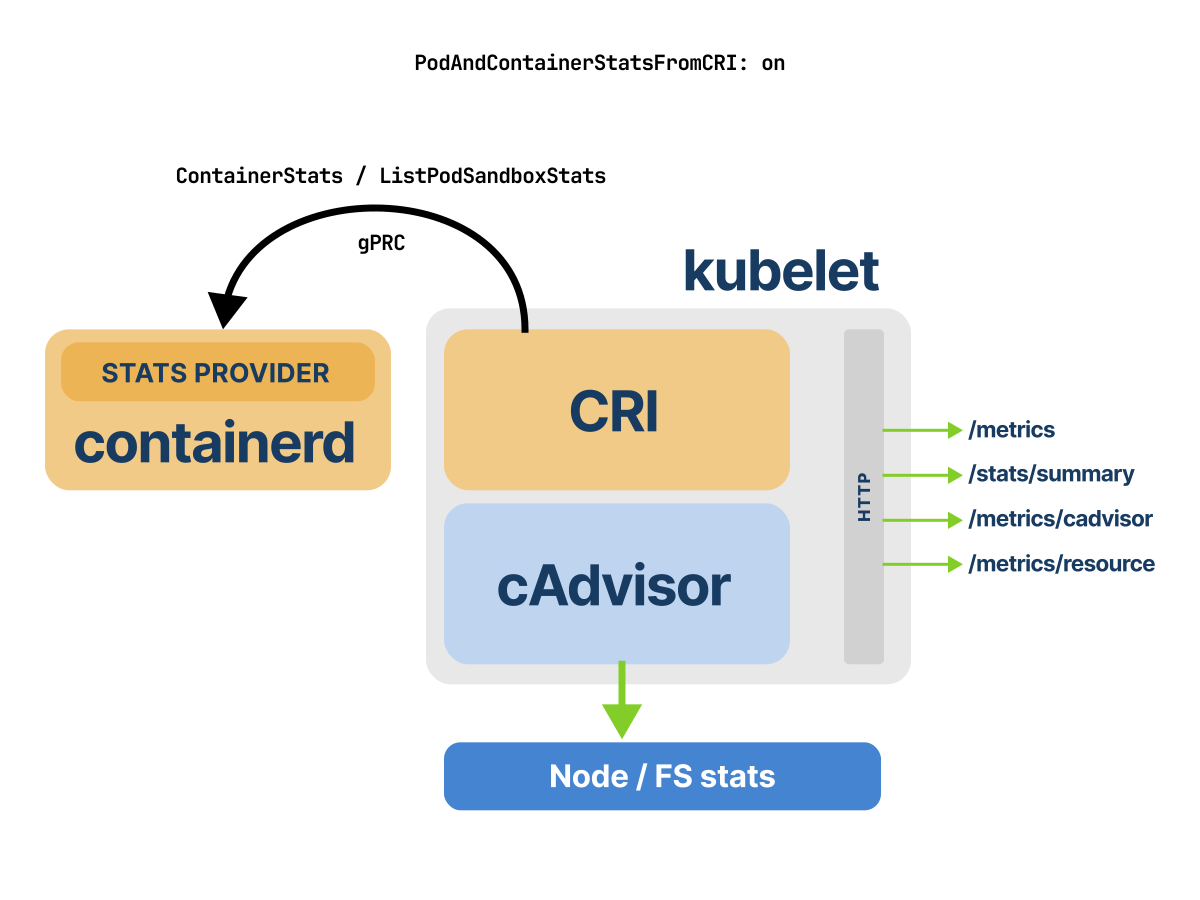 2/2
2/2With PodAndContainerStatsFromCRI enabled, kubelet asks containerd for pod and container stats over CRI gRPC calls, while cAdvisor still provides node and filesystem stats.
Validating CRI-Based Metrics Collection in Kubelet
Now that we understand why Kubernetes shifted metrics collection from cAdvisor to the CRI, let’s validate that kubelet is actually pulling metrics from the runtime.
We’ll configure kubelet to use CRI-based metrics, confirm it through logs, and compare kubelet’s reported data to what containerd provides directly.
We start by increasing kubelet’s log verbosity by editing its unit file to pass the --v=5 argument.
bash
/etc/systemd/system/kubelet.service.d/10-kubeadm.confInside the above file, we ensure the ExecStart line includes the verbose logging flag.
bash
[Unit]
Wants=containerd.service

[Service]
ExecStart=
ExecStart=/var/lib/minikube/binaries/v1.34.0/kubelet \
  --bootstrap-kubeconfig=/etc/kubernetes/bootstrap-kubelet.conf \
  --config=/var/lib/kubelet/config.yaml \
  --hostname-override=minikube \
  --kubeconfig=/etc/kubernetes/kubelet.conf \
  --node-ip=192.168.49.2 \
  --v=5

[Install]
Once we save the configuration, we reload the systemd daemon and restart kubelet.
bash
sudo systemctl daemon-reload
sudo systemctl restart kubelet
First, validate that the container runtime’s socket is active and listening:
bash
minikube ssh -- "ss -lx | grep containerd.sock"
u_str LISTEN 0      4096   /run/containerd/containerd.sock.ttrpc 80566      * 0
u_str LISTEN 0      4096   /run/containerd/containerd.sock 79442            * 0
Containerd is exposing its CRI endpoint over /run/containerd/containerd.sock.
Next, verify kubelet is configured to use the correct runtime endpoint:
bash
minikube ssh -- "sudo cat /var/lib/kubelet/config.yaml | grep -i containerRuntimeEndpoint"
containerRuntimeEndpoint: unix:///run/containerd/containerd.sock
Kubelet is communicating with the correct CRI runtime over the expected UNIX domain socket.
Let's tell kubelet to use the CRI for collecting pod and container stats by enabling the PodAndContainerStatsFromCRI feature gate.
Before we flip this switch, one thing is worth knowing.
Kubelet reports the maturity of every feature gate it knows about through the /metrics endpoint, under the kubernetes_feature_enabled series.
Querying that series for PodAndContainerStatsFromCRI on a fresh Kubernetes 1.34 cluster gives us:
bash
curl -sS http://localhost:8001/api/v1/nodes/minikube/proxy/metrics \
  | grep 'kubernetes_feature_enabled.*PodAndContainer'

kubernetes_feature_enabled{name="PodAndContainerStatsFromCRI",stage="ALPHA"} 0
stage="ALPHA" and 0 means disabled by default.
We open kubelet's /var/lib/kubelet/config.yaml configuration file on the minikube node and add the feature gate and ensure the following block is present:
config.yaml
...
featureGates:
  PodAndContainerStatsFromCRI: true
Then we restart kubelet once more.
bash
sudo systemctl restart kubeletAt this point, kubelet should be sourcing pod and container metrics directly from containerd over the CRI API.
When we inspect the kubelet logs with the following command:
bash
sudo journalctl -u kubelet | grep -i containerstats

May 01 10:27:57 minikube kubelet[4205]: feature gates: {map[PodAndContainerStatsFromCRI:true]}
May 01 10:27:57 minikube kubelet[4205]: "PodAndContainerStatsFromCRI": true
Great!
We see kubelet successfully loads the PodAndContainerStatsFromCRI gate.
But it's output doesn’t confirm metrics are being retrieved from the runtime.
/stats/summary is kubelet's primary interface for exposing metrics that it collects, whether from cAdvisor or directly from the container runtime through the CRI.
When PodAndContainerStatsFromCRI is enabled, kubelet populates this endpoint with data retrieved from the runtime.
Let's query /stats/summary endpoint to observe the metrics kubelet is serving and confirm whether they match what the runtime reports.
We will start the kubelet proxy first if you haven't already and query the summary stats for our pod:
bash
kubectl proxy --port=8001
curl -sS \
  http://localhost:8001/api/v1/nodes/minikube/proxy/stats/summary \
  | jq '.pods[] | select(.podRef.name == "python-66dc9f5c8b-2kktd")'
{
  "podRef": {
    "name": "python-66dc9f5c8b-2kktd",
    "namespace": "default"
  },
  "containers": [
    {
      "name": "python-metrics",
      "cpu": {
        "usageNanoCores": 149575,
        "usageCoreNanoSeconds": 1647087000
      },
      "memory": {
        "workingSetBytes": 22114304
      }
    }
  ]
}
The Summary API reports 22114304 bytes of memory working set, about 22.11 MB, and 149575 nanocores of current CPU usage for the python-metrics container.
But how do we know kubelet sourced this from containerd, not cAdvisor?
We can cross-check by querying containerd directly with crictl.
But first, we need to confirm the container ID:
bash
kubectl get pod python-66dc9f5c8b-2kktd -o jsonpath='{.status.containerStatuses[*].containerID}'
containerd://9b508d38b441b
Now we SSH into the node and run crictl stats.
bash
minikube ssh -- sudo crictl stats

CONTAINER           CPU %               MEM                 DISK                INODES
...
5e63e93291a32       0.21                75.7MB              36.86kB             11
62bbd4d869537       0.04                66.93MB             65.54kB             24
6cff256e868f3       0.00                37.74MB             65.54kB             24
9b508d38b441b       0.02                22.11MB             122.9kB             16
The python-metrics container appears as container ID 9b508d38b441b in crictl stats, with MEM reported as 22.11MB.
That matches the Summary API value.
CPU is harder to match exactly because both values are point-in-time samples, but they are consistent: kubelet reports 149575 nanocores, and crictl stats shows 0.02% CPU for the same container.
Next, we query kubelet’s /metrics/resource endpoint to see the Prometheus exposition format.
bash
curl -sS http://localhost:8001/api/v1/nodes/minikube/proxy/metrics/resource \
  | grep -i "python-66dc9f5c8b-2kktd"

pod_cpu_usage_seconds_total{namespace="default",pod="python-66dc9f5c8b-2kktd"} 1.760035 1777632057760
pod_memory_working_set_bytes{namespace="default",pod="python-66dc9f5c8b-2kktd"} 2.2421504e+07 1777632057760
Again, the working set is in the same range across all three views:
/metrics/resourcereports about22.42 MB,/stats/summaryandcrictl statsreport about22.11 MB.
Kubelet sources pod and container metrics directly from containerd through the CRI API.
What happens when we check kubelet’s /metrics/cadvisor endpoint:
bash
curl -sS http://localhost:8001/api/v1/nodes/minikube/proxy/metrics/cadvisor
machine_cpu_cores{machine_id="a5b246...",system_uuid="7bd5a1e2-ea5e-452b-a202-536452caf458"} 20
machine_cpu_physical_cores{machine_id="a5b246...",system_uuid="7bd5a1e2-ea5e-452b-a202-536452caf458"} 14
machine_cpu_sockets{machine_id="a5b246...",system_uuid="7bd5a1e2-ea5e-452b-a202-536452caf458"} 1
machine_memory_bytes{machine_id="a5b246...",system_uuid="7bd5a1e2-ea5e-452b-a202-536452caf458"} 3.338305536e+10
machine_swap_bytes{machine_id="a5b246...",system_uuid="7bd5a1e2-ea5e-452b-a202-536452caf458"} 3.4088153088e+10
Huh!
Before enabling the CRI stats path, /metrics/cadvisor exposed detailed container metrics emitted by cAdvisor and labeled by pod, namespace, container, image, and cgroup path.
Now, in this run, the endpoint only shows machine-level cAdvisor metrics such as CPU topology, installed memory, swap capacity, and machine scrape status.
In this run, no pod metrics or container-level data appeared in the /metrics/cadvisor output.
All the pod and container resource usage?
Those pod and container metrics are now sourced from containerd's CRI stats implementation.
Summary
- Kubernetes does not directly enforce Linux resource limits; the Linux kernel enforces them through cgroups. Kubelet and the container runtime translate pod resource settings into cgroup configuration, then the kernel applies the actual CPU, memory, pids, and related controls.
- cgroup v2 uses a single unified hierarchy where controllers coexist under
/sys/fs/cgroup/. cgroup v1 uses separate controller hierarchies, so controllers such as CPU, memory, and pids can be mounted as separate cgroup trees. - cgroup v1 has been officially deprecated since Kubernetes v1.35. As part of KEP-5573, kubelet now fails by default on cgroup v1 nodes unless
failCgroupV1is explicitly set tofalse, with full code removal planned no earlier than Kubernetes v1.38. - Kubelet and the container runtime must use a compatible cgroup driver. With the
systemddriver, kubelet and the runtime place containers under systemd-managed slices; withcgroupfs, they manage cgroup paths directly. For cgroup v2, Kubernetes strongly recommends thesystemdcgroup driver. KubeletCgroupDriverFromCRIgraduated to GA in Kubernetes v1.34. At startup, kubelet asks the runtime for the cgroup driver through the CRIRuntimeConfigRPC when the runtime supports it; otherwise kubelet falls back to its configuredcgroupDriver.- cAdvisor is embedded inside the kubelet process and starts as part of kubelet. By default, kubelet uses cAdvisor to collect node, pod, container, volume, and filesystem statistics, then exposes that data through kubelet HTTP endpoints. There is no separate cAdvisor sidecar or daemon in the normal kubelet setup.
- Kubelet exposes several metrics and stats endpoints.
/metrics/cadvisorexposes cAdvisor-style container and machine metrics in Prometheus format./stats/summaryreturns structured JSON for node, pod, container, and volume stats./metrics/resourceexposes lightweight CPU and memory resource metrics used by modern Metrics Server versions./metricsexposes kubelet’s own internal component metrics, such as operation counters and latencies. Metrics Server 0.6.x and later query/metrics/resource, not/stats/summary. - CRI is the gRPC API that standardizes kubelet-to-runtime communication. It lets kubelet manage pods and containers through the runtime, and with compatible runtimes it can also collect pod and container metrics directly from the runtime over the runtime socket.
PodAndContainerStatsFromCRIis an Alpha feature gate and is disabled by default. When enabled with a compatible runtime, kubelet collects pod and container stats through CRI instead of relying on cAdvisor for those pod and container stats.- Even with CRI-based pod and container metrics collection, kubelet still depends on cAdvisor for stats that CRI does not provide, especially node-level, machine-level, volume, and filesystem-related data.
References
- Kubernetes 1.25: cgroup v2 graduates to GA
- Kubernetes v1.34: KubeletCgroupDriverFromCRI graduates to GA
- kube-state-metrics addon
- pkg/features/kube_features.go
- pkg/kubelet/cadvisor/util.go We're interested in
UsingLegacyCadvisorStatsfunction. - minikube Runtime configuration
- cri-api
- cri protocol definition
- gRPC
- cri-dockerd adapter for docker
- kubelet.go
- manager.go
- raw handler
- cgroup v2
- cAdvisor issues #2785
- cAdvisor-less, CRI-full Container and Pod Stats Enhancement
- PodAndContainerStatsFromCRI feature gate
- KEP #2371 tracking
- implement CRI ListPodSandboxMetrics
- containerd CRI configuration
- container-stats exporter to the Kata Containers