
Server-side apply: what happens when you run kubectl apply
June 2026
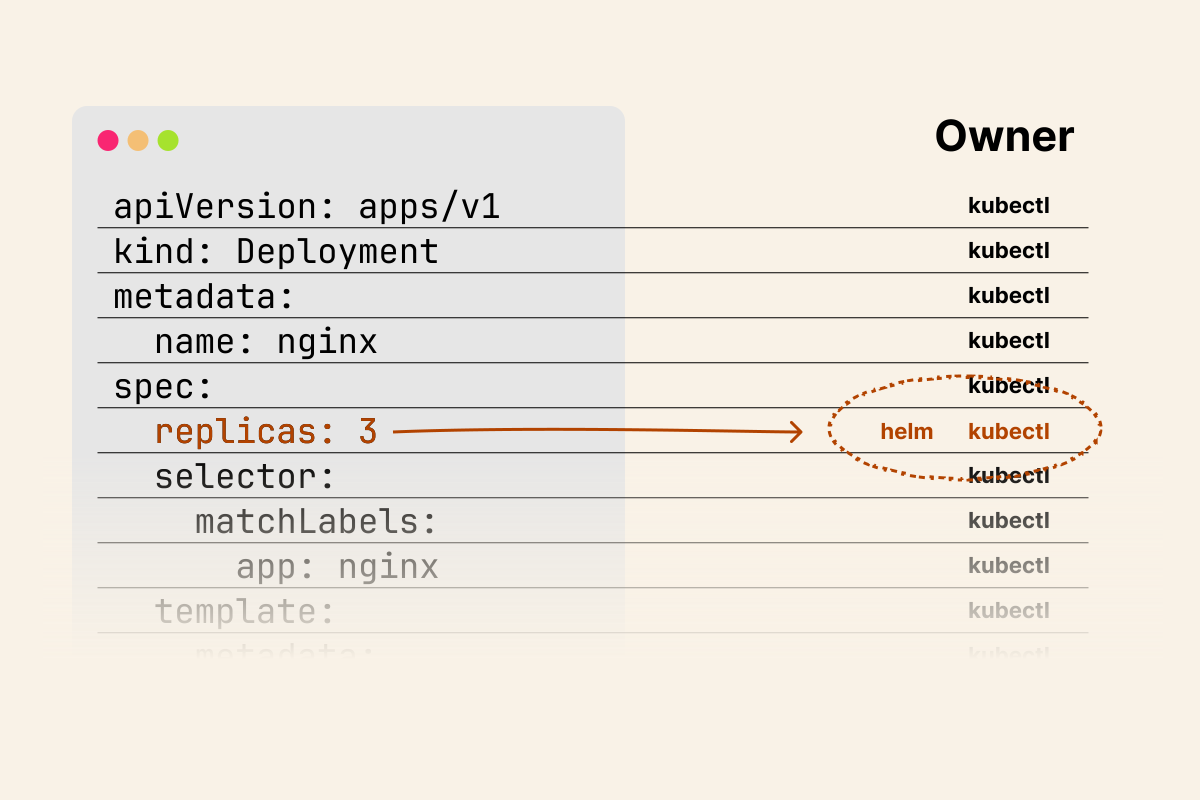
TL;DR: Server-side apply matters because Kubernetes objects are shared state: it moves field ownership into the API server, so apply-style tools can surface conflicts instead of hiding them as silent overwrites.
A Kubernetes object is shared state.
A Deployment is not managed solely by the YAML file that created it; it can also be touched by kubectl, Helm, Argo CD, an HPA, admission webhooks, operators, and built-in controllers.
All of them can write to the same API object.
That raises a simple question: when several tools care about the same field, who owns it?
In a small cluster, this can look like an implementation detail.
In a real cluster, it decides whether an HPA keeps the replica count it just calculated, whether a Helm upgrade undoes a manual hotfix, or whether a GitOps controller reverts a change made by another controller.
This article explains why apply has to do more than "send this YAML to Kubernetes".
It has to decide what changed, what should be preserved, and what another tool might already be managing.
To understand why this is hard, let's start with what kubectl apply does today.
Client-side Apply
If you have ever used kubectl apply, you have used client-side apply (CSA).
It is still the default mode, and most engineers never think twice about it.
So, what happens when you run kubectl apply -f deployment.yaml?
Let's start with a simple deployment manifest:
deployment.yaml
apiVersion: apps/v1
kind: Deployment
metadata:
  name: my-app
  labels:
    app: my-app
spec:
  replicas: 3
  selector:
    matchLabels:
      app: my-app
  template:
    metadata:
      labels:
        app: my-app
    spec:
      containers:
        - name: my-app
          image: nginx:1.26
          ports:
            - containerPort: 80
          resources:
            requests:
              cpu: 100m
              memory: 128Mi
            limits:
              cpu: 200m
              memory: 256Mi
Despite the name, client-side apply is not entirely client-side.
Before computing anything locally, kubectl makes several API server calls.
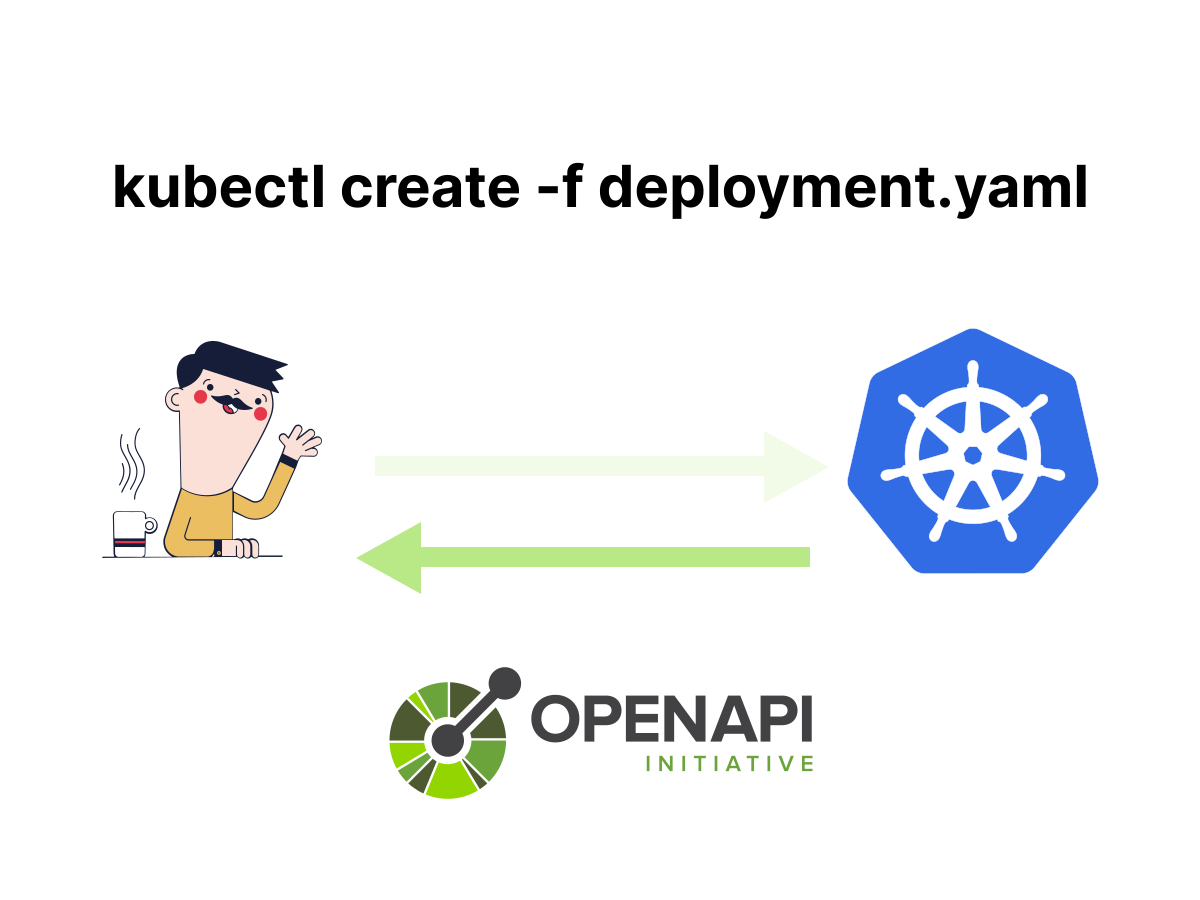
You can see this by running kubectl apply with verbose logging enabled.
But first, let's have a look at kubectl create:
bash
kubectl create -f deployment.yaml -v=8 2>&1 | grep -E "PATCH|POST|GET|Content-Type"
GET /openapi/v3
GET /openapi/v3/apis/apps/v1
POST /apis/apps/v1/namespaces/default/deployments?fieldManager=kubectl-create
  Content-Type: application/json
kubectl create is straightforward: it fetches the OpenAPI schema, then sends a single POST to create the resource.
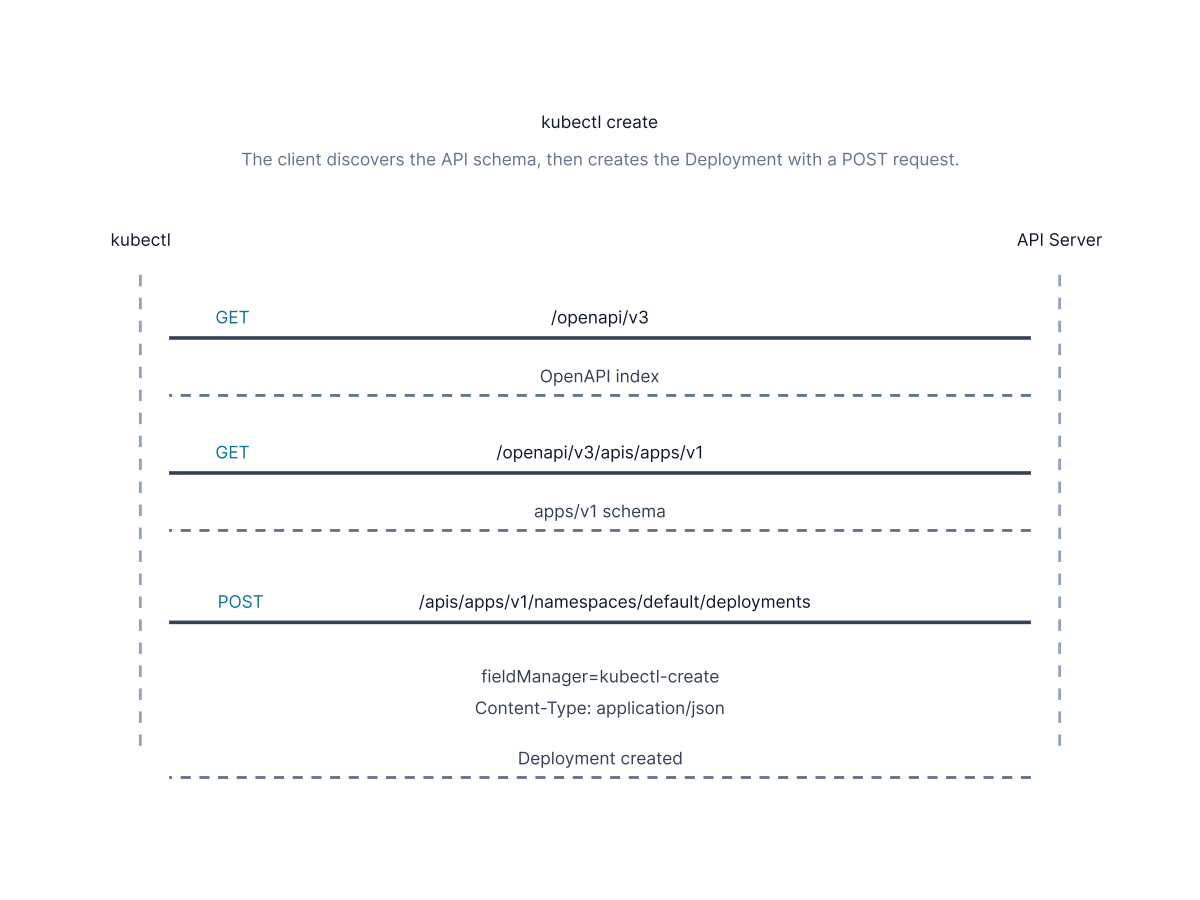
If the resource already exists, it fails with an error.
The OpenAPI schema describes the Kubernetes API: resource types, fields, whether they are required, and how to handle lists.
kubectl fetches this schema from the API Server at /openapi/v3 before every apply or create operation.
This is how kubectl learns the structure of a Deployment, a Pod, or any other resource.
Now delete the deployment and apply it instead:
bash
kubectl delete deployment my-app
kubectl apply -f deployment.yaml -v=8 2>&1 | grep -E "PATCH|POST|GET|Content-Type"

GET /openapi/v3
GET /openapi/v3/apis/apps/v1
GET /apis/apps/v1/namespaces/default/deployments/my-app
POST /apis/apps/v1/namespaces/default/deployments?fieldManager=kubectl-client-side-apply
  Content-Type: application/json
The first two calls are identical to those in kubectl create.
They are calls to OpenAPI.
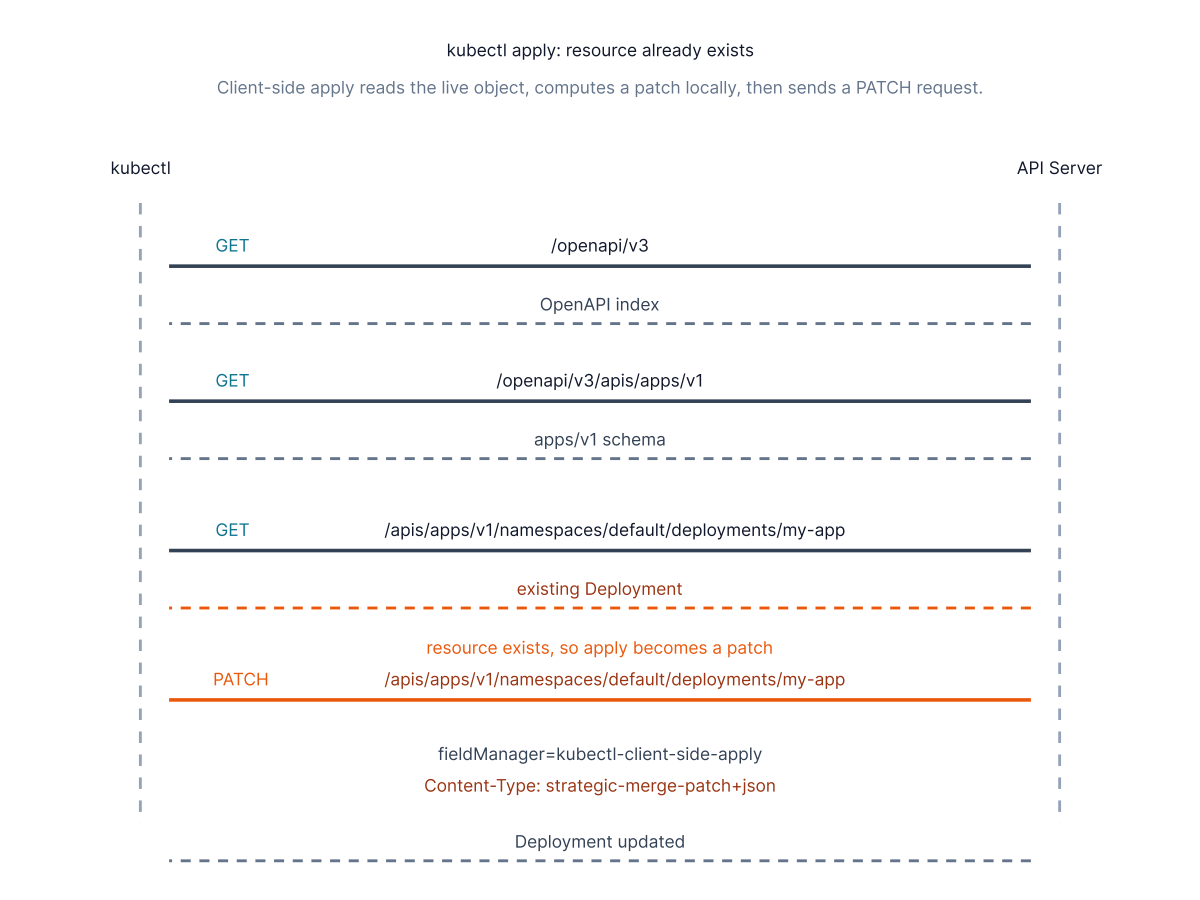
In this case, kubectl apply also sends a POST, but notice the extra GET before it.
kubectl checks whether the resource exists before deciding what to do.
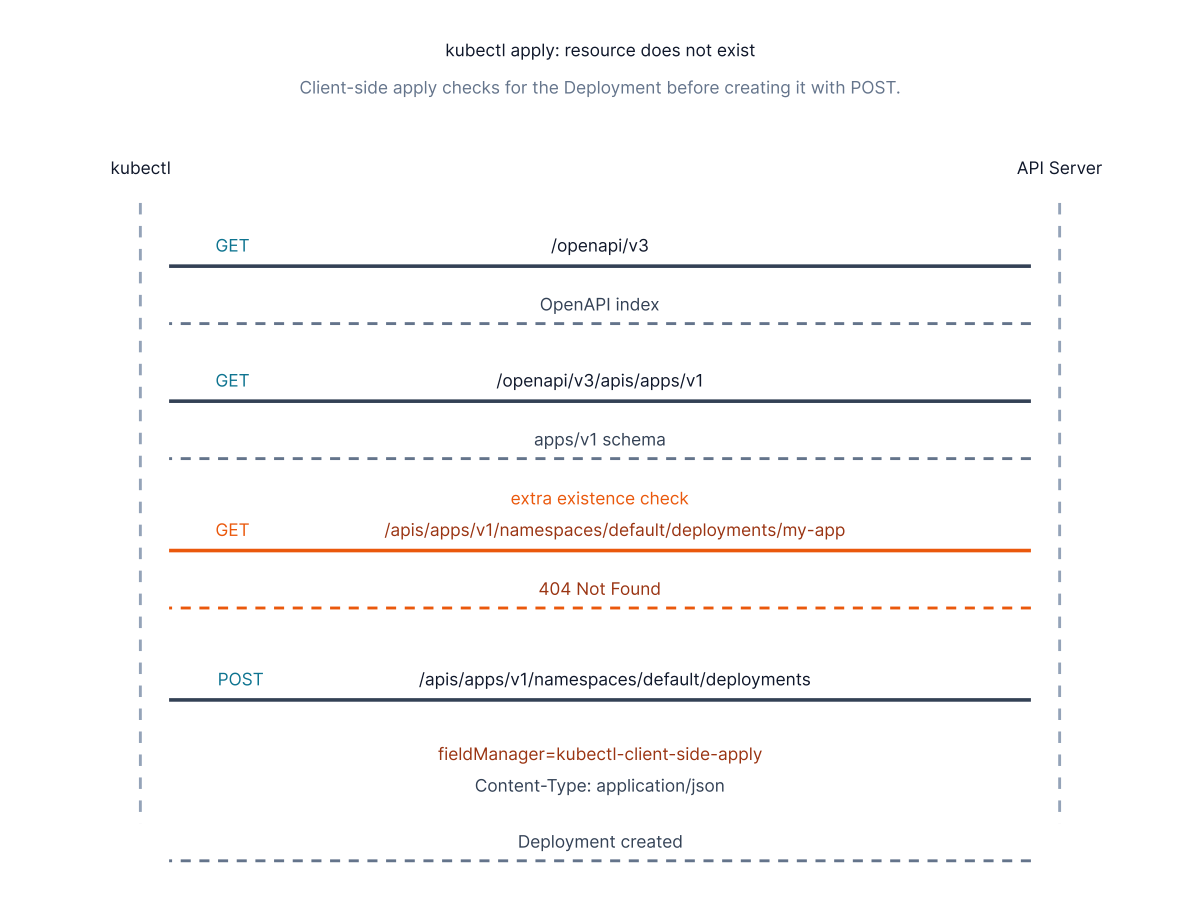
Change the container image version and run the same command again.
This time, the resource already exists:
bash
sed 's/nginx:1.26/nginx:1.27/' deployment.yaml > deployment-v2.yaml
kubectl apply -f deployment-v2.yaml -v=8 2>&1 | grep -E "PATCH|POST|GET|Content-Type"
GET /openapi/v3
GET /openapi/v3/apis/apps/v1
GET /apis/apps/v1/namespaces/default/deployments/my-app
PATCH /apis/apps/v1/namespaces/default/deployments/my-app?fieldManager=kubectl-client-side-apply
  Content-Type: application/strategic-merge-patch+json
The sequence is the same, except for the last call, which is now a PATCH.
Since the resource already exists, the Content-Type header specifies the patch semantics to use: application/strategic-merge-patch+json.
Strategic Merge Patch
For traditional patch operations, Kubernetes commonly uses three patch types:
application/strategic-merge-patch+json: It is kubernetes-specific and understands resource structure through the OpenAPI schema. It knows which lists should be merged by key and which should be replaced atomically. It is used by kubectl apply (client-side) by default. It isn't supported for CRDs.application/merge-patch+json: it is simpler and doesn't understand Kubernetes-specific list semantics. Lists are always fully replaced. It works with CRDs and is used withkubectl patch --type=merge.application/json-patch+json: It is RFC 6902 compliant and operates on specific paths using explicit operations (add, remove, replace). It is most precise but most verbose. It is used bykubectl patch --type=json.
Why does kubectl apply use application/strategic-merge-patch+json and not one of the other patch types?
Kubectl needs to know whether a list should be merged or replaced entirely.
If you add a container to spec.containers, should it be appended to the existing list or overwrite the existing ones?
For example, imagine the live Deployment has one container:
containers:
- name: app
  image: nginx:1.26
And your new manifest contains another container:
containers:
- name: sidecar
  image: busybox
Should Kubernetes end up with both containers?
containers:
- name: app
  image: nginx:1.26
- name: sidecar
  image: busybox
Or should the new list replace the old one?
containers:
- name: sidecar
  image: busybox
Both behaviours are valid for different fields.
For spec.containers, Kubernetes merges items by the container name.
For other lists, such as tolerations, Kubernetes may replace the whole list instead.
The strategic merge patch addresses this by reading annotations from the OpenAPI schema.
Let's query the OpenAPI to see what information it provides about the containers in a pod.
You can query /openapi/v3/apis/apps/v1 to get the schema for the apps/v1 group.
Inside it, resource types are identified by their fully qualified Go type name.
Look at io.k8s.api.core.v1.PodSpec because containers are defined at the Pod level.
bash
kubectl get --raw /openapi/v3/apis/apps/v1 | jq \
  '.components.schemas["io.k8s.api.core.v1.PodSpec"].properties.containers'
{
  "description": "List of containers belonging to the pod. Containers cannot be added or removed.",
  # truncated
  "x-kubernetes-list-map-keys": ["name"],
  "x-kubernetes-list-type": "map",
  "x-kubernetes-patch-merge-key": "name",
  "x-kubernetes-patch-strategy": "merge"
}
The output description says that containers cannot be added or removed.
It might sound contradictory, but this refers to running Pods, not Deployments.
When you update a Deployment's containers, the controller creates new Pods rather than modifying existing ones.
The strategic merge patch uses x-kubernetes-patch-merge-key and x-kubernetes-patch-strategy to determine how to handle this list; the strategy is to merge by matching on the name field.
A container named my-app in the patch will be merged with the existing container named my-app in the cluster.
For lists like tolerations, the patch annotations are absent:
bash
kubectl get --raw /openapi/v3/apis/apps/v1 | jq \
  '.components.schemas["io.k8s.api.core.v1.PodSpec"].properties.tolerations'
{
  "description": "If specified, the pod's tolerations.",
  "type": "array",
  "items": {
    "default": {},
    "allOf": [
      { "$ref": "#/components/schemas/io.k8s.api.core.v1.Toleration" }]
  },
  "x-kubernetes-list-type": "atomic"
}
Without x-kubernetes-patch-merge-key and x-kubernetes-patch-strategy, a strategic merge patch has no merge key to use and replaces the entire list.
The Three-way Merge
Once kubectl understands the resource structure, it performs a "three-way merge" to combine three sources of information.
- The first piece of information is an annotation stored on the resource itself. The name of this annotation is
kubectl.kubernetes.io/last-applied-configurationand contains the last configuration that kubectl applied. - The second one is the live state of the resource in the cluster.
- The third one is the new manifest you are applying.
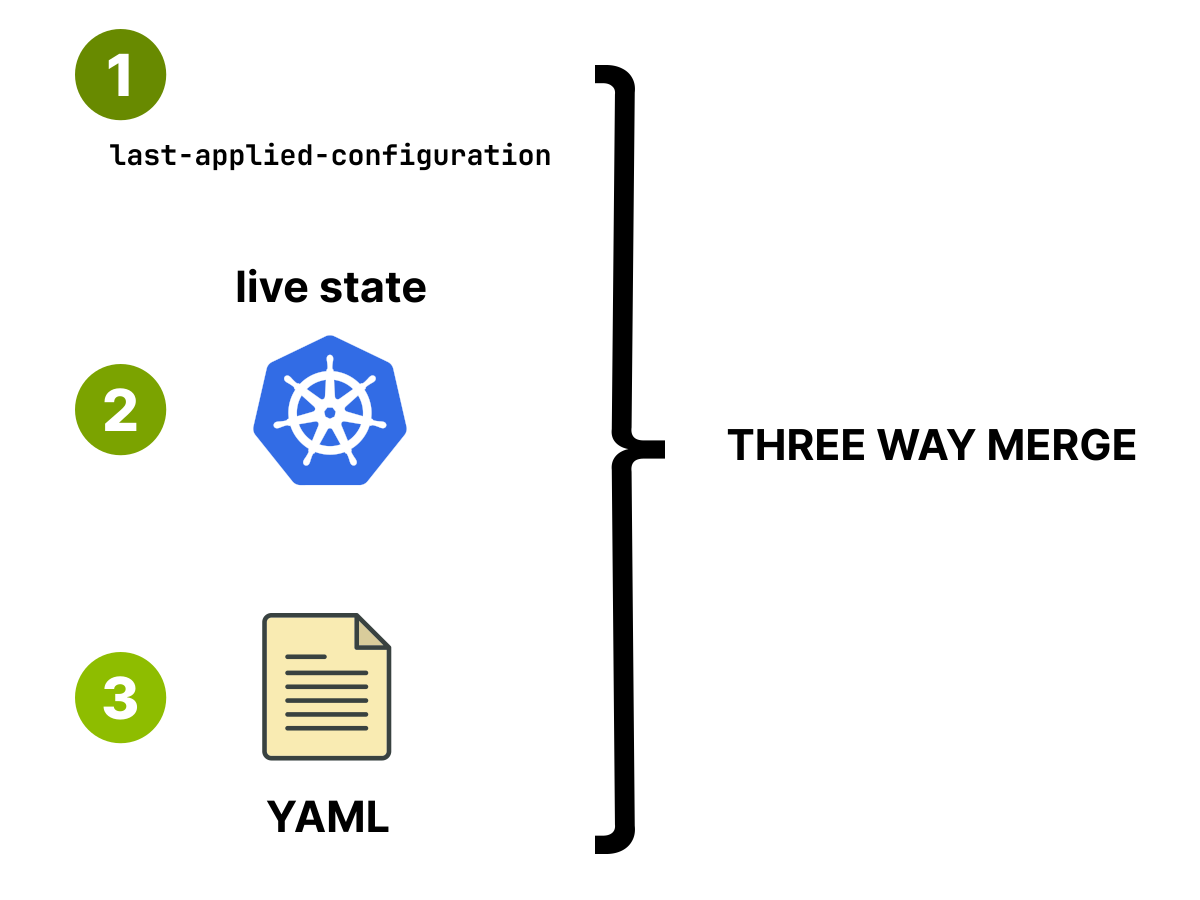
By comparing the last-applied annotation with the new manifest, kubectl decides which fields you changed intentionally.
But this does not mean every external change is preserved.
If your manifest still declares a field, kubectl treats that value as your desired state and may generate a patch to put the live object back to that value.
External changes are preserved only when kubectl decides they are outside the fields you are currently managing.
It then computes a strategic merge patch and sends it to the API server.
This works reasonably well as long as kubectl is the only tool managing a resource, but in a real cluster, this is rarely the case.
In a real scenario, it's common for someone to manually apply a change to a resource using kubectl, for Helm to update the same resource during an upgrade to a new release, and for Argo CD to reconcile the same manifest as part of a GitOps process.
When kubectl applies again, it can overwrite changes made by other tools without your awareness.
And with controllers, the situation gets even worse!
A Horizontal Pod Autoscaler (HPA) can increase the replicas of a deployment when the load increases, but Helm might overwrite it again.
Silent Overwrites in Practice
Let's look at an example to see how it works in practice.
Apply the original manifest:
bash
kubectl apply -f deployment.yamlAnd check the result:
bash
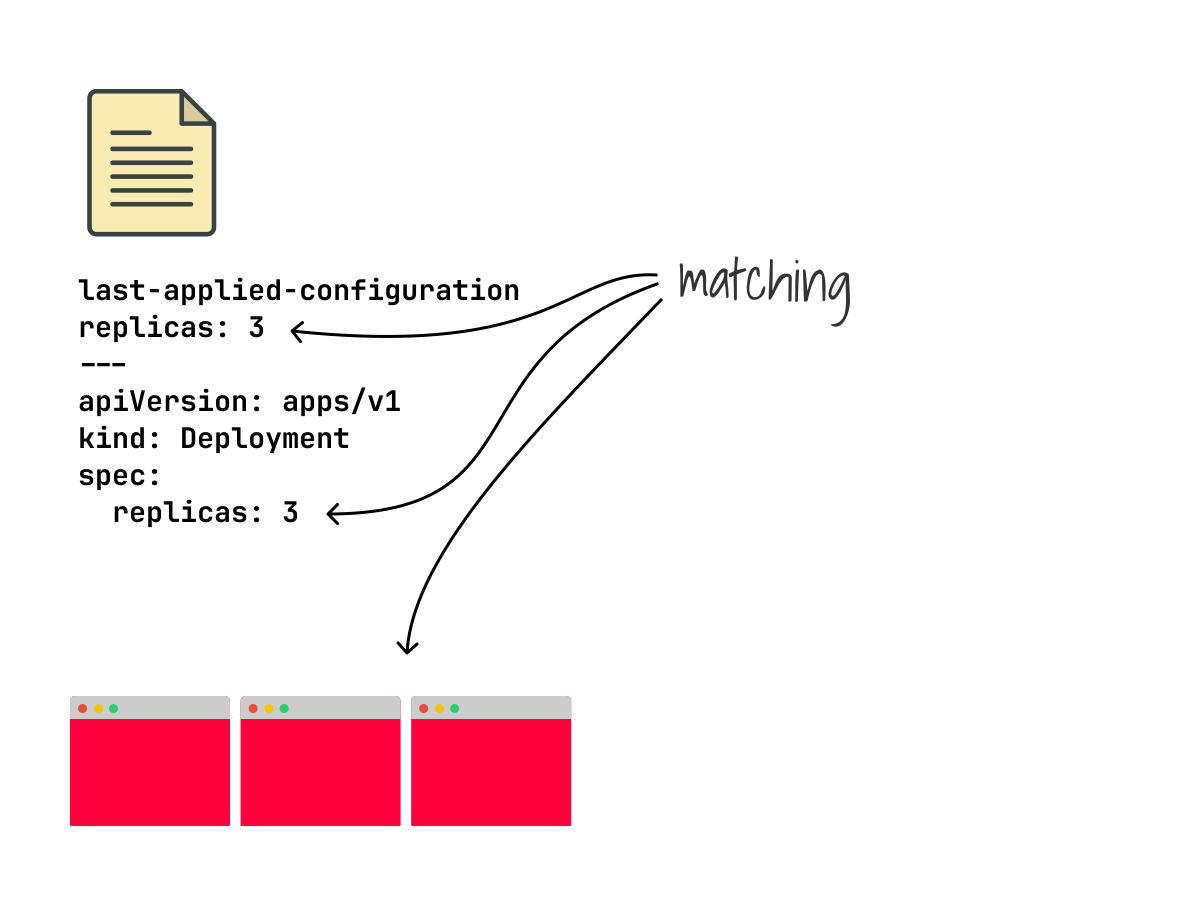
kubectl get deployment my-app -o yamlHere you will find the last-applied-configuration annotation.
It is stored as a JSON blob in the resource itself:
kubectl.kubernetes.io/last-applied-configuration: |
  {
    "apiVersion": "apps/v1",
    "kind": "Deployment",
    "spec": { "replicas": 3 }
    # truncated
  }
Let's simulate HPA scaling our deployment to 5 replicas.
You can use the /scale subresource with a JSON merge patch (--type=merge), the same mechanism the HPA uses:
bash
kubectl patch deployment my-app --subresource='scale' --type='merge' -p '{"spec":{"replicas":5}}'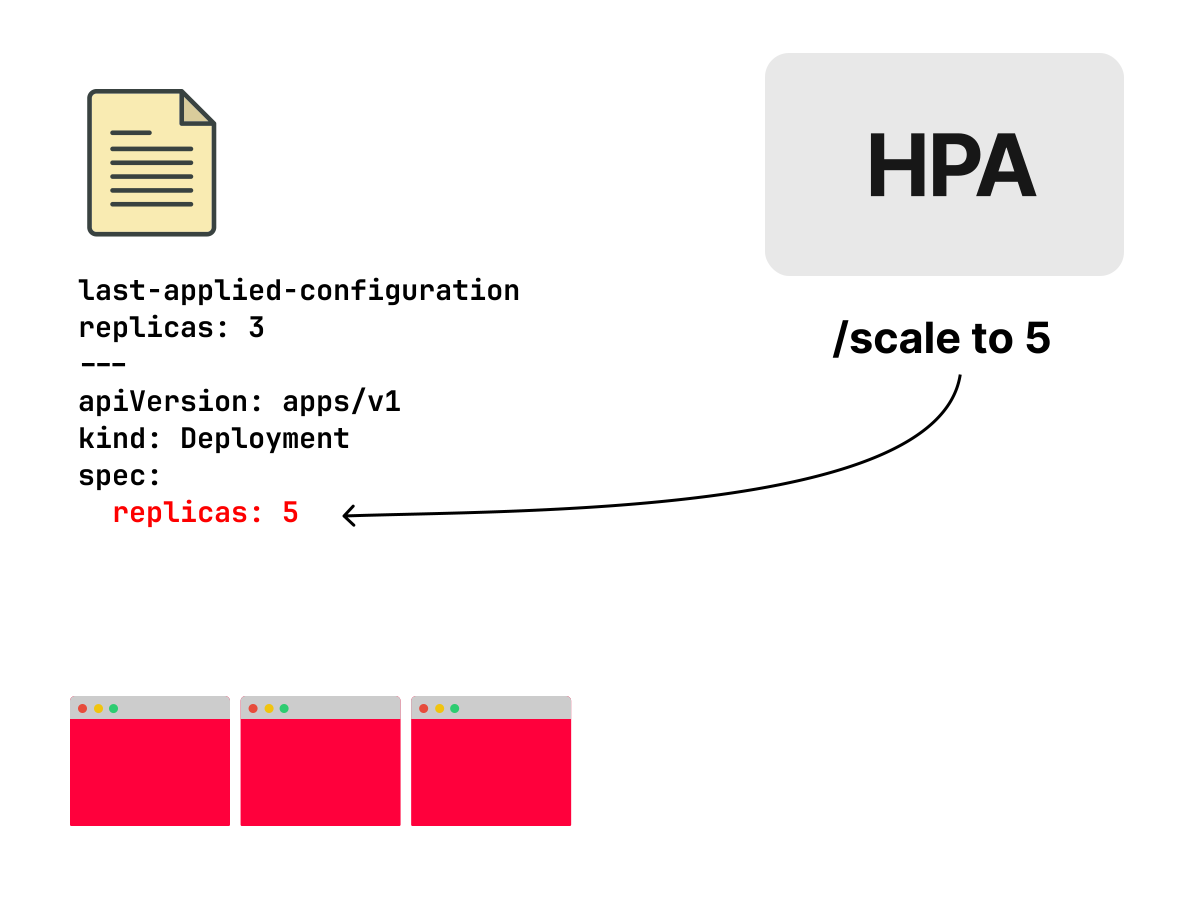
And then let's check our last-applied-configuration again:
bash
kubectl get deployment my-app -o yaml

# truncated output
kubectl.kubernetes.io/last-applied-configuration: |
  {
    "apiVersion": "apps/v1",
    "kind": "Deployment",
    "spec": { "replicas": 3 }
    # truncated
  }
It still shows replicas: 3, even though spec.replicas now has the value 5!
spec:
  replicas: 5
It was never updated by the patch because kubectl patch sends a direct PATCH request to the API Server, bypassing the last-applied-configuration annotation.
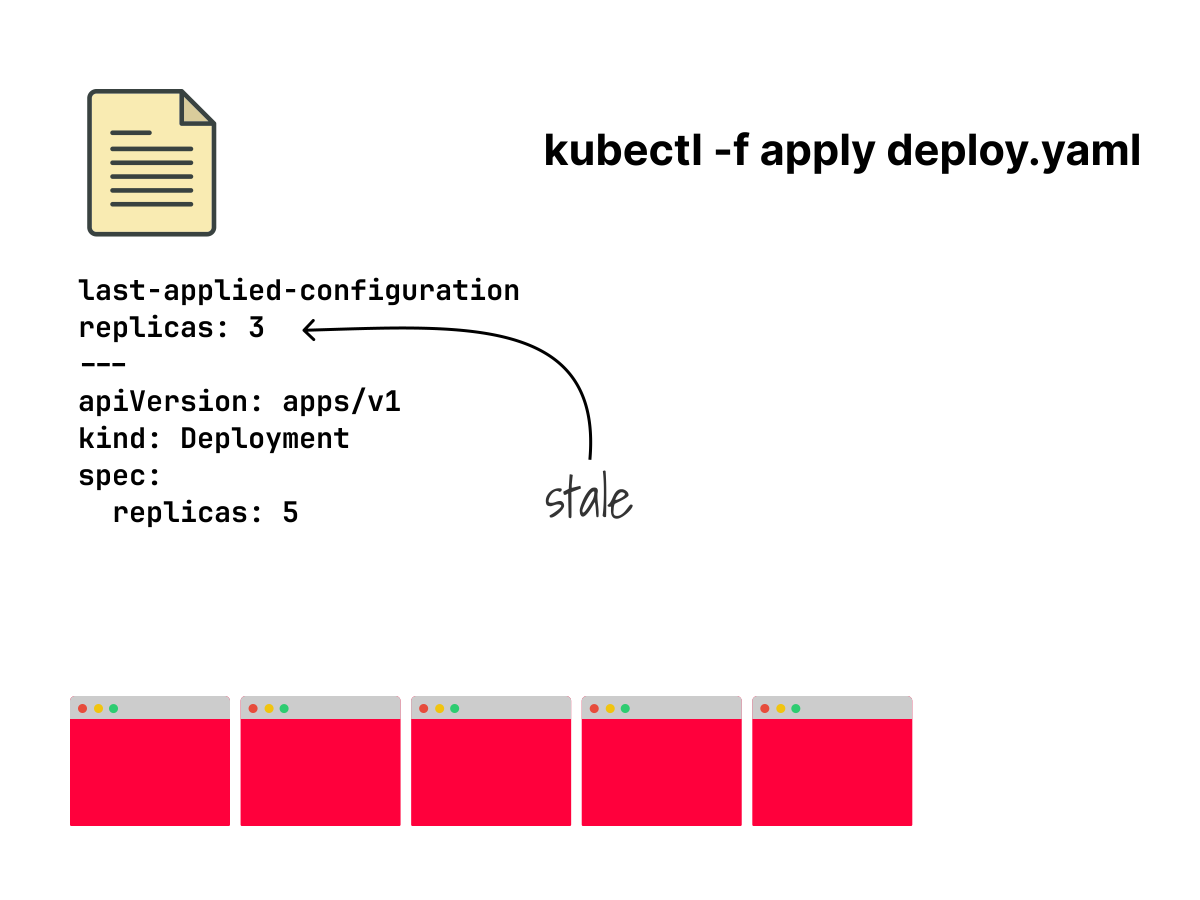
It doesn't go through the three-way merge process at all; it just modifies the field directly in the live state.
The annotation is updated only when you use kubectl apply, which is the only command that both writes and reads it.
As far as the last-applied-configuration annotation is concerned, spec.replicas is still 3, and that is exactly what kubectl apply will use as its reference points on the next apply.
Now simulate kubectl re-applying the same manifest during an upgrade:
bash
kubectl apply -f deployment.yaml
kubectl get deployment my-app -o yaml

# truncated output
spec:
  replicas: 3
Replicas silently dropped back to 3 without any warnings or errors.
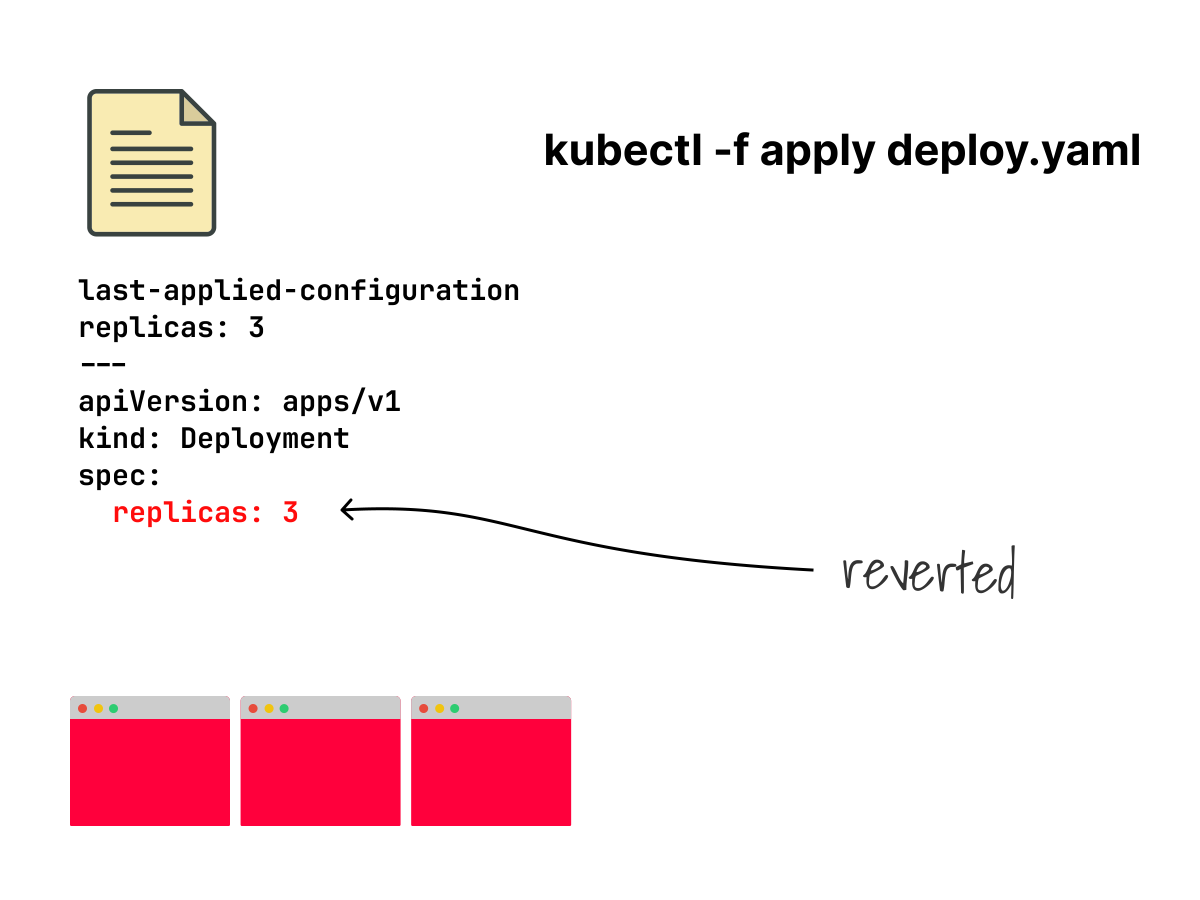
The patch was overwritten without any indication that something outside kubectl had changed that field.
And since the annotation always showed replicas: 3, kubectl had no way of knowing it was overwriting something meaningful.
You might think these are edge cases that rarely happen.
They are not.
These situations are very common in mature platforms, and client-side apply's three-way merge might cause you some strong headaches.
How Server-side Apply Works
Adding the --server-side flag to your kubectl apply command switches to server-side apply (SSA).
With server-side apply, the responsibility shifts: kubectl no longer builds a patch locally.
Instead, the new desired state is sent directly to the API server, and it's the API server that decides what to change.
This desired state, as the official Kubernetes documentation calls it, is the "fully specified intent" and includes only the fields and values the client cares about.
You can see the difference immediately by comparing the HTTP calls with the CSA ones.
bash
kubectl delete deployment my-app
kubectl apply --server-side -f deployment.yaml -v=8 2>&1 | grep -E "PATCH|POST|GET|Content-Type"
GET /openapi/v3
GET /openapi/v3/apis/apps/v1
PATCH /apis/apps/v1/namespaces/default/deployments/my-app?fieldManager=kubectl
  Content-Type: application/apply-patch+yaml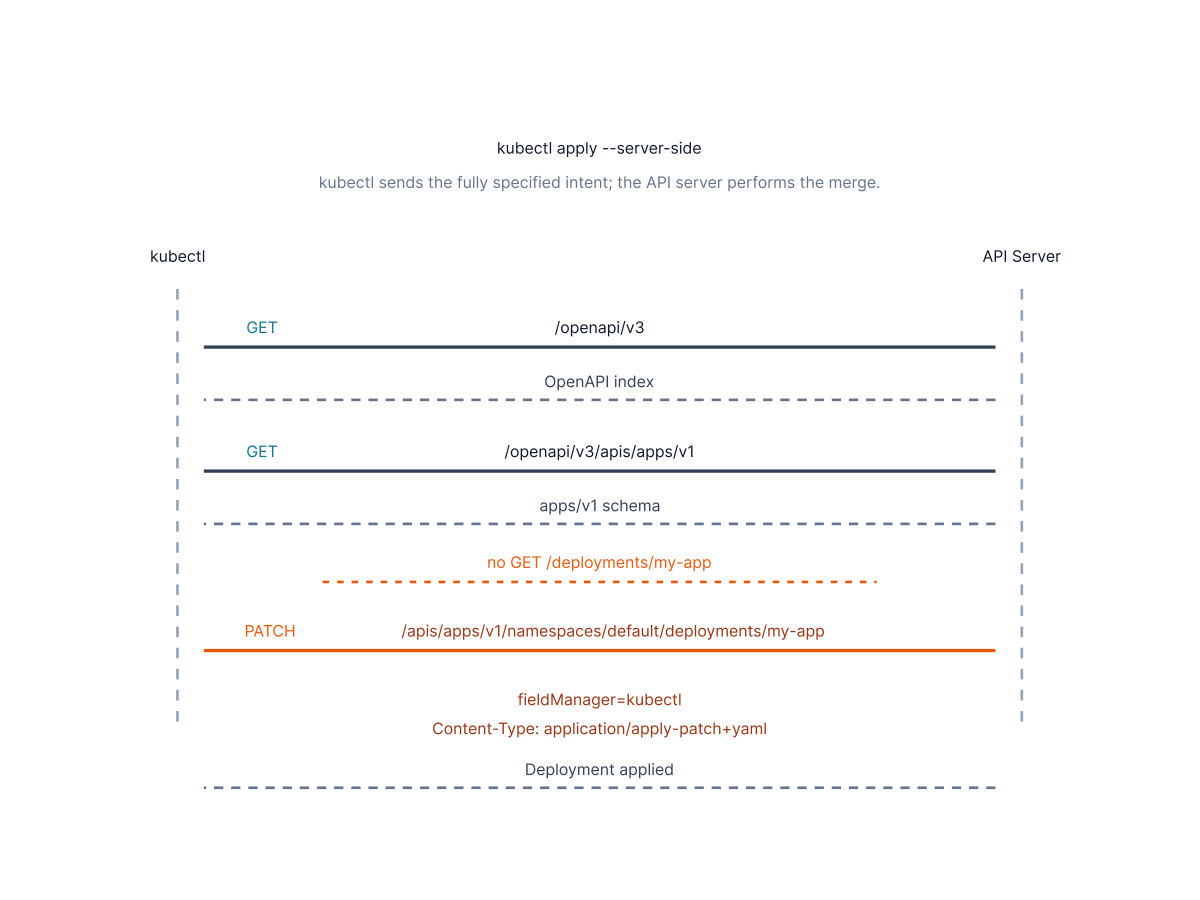
What stands out:
- In the SSA logs there is no GET call to retrieve the resource. Client-side apply needs to fetch the live state to compute the diff locally. With SSA, the diff happens on the server, so kubectl doesn't need it.
- Although we executed a kubectl apply on a new resource, a PATCH call is sent and not a POST. SSA always sends a PATCH, regardless of whether the resource exists. The API server handles the create-or-update logic internally. Client-side apply, as we checked earlier, sends a POST for new resources and a PATCH for existing ones.
- The
Content-Typeis different. It isapplication/apply-patch+yaml, notapplication/strategic-merge-patch+json. This content type is exclusive to SSA: it tells the API server to apply the manifest using SSA semantics, track field ownership, and detect conflicts.
We mentioned the shift in responsibility, but let's now delve into another important change: ownership tracking.
With server-side apply, the API server records which manager owns each applied field.
This piece of information is used by the API server to determine which field was modified by which tool and how to apply the new desired state.
The ownership is identified with a manager's name.
Every tool identifies itself with a specific name: Helm uses "helm", Argo CD uses "argocd", kubectl uses "kubectl", and so on.
It is also possible to associate a custom manager name using the --field-manager flag.
This information is stored on the API server and used for every subsequent apply operation.
Now that we know the API server handles the merge, let's look at how it does so.
When the API server receives an SSA request, it doesn't blindly apply the manifest.
It uses an open-source Go library called structured-merge-diff (sigs.k8s.io/structured-merge-diff), built specifically for Kubernetes, to compare the incoming manifest against the resource's live state.
Unlike a plain-text diff or even a JSON diff, it understands the structure of Kubernetes resources via the OpenAPI schema.
It knows that spec.containers is a list merged by name, that spec.tolerations is atomic, and that spec.replicas is a scalar.
It uses this knowledge to make correct merge decisions that a generic diff algorithm couldn't make.
Before SSA, this kind of structured diffing happened client-side in kubectl via a strategic merge patch.
The structured-merge-diff library moved this logic to the server, making it available to any tool that sends an SSA request, not just kubectl.
Earlier, you saw how the strategic merge patch reads x-kubernetes-patch-merge-key and x-kubernetes-patch-strategy from the OpenAPI schema to understand how to handle lists.
SSA uses a different but complementary set of annotations from the same schema.
Let's look at the list of annotations again:
"x-kubernetes-list-map-keys": ["name"],    // used by SSA
"x-kubernetes-list-type": "map",           // used by SSA
"x-kubernetes-patch-merge-key": "name",    // used by CSA
"x-kubernetes-patch-strategy": "merge"     // used by CSA
SSA reads x-kubernetes-list-type and x-kubernetes-list-map-keys.
The structured-merge-diff library uses these to make the same decision: merge the containers list by matching on the name field.
For tolerations:
"x-kubernetes-list-type": "atomic" // used by SSAx-kubernetes-list-type: atomic tells SSA to treat the entire list as a single unit and replace it atomically.
It's the same conclusion that the strategic merge patch reaches from the absence of patch annotations.
Everything we discussed so far applies to Kubernetes built-in resources, where the OpenAPI schema is well-defined and includes all the necessary annotations.
Server-side Apply and CRDs
Modern clusters are full of Custom Resource Definitions (CRDs), and SSA behavior depends on whether the CRD has a schema and how that schema is defined.
Without schema information, SSA has no way to know how to merge lists, so it assumes the safest default: all lists are considered atomic.
The entire list is replaced on every apply.
This can lead to data loss if you don't expect it.
CRD authors can control SSA merge behavior by adding x-kubernetes-list-type and x-kubernetes-list-map-keys annotations to their schema.
These annotations are the same ones that are used by built-in resources.
You can inspect them directly on any installed CRDs.
Let's try with the certificate cert-manager CRD:
bash
kubectl get crd certificates.cert-manager.io -o yaml | grep -A 3 "x-kubernetes-list"Most lists in this CRD use x-kubernetes-list-type: atomic.
The output is very verbose, let's focus on dnsNames:
dnsNames:
  description: Requested DNS subject alternative names.
  items:
    type: string
  type: array
  x-kubernetes-list-type: atomic # the entire list of domain names is replaced
The status.conditions list is different:
conditions:
  type: array
  x-kubernetes-list-map-keys:
    - type
  x-kubernetes-list-type: map
SSA merges this list by the type field.
In this CRD context, this means different controllers can manage different condition types without overwriting each other.
If you develop Kubernetes operators or CRDs, make sure to add the right annotations to the schema.
Luckily, modern operator frameworks like Kubebuilder automatically generate these annotations, so popular operators are usually compliant.
If you are using a CRD you don't control, it is still good practice to check for the SSA annotations before relying blindly on them during an SSA apply.
You can check with:
bash
kubectl get crd <crd-name> -o yaml | grep -A 3 "x-kubernetes-list"If the output is empty, expect atomic behavior for all lists in that CRD.
Ownership-based Merging
With this new piece of information retrieved from the OpenAPI schema, the API Server is ready to go through the "fully specified intent" and it checks every field: if you want to change a field that you own, it allows the update; if a field that you don't own is not present in the intent, the field stays unchanged; if you want to edit a field you don't own, a conflict error is returned.
Explicitly.
This is a key difference between SSA and CSA.
Strategic merge patch merges based on values: it looks at what changed and tries to preserve what it didn't touch.
SSA merges based on ownership: it looks at who declared what and makes decisions accordingly.
The result is a more stable and predictable object lifecycle, especially in environments where multiple tools manage the same resources.
In client-side apply a conflict was silently and automatically resolved.
Server-side apply, on the contrary, raises an error and informs you of the field causing the conflict and its legitimate owner.
As our deployment is already applied with SSA, let's check if something has changed in the live state:
bash
kubectl get deployment my-app -o yaml

#truncated
metadata:
  annotations:
    deployment.kubernetes.io/revision: '1'
We can immediately notice that there is no longer a last-applied-configuration annotation in the metadata because SSA doesn't rely on it!
Now create a copy of the same deployment with 5 replicas instead of 3.
bash
sed 's/replicas: 3/replicas: 5/' deployment.yaml > deployment-helm.yamlLet's use a different manager (we set "helm" manually) and try to change a field already owned by a different manager:
bash
kubectl apply --server-side --field-manager=helm -f deployment-helm.yaml
error: Apply failed with 1 conflict: conflict with "kubectl": .spec.replicas
Please review the fields above--they currently have other managers. Here
are the ways you can resolve this warning:
* If you intend to manage all of these fields, please re-run the apply
  command with the `--force-conflicts` flag.
* If you do not intend to manage all of the fields, please edit your
  manifest to remove references to the fields that should keep their
  current managers.
* You may co-own fields by updating your manifest to match the existing
  value; in this case, you'll become the manager if the other manager(s)
  stop managing the field (remove it from their configuration).
See https://kubernetes.io/docs/reference/using-api/server-side-apply/#conflicts
Oh no, we have a conflict!
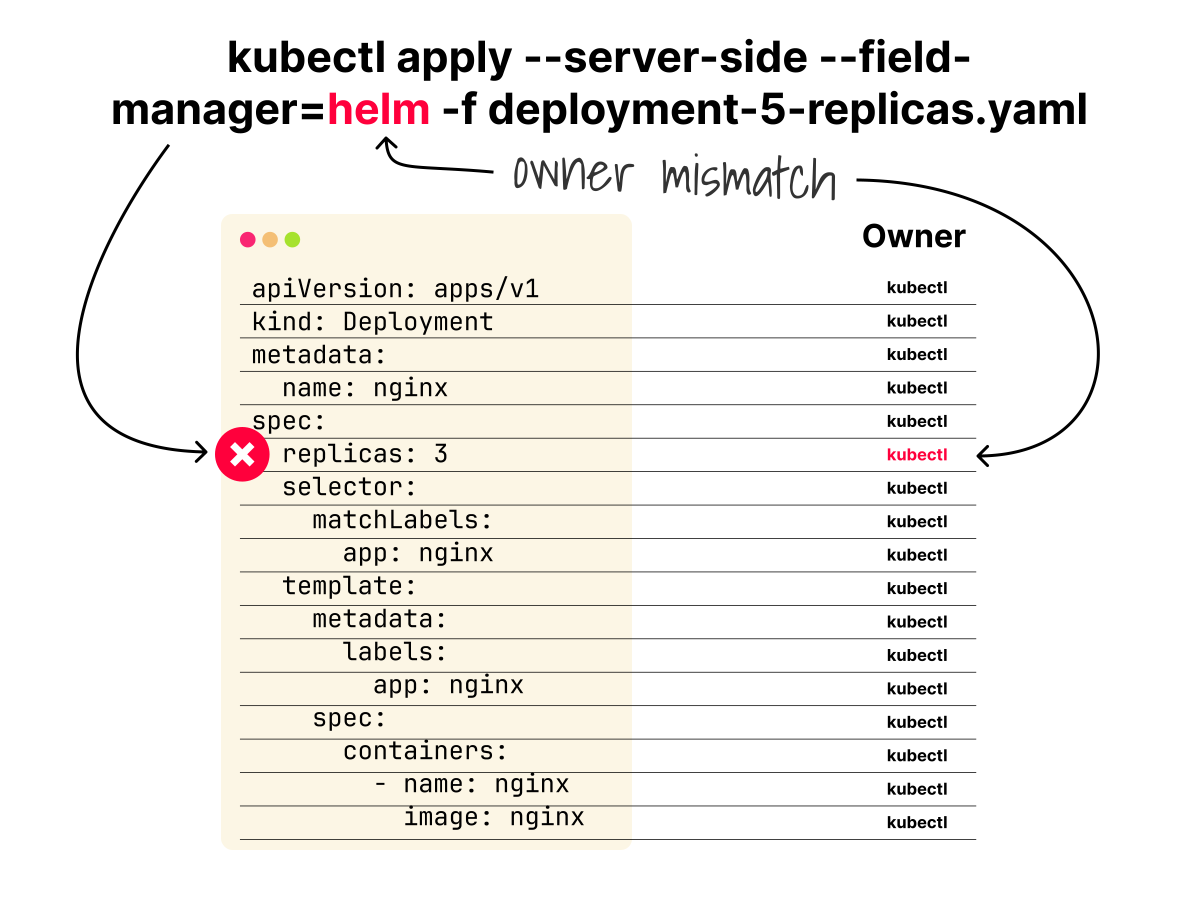
But is it really bad?
The error tells you exactly what conflicted and who owns it.
This is the fundamental difference from client-side apply: conflicts are explicit, not silent.
We will come back to the three suggested resolutions after looking at where the ownership data is stored.
Managed Fields
When you apply a resource using server-side apply, the API server must store ownership information.
The managed fields in the resource's metadata are the designated place for that.
You might wonder if you have ever seen these "managed fields".
By default, kubectl hides managedFields to keep the output more readable.
To make them visible, you have to add the --show-managed-fields flag to your kubectl get command.
Even if you have seen them, you might have thought it was just noise and scroll past them.
But managedFields are more precious than what can appear at first sight.
They record critical information, such as which manager owns which field, when, and via which operation.
But let's have a look at a real example:
bash
kubectl get deployment my-app -o yaml --show-managed-fields
managedFields:
- fieldsV1:
    f:spec:
      f:replicas: {}
      f:selector: {}
      f:template: {}
      # truncated
  manager: kubectl
  operation: Apply
  time: "2026-05-09T11:47:40Z"

- fieldsV1:
    f:status:
      f:availableReplicas: {}
      f:conditions: {}
      f:readyReplicas: {}
      # truncated
  manager: k3s
  operation: Update
  subresource: status
  time: "2026-01-01T00:00:00Z"
Our deployment has two managers with two different roles: kubectl owns the spec, which you declared; k3s owns the status subresource, which the controller reports back.
The operation field indicates how each manager interacted with the resources: "Apply" means the fields were set via SSA, "Update" means they were set via another mechanism.
The difference is in the structure of the request.
A server-side apply operation uses the PATCH HTTP verb with a specific content-type: "application/apply-patch+yaml".
This is the content type that tells the API server, "this is a fully specified intent, please track my ownership".
"Update" is used for everything else; POST, PUT, or PATCH with any other content-type: (strategic merge patch, JSON merge patch, JSON patch).
All of these are treated as imperative operations that don't carry ownership semantics.
That's why in our previous output, we see operation "update" for the subresource "status".
In this cluster, the controller recorded as k3s doesn't use SSA to update status.
They use the /status subresource endpoint, which is an imperative PUT or PATCH operation.
In Kubernetes, some resources have sub-resources.
Subresources can be updated independently of the parent resource.
The most common ones are /status and /scale.
When a manager updates a resource via a subresource endpoint, the API server records the change in managedFields, indicating that this manager has authority only over that specific subresource, not the whole resource.
Reading FieldsV1
The FieldsV1 is a field ownership map: the presence of a key indicates ownership, not a value assignment.
The fieldsV1 map uses a notation that follows simple rules:
- f: prefix means a field name.
- k: prefix means a map key.
- v: prefix means a specific value. It appears when a list has no natural key field and the value itself is used as the identifier.
- .: means the object itself. It marks ownership of the parent object, not just its fields.
f:spec:
  f:replicas: {} # this manager owns the replicas field

f:containers:
  k:{"name":"my-app"}: # it identifies which container we are talking about
    .: {} # this manager owns the container named my-app as a whole
    f:image: {} # this manager owns the container's image and name fields
    f:name: {}
We don't use the v: prefix in our my-app deployment, since it's less common than f: and k:.
Common examples for v: are imagePullSecrets and finalizers:
f:imagePullSecrets:
  v:{"name":"my-registry-secret"}:
    .: {}

f:finalizers:
  v:"kubernetes.io/pvc-protection":
    .: {}
What Changes in Managed Fields
We have already mentioned that the client-side apply operation field is different from the server-side one (update vs apply).
But there are other differences.
First, the manager's name.
Even if you use kubectl in both cases, you will have "kubectl-client-side-apply" in one case and "kubectl" in the other.
So the manager's name already tells you how to apply.
We also mentioned that the last-applied-configuration annotation disappears after a server-side apply operation.
After a client-side apply operation, not only is the annotation present, but it is also listed in the managedFields as a field owned by the manager.
Indeed, even the fields V1 map changes: server-side apply only claims fields that you added to your manifest; whereas client-side apply includes many fields you never explicitly set.
This last point is the most interesting one because it highlights the SSA "fully specified intent" well: SSA only claims ownership of what you actually declared, not everything Kubernetes adds as default fields.
Let's compare the managedFields of our previous server-side apply example with the managedFields generated by a client-side apply operation.
bash
kubectl delete deployment my-app
kubectl apply -f deployment.yaml
kubectl get deployment my-app -o yaml --show-managed-fields
The output is:
managedFields:
- apiVersion: apps/v1
  fieldsType: FieldsV1
  fieldsV1:
    f:metadata:
      f:annotations:
        .: {}
        f:kubectl.kubernetes.io/last-applied-configuration: {}
      f:labels:
        .: {}
        f:app: {}
    f:spec:
      f:progressDeadlineSeconds: {}
      f:replicas: {}
      f:revisionHistoryLimit: {}
      f:strategy:
        f:rollingUpdate:
          .: {}
          f:maxSurge: {}
          f:maxUnavailable: {}
        f:type: {}
      f:template:
        f:spec:
          f:containers:
            k:{"name":"my-app"}:
              f:imagePullPolicy: {}
              f:terminationMessagePath: {}
              f:terminationMessagePolicy: {}
          f:dnsPolicy: {}
          f:restartPolicy: {}
          f:schedulerName: {}
  manager: kubectl-client-side-apply
  operation: Update
# truncated
The highlighted lines show the difference: client-side apply owns the last-applied-configuration annotation, several Kubernetes default fields, and records the operation as Update.
Debugging Unexpected Changes
ManagedFields is not just metadata; it can also serve as a debug tool.
We have already seen that managedFields is not static; it changes every time a manager applies, modifies, or stops managing fields.
If something in your cluster changed unexpectedly, managedFields tells you which tool did it and when.
For example, going back to our earlier scenario, after the kubectl patch changed replicas to 5, a new manager entry appeared in managedFields:
deployment.yaml
- fieldsV1:
    f:spec:
      f:replicas: {}
  manager: kubectl-patch
  operation: Update
  time: '2026-01-01T19:10:00Z'
This tells you exactly what happened: kubectl patch took ownership of spec.replicas at 19:10.
With managedFields, the current ownership state is always visible and shows which tool owns each field.
Conflict Detection and Resolution
You already saw what a conflict error looks like.
Now let's go deeper: what exactly causes a conflict, and what are your options when one occurs?
A conflict happens when two managers try to own the same field with different values.
The API server checks the managedFields of the resource, and if the field you are trying to set is already owned by a different manager with a different value, it returns a conflict.
Let's print the conflict message again:
output
error: Apply failed with 1 conflict: conflict with "kubectl": .spec.replicas
Please review the fields above--they currently have other managers. Here
are the ways you can resolve this warning:
* If you intend to manage all of these fields, please re-run the apply
  command with the `--force-conflicts` flag.
* If you do not intend to manage all of the fields, please edit your
  manifest to remove references to the fields that should keep their
  current managers.
* You may co-own fields by updating your manifest to match the existing
  value; in this case, you'll become the manager if the other manager(s)
  stop managing the field (remove it from their configuration).
See https://kubernetes.io/docs/reference/using-api/server-side-apply/#conflicts
Let's delve into the three possible solutions that the error message reports.
The first option is to take ownership of the contested field by using the --force-conflicts flag:
bash
kubectl apply --server-side --field-manager=helm --force-conflicts -f deployment-helm.yamlWith this command, you transfer ownership of spec.replicas from kubectl to helm, overriding the managedFields entry forcibly.
This option works, but is very risky as the other manager might have a good reason to own that field.
The second option is to remove the field from your manifest if you do not actually need to manage it.
In that case, you simply let the current owner keep managing it.
This is the safest and cleanest resolution when the conflict is accidental.
In this case, SSA saves you from an unwanted override.
The third option is co-ownership: if you set the same value as the current owner, both managers become co-owners of the field.
No conflict occurs because both managers agree on the value.
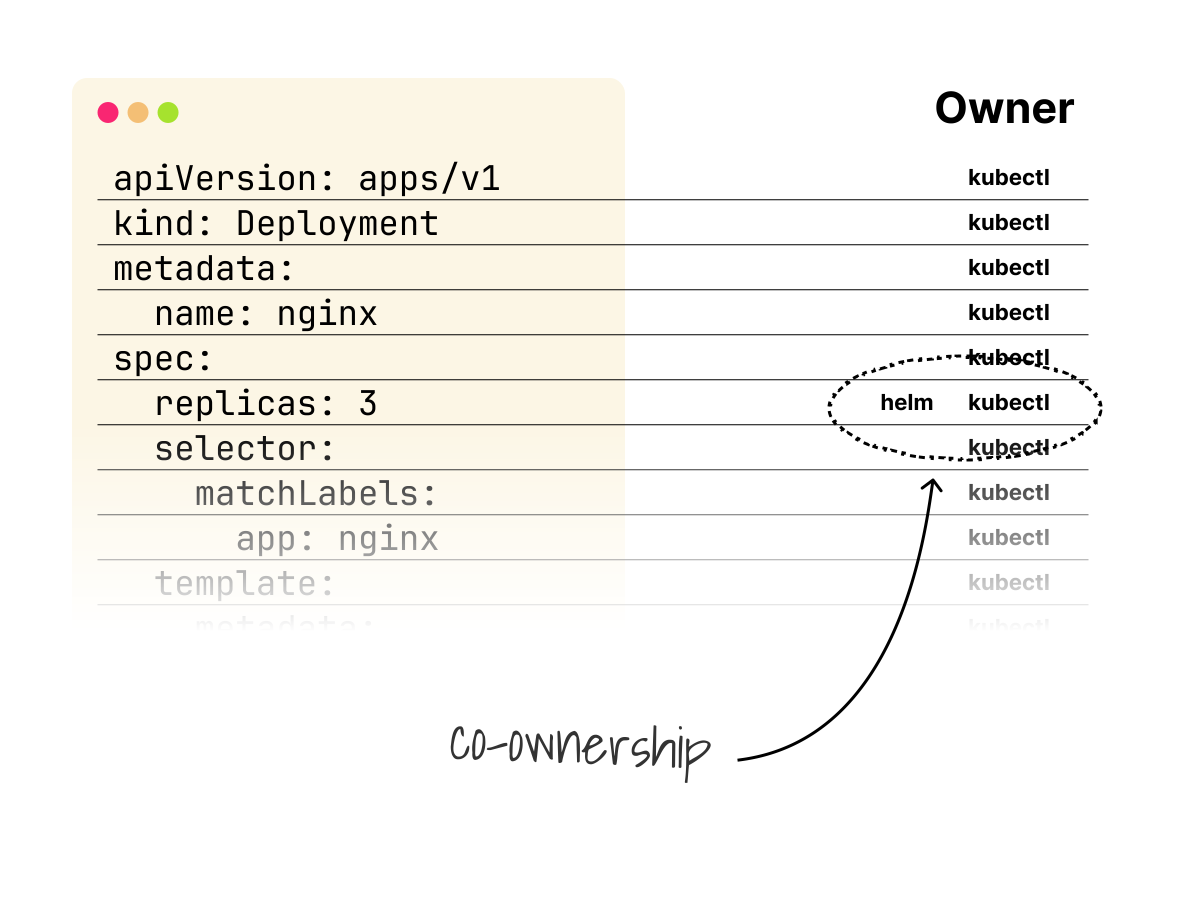
Do not overlook a subtle implication, though.
In co-ownership, the field is removed only when all co-owners stop managing it.
Let's look at an example to better understand co-ownership:
bash
kubectl delete deployment my-app
kubectl apply --server-side -f deployment.yaml
kubectl apply --server-side --field-manager=helm -f deployment.yaml
kubectl get deployment my-app -o yaml --show-managed-fields
Which outputs:
managedFields:
- apiVersion: apps/v1
  fieldsType: FieldsV1
  fieldsV1:
    f:metadata:
      f:labels:
        f:app: {}
    f:spec:
      f:replicas: {}
      f:selector: {}
  manager: helm
  operation: Apply

- apiVersion: apps/v1
  fieldsType: FieldsV1
  fieldsV1:
    f:metadata:
      f:labels:
        f:app: {}
    f:spec:
      f:replicas: {}
      f:selector: {}
  manager: kubectl
  operation: Apply
# truncated
Both kubectl and helm own f:spec.replicas.
Co-ownership is confirmed.
Let kubectl remove replicas from its manifest.
bash
grep -v "replicas: 3" deployment.yaml > deployment-no-replicas.yaml
cat deployment-no-replicas.yaml
kubectl apply --server-side -f deployment-no-replicas.yaml
kubectl get deployment my-app -o yaml --show-managed-fields
Let's look at the output:
deployment.yaml
managedFields:
- apiVersion: apps/v1
  fieldsType: FieldsV1
  fieldsV1:
    f:metadata:
      f:labels:
        f:app: {}
    f:spec:
      f:replicas: {}
      f:selector: {}
  manager: helm
  operation: Apply

- apiVersion: apps/v1
  fieldsType: FieldsV1
  fieldsV1:
    f:metadata:
      f:labels:
        f:app: {}
    f:spec:
      f:selector: {}
  manager: kubectl
  operation: Apply
# truncated
The highlighted output shows Helm still owns spec.replicas, while kubectl no longer lists it under
f:spec.
spec:
  progressDeadlineSeconds: 600
  replicas: 3
The value is still 3 because Helm is still managing the field.
And what happens if Helm loses ownership of spec.replicas too?
Let's find out!
bash
grep -v "replicas: 3" deployment.yaml > deployment-no-replicas.yaml
kubectl apply --server-side --field-manager=helm -f deployment-no-replicas.yaml
kubectl get deployment my-app -o yaml --show-managed-fields
kubectl get deployment my-app --template='{{.spec.replicas}}{{"\n"}}'
The managedFields output is:
deployment.yaml
managedFields:
- fieldsV1:
    f:metadata:
      f:labels:
        f:app: {}
    f:spec:
      f:selector: {}
      # truncated
  manager: helm
  operation: Apply
  time: "2026-05-22T20:41:54Z"
# truncated
The highlighted f:spec section no longer contains f:replicas, so Helm is not managing the field anymore.
And the replica count is now:
replicas
1We now have the whole picture: when a manager abandons a field, if another manager still owns it, the ownership remains with that manager, and the value doesn't change.
If no other manager owns it, the field is either deleted or reset to its default value if one exists.
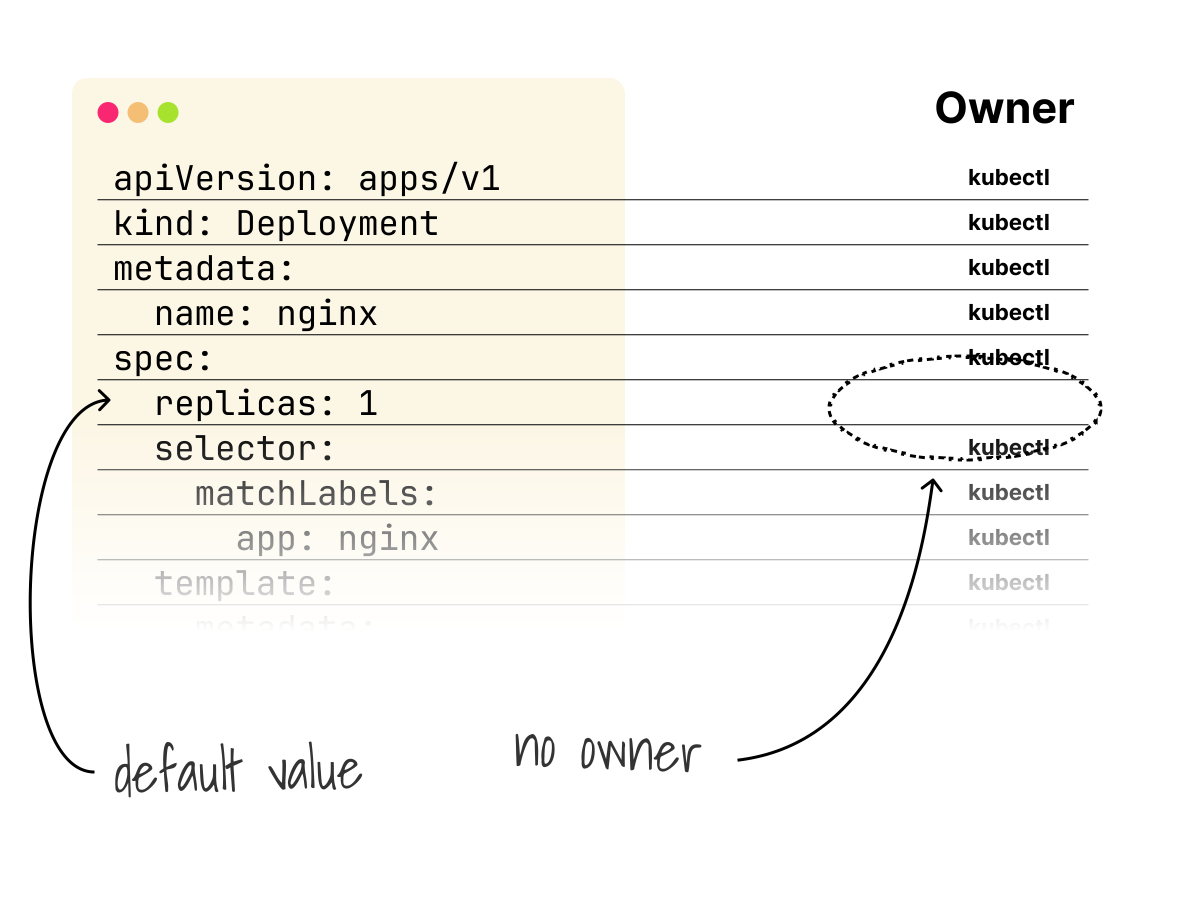
It's important to note that this implies the value can change, as we saw in our example: the replicas were reset to 1.
It might seem that conflicts are a problem.
Actually, we should consider them as features.
A conflict tells you that two tools are trying to manage the same field, which is almost always a sign of a misconfiguration somewhere that is worth fixing.
Imperative Writes Still Bypass Conflicts
It is important to understand that SSA conflict resolution has a blind spot: it only fires for requests that use Content-Type: application/apply-patch+yaml.
Imperative operations, such as a patch with a strategic merge patch, a put, or a subresource update, can still override SSA fields without triggering any conflict errors.
Let's start clean with SSA:
bash
kubectl delete deployment my-app
kubectl apply --server-side -f deployment.yaml
kubectl get deployment my-app -o yaml --show-managed-fields | grep -E "replicas|manager:|operation:"
Which outputs:
deployment.yaml
       f:replicas: {}
    manager: kubectl
    operation: Apply
        f:replicas: {}
    manager: k3s
    operation: Update
  replicas: 3
  replicas: 3
The highlighted lines show kubectl owning spec.replicas via SSA.
An imperative patch overrides spec.replicas:
bash
kubectl patch deployment my-app --subresource='scale' --type='merge' -p '{"spec":{"replicas":5}}'
kubectl get deployment my-app -o yaml --show-managed-fields | grep -E "replicas|manager:|operation:"
Which points to the following output:
deployment.yaml
    manager: kubectl
    operation: Apply
        f:replicas: {}
    manager: kubectl-patch
    operation: Update
        f:replicas: {}
    manager: k3s
    operation: Update
  replicas: 5
  replicas: 5
The highlighted lines show kubectl-patch taking over spec.replicas, and the live value changing to 5 without a conflict.
SSA allows you to explicitly identify conflicts between managers that use SSA, but it does not protect against imperative write operations.
This is a significant limitation to keep in mind, since in real clusters, legacy controllers and tools might continue using imperative updates alongside resources managed by SSA.
Conflict resolution becomes particularly relevant when you start using Helm 4 with server-side apply.
Helm 3 uses client-side apply, which means conflicts are silent and ownership imprecise.
Helm 4 defaults new releases to SSA, turning many silent overwrites into explicit conflicts.
For existing releases, Helm keeps using the previous apply method unless you explicitly opt into SSA.
The Helm migration example below shows what this means in practice.
Server-side Apply in Helm
You might wonder why client-side apply is still the default mechanism for kubectl apply and other workflows, given the many advantages of server-side apply.
Well, SSA reached general availability in Kubernetes 1.22 in 2021, but changing the default behavior for existing workflows across the entire ecosystem without breaking backward compatibility was not easy.
The tooling needed time to catch up.
Helm, one of the most widely used Kubernetes tools, finally adopted SSA by default for new releases after releasing Helm 4 in November 2025.
This is one of the clearest signals that SSA is becoming the standard for how tools interact with the Kubernetes API.
When you run helm install or helm upgrade in Helm 3, Helm computes a three-way merge between the last deployed release, the live state of the cluster, and the new chart.
It's exactly the mechanism that we described at the beginning of the article, with the same limitations.
Helm 3 stores the release state as a Secret in the cluster namespace.
This Secret contains the full rendered manifest of the last release of a chart.
Helm uses it as its equivalent of the last-applied-configuration annotation that is used by kubectl, and the problem is the same: it only reflects what Helm knows about, not what other tools have done to the same resources.
Let's install the my-app deployment using Helm 3:
bash
kubectl delete deployment my-app
mkdir -p my-chart/templates

cat << 'EOF' > my-chart/Chart.yaml
apiVersion: v2
name: my-app
description: A test chart
version: 0.1.0
EOF

cat << 'EOF' > my-chart/templates/deployment.yaml
apiVersion: apps/v1
kind: Deployment
metadata:
  name: my-app
spec:
  replicas: 3
  selector:
    matchLabels:
      app: my-app
  template:
    metadata:
      labels:
        app: my-app
    spec:
      containers:
        - name: my-app
          image: nginx:1.26
          ports:
            - containerPort: 80
          resources:
            requests:
              cpu: 100m
              memory: 128Mi
            limits:
              cpu: 200m
              memory: 256Mi
EOF

helm install my-app my-chart
Looking at the managedFields after a Helm 3 install, we can identify the patterns we noticed before:
bash
kubectl get deployment my-app -o yaml --show-managed-fieldsThe output is:
managedFields:
- apiVersion: apps/v1
  fieldsType: FieldsV1
  fieldsV1:
    f:metadata:
      f:annotations:
        .: {}
        f:meta.helm.sh/release-name: {}
        f:meta.helm.sh/release-namespace: {}
      f:labels:
        .: {}
        f:app.kubernetes.io/managed-by: {}
    f:spec:
      f:progressDeadlineSeconds: {}
      f:replicas: {}
      f:revisionHistoryLimit: {}
      f:strategy:
        f:rollingUpdate:
          .: {}
          f:maxSurge: {}
          f:maxUnavailable: {}
        f:type: {}
      f:template:
        f:spec:
          f:containers:
            k:{"name":"my-app"}:
              f:imagePullPolicy: {}
              f:terminationMessagePath: {}
              f:terminationMessagePolicy: {}
          f:dnsPolicy: {}
          f:restartPolicy: {}
          f:schedulerName: {}
  manager: helm
  operation: Update
  time: "2026-01-01T00:00:00Z"
# truncated
The highlighted fields are Kubernetes defaults that Helm 3 claimed even though the chart did not declare them.
The highlighted operation: Update also confirms that Helm 3 is not using SSA here.
Let's have a look at the secret that stores the release state.
The release data is gzipped and double base64 encoded.
Helm compresses it before storing it in the Secret.
bash
kubectl get secret sh.helm.release.v1.my-app.v1 -o \
  jsonpath='{.data.release}' | base64 -d | base64 -d | gunzip
{
  "manifest": "---\n# Source: my-app/templates/deployment.yaml\n# truncated",
  "version": 1,
  "namespace": "default"
}
With Helm 4 and SSA, this secret is no longer used to calculate the diff, but it is still used for Helm rollback and Helm history.
Let's now try to upgrade our Helm 3 release with Helm 4.
bash
helm4 upgrade my-app my-chartUpgrading an existing release with a standard Helm upgrade, even using Helm 4, doesn't switch to SSA.
Helm 4 is backward compatible by default and doesn't change the mechanism for already-deployed charts.
To migrate this existing release to the new SSA mechanism, we have to use the --server-side=true flag.
bash
helm4 upgrade my-app my-chart --server-side=true
kubectl get deployment my-app -o yaml --show-managed-fields
Which outputs:
managedFields:
- apiVersion: apps/v1
  fieldsType: FieldsV1
  fieldsV1:
    f:metadata:
      f:annotations:
        f:meta.helm.sh/release-name: {}
        f:meta.helm.sh/release-namespace: {}
      f:labels:
        f:app.kubernetes.io/managed-by: {}
    f:spec:
      f:replicas: {}
      f:selector: {}
      f:template:
        f:metadata:
          f:labels:
            f:app: {}
        f:spec:
          f:containers:
            k:{"name":"my-app"}:
              .: {}
              f:image: {}
              f:name: {}
              f:ports:
                k:{"containerPort":80,"protocol":"TCP"}:
                  .: {}
                  f:containerPort: {}
              f:resources:
                f:limits:
                  f:cpu: {}
                  f:memory: {}
                f:requests:
                  f:cpu: {}
                  f:memory: {}
  manager: helm
  operation: Apply
  time: "2026-01-01T00:00:00Z"
# truncated
The highlighted operation: Apply confirms that Helm is using SSA for this upgrade.
In a clean environment like the one in our example, the migration from Helm 3 to Helm 4 is smooth.
In a real production cluster, the picture is more complex.
If other tools (kubectl, Argo CD, operators) have touched the same resources, conflicts will surface during the server-side upgrade.
Each conflict tells you exactly which field is contested and who owns it, and now you know how to deal with them!
Helm 3 claimed ownership of many Kubernetes defaults.
After the SSA transition, those fields are no longer owned by Helm, so there will be no conflicts with them.
The release history Secrets remain unchanged.
Helm history and helm rollback still work exactly as before, regardless of whether SSA is used.
If you mix Helm versions in your pipeline (some environments use Helm 3 and others use Helm 4), be careful about consistency.
A release upgraded with Helm 4 and the server-side flag, which is then rolled back by Helm 3, will revert to client-side apply for that rollback.
Recap
When you run kubectl apply, the client computes a patch locally using a three-way merge and sends it to the API server.
Each tool only knows about its own changes.
In a cluster where kubectl, Helm, Argo CD, and controllers all touch the same resources, this leads to silent overwrites and conflicts that are nearly impossible to debug.
Server-side apply moves ownership tracking to the API server, where it belongs.
The API server records which manager owns each applied field.
The full ownership state is recorded in managedFields, including which tool owns each field, via which operation, and when.
When two managers claim the same field, SSA returns an explicit conflict error rather than silently overwriting.
Conflicts are not a problem; they are a feature.
Every conflict SSA surfaces is a problem that a client-side apply would have hidden.
With Helm 4 defaulting new releases to SSA, the ecosystem is finally catching up to what the Kubernetes API has supported since version 1.22.