
What happens inside the Kubernetes API server?
January 2026
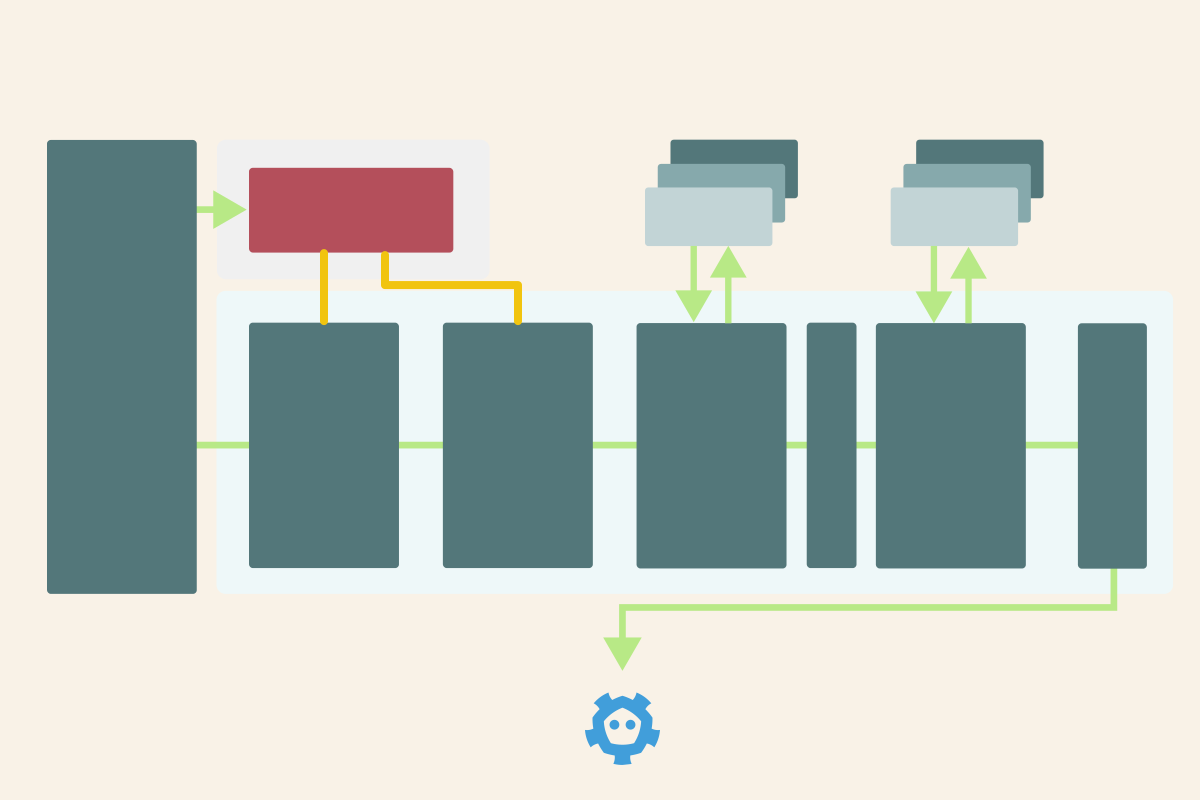
This is part 1 of 6 of the How the Kubernetes control plane works. More
The Kubernetes API server handles all of the requests to your Kubernetes cluster.
But how does it actually work?
When you type kubectl apply -f my.yaml, your YAML is sent to the API and stored in etcd.
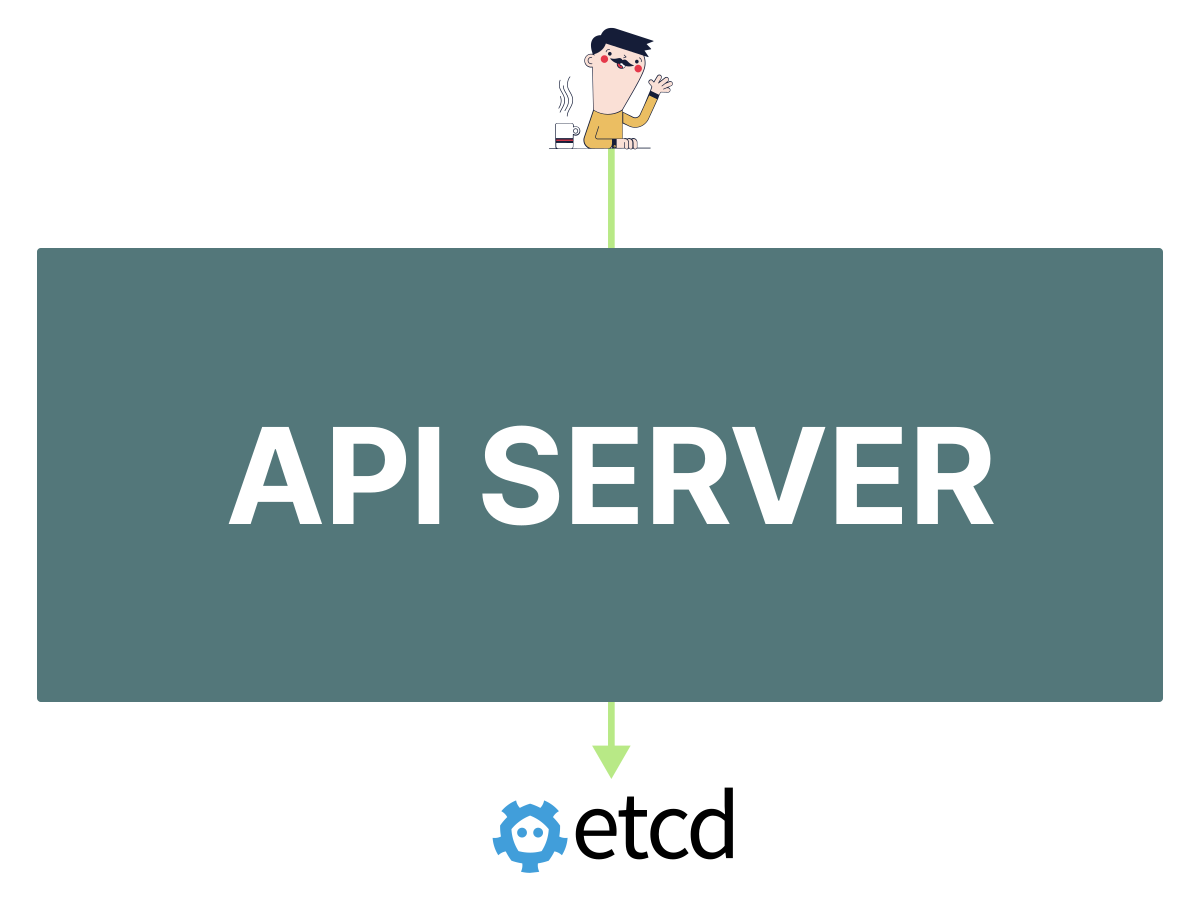
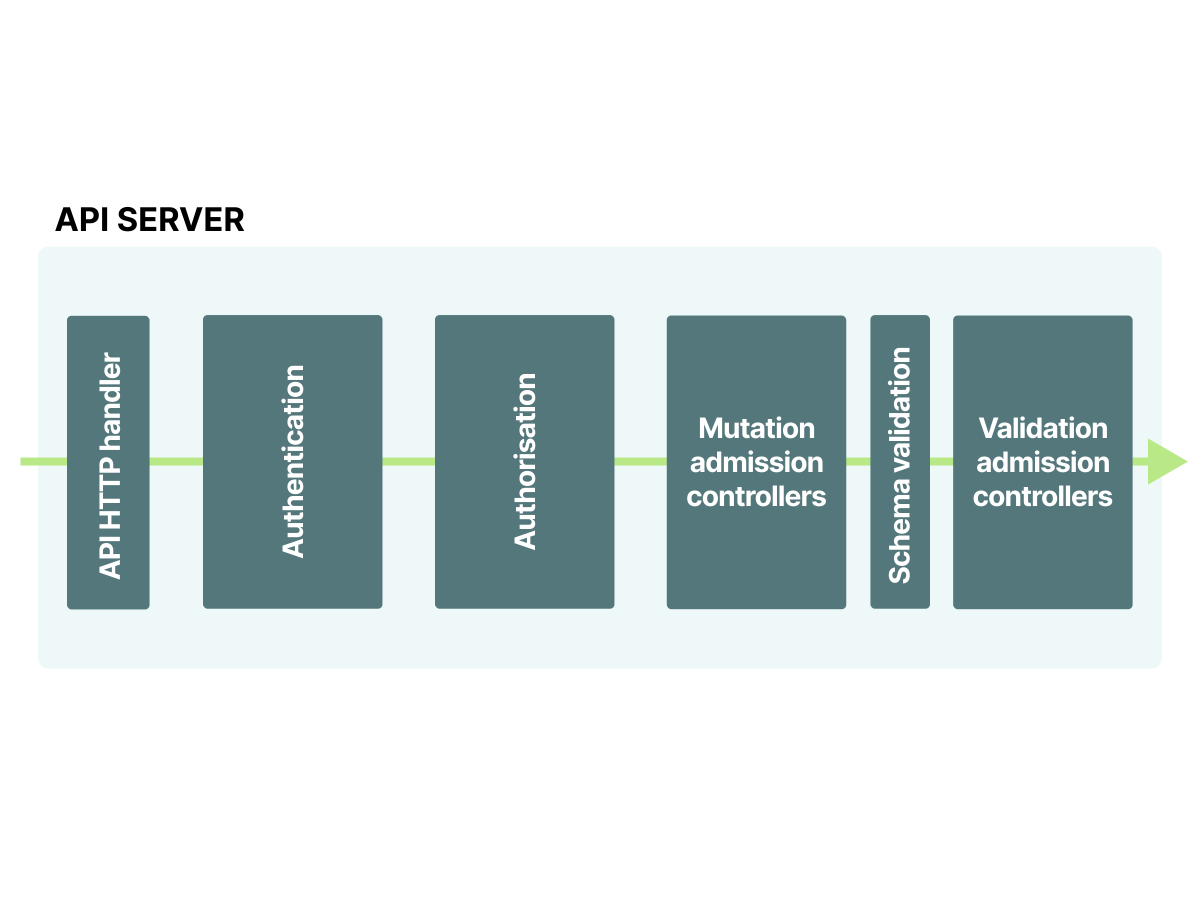
The API diagram shows a single block, but in reality, several components are involved in processing your request in sequence.
The first module is the HTTP handler.
This is nothing more than a regular web server.
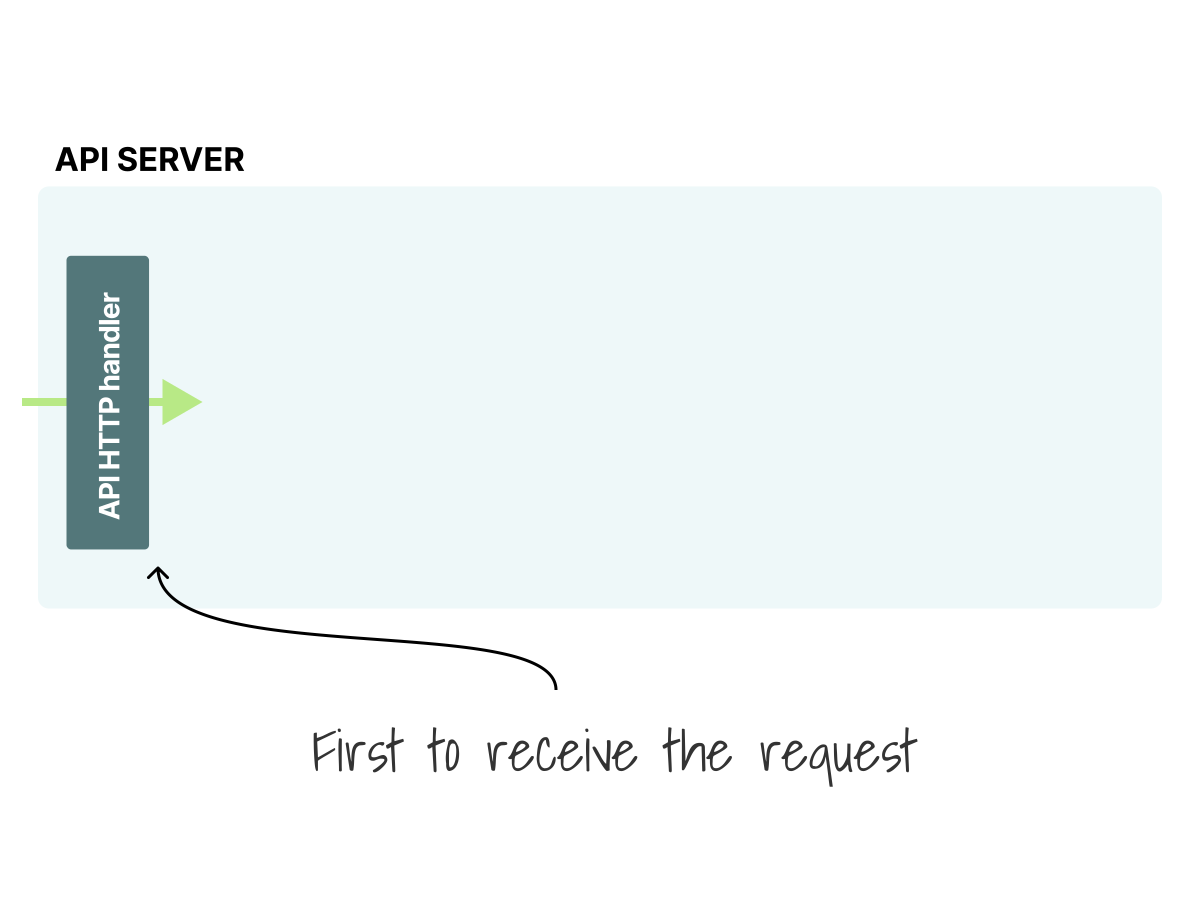
It's easy to forget, but the Kubernetes API is just an HTTP server.
It accepts requests and returns responses.
You can even call it directly with curl if you want:
bash
kubectl proxy &
curl localhost:8001/api/v1/pods
The output is a regular JSON response, just like any other REST API.
This might sound obvious, but it's worth keeping in mind: everything in Kubernetes goes through this API.
kubectl, the scheduler, the kubelet, your CI/CD pipeline, they all speak the same HTTP.
But the Kubernetes API is more than a plain REST API.
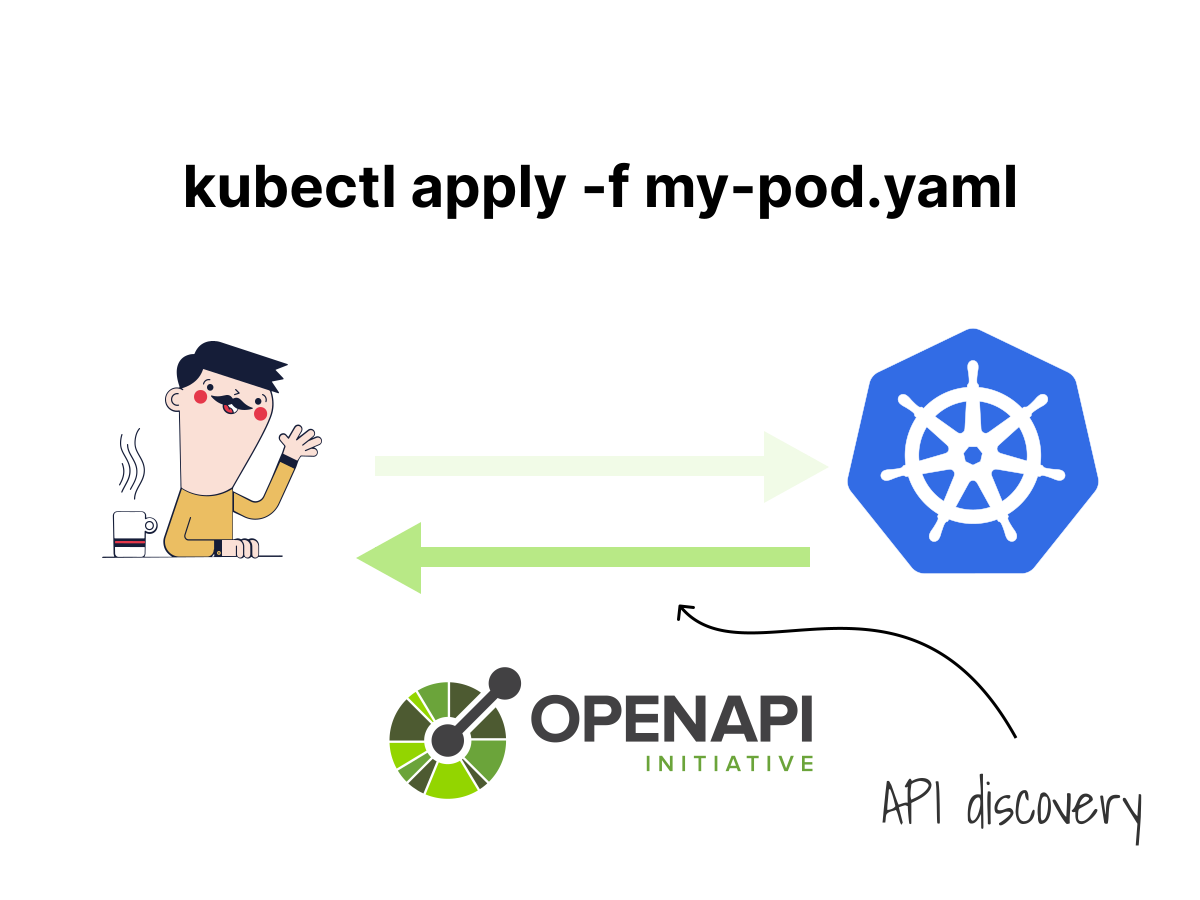
It's an OpenAPI-compliant API that publishes a machine-readable schema describing every resource, every field, and every operation.
This schema is what powers kubectl explain, editor autocompletion, and the auto-generated API reference documentation.
It's an excellent resource for looking up which fields a resource supports.
You can even fetch the OpenAPI spec directly from your cluster:
bash
kubectl get --raw /openapi/v3But why use kubectl if you could just use curl?
It's a lot more than that.
When you run kubectl apply, it downloads the OpenAPI schema from the cluster and uses it to validate your YAML client-side before sending anything to the API server.
Wrong field name?
Type mismatch?
kubectl catches these mistakes on your machine, before your request even hits the network.
Authentication and authorization
Next, once the API receives the requests, it has to make sure that:
- You have access to the cluster (authentication).
- You can create, delete, list, etc., resources (authorization).
This is the part where the access rules are evaluated.
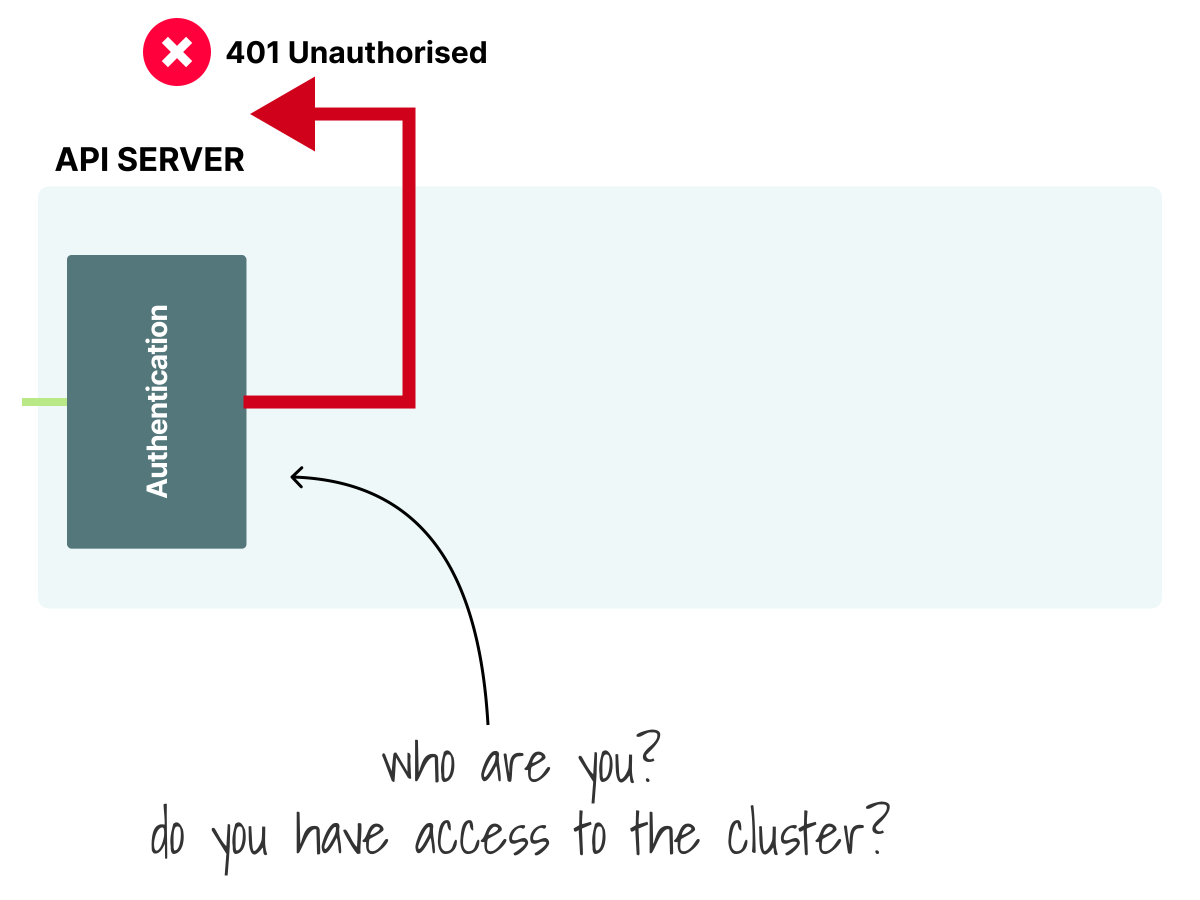
Authentication answers the question "Who are you?".
Kubernetes supports several methods for verifying your entry: client certificates, bearer tokens, OpenID Connect, and more.
Internally, the API server assembles these methods into an authenticator chain and attempts each in turn.
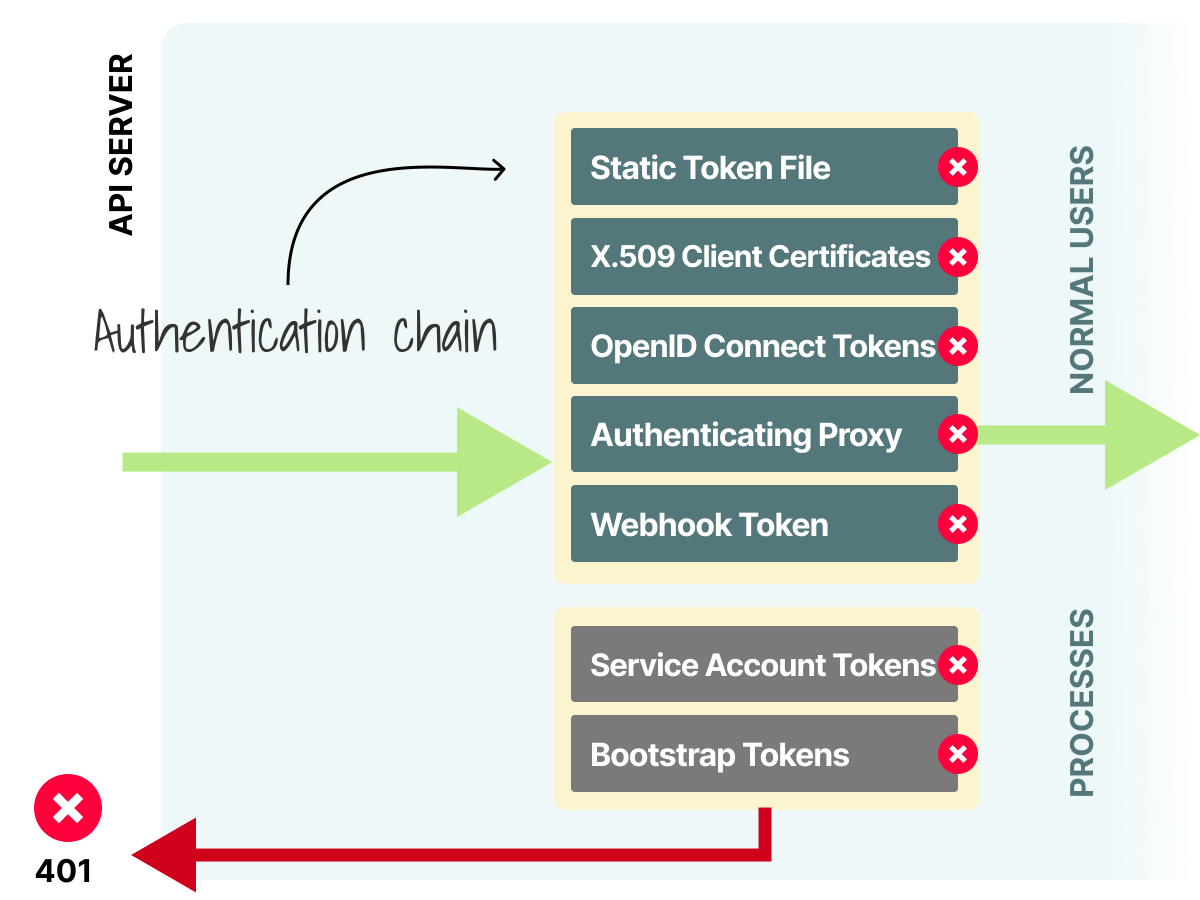
If any authenticator recognises the request, you're in.
If none do, you get a 401 Unauthorized.
On the other hand, authorization answers "Are you allowed to do this?".
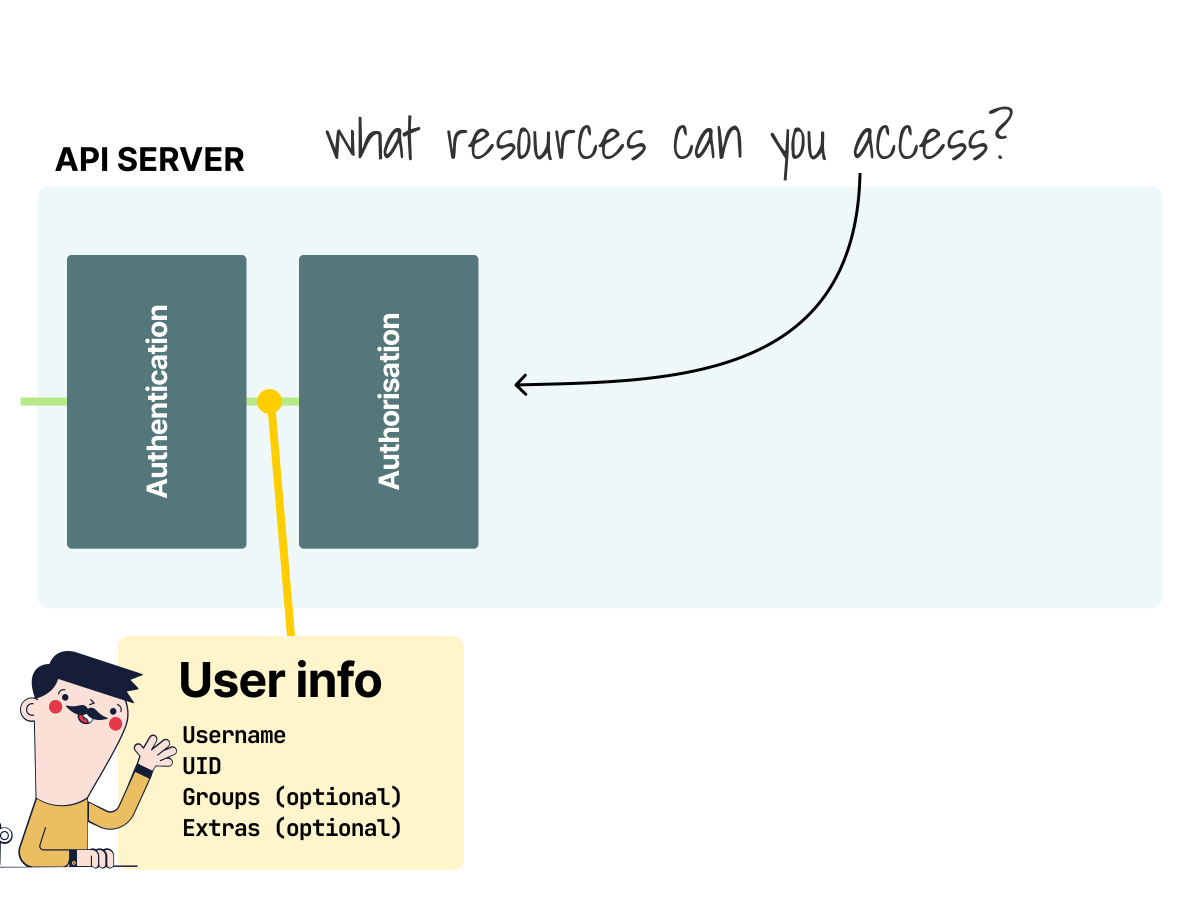
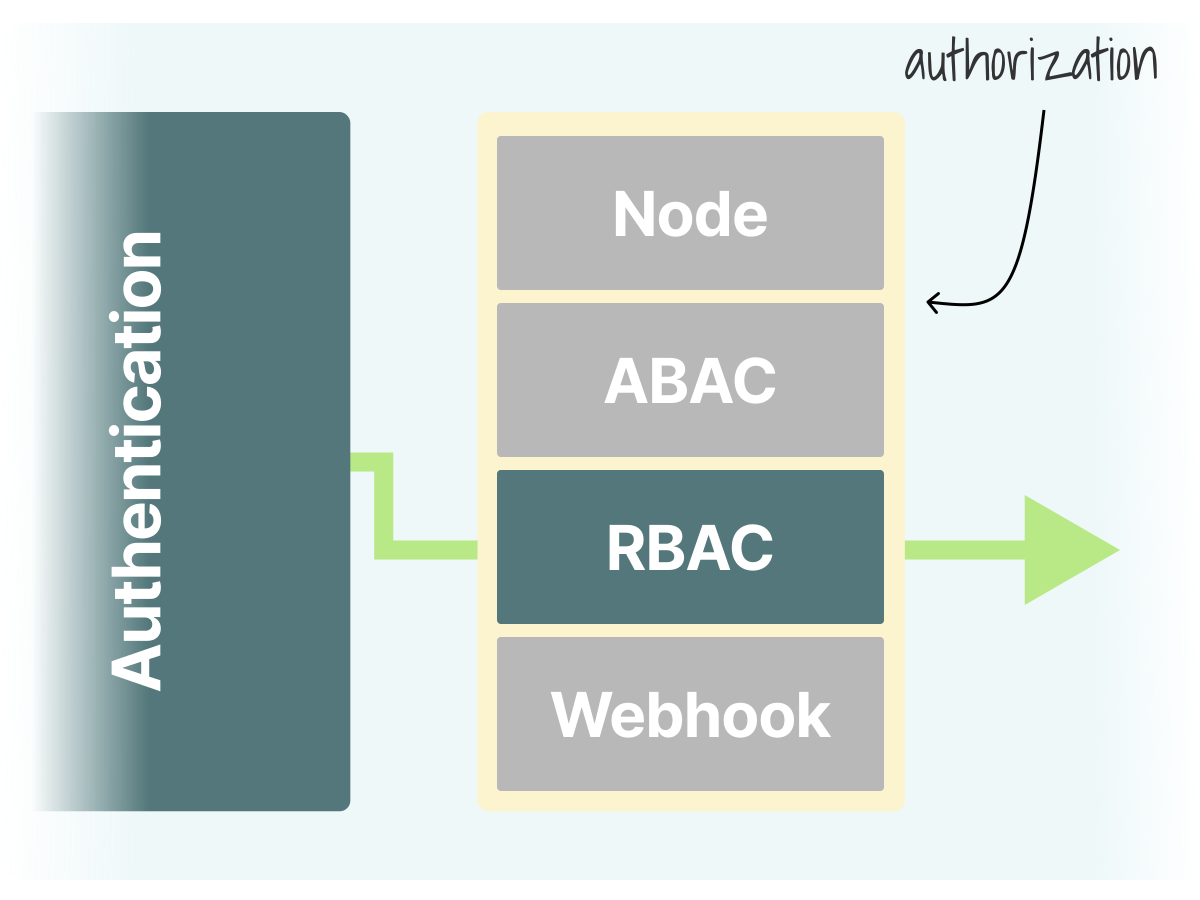
The most common method is RBAC (Role-Based Access Control), where you define rules like "this ServiceAccount can list Pods in this namespace".
RBAC isn't the only option, though.
The API server also supports webhook authorization (delegating decision-making to an external service), ABAC (policies in a static file), and the Node authorizer, a special-purpose authorizer that ensures kubelets can access resources only on their own node.
If either check fails, the API returns a 401 or 403 error and stops processing the request.
Nothing further happens, and the request never reaches the following stages.
But why "Role-Based" access control? Why not just say "Alice can list Pods" and be done with it?
Imagine you have 20 developers who all need the same permissions: create Deployments, list Pods, and view logs.
If you hardcode the permissions for each person, you end up with 20 nearly identical permission sets.
When the team's permissions need to change, you update all 20 of them.
When someone leaves, you hunt down their specific entry.
RBAC solves this with a level of indirection.
Instead of attaching permissions directly to people, you create a Role that describes what's allowed (e.g., "can create Deployments and list Pods in the production namespace").
Then you create a RoleBinding that connects people to that Role.
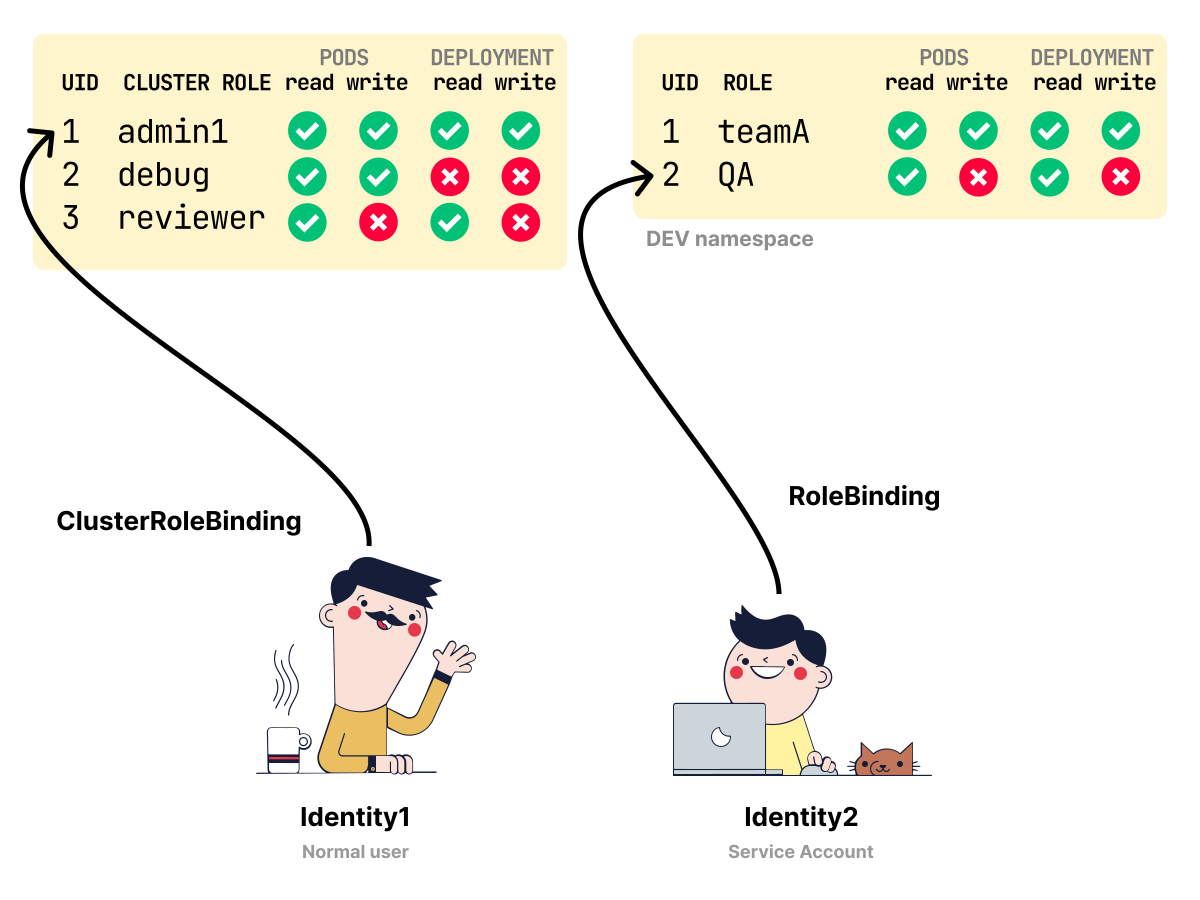
Now, when your team's permissions change, you only need to update the Role once.
When someone joins, you add a binding.
When they leave, you remove it.
Permissions and people are managed independently.
For a deeper look at how Roles, ClusterRoles, and bindings work in practice, check out the RBAC deep-dive.
The Mutation Admission Controller
So you're authenticated, and you can create Pods; what's next?
The API passes the request to the Mutation Admission Controller.
This component is in charge of looking at your YAML and modifying it.
What YAML can you change with it, though?
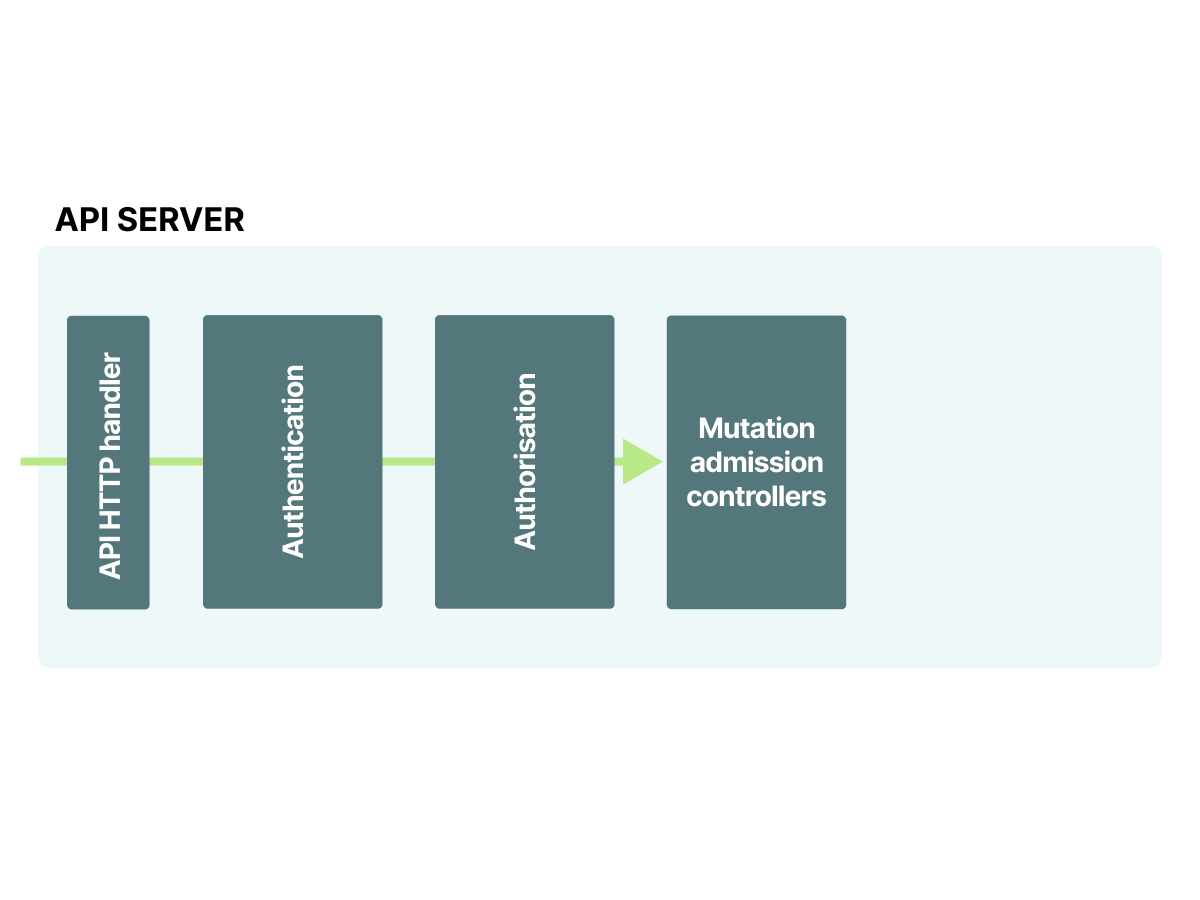
Does your Pod have an image pull policy?
If not, the admission controller will add "Always" for you.
Is the resource a Pod?
- It sets the default Service Account (if none is set).
- Adds a volume with the token.
And more!
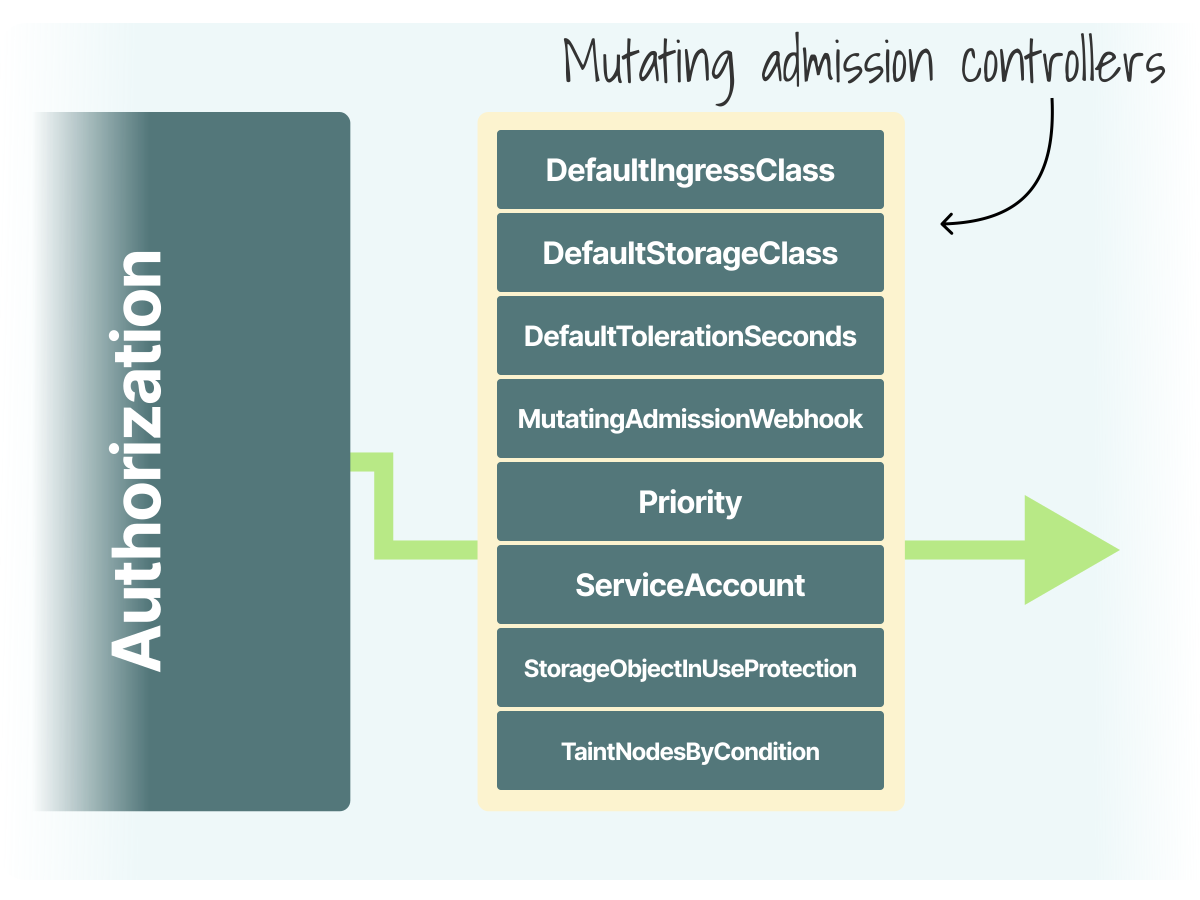
This is why the resource you retrieve from the cluster never looks exactly like the one you submitted.
Try it yourself.
Create a simple Pod and then inspect it:
bash
kubectl run nginx --image=nginx
kubectl get pod nginx -o yaml
You'll notice fields you never set: imagePullPolicy, terminationGracePeriodSeconds, dnsPolicy, a mounted ServiceAccount token, and many more.
The Mutation Admission Controller added all of these.
Schema validation
After all modifications, does the Pod still look like a Pod?
The API performs a quick check to ensure the resource remains valid against the internal schema.
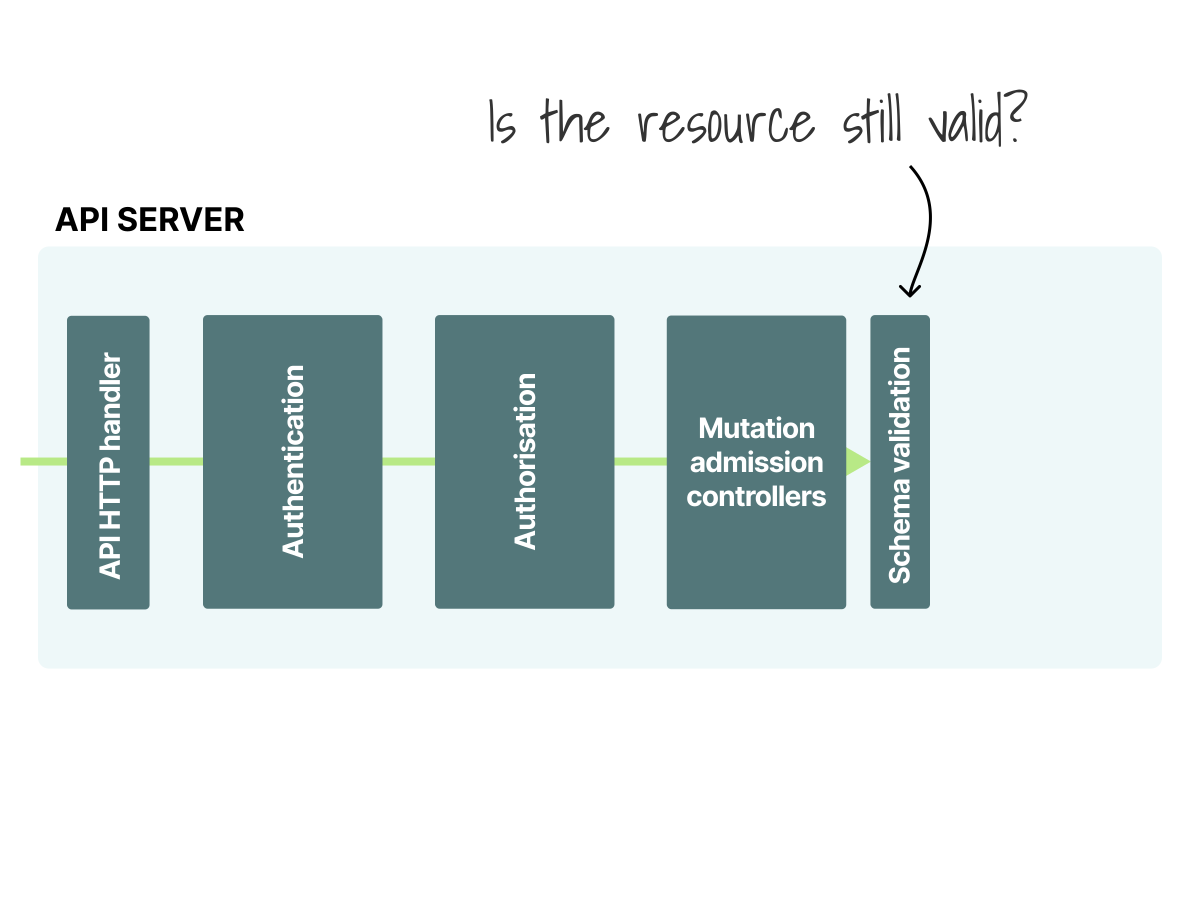
Didn't kubectl do this already?
kubectl does catch mistakes in your YAML by validating against the OpenAPI schema before sending the request.
But remember what just happened: the Mutation Admission Controllers modified your resource.
They added fields, injected defaults, maybe even changed values.
Schema validation exists to catch corruption introduced during the mutation phase.
If you submit your YAML with replicas: 3 and a buggy mutating webhook changes it to replicas: "three", schema validation is the safety net that rejects it.
No malformed resource reaches etcd.
kubectl can't predict what mutating webhooks will do to the resource after it arrives at the API server.
That's why this step exists: it validates the resource in its final, mutated form.
If the schema validation fails, the API returns an error message that usually tells you exactly what's wrong.
The Validation Admission Controller
If you try to deploy a Pod in a namespace that doesn't exist, is there anyone stopping you?
The Validation Admission Controller does.
Are you trying to deploy more resources than your quota?
The controller will prevent that too.
The difference between schema validation and the Validation Admission Controller is subtle but essential.
Schema validation checks whether the YAML is valid: the right types, the right fields, the proper structure.
The Validation Admission Controller checks whether the request makes sense: business rules, organizational policies, cluster-level constraints.
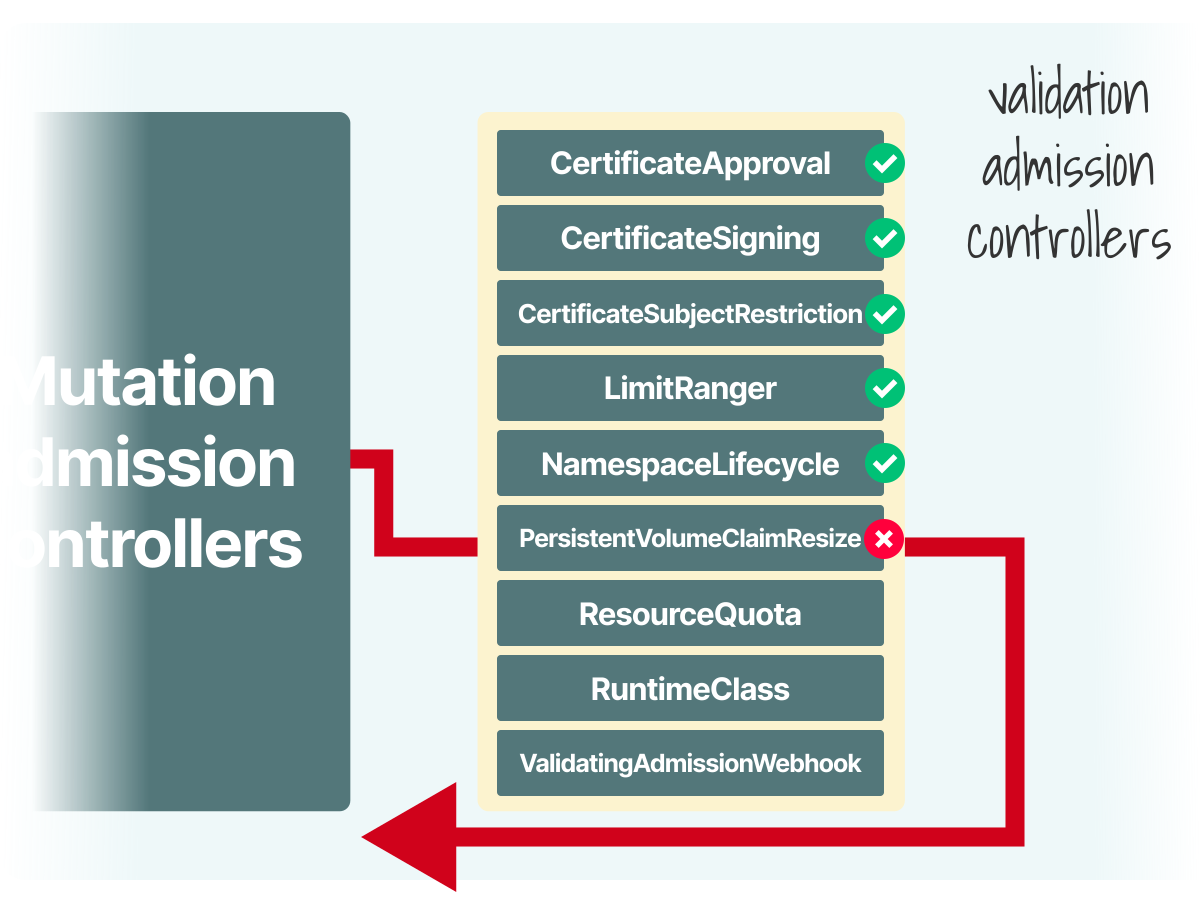
For example, "you can't create a Pod requesting 1000 CPUs" isn't a schema issue (the YAML is valid), but it's a policy issue (you don't have that quota).
Custom admission controllers
The Validation and the Mutation Admission Controllers also support custom extensions via webhooks.
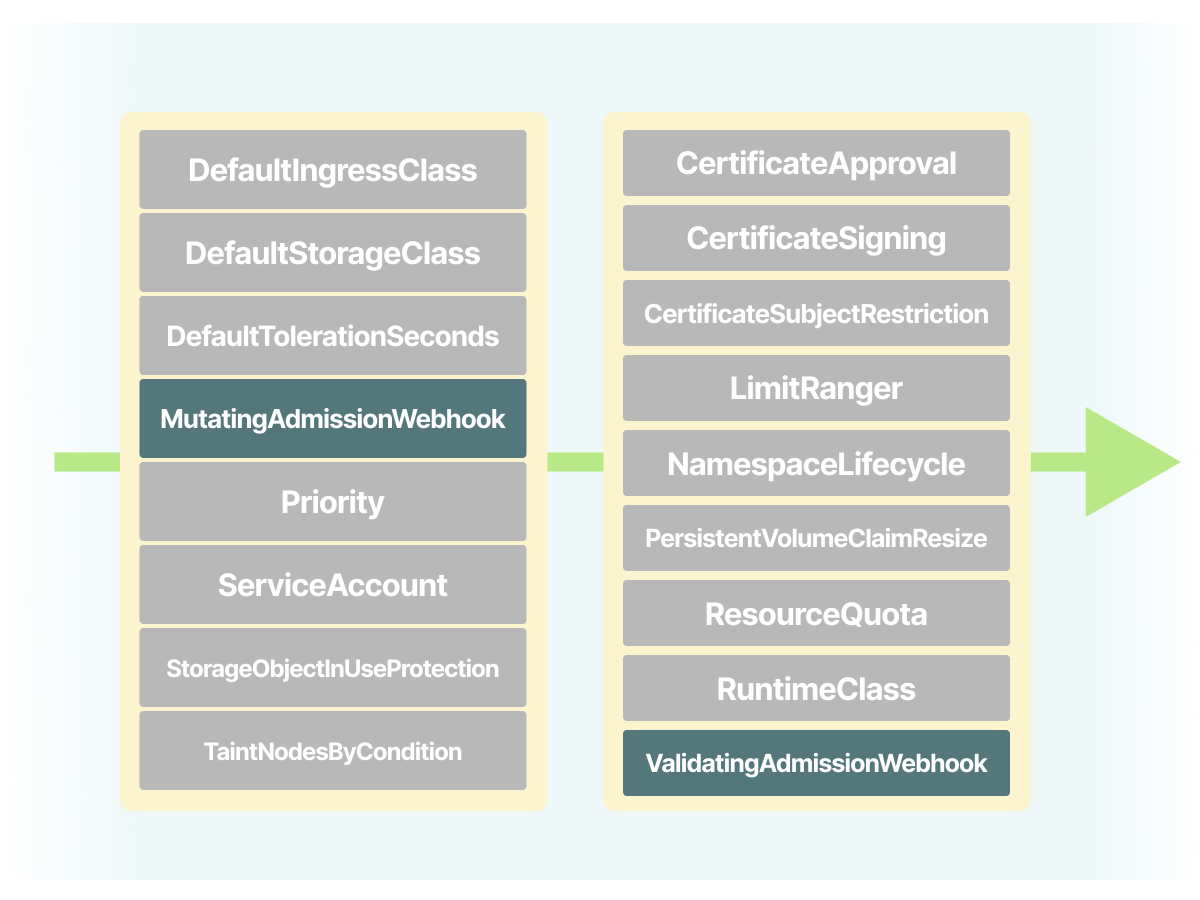
When you register a custom admission controller, you're telling the API server: "Before you accept this resource, call my webhook first."
The API server sends an HTTP POST request to your webhook with the resource details, and your webhook returns an "allow" or "deny" decision.
For mutation webhooks, the response can also include a set of changes (as a JSON Patch) to apply to the resource.
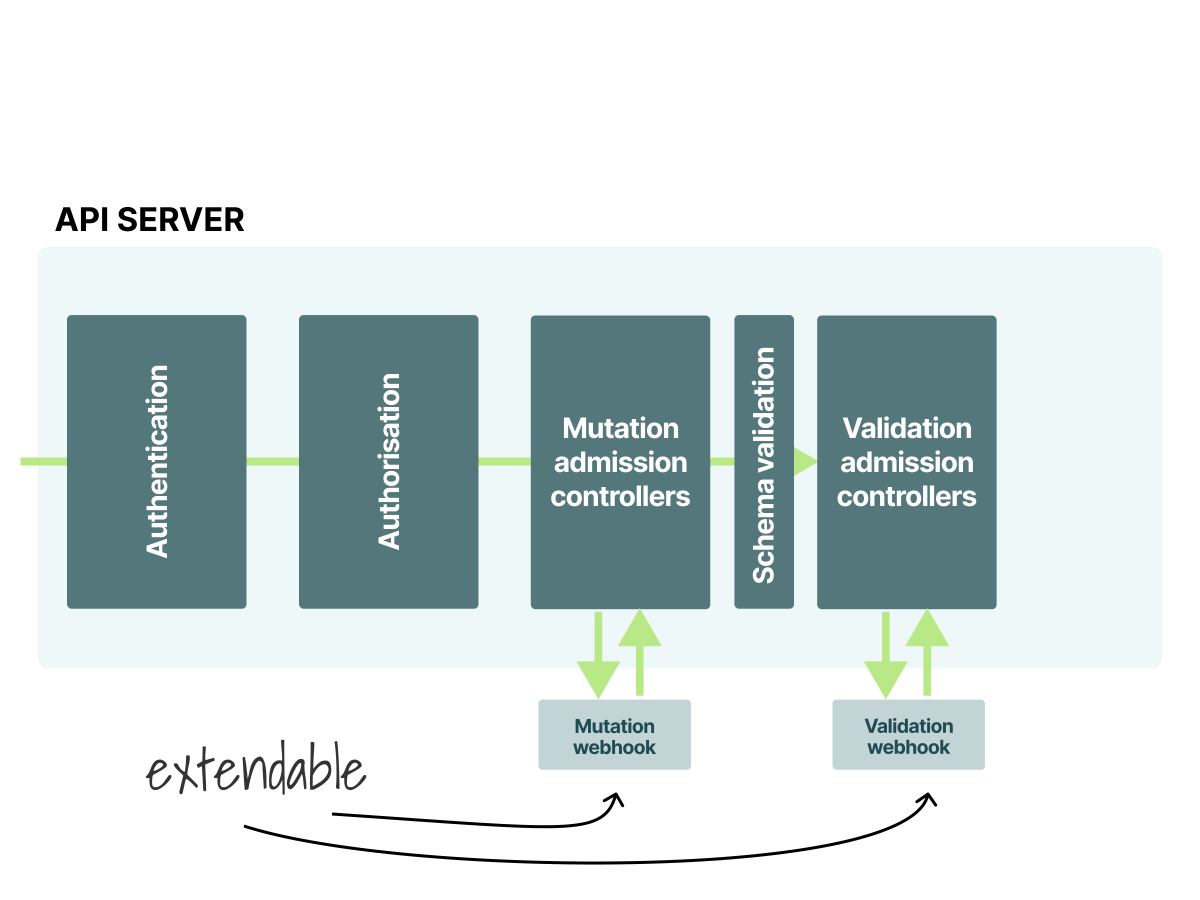
Tools like Istio and Kyverno run a small server inside your cluster that the API server calls for every matching request.
For example, Istio uses a mutation webhook to inject a sidecar container into every Pod automatically.
You never write the sidecar YAML yourself; Istio's webhook adds it for you.
Kyverno uses validation webhooks to enforce policies.
Instead of writing code for a webhook server, you write a YAML policy like:
policy.yaml
apiVersion: kyverno.io/v1
kind: ClusterPolicy
metadata:
  name: require-labels
spec:
  rules:
    - name: check-team-label
      match:
        any:
          - resources:
              kinds:
                - Pod
      validate:
        message: "The label 'team' is required."
        pattern:
          metadata:
            labels:
              team: "?*"
This policy rejects any Pod that doesn't have a team label.
Under the hood, Kyverno is still a webhook, but it abstracts the webhook logic so you only write policies.
Webhooks are powerful, but they come with a cost.
Your webhook is a Pod running in your cluster.
If that Pod crashes or becomes unreachable, the API server can't call it.
With failurePolicy: Fail (the safe default), every resource that matches the webhook is rejected from your cluster.
That includes Pods, Deployments, and anything else the webhook was supposed to inspect.
A single crashed Pod can block your entire cluster from accepting new resources.
This has led Kubernetes to develop a lighter alternative.
Admission policies with CEL
Since Kubernetes 1.30, you can write validation rules that run directly inside the API server.
No webhook, no external Pod, no network call.
The ValidatingAdmissionPolicy resource lets you define policies using CEL (Common Expression Language), a lightweight expression language evaluated inline by the API server process itself.
For example, this policy rejects any Deployment without the app.kubernetes.io/name label:
admission-policy.yaml
apiVersion: admissionregistration.k8s.io/v1
kind: ValidatingAdmissionPolicy
metadata:
  name: require-app-label
spec:
  failurePolicy: Fail
  matchConstraints:
    resourceRules:
      - apiGroups: ["apps"]
        apiVersions: ["v1"]
        operations: ["CREATE", "UPDATE"]
        resources: ["deployments"]
  validations:
    - expression: >-
        has(object.metadata.labels) &&
        'app.kubernetes.io/name' in object.metadata.labels
      message: "All Deployments must have the label 'app.kubernetes.io/name'."
No webhook server, no TLS certificates, no extra Deployment to maintain.
Just a YAML resource and a CEL expression.
CEL is deliberately limited: no loops, no unbounded recursion.
This makes it safe to run inside the API server.
Every expression is guaranteed to terminate in milliseconds.
Since Kubernetes 1.32, there's an alpha counterpart for mutations: MutatingAdmissionPolicy.
It brings the same CEL-based approach to setting defaults, injecting fields, and transforming resources.
For example, this policy adds a team: default label to any Pod that doesn't already have one:
mutation-policy.yaml
apiVersion: admissionregistration.k8s.io/v1alpha1
kind: MutatingAdmissionPolicy
metadata:
  name: add-default-team-label
spec:
  failurePolicy: Fail
  matchConstraints:
    resourceRules:
      - apiGroups: [""]
        apiVersions: ["v1"]
        operations: ["CREATE"]
        resources: ["pods"]
  mutations:
    - patchType: ApplyConfiguration
      applyConfiguration:
        expression: >-
          Object{
            metadata: Object.metadata{
              labels: object.metadata.labels + {"team": "default"}
            }
          }
No webhook server, no sidecar.
The API server evaluates the CEL expression inline and applies the patch.
This is an alpha feature (Kubernetes 1.32), so the API may change.
The direction is clear: between ValidatingAdmissionPolicy and MutatingAdmissionPolicy, Kubernetes is moving towards CEL-based policies inside the API server.
Webhooks remain the right choice for complex cases (such as calling external systems, cross-resource checks, or logic that CEL can't express).
Still, for straightforward field validation and defaults, you no longer need an external server.
So the request has passed authentication, authorization, mutation, schema validation, and custom validation.
What happens next?
Persisting resources in etcd
If you managed to pass the Validation Admission Controller, your resource is safely stored in etcd.
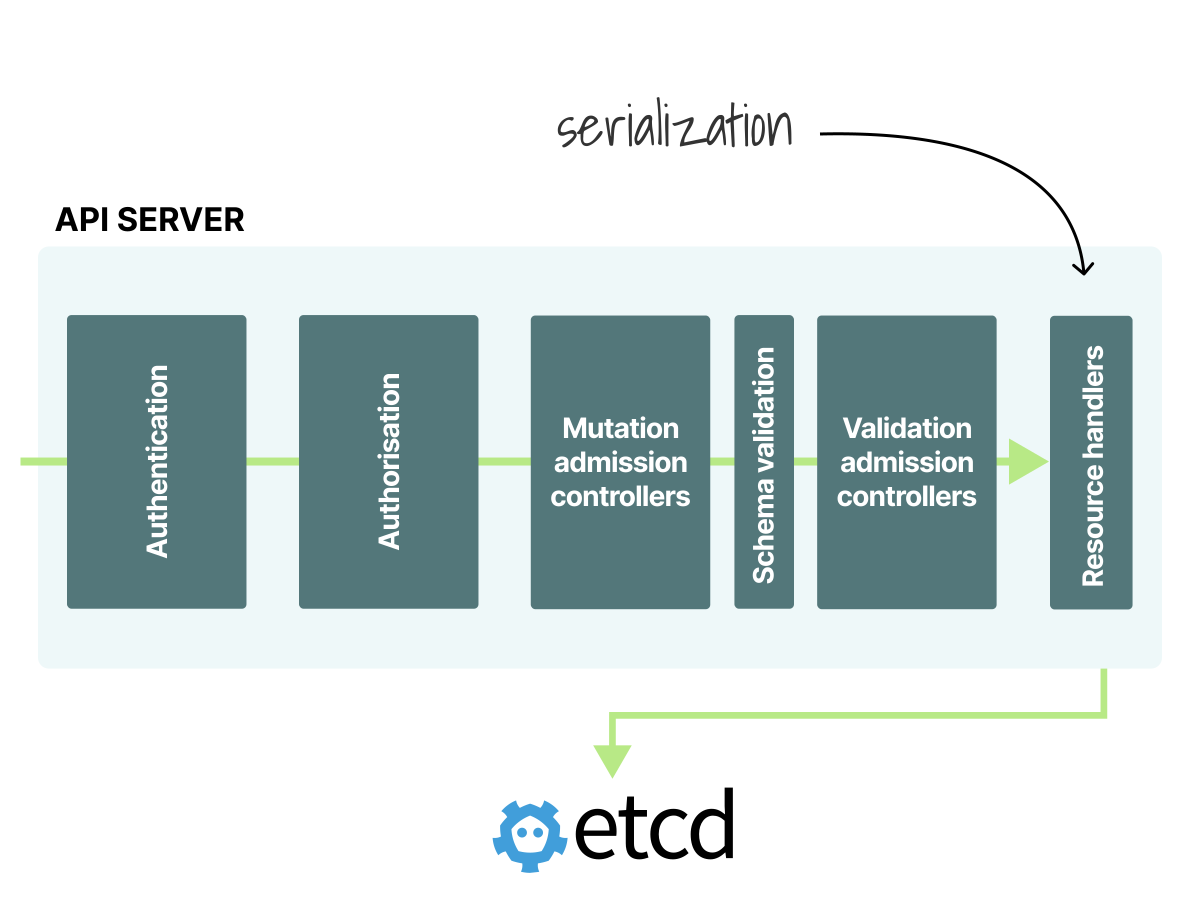
The write path has several steps:
- The API server deserializes the HTTP request body, parsing the JSON or YAML into a Go struct.
- It converts the versioned resource (e.g.,
apps/v1 Deployment) into an internal representation, a version-neutral runtime object that the API server uses internally. - The storage provider serializes this internal object (typically as Protobuf, not JSON, since it's more compact) and writes it to etcd.
- The storage provider reads the object back to confirm the write succeeded and to populate server-generated fields like
metadata.uid,metadata.creationTimestamp, andmetadata.resourceVersion.
The key in etcd is typically /registry/<resource-type>/<namespace>/<name>.
A Pod named nginx in the default namespace is stored at /registry/pods/default/nginx.
The API server never exposes etcd directly.
It's the only component that talks to etcd.
Every other component (kubectl, the scheduler, the kubelet) goes through the API server.
This makes etcd a single source of truth with a single gatekeeper.
It's worth noting that Pods have versions when you define them in YAML.
For example, you might write apiVersion: v1 or apiVersion: apps/v1.
However, the same Pod does not have a version when stored in the database.
It is stored with an internal representation that can later be deserialized into a version.
Why?
Think about what would happen if you had Deployments stored as apps/v1beta1, apps/v1beta2, and apps/v1 in your cluster at the same time.
Every time you list all Deployments, the API server would need to convert between different versions.
That could get messy fast.
Instead, Kubernetes stores every resource using a single internal version, sometimes called the storage version.
When you request a resource in a specific API version (e.g., apps/v1), the API server converts from the internal representation to the version you asked for on the fly.
This is why Kubernetes can deprecate and remove API versions without losing data.
The data in etcd doesn't change; only the conversion logic is updated.
Server-Side Apply and field ownership
At the start of this article, we said: "your YAML is sent to the API and stored in etcd."
You now know that's a simplification.
There are many steps between sending and storing.
But there's one more thing we glossed over: the API server doesn't just store your resource.
It also remembers who set which field.
This is called field ownership, and it's at the heart of a mechanism called Server-Side Apply.
Every field in a resource has a field manager: the actor who last set that value.
Your kubectl apply is one manager, the Horizontal Pod Autoscaler (HPA) is another, and a CI/CD pipeline is a third.
Why does this matter?
Imagine you deploy a resource with replicas: 3 via kubectl apply.
Later, the HPA scales it to replicas: 10.
If you run kubectl apply again with your original YAML (which still says replicas: 3), what should happen?
Without field ownership, kubectl would silently overwrite the HPA's decision, resetting replicas back to 3.
With Server-Side Apply, the API server detects a conflict: two different managers are trying to control the same field.
You have to choose who wins explicitly.
This mechanism replaced the old client-side approach, where kubectl stored a kubectl.kubernetes.io/last-applied-configuration annotation on every resource.
That was a bulky JSON blob that bloated resources and worked only with kubectl (not with controllers or other tools).
With Server-Side Apply, the conflict detection lives in the API server itself and works for every client: kubectl, Terraform, Helm, your custom operator.
And this isn't a future feature.
Server-Side Apply has been the default for kubectl apply since Kubernetes 1.22.
If you've used kubectl apply recently, you're already using it.
Watching for changes
So your resource is stored in etcd. Now what?
If you submitted a Pod, it still needs to be scheduled, assigned to a node, and started by the kubelet.
But how do the other components in the cluster find out that something changed?
The answer is the Watch API.
The Kubernetes API server supports a special kind of request: instead of asking "give me all Pods right now", you can ask "tell me every time a Pod changes".
You can try this yourself:
bash
kubectl get pods --watchUnder the hood, this command makes a long-lived HTTP request with a ?watch=1 query parameter:
GET /api/v1/pods?watch=1The connection stays open, and the API server sends an event every time a Pod is added, modified, or deleted:
events
{"type":"ADDED","object":{"kind":"Pod","apiVersion":"v1", ...}}
{"type":"MODIFIED","object":{"kind":"Pod","apiVersion":"v1", ...}}
{"type":"DELETED","object":{"kind":"Pod","apiVersion":"v1", ...}}
Every component in Kubernetes uses this mechanism to react to changes.
The kubelet watches for Pods assigned to its node.
Controllers watch for changes to the resources they manage.
The ReplicaSet controller watches for ReplicaSets, the Deployment controller watches for Deployments, and so on.
Even the scheduler uses the exact mechanism.
It watches all Pod events and, when it spots a Pod with no node assigned, adds it to an internal scheduling queue.
The scheduler then pulls Pods from this queue one at a time and assigns each to the best node.
But there's a subtlety.
If a component restarts or the connection is dropped, how does it know what it missed?
Every Kubernetes resource has a resourceVersion, an opaque value that changes whenever the resource is modified.
When a component reconnects, it says "give me all events since this resourceVersion", and the API server picks up right where it left off.
This combination (listing resources, watching for updates, and tracking the resourceVersion) is so common that it has a name: the Shared Informer pattern.
Almost every controller, operator, and tool that integrates with Kubernetes uses it.
If you want to see this in action (with code), you might enjoy the article on building a real-time Kubernetes dashboard.
Extending the Kubernetes API
And to conclude, the Kubernetes API is also extensible!
You can add your own APIs and register them with Kubernetes.
There are two ways to do this:
- The API aggregation layer and
- Custom resource definitions.
The first way is to run a separate API server and register it with the Kubernetes API.
An excellent example of that is the metrics API server.
The metrics API server registers itself with the API and exposes extra API endpoints.
You can integrate with the rest of the API and use the API server's existing authentication and authorization modules.
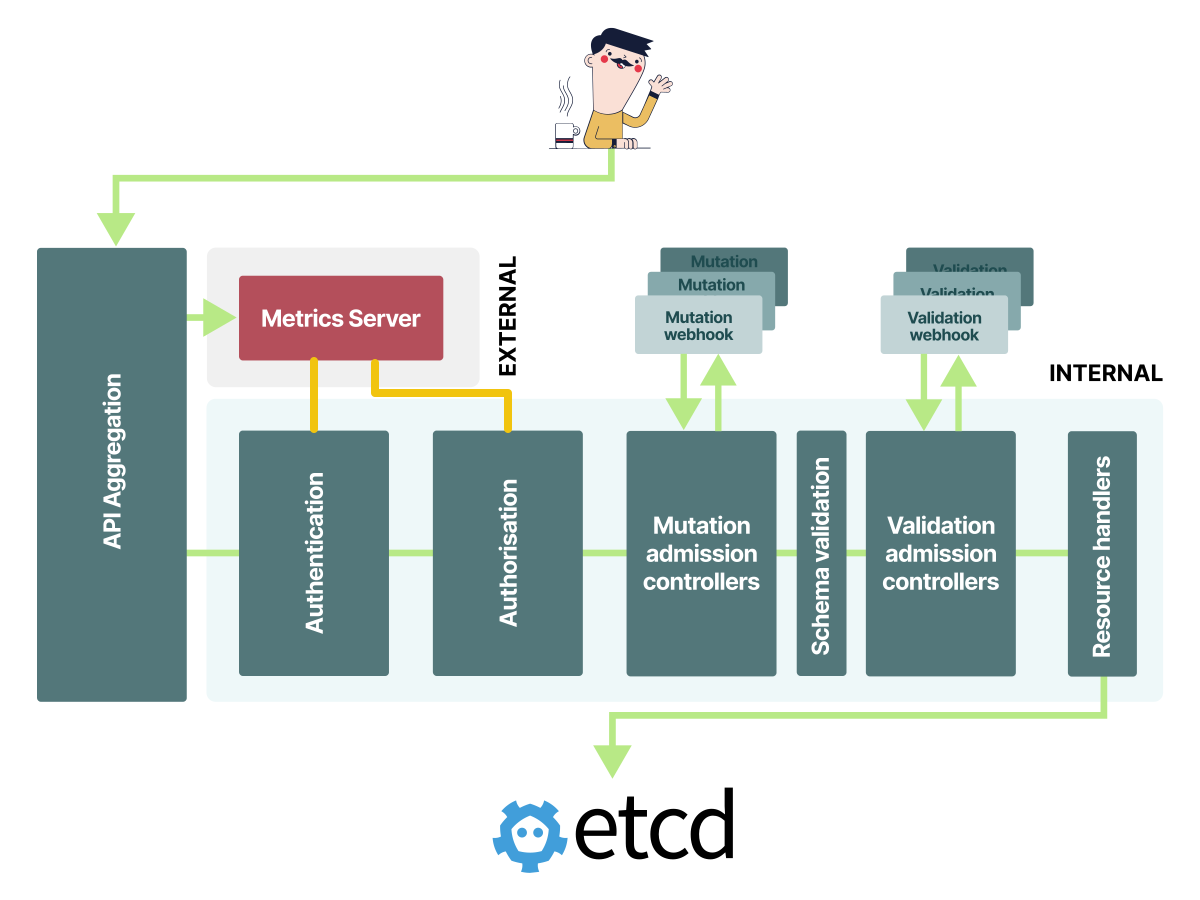
When you run kubectl top pods, the request goes to the Kubernetes API server, which proxies it to the Metrics Server.
You don't need to know where the Metrics Server runs.
The API server handles the routing.
But how does this registration work?
The Metrics Server creates an APIService resource that tells the API server: "I handle the metrics.k8s.io API group. Proxy matching requests to my Service."
apiservice.yaml
apiVersion: apiregistration.k8s.io/v1
kind: APIService
metadata:
  name: v1beta1.metrics.k8s.io
spec:
  group: metrics.k8s.io
  version: v1beta1
  service:
    name: metrics-server
    namespace: kube-system
  groupPriorityMinimum: 100
  versionPriority: 100
When you run kubectl top pods, the request hits /apis/metrics.k8s.io/v1beta1/pods.
The API server looks up the matching APIService, finds the metrics-server Service in kube-system, and proxies the request there.
The extension server doesn't need to implement its own authentication.
The API server handles that and passes the user's identity along via request headers.
You can list all registered API services in your cluster:
bash
kubectl get apiservicesYou'll see both the built-in API groups (like v1.apps) and any extension servers you've installed.
The second (and more common) way to extend the API is with Custom Resource Definitions.
A CRD lets you define a brand-new resource type (say, Certificate or Backup) and Kubernetes treats it just like a built-in resource.
Here's a simplified version of what cert-manager's Certificate CRD looks like:
certificate-crd.yaml
apiVersion: apiextensions.k8s.io/v1
kind: CustomResourceDefinition
metadata:
  name: certificates.cert-manager.io
spec:
  group: cert-manager.io
  names:
    kind: Certificate
    plural: certificates
  scope: Namespaced
  versions:
    - name: v1
      served: true
      storage: true
      schema:
        openAPIV3Schema:
          type: object
          properties:
            spec:
              type: object
              properties:
                secretName:
                  type: string
                dnsNames:
                  type: array
                  items:
                    type: string
Once this CRD is installed, you can create, list, update, and delete Certificate resources with kubectl.
They go through the same pipeline: authentication, authorization, admission controllers, and storage in etcd.
Why is this useful?
Because it means you can build tools that manage complex infrastructure (databases, certificates, message brokers) using the same Kubernetes API and patterns.
When you create a Certificate resource, the cert-manager controller (which is watching for Certificate events using the Shared Informer pattern) picks it up and provisions a real TLS certificate from Let's Encrypt.
You can check which CRDs are installed in your cluster:
bash
kubectl get crdsThe request pipeline is the same. CRDs don't skip any step.
Your custom resources are authenticated, authorized, validated, and stored in etcd just like Pods and Deployments.
Auditing
A lot goes on inside the API server: authentication, authorization, admission, persistence, and watch notifications.
But how do you know who is accessing it?
The API server has a built-in audit logging pipeline that records every request: who made it, what they did, when, and what happened.
You configure auditing with an audit policy, a YAML file that specifies which events to log and at what level of detail.
There are four levels:
- None: don't log.
- Metadata: log who did what and when, but not the request or response body.
- Request: log the metadata plus the full request body.
- RequestResponse: log everything, request, and response.
You don't want RequestResponse for every API call (the volume would be enormous), so audit policies let you be selective.
Here's an example:
audit-policy.yaml
apiVersion: audit.k8s.io/v1
kind: Policy
rules:
  - level: RequestResponse
    resources:
      - group: ""
        resources: ["secrets", "configmaps"]
  - level: Metadata
    resources:
      - group: ""
        resources: ["pods", "services"]
  - level: None
    users: ["system:kube-proxy"]
This policy logs full request and response bodies for Secrets and ConfigMaps (sensitive resources you want to track closely), only metadata for Pods and Services, and nothing at all for kube-proxy's routine traffic.
This is how teams answer: "Who deleted that Deployment at 3 am?" or detect unusual access patterns.
It's a key building block for compliance in regulated environments.
Audit logs can be written to files and sent to external systems via webhook backends, feeding into your SIEM, alerting pipeline, or a dedicated audit dashboard.
Recap
Let's zoom out and look at the whole journey of a request:
- You type
kubectl apply -f my.yaml. kubectl validates your YAML against the OpenAPI schema before sending it. - The API server receives the HTTP request.
- Authentication: Who are you? The authenticator chain tries each method until one succeeds.
- Authorization: Can you do this? RBAC (or another authorizer) checks your permissions.
- Mutation Admission: The resource is modified. Defaults are added, sidecars injected, fields populated.
- Schema Validation: Is the mutated resource still valid?
- Validation Admission: Does this request comply with policies? If a single controller rejects, the request fails.
- Persistence: The resource is stored in etcd. For
applyoperations, Server-Side Apply tracks field ownership and detects conflicts. - Watch notifications: All interested components are notified of the change.
- Auditing: The request is recorded in the audit log.
From this point, the resource takes on a life of its own.
Controllers notice the change, the scheduler assigns a node, and the kubelet starts the container.
But all of that starts here, with the API server.