

The mechanics of Kubernetes RBAC and how it connects users to permissions
June 2026
This is part 2 of 4 of the Authentication and authorization in Kubernetes. More
TL;DR In this article, we will learn how to recreate the Kubernetes RBAC authorization model from scratch and practice the relationships between Roles, ClusterRoles, ServiceAccounts, RoleBindings and ClusterRoleBindings.
This is the second article in a four-part series about how a request travels through the Kubernetes API server.
This part focuses on the second checkpoint: authorization.
As the number of applications and actors increases in our cluster, we might want to review and restrict the actions they can take.
For example, we might want to restrict access to production systems to a handful of individuals.
Or we might want to grant a narrow set of permissions to an operator deployed in the cluster.
The Role-Based Access Control (RBAC) framework in Kubernetes allows us to do just that.
Table of contents
- Table of contents
- The Kubernetes API
- Decoupling users and permission with RBAC roles
- RBAC in Kubernetes
- Assigning identities: humans, bots and groups
- Modelling access to resources
- Granting permissions to users
- Namespaces and cluster-wide resources
- Making sense of Roles, RoleBindings, ClusterRoles, and ClusterRoleBindings
- Scenario 1: Role and RoleBinding in the same namespace
- Scenario 2: Role and RoleBinding in a different namespace
- Scenario 3: Using a ClusterRole with a RoleBinding
- Scenario 4: Granting cluster-wide access with ClusterRole and ClusterRoleBinding
- Bonus #1: Make RBAC policies more concise
- Bonus #2: Using ServiceAccount tokens to access the Kubernetes API
- Clean up
- Summary
The Kubernetes API
Before discussing RBAC, let's see where the authorization model fits into the picture.
Let's imagine we wish to submit the following Pod to a Kubernetes cluster:
bash
kubectl apply -f - <<'EOF'
apiVersion: v1
kind: Pod
metadata:
  name: my-pod
spec:
  containers:
  - name: sise
    image: ghcr.io/learnk8s/app:1.0.0
    ports:
    - containerPort: 8080
EOF

pod/my-pod created
When we type kubectl apply, a few things happen.
The kubectl binary:
- Reads the configs from our
KUBECONFIG. - Discovers APIs and objects from the API.
- Prepares and validates the resource against the API schema (is there any obvious error?).
- Sends a request with the payload to the
kube-apiserver.
When the kube-apiserver receives the request, it doesn't store it in etcd immediately.
First, it has to verify that the requester is legitimate.
In other words, it has to authenticate the request.
Once authenticated, does the requester have permission to create the resource?
Identity and permission are not the same things.
Just because we have access to the cluster doesn't mean we can create or read all the resources.
The authorization is commonly done with Role-Based Access Control (RBAC).
With Role-Based Access Control (RBAC), we can assign granular permissions and restrict what a user or app can do.
In more practical terms, the API server executes the following operations sequentially:
- On receiving the request, authenticate the user.
- When authentication fails, reject the request by returning
401 Unauthorized. - If the request is treated as anonymous, continue as
system:anonymous. - Otherwise, move on to the next stage.
- When authentication fails, reject the request by returning
- The user is authenticated, but do they have access to the resource?
- If they don't, reject the request by returning
403 Forbidden. - Otherwise, continue to admission and persistence.
- If they don't, reject the request by returning
In this article, we will focus on the authorization part. This is the checkpoint after authentication and before admission in the Kubernetes API server request path. If you want a complete walkthrough of all the stages in the API pipeline, check out What happens inside the Kubernetes API server?
Decoupling users and permission with RBAC roles
RBAC is a model designed to grant access to resources based on the roles of individual users within an organization.
To understand how that works, let's take a step back and imagine we had to design an authorization system from scratch.
How could we ensure that a user has write access to a particular resource?
A simple implementation could involve writing a list with three columns like this:
| User  | Permission | Resource |
| ----- | ---------- | -------- |
| Bob   | read+write |   app1   |
| Alice |    read    |   app2   |
| Mo    |    read    |   app2   |
In this example:
- Bob has read & write access to
app1but has no access toapp2. - Mo & Alice have only read access to
app2and have no access toapp1.
The table works well with a few users and resources but shows some limitations as soon as we start to scale it.
Let's imagine that Mo & Alice are in the same team, and they are granted read access to app1.
We will have to add the following entries to our table:
| User      | Permission | Resource |
| --------- | ---------- | -------- |
| Bob       | read+write |   app1   |
| Alice     |    read    |   app2   |
| Mo        |    read    |   app2   |
| Alice     |    read    |   app1   |
| Mo        |    read    |   app1   |
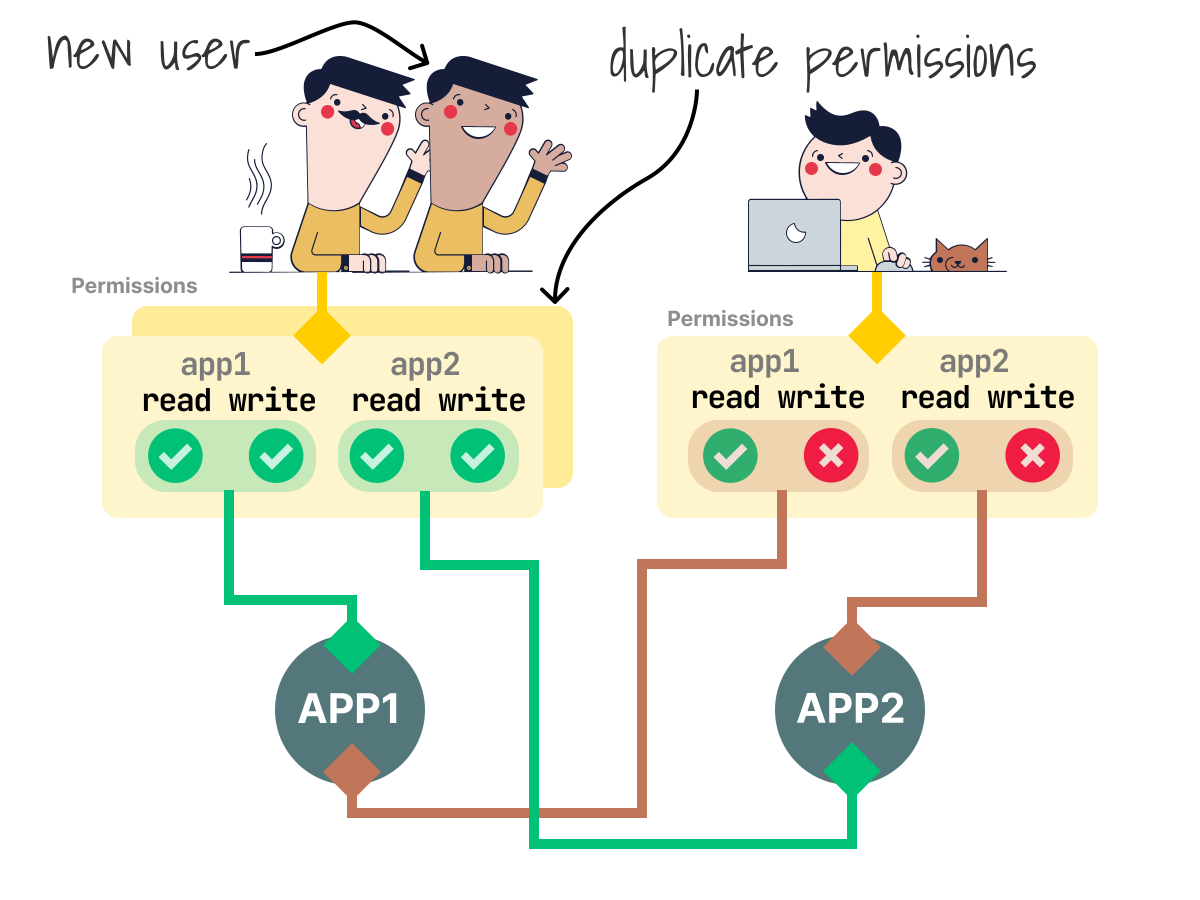
That's great, but it is not evident that Alice and Mo have the same access because they are part of the same team.
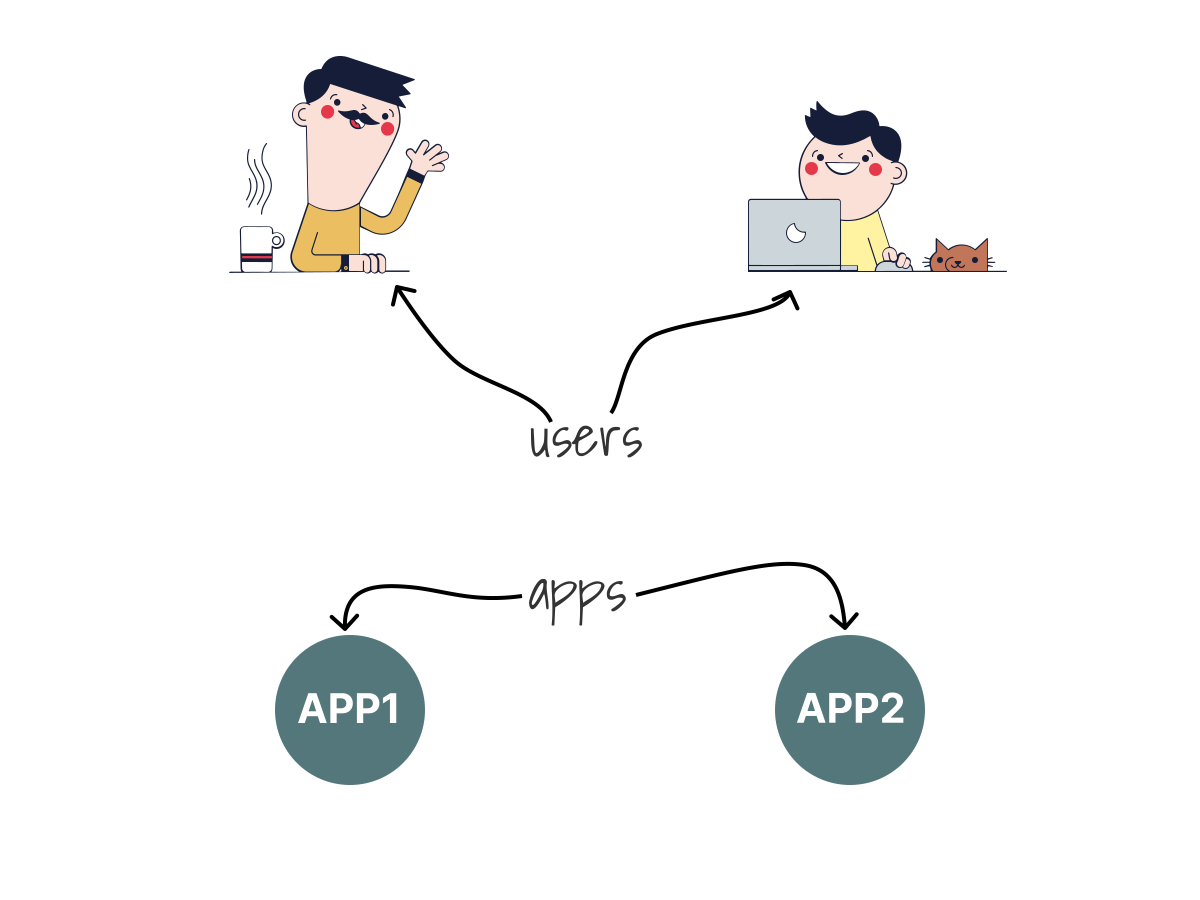 1/4
1/4In a typical authorization system, we have users accessing resources.
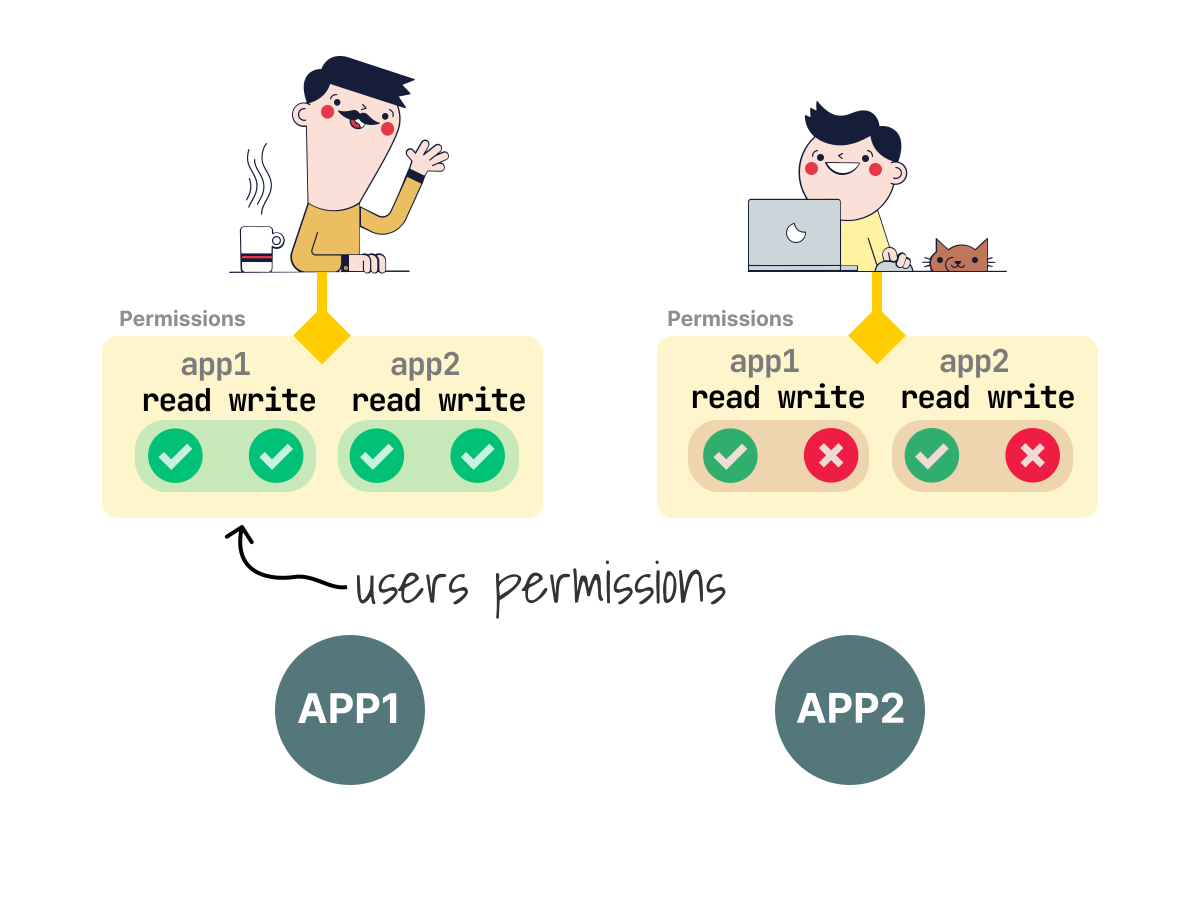 2/4
2/4We can assign permissions directly to a user and define what resources they can consume.
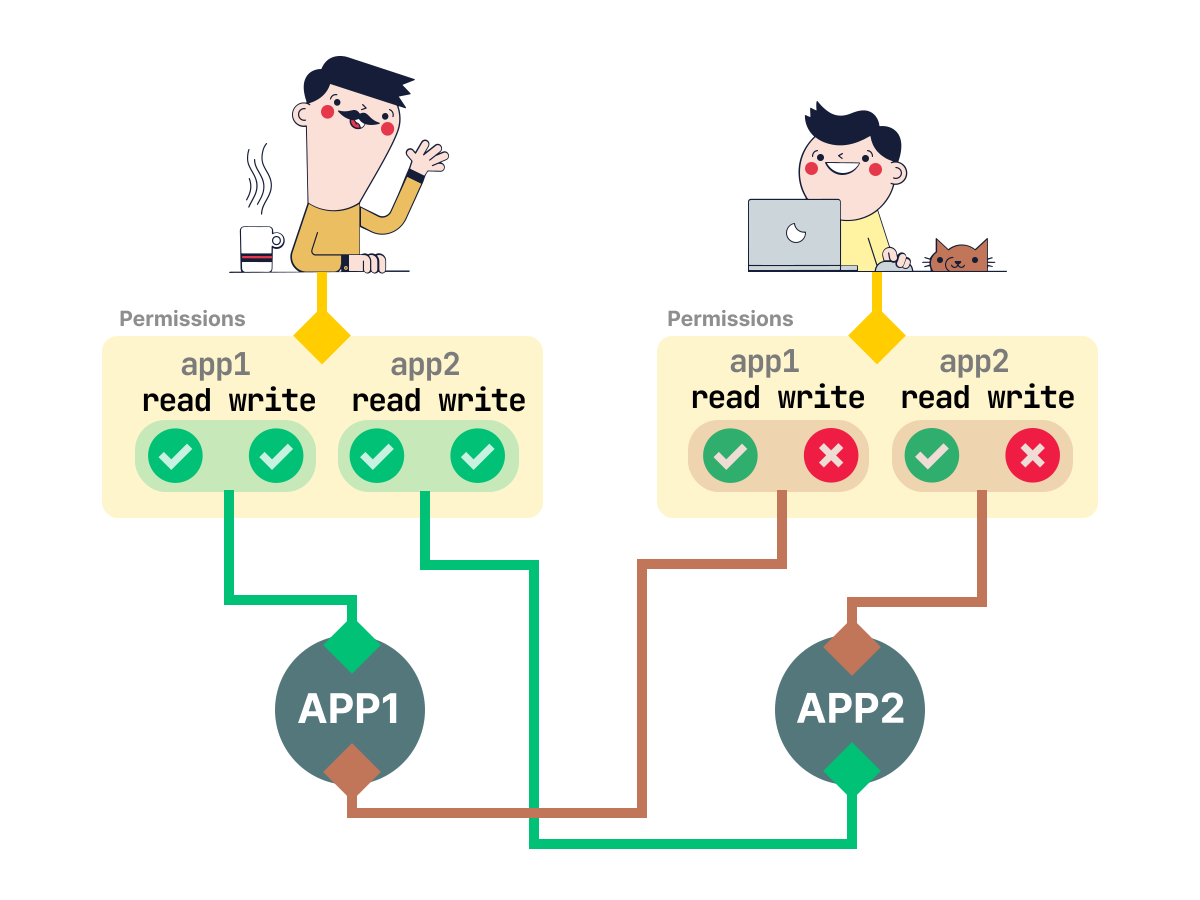 3/4
3/4Those permissions map the resources directly. Notice how they are user-specific.
 4/4
4/4If we decide to have a second user with the same permissions, we will have to duplicate the entry.
We could solve this by adding a "Team" column to our table, but a better alternative is to break down the relationships:
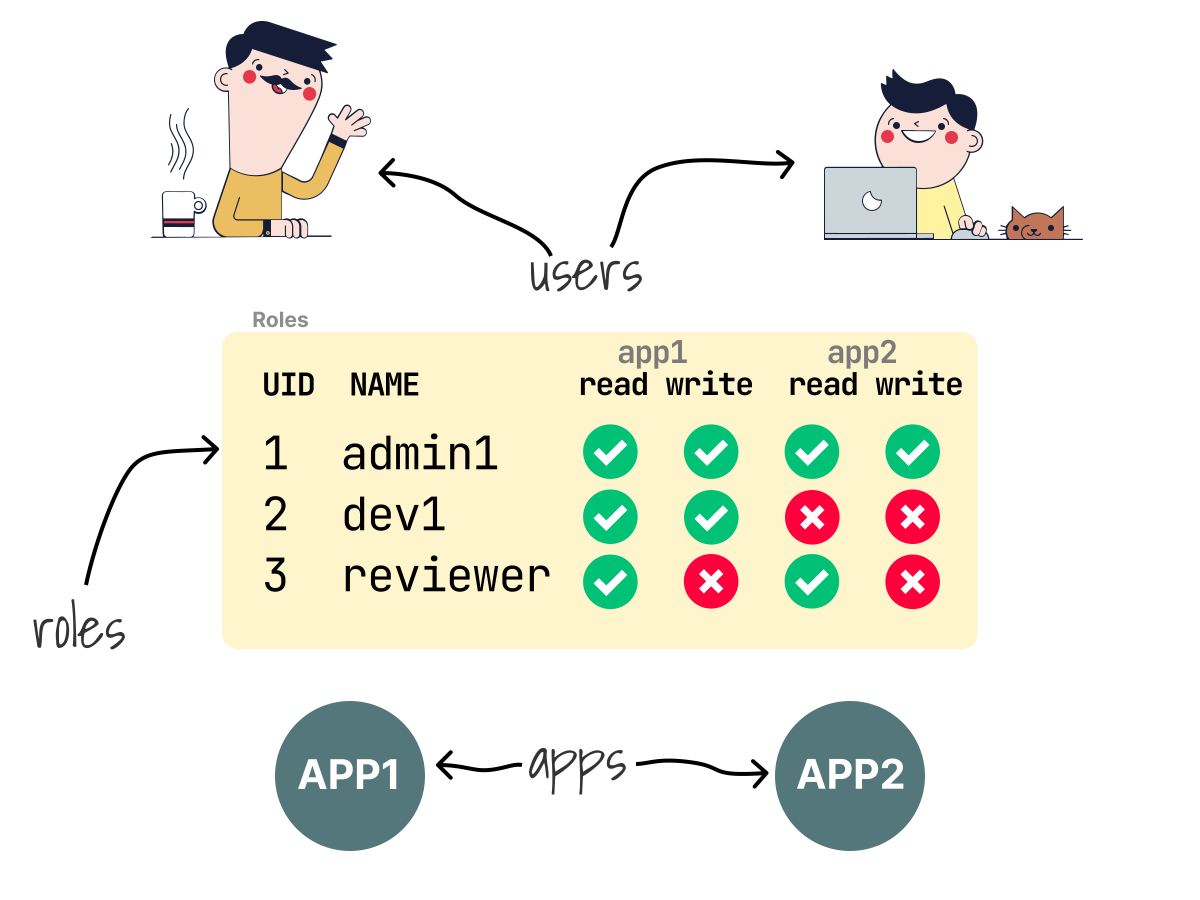
- We could define a generic container for permissions: a role.
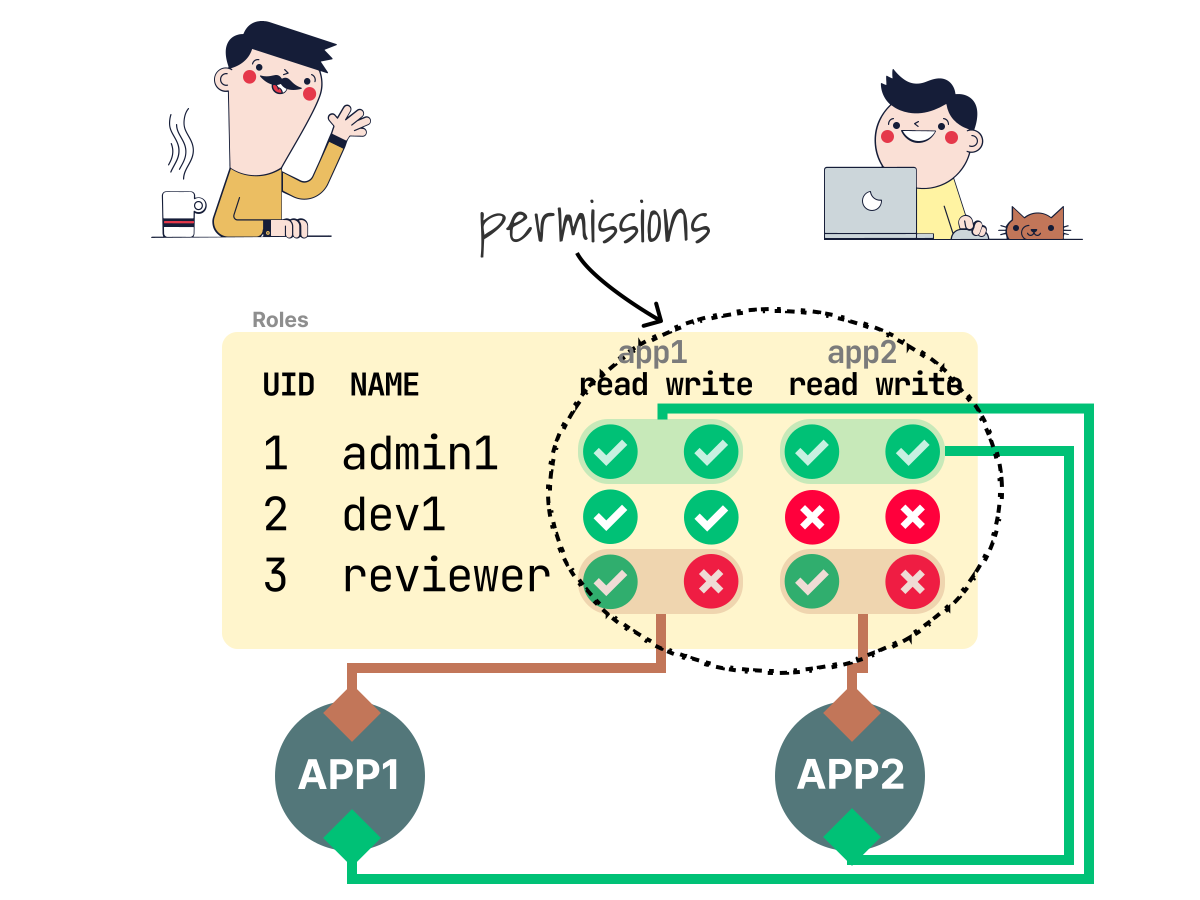
- Instead of assigning permissions to users, we could include them in the roles that reflect their role in the organization.
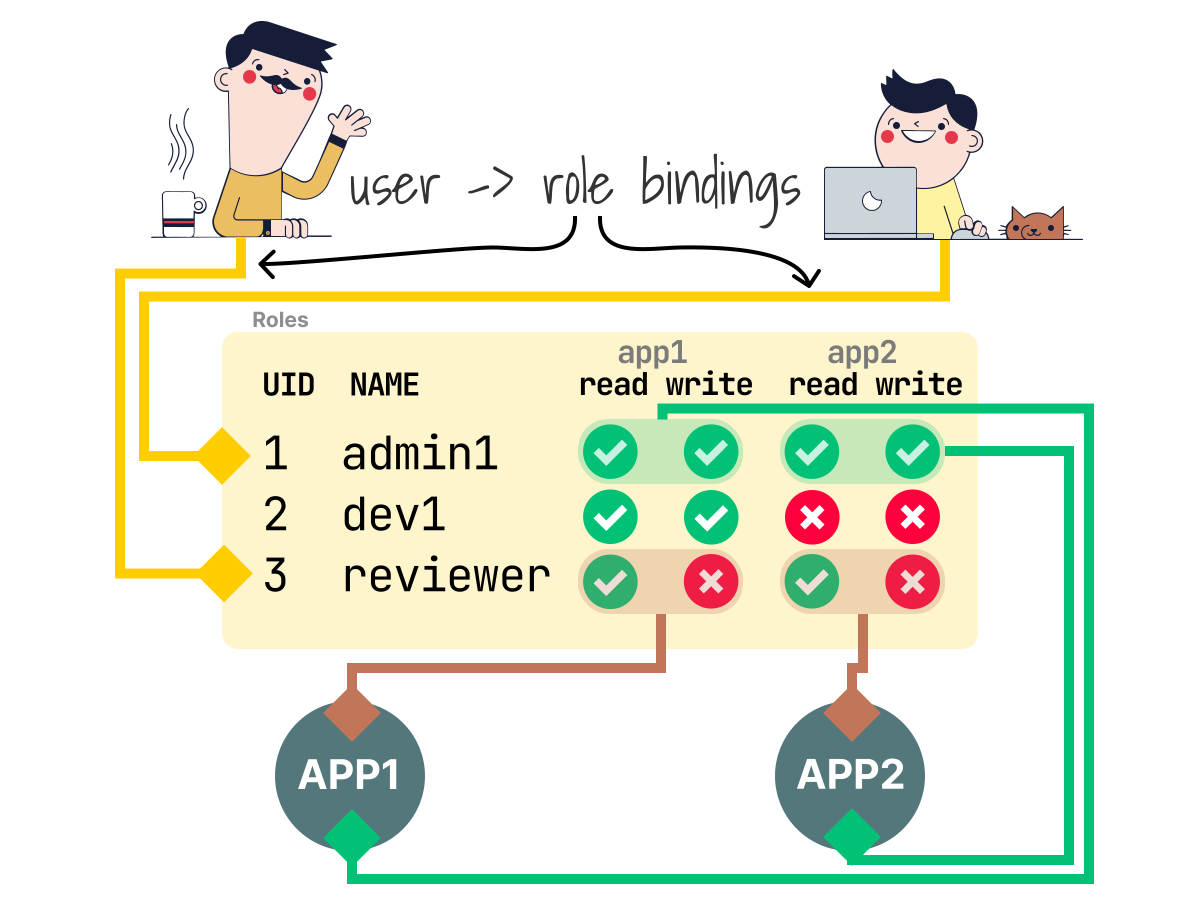
- And finally, we could link roles to users.
Let's see how this is different.
Instead of having a single table, now we have two:
- In the first table, permissions are mapped to roles.
- In the second table, roles are linked to identities.
| Role     | Permission | Resource |
| -------- | ---------- | -------- |
| admin1   | read+write |   app1   |
| reviewer |    read    |   app2   |

| User  |   Roles  |
| ----- | -------- |
| Bob   |  admin1  |
| Alice | reviewer |
| Mo    | reviewer |
What happens when we want Mo to be an admin for app1?
We can add the role to the user like this:
| User  |        Roles        |
| ----- | ------------------- |
| Bob   |        admin1       |
| Alice |       reviewer      |
| Mo    |   reviewer,admin1   |
We can already imagine how decoupling users from permissions with Roles can facilitate security administration in large organizations with many users and permissions.
 1/4
1/4When using RBAC, we have users, resources and roles.
 2/4
2/4The permissions are not assigned directly to a user. Instead, they are included in the role.
 3/4
3/4Users are linked to a role with a binding.
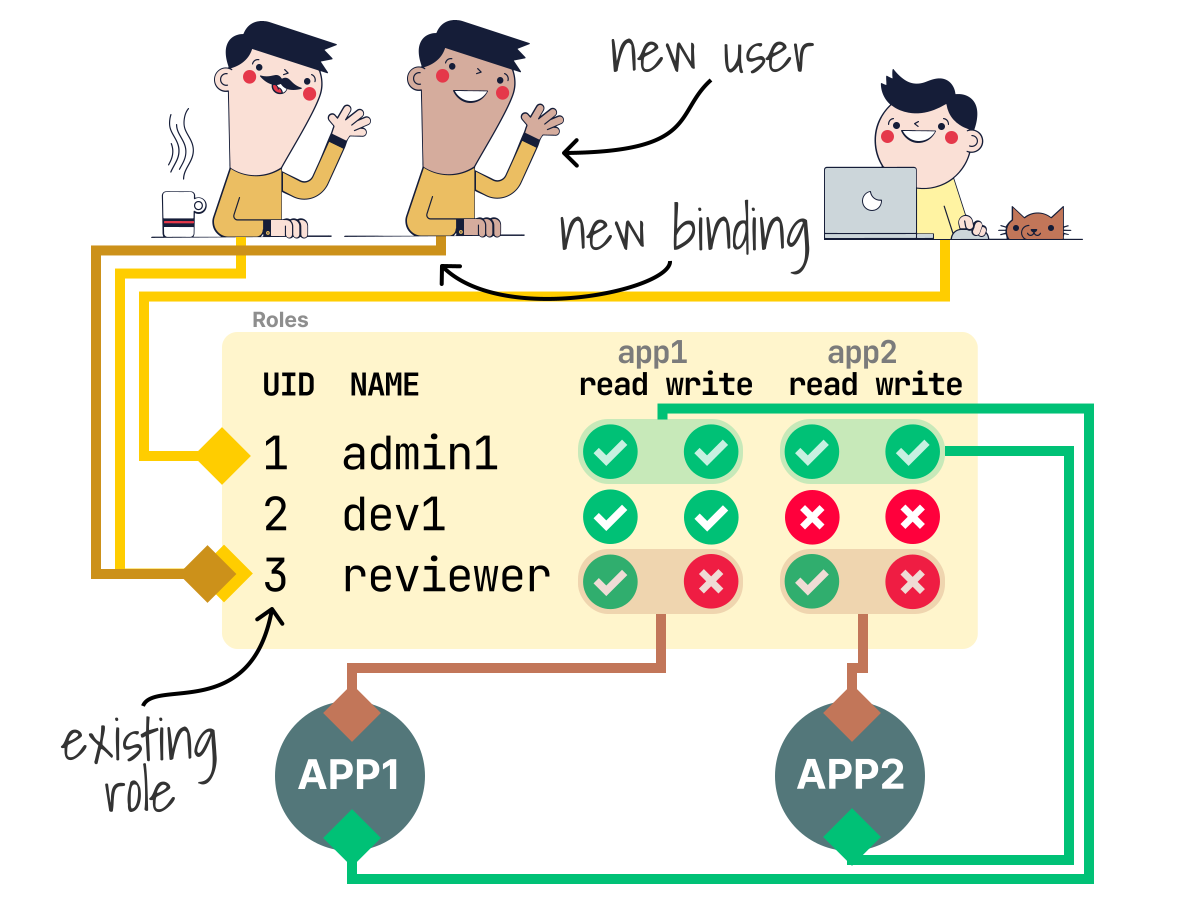 4/4
4/4Since roles are generic, when a new user needs access to the same resources, we can use the existing role and link it with a new binding.
RBAC in Kubernetes
Kubernetes implements an RBAC model (as well as several other models) for protecting resources in the cluster.
So Kubernetes uses the same three concepts explained earlier: identities, roles and bindings.
It just calls them with slightly different names.
As an example, let's inspect the following YAML definition needed to grant access to Pods, Services, etc.:
bash
kubectl create namespace demo-namespace

kubectl apply -f - <<'EOF'
apiVersion: v1
kind: ServiceAccount
metadata:
  name: app1
  namespace: demo-namespace
---
apiVersion: rbac.authorization.k8s.io/v1
kind: Role
metadata:
  name: viewer
  namespace: demo-namespace
rules:
  - apiGroups:
      - ''
    resources:
      - services
      - pods
    verbs:
      - get
      - list
  - apiGroups:
      - apps
    resources:
      - deployments
    verbs:
      - get
      - list
  - apiGroups:
      - stable.example.com
    resources:
      - crontabs
    verbs:
      - get
      - list
---
apiVersion: rbac.authorization.k8s.io/v1
kind: RoleBinding
metadata:
  name: app1-viewer
  namespace: demo-namespace
roleRef:
  apiGroup: rbac.authorization.k8s.io
  kind: Role
  name: viewer
subjects:
  - kind: ServiceAccount
    name: app1
    namespace: demo-namespace
EOF

namespace/demo-namespace created
serviceaccount/app1 created
role.rbac.authorization.k8s.io/viewer created
rolebinding.rbac.authorization.k8s.io/app1-viewer created
The file is divided into three blocks:
- A Service Account: this is the identity of who is accessing the resources.
- A Role which includes the permission to access the resources.
- A RoleBinding that links the identity (Service Account) to the permissions (Role).
After submitting the definition to the cluster, the application that uses the Service Account is allowed to issue requests to the following endpoints:
# 1. Kubernetes built-in resources
/api/v1/namespaces/{namespace}/services
/api/v1/namespaces/{namespace}/pods

# 2. Workload resources from the apps API group
/apis/apps/v1/namespaces/{namespace}/deployments

# 3. A specific API extension provided by stable.example.com
/apis/stable.example.com/v1/namespaces/{namespace}/crontabs
This is great, but there are a lot of details that we've glossed over.
What resources are we granting access to, exactly?
What is a Service Account? Aren't the identities just "Users" in the cluster?
Why does the Role contain a list of Kubernetes objects?
To understand how those work, let's set aside the Kubernetes RBAC model and try to rebuild it from scratch.
We will focus on three elements:
- Identifying and assigning identities.
- Granting permissions.
- Linking identities to permissions.
Let's start.
Assigning identities: humans, bots and groups
Suppose our new colleague wishes to log in to the Kubernetes dashboard.
In this case, we should have an entity for an "account" or a "user", with each of them having a unique name or ID (such as the email address).
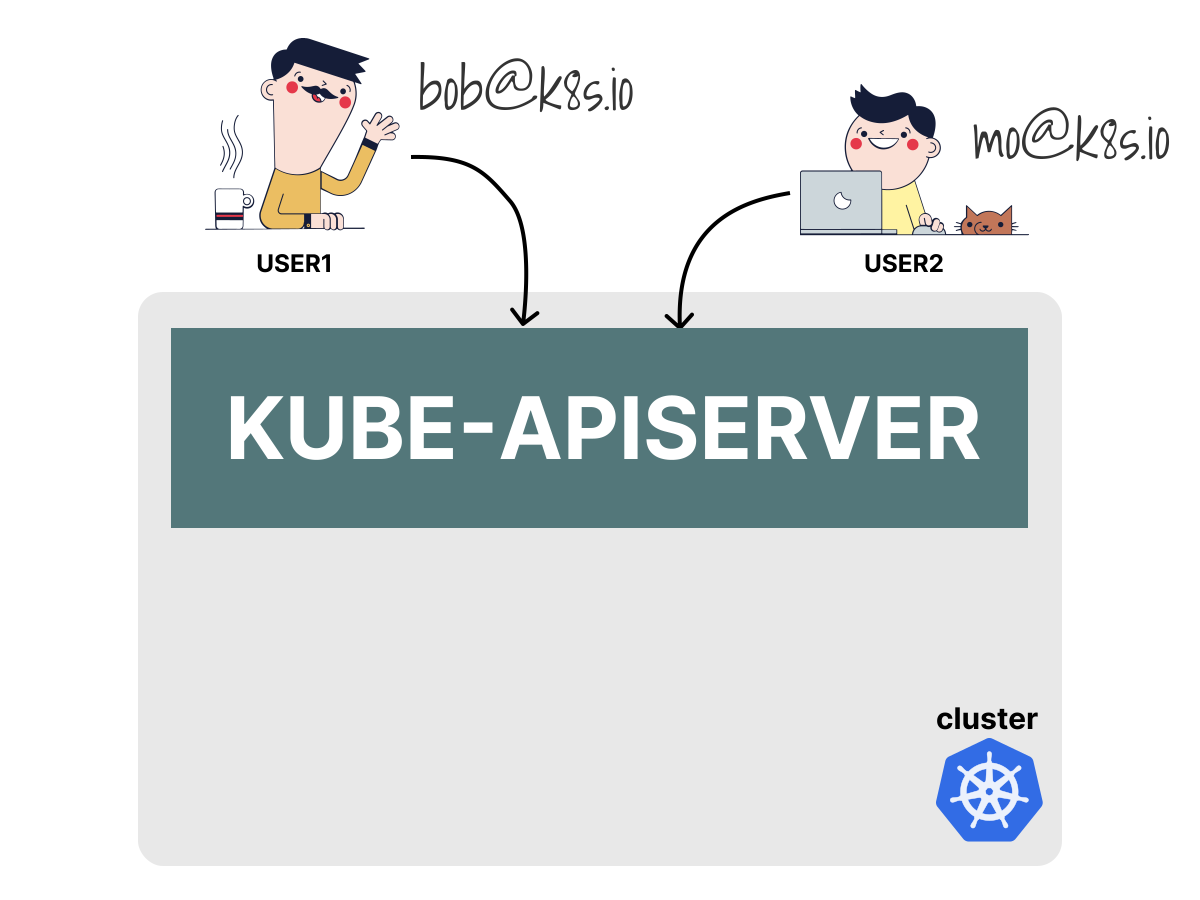
How should we store the User in the cluster?
Kubernetes does not have objects which represent regular user accounts.
Users cannot be added to a cluster through an API call.
For example, if client certificate authentication is configured, any actor that presents a valid client certificate signed by the configured client certificate authority (CA) is considered authenticated.
In this scenario, Kubernetes assigns the username from the common name field in the 'subject' of the certificate (e.g.
commonName=bobbecomes usernamebob).
Kubernetes delegates normal user authentication to external systems such as client certificates, OIDC or webhook token authentication; it only receives the authenticated identity and groups.
A temporary User info object is created and passed to the authorization (RBAC) module.
Digging into the code reveals that Kubernetes represents the authenticated identity with a user.Info interface.
type Info interface {
    GetName() string
    GetUID() string
    GetGroups() []string
    GetExtra() map[string][]string
}
Note that regular user identities are used for humans or processes outside the cluster.
If we want to identify a process in the cluster, we should use a Service Account instead.
The account is very similar to a regular user, but it's different because Kubernetes manages it.
A Service Account is usually assigned to Pods, and RBAC grants permissions to that identity.
For example, we could have the following applications accessing resources from inside the cluster:
- A node agent has to list all pod resources on a specific node.
- The
ingress-nginx-controllerhas to list all the backend endpoints for a service.
For those apps, we can define a ServiceAccount (SA).
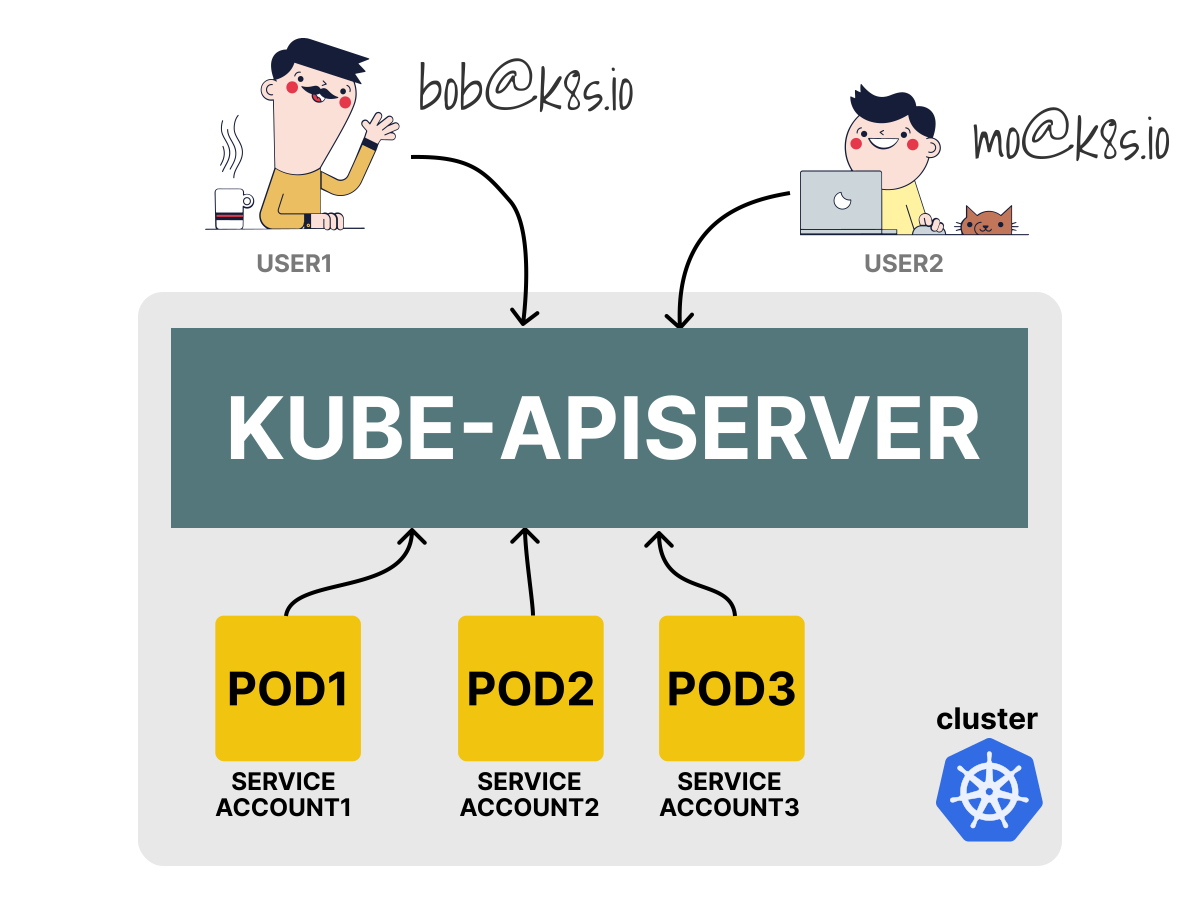
Since Service Accounts are managed in the cluster, we can create them with YAML:
bash
kubectl apply -f - <<'EOF'
apiVersion: v1
kind: ServiceAccount
metadata:
  name: app1                # valid DNS subdomain name, unique in the namespace
  namespace: demo-namespace
EOF

serviceaccount/app1 created
To facilitate Kubernetes administration, we could also define a group of Users or ServiceAccounts.
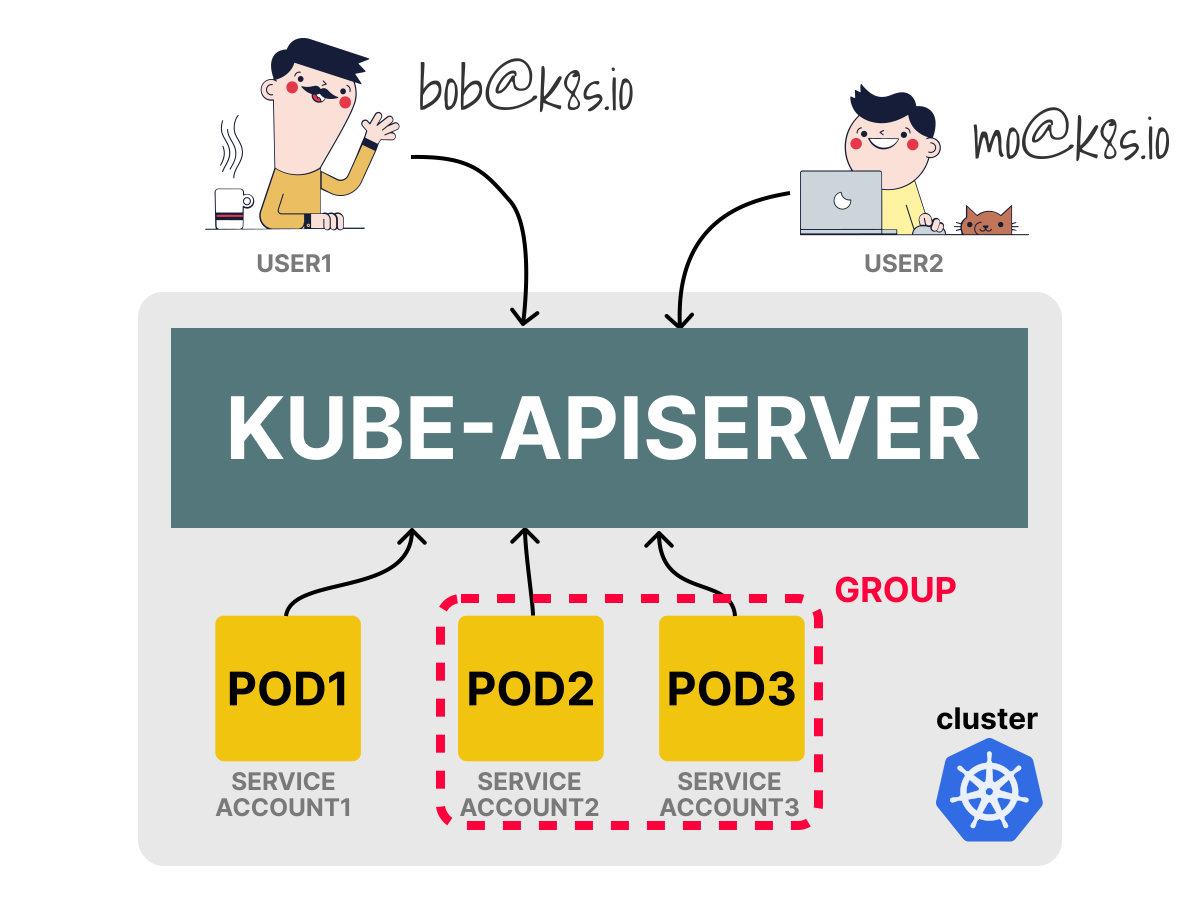
This is convenient if we wish to reference all ServiceAccounts in a specific namespace or across all namespaces.
Now that we have defined how to access the resources, it's time to discuss the permissions.
Excellent!
At this point, we have a mechanism to identify who has access to resources.
It could be a human, a bot or a group of them.
But what resources are they accessing in the cluster?
Modelling access to resources
In Kubernetes, we are interested in controlling access to resources such as Pods, Services, Endpoints, etc.
Those resources are usually stored in the database (etcd) and accessed via built-in APIs such as:
/api/v1/namespaces/{namespace}/pods/{name}
/api/v1/namespaces/{namespace}/pods/{name}/log
/api/v1/namespaces/{namespace}/serviceaccounts/{name}
The best way to limit access to those resources is to control how those API endpoints are requested.
We will need two things for that:
- The API endpoint of the resource.
- The type of permission granted to access the resource (e.g. read-only, read-write, etc.).
For the permissions, we will use a verb such as get, list, create, patch, delete, etc.
Imagine that we want to get, list and watch Pods and ServiceAccounts.
We could combine those resources and permission in a list like this:
resources:
  - /api/v1/namespaces/{namespace}/pods/{name}
  - /api/v1/namespaces/{namespace}/serviceaccounts/{name}
verbs:
  - get
  - list
  - watch
We could simplify the definition and make it more concise if we notice that:
- The base URL
/api/v1/namespaces/is common for all. Perhaps we could omit it. - We could assume that all those resources are in the current namespace and drop the
{namespace}path.
That leads to:
resources:
  - pods
  - serviceaccounts
verbs:
  - get
  - list
  - watch
The list is more human-friendly, and we can immediately identify what's going on.
There's more, though.
Besides built-in APIs such as those for pods, endpoints, services, etc., Kubernetes also supports API extensions.
For example, an extension could create a CronTab custom resource (CR):
bash
kubectl apply -f - <<'EOF'
apiVersion: apiextensions.k8s.io/v1
kind: CustomResourceDefinition
metadata:
  name: crontabs.stable.example.com
spec:
  group: stable.example.com
  names:
    kind: CronTab
    plural: crontabs
  scope: Namespaced
  versions:
    - name: v1
      served: true
      storage: true
      schema:
        openAPIV3Schema:
          type: object
EOF

customresourcedefinition.apiextensions.k8s.io/crontabs.stable.example.com created
Then create two custom resources:
bash
kubectl apply -f - <<'EOF'
apiVersion: stable.example.com/v1
kind: CronTab
metadata:
  name: backup
  namespace: demo-namespace
---
apiVersion: stable.example.com/v1
kind: CronTab
metadata:
  name: cleanup
  namespace: demo-namespace
EOF

crontab.stable.example.com/backup created
crontab.stable.example.com/cleanup created
Those objects are stored in the cluster and are available through kubectl:
bash
kubectl get crontabs.stable.example.com -n demo-namespace -o name

crontab.stable.example.com/backup
crontab.stable.example.com/cleanup
The custom resources can be similarly accessed via the Kubernetes API:
/apis/stable.example.com/v1/namespaces/{namespace}/crontabs
/apis/stable.example.com/v1/namespaces/{namespace}/crontabs/{name}

kubectl proxy &
curl http://localhost:8001/apis/stable.example.com/v1/namespaces/demo-namespace/crontabs

{
  "kind": "CronTabList",
  "items": [
    { "kind": "CronTab", "metadata": { "name": "backup", "namespace": "demo-namespace" } },
    { "kind": "CronTab", "metadata": { "name": "cleanup", "namespace": "demo-namespace" } }
  ]
}
This kubectl proxy example is intended for local exploration and debugging. Do not expose the proxy outside your local machine.
If we want to map those into a YAML file, we could write the following:
resources:
  - crontabs
verbs:
  - get
However, how does Kubernetes know that the resources are custom?
How can it differentiate between APIs that use custom resources and built-in?
Unfortunately, dropping the base URL from the API endpoint wasn't such a good idea.
We could restore it with a slight change.
We could define it at the top and use it later to expand the URL for the resources.
apiGroups:
  - stable.example.com # APIGroup name
resources:
  - crontabs
verbs:
  - get
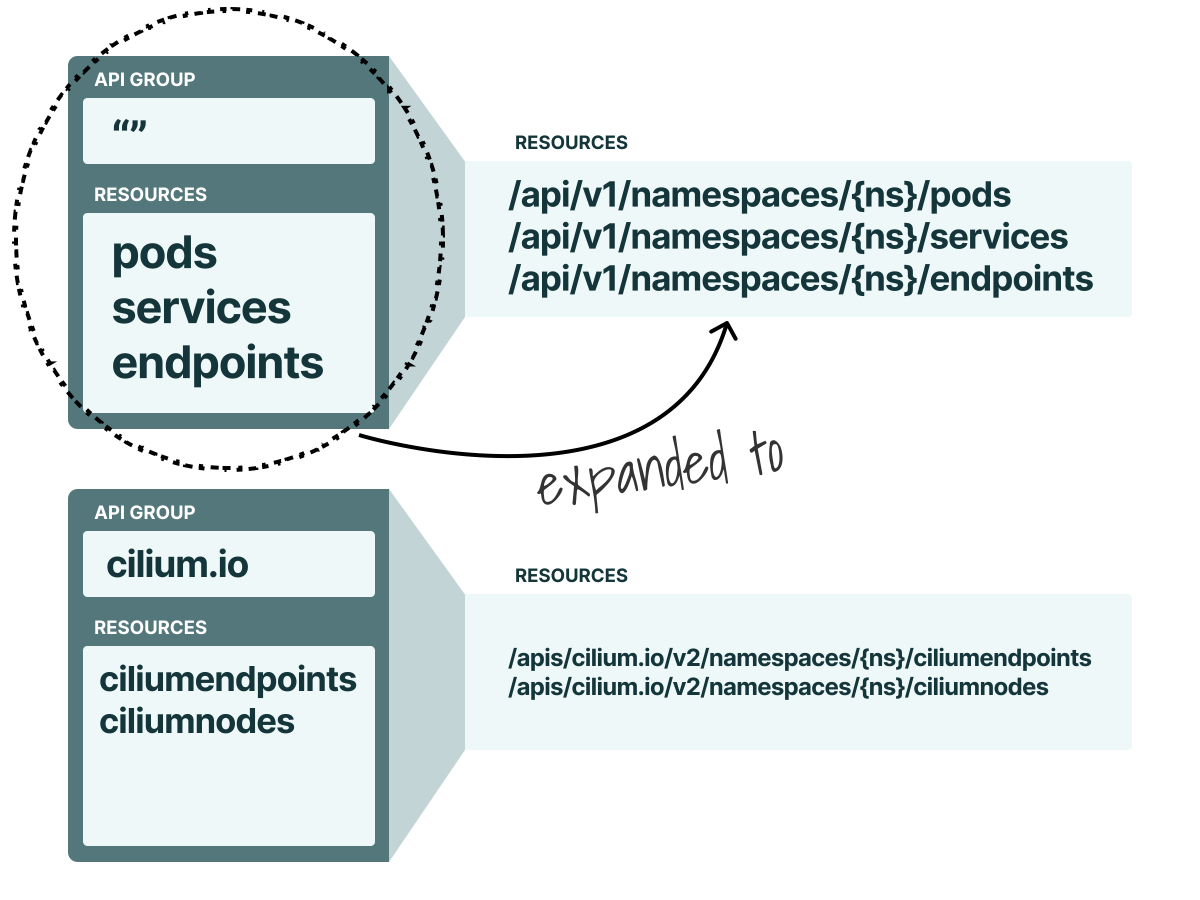
What about resources such as Pods that belong to the core API group?
The Kubernetes "" empty API group is a special group that refers to the core API group.
So the previous definition should be expanded to:
apiGroups:
  - '' # Core API group
resources:
  - pods
  - serviceaccounts
verbs:
  - get
  - list
  - watch
Kubernetes reads the API group and matches it to the request path:
- If it is empty
"", the request path starts with/api/v1/. - Otherwise, the request path starts with
/apis/{apiGroup}/{version}/.
Now that we know how to map resources and permissions, it's finally time to glue access to multiple resources together.
In Kubernetes, a collection of resources and verbs is called a Rule, and we can group rules into a list:
rules:
  - rule 1
  - rule 2
Each rule contains the apiGroups, resources and verbs that we just learned:
rules: # Authorization rules
  - apiGroups: # 1st API group
      - '' # An empty string designates the core API group.
    resources:
      - pods
      - serviceaccounts
    verbs:
      - get
      - list
      - watch
  - apiGroups: # another API group
      - stable.example.com # Custom APIGroup
    resources:
      - crontabs
    verbs:
      - get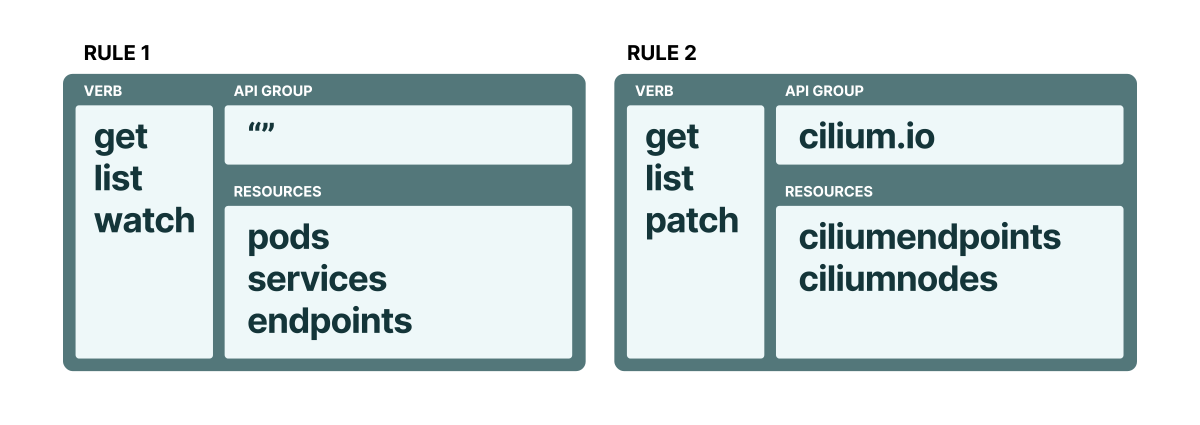
A collection of rules has a specific name in Kubernetes, and it is called a Role.
apiVersion: rbac.authorization.k8s.io/v1
kind: Role
metadata:
  name: viewer
rules: # Authorization rules
  - apiGroups: # 1st API group
      - '' # An empty string designates the core API group.
    resources:
      - pods
      - serviceaccounts
    verbs:
      - get
      - list
      - watch
  - apiGroups: # another API group
      - stable.example.com # Custom APIGroup
    resources:
      - crontabs
    verbs:
      - get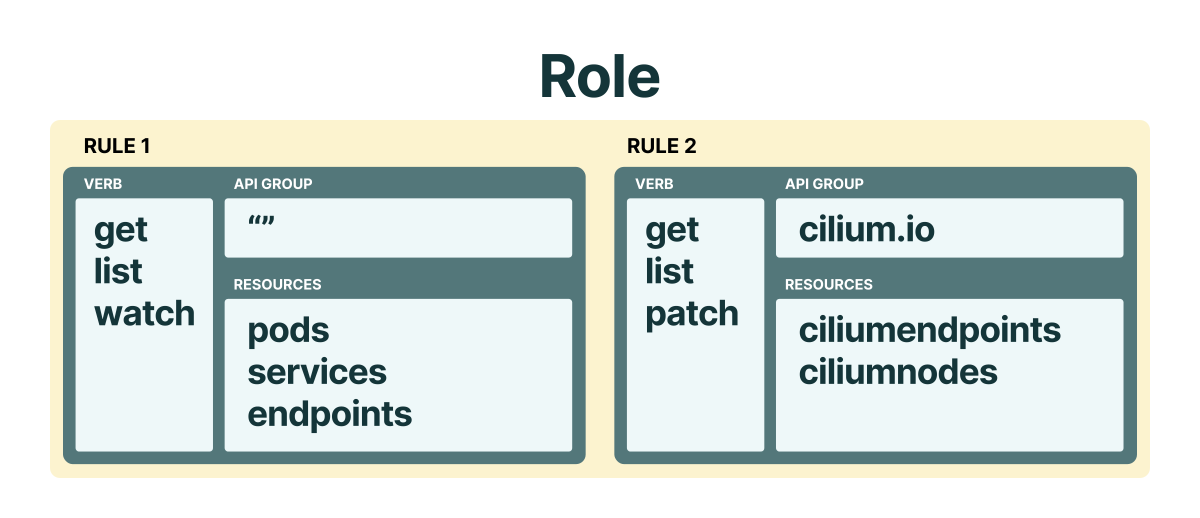
Excellent!
So far, we modelled:
- Identities with Users, Service Accounts and Groups.
- Permissions to resources with Roles.
The missing part is linking the two.
Granting permissions to users
A RoleBinding grants permissions to a User, Service Account or Group.
Let's have a look at an example:
apiVersion: rbac.authorization.k8s.io/v1
kind: RoleBinding
metadata:
  name: role-binding-for-app1
roleRef:
  apiGroup: rbac.authorization.k8s.io
  kind: Role
  name: viewer
subjects:
  - kind: ServiceAccount
    name: sa-for-app1
    namespace: kube-system
The definition has two important fields:
- the
roleRefthat references theviewerRole. - the
subjectsfield links to thesa-for-app1Service Account.
As soon as we submit the resource to the cluster, the application or user using the Service Account will have access to the resources listed in the Role.
If we remove the binding, the app or user will lose access to those resources (but the Role will stay ready to be used by other bindings).
Note how the subjects field is a list that contains kind, name and namespace.
The kind property is necessary to identify Users from Service Accounts and Groups.
But what about namespace?
It's often helpful to break the cluster up into namespaces and limit access to namespaced resources to specific accounts.
In most cases, Roles and RoleBindings are placed inside and grant access to a specific namespace.
However, it is possible to mix these two types of resources. We will see how later.
Before we wrap up the theory and start with the practice, let's have a look at a few examples for the subjects field:
subjects:
  - kind: Group
    name: system:serviceaccounts
    apiGroup: rbac.authorization.k8s.io
    # this group targets all service accounts in all namespaces
We can also have multiple Groups, Users or Service Accounts as subjects:
subjects:
  - kind: Group
    name: system:authenticated # for all authenticated users
    apiGroup: rbac.authorization.k8s.io
  - kind: Group
    name: system:unauthenticated # for all unauthenticated users
    apiGroup: rbac.authorization.k8s.io
Granting permissions to system:unauthenticated applies to anonymous requests and should be used only for information that is safe to expose publicly, such as Kubernetes' default public discovery endpoints. For stricter production clusters, consider disabling or limiting anonymous requests instead of binding extra permissions to this group.
To recap what we've learned so far, let's look at how to grant permissions for an app to access some custom resources.
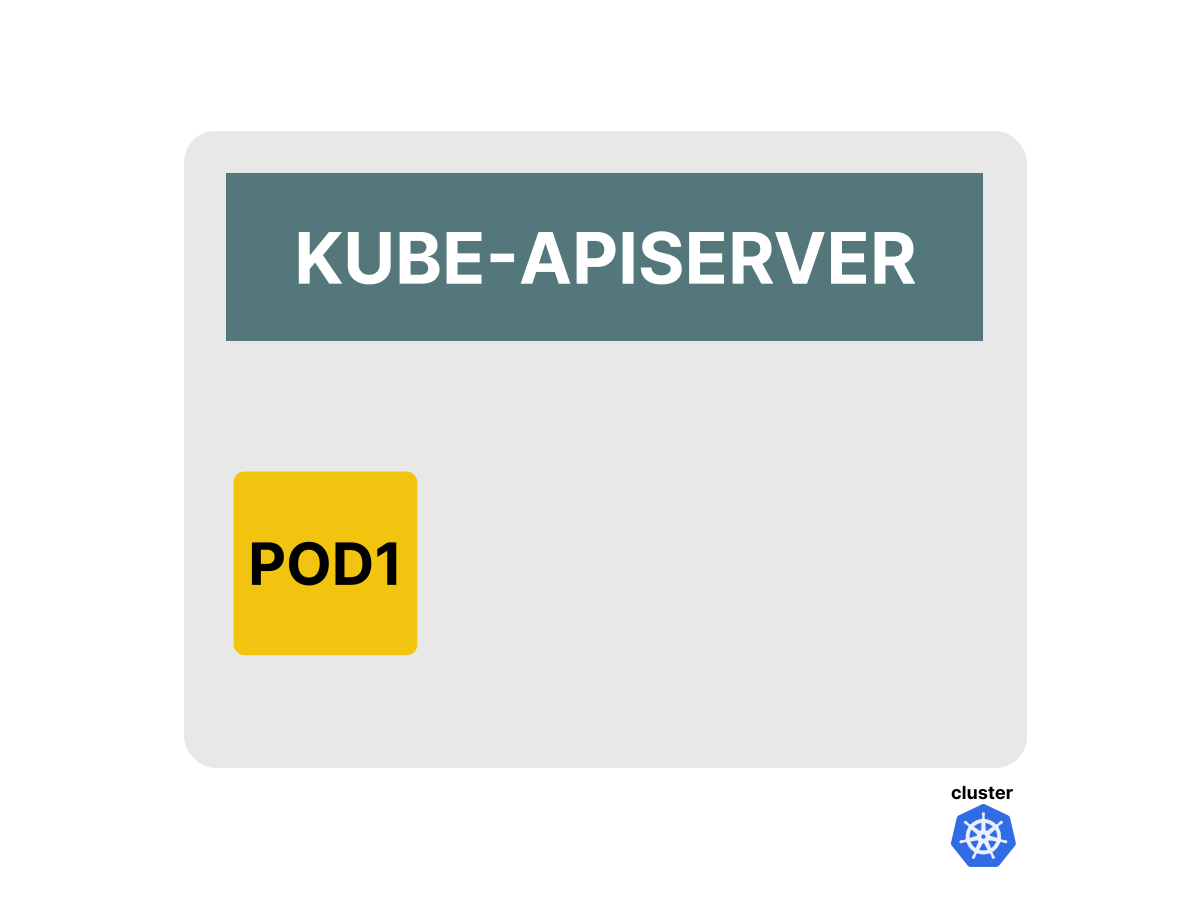
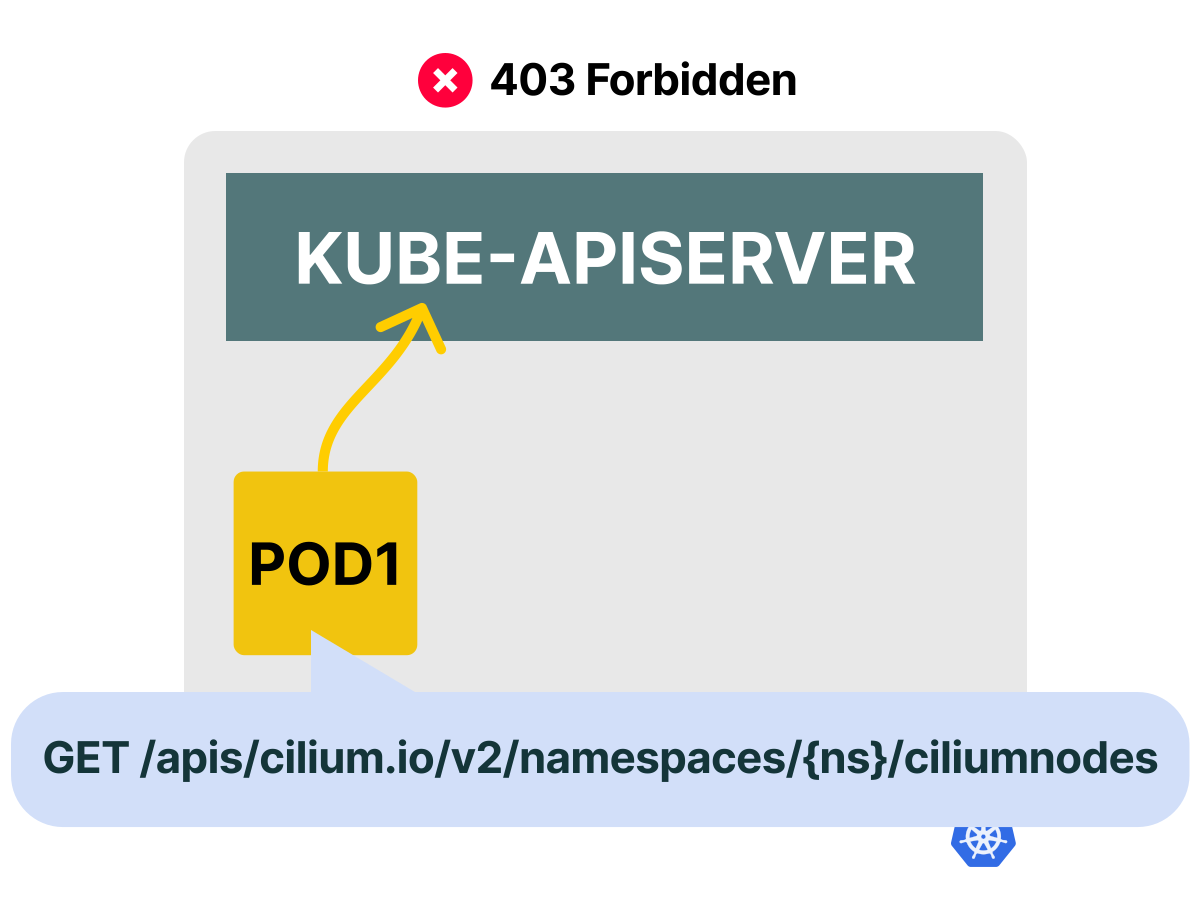
First, let's present the challenge: we have an app that needs access to a custom resource.
 1/2
1/2Imagine having an app deployed in the cluster that needs to access a Custom Resource through the API.
 2/2
2/2If we don't grant access to those APIs, the request will fail with a 403 Forbidden error message.
How can we grant permissions to access those resources?
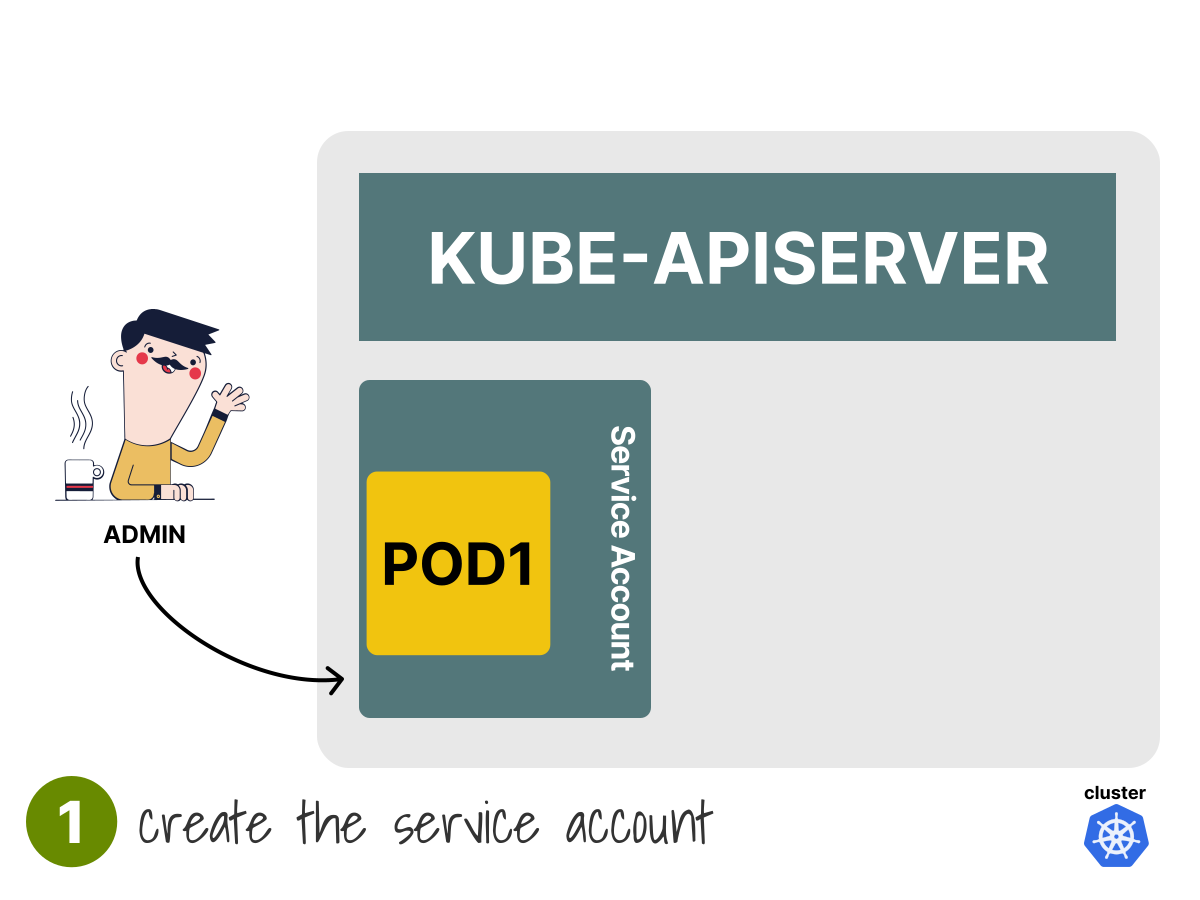
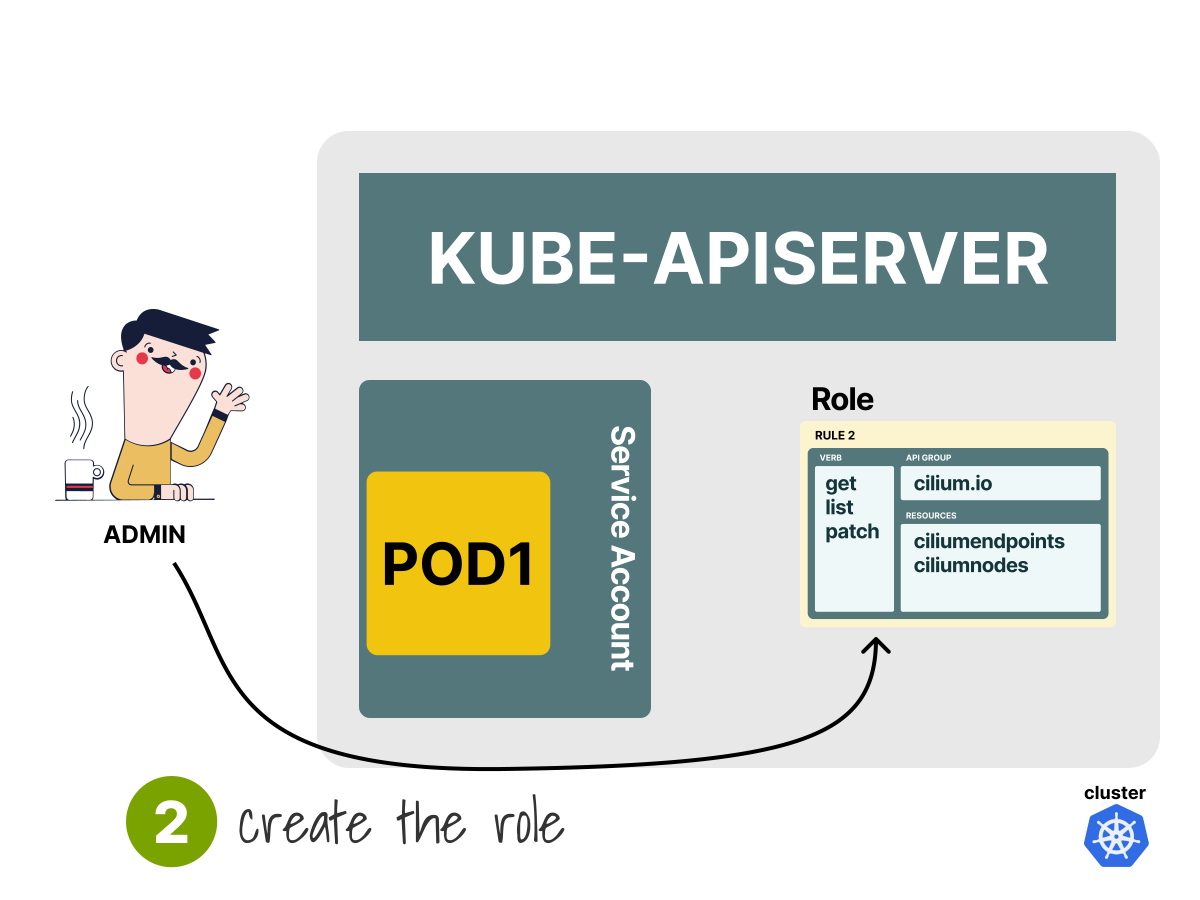
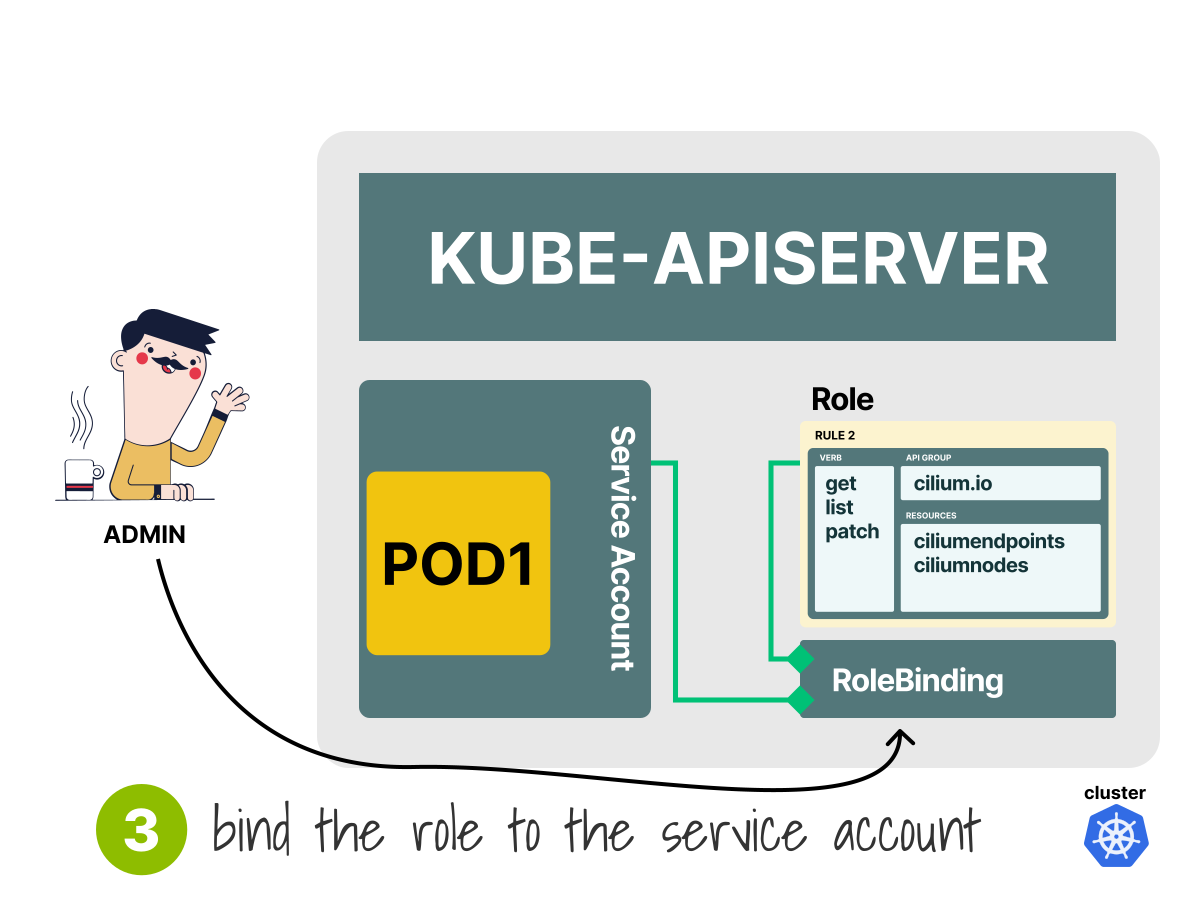
With a Service Account, Role and RoleBinding.
 1/4
1/4First, we should create an identity for our workload. In Kubernetes, that means creating a Service Account.
 2/4
2/4Then, we want to define the permissions and include them into a Role.
 3/4
3/4And finally, we want to link the identity (Service Account) to the permissions (Role) with a RoleBinding.
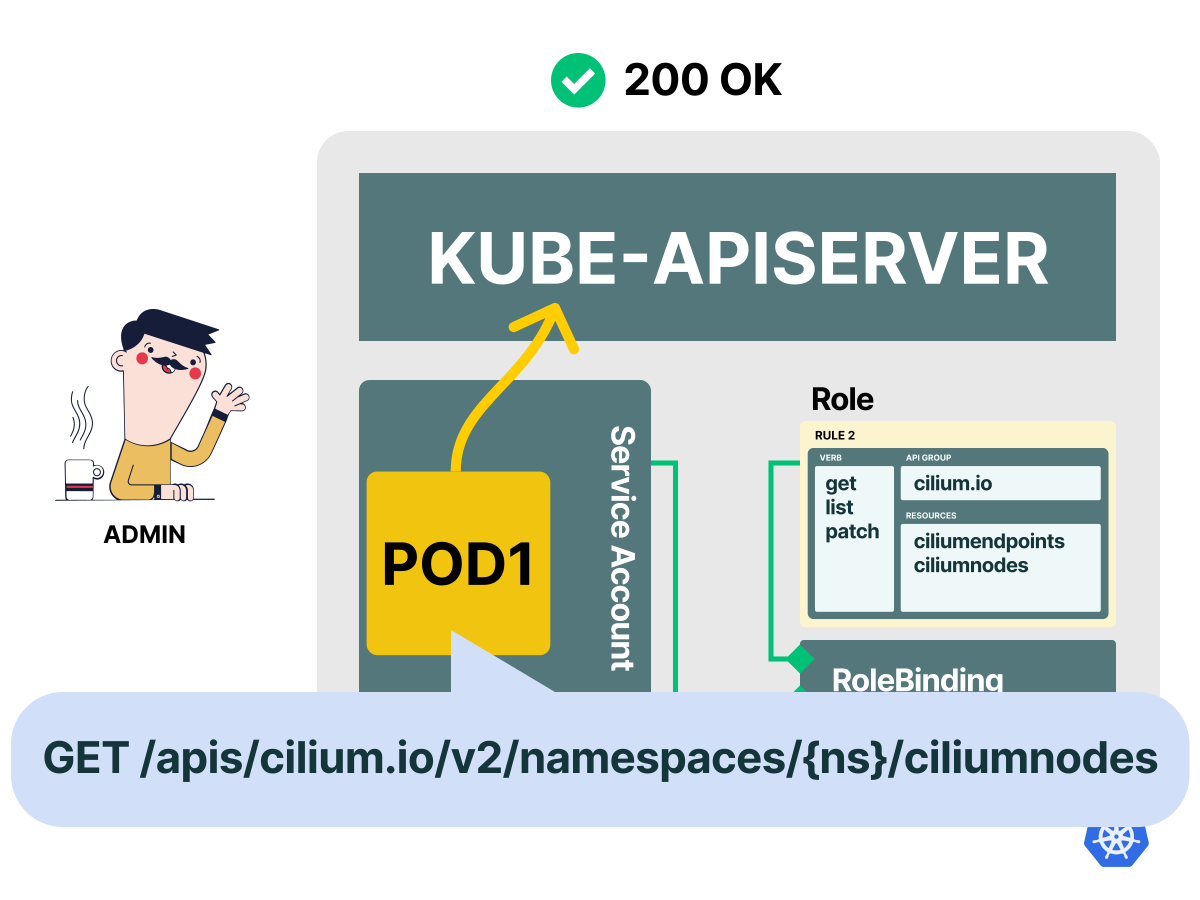 4/4
4/4The next time the app issues a request to the Kubernetes API, it will be granted access to the custom resources.
Namespaces and cluster-wide resources
When we discussed the resources, we learned that the structure of the endpoints is similar to this:
/api/v1/namespaces/{namespace}/pods/{name}
/api/v1/namespaces/{namespace}/pods/{name}/log
/api/v1/namespaces/{namespace}/serviceaccounts/{name}
But what about resources that don't have a namespace, such as Persistent Volumes and Nodes?
Namespaced resources can only be created within a namespace, and the name of that namespace is included in the HTTP path.
If the resource is global, like in the case of a Node, the namespace name is not present in the HTTP path.
/api/v1/nodes/{name}
/api/v1/persistentvolumes/{name}
Can we add those to a Role?
We can create that Role.
However, it will not grant access to those resources because Roles are namespaced.
Here's an example:
apiVersion: rbac.authorization.k8s.io/v1
kind: Role
metadata:
  name: viewer
rules: # Authorization rules
  - apiGroups: # 1st API group
      - '' # An empty string designates the core API group.
    resources:
      - persistentvolumes
      - nodes
    verbs:
      - get
      - list
      - watch
If we try to submit that definition and link it to a Service Account, we might realize it doesn't work, though.
Persistent Volumes and Nodes are cluster-scoped resources.
However, Roles can only grant access to resources within their namespace.
If we'd like to use a Role that applies to the entire cluster, we can use a ClusterRole (and the corresponding
ClusterRoleBinding to assign it a subject).
We should change the previous definition to:
apiVersion: rbac.authorization.k8s.io/v1
kind: ClusterRole
metadata:
  name: viewer
rules:          # Authorization rules
  - apiGroups:  # 1st API group
      - ''      # An empty string designates the core API group.
    resources:
      - persistentvolumes
      - nodes
    verbs:
      - get
      - list
      - watch
Notice how the only change is the kind property, and everything else stays the same.
We can use ClusterRoles to grant permissions to namespaced resources across namespaces when they are bound with a ClusterRoleBinding, for example, all Pods in the cluster.
This functionality isn't restricted to cluster-scoped resources.
Kubernetes clusters usually include a few Roles and ClusterRoles already.
Let's explore them.
bash
kubectl get roles -n kube-system

NAME                                             CREATED AT
extension-apiserver-authentication-reader        2026-05-29T02:52:39Z
kube-proxy                                       2026-05-29T02:52:40Z
kubeadm:kubelet-config                           2026-05-29T02:52:39Z
kubeadm:nodes-kubeadm-config                     2026-05-29T02:52:39Z
system::leader-locking-kube-controller-manager   2026-05-29T02:52:39Z
system::leader-locking-kube-scheduler            2026-05-29T02:52:39Z
system:controller:bootstrap-signer               2026-05-29T02:52:39Z
system:controller:cloud-provider                 2026-05-29T02:52:39Z
system:controller:token-cleaner                  2026-05-29T02:52:39Z
system:persistent-volume-provisioner             2026-05-29T02:52:41Z
Many are system: prefixed to denote that the resource is directly managed by the cluster control plane.
Besides, all of the default ClusterRoles and ClusterRoleBindings are labeled with kubernetes.io/bootstrapping=rbac-defaults.
Let's also list the ClusterRoles with:
bash
kubectl get clusterroles

NAME                                                                   CREATED AT
admin                                                                  2026-05-29T02:52:38Z
cluster-admin                                                          2026-05-29T02:52:38Z
edit                                                                   2026-05-29T02:52:38Z
kubeadm:get-nodes                                                      2026-05-29T02:52:39Z
system:aggregate-to-admin                                              2026-05-29T02:52:38Z
system:aggregate-to-edit                                               2026-05-29T02:52:38Z
system:aggregate-to-view                                               2026-05-29T02:52:38Z
system:auth-delegator                                                  2026-05-29T02:52:38Z
system:basic-user                                                      2026-05-29T02:52:38Z
system:discovery                                                       2026-05-29T02:52:38Z
# truncated output...
We can inspect the details for each Role and ClusterRole with:
bash
kubectl get role system:controller:token-cleaner -n kube-system -o yaml

apiVersion: rbac.authorization.k8s.io/v1
kind: Role
metadata:
  name: system:controller:token-cleaner
  namespace: kube-system
rules:
- apiGroups:
  - ""
  resources:
  - secrets
  verbs:
  - delete
  - get
  - list
  - watch
# truncated output...

kubectl get clusterrole system:discovery -o yaml

apiVersion: rbac.authorization.k8s.io/v1
kind: ClusterRole
metadata:
  name: system:discovery
rules:
- nonResourceURLs:
  - /api
  - /api/*
  - /apis
  - /apis/*
  - /healthz
  - /livez
  - /openapi
  - /openapi/*
  - /readyz
  - /version
  - /version/
  verbs:
  - get
# truncated output...
Excellent!
At this point, we know the basic building blocks of Kubernetes RBAC.
We learned:
- How to create identities with Users, Service Accounts and groups.
- How to assign permissions to resources in a namespace with a Role.
- How to assign permissions to cluster resources with a ClusterRole.
- How to link Roles and ClusterRoles to subjects.
There's only one missing topic left to explore: a few unusual edge cases of RBAC.
Making sense of Roles, RoleBindings, ClusterRoles, and ClusterRoleBindings
At a high level, Roles and RoleBindings are namespaced and grant access within a specific namespace, while ClusterRoles and ClusterRoleBindings do not belong to a namespace. A ClusterRoleBinding grants the referenced ClusterRole permissions across the cluster.
However, it is possible to mix these two types of resources.
For example, what happens when a RoleBinding links an account to a ClusterRole?
Let's explore this next with some hands-on practice.
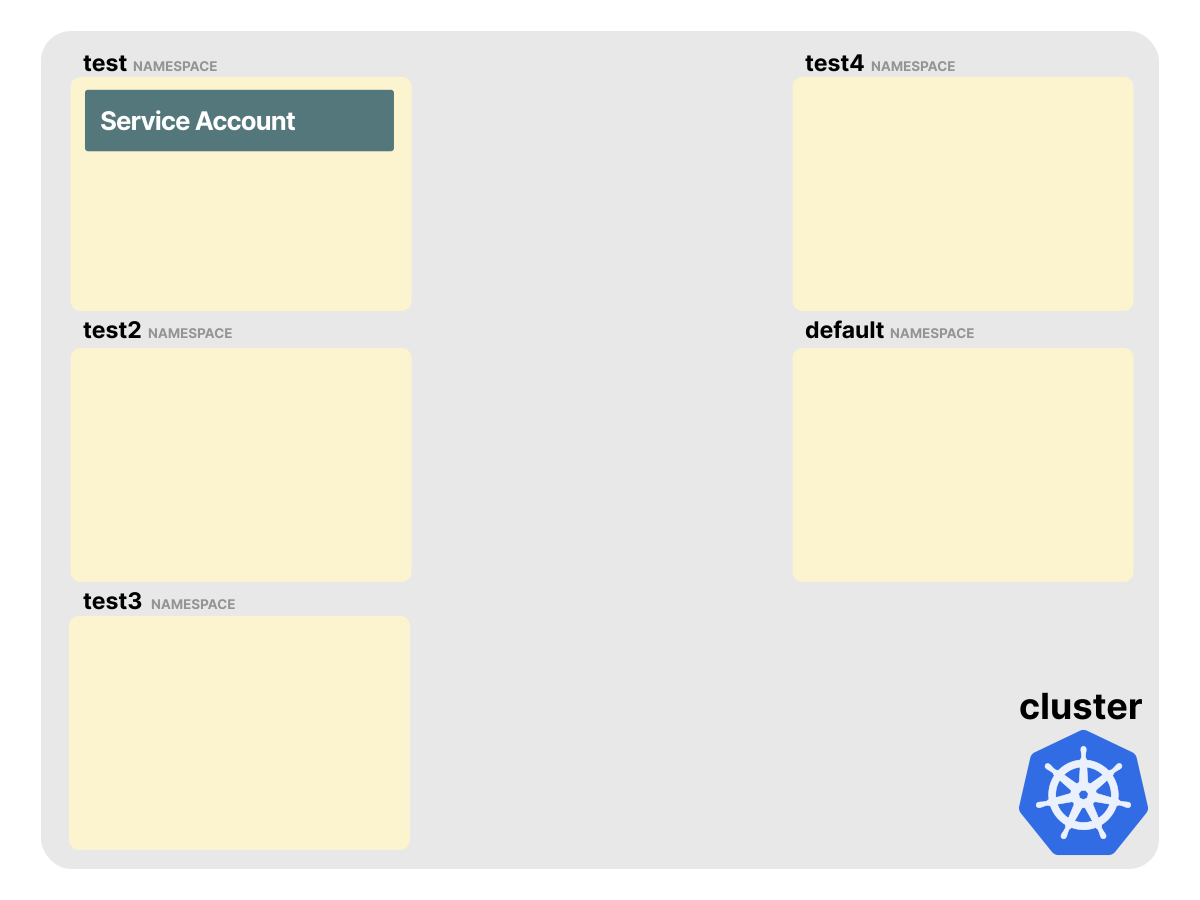
Let's start by creating a local cluster with minikube. To start, create four namespaces:
bash
kubectl create namespace test
namespace/test created
kubectl create namespace test2
namespace/test2 created
kubectl create namespace test3
namespace/test3 created
kubectl create namespace test4
namespace/test4 created
And finally, create a Service Account in the test namespace:
bash
kubectl apply -f - <<'EOF'
apiVersion: v1
kind: ServiceAccount
metadata:
  name: myaccount
  namespace: test
EOF

serviceaccount/myaccount created
At this point, our cluster should look like this:
Scenario 1: Role and RoleBinding in the same namespace
Let's start with creating a Role and a RoleBinding to grant the Service Account access to the test namespace:
bash
kubectl apply -f - <<'EOF'
kind: Role
apiVersion: rbac.authorization.k8s.io/v1
metadata:
  name: testadmin
  namespace: test
rules:
  - apiGroups: ['*']
    resources: ['*']
    verbs: ['*']
---
kind: RoleBinding
apiVersion: rbac.authorization.k8s.io/v1
metadata:
  name: testadminbinding
  namespace: test
subjects:
  - kind: ServiceAccount
    name: myaccount
    namespace: test
roleRef:
  kind: Role
  name: testadmin
  apiGroup: rbac.authorization.k8s.io
EOF

role.rbac.authorization.k8s.io/testadmin created
rolebinding.rbac.authorization.k8s.io/testadminbinding created
This wildcard rule is intentionally broad for the demo; avoid granting wildcard permissions in production unless you really need them.
Our cluster looks like this:
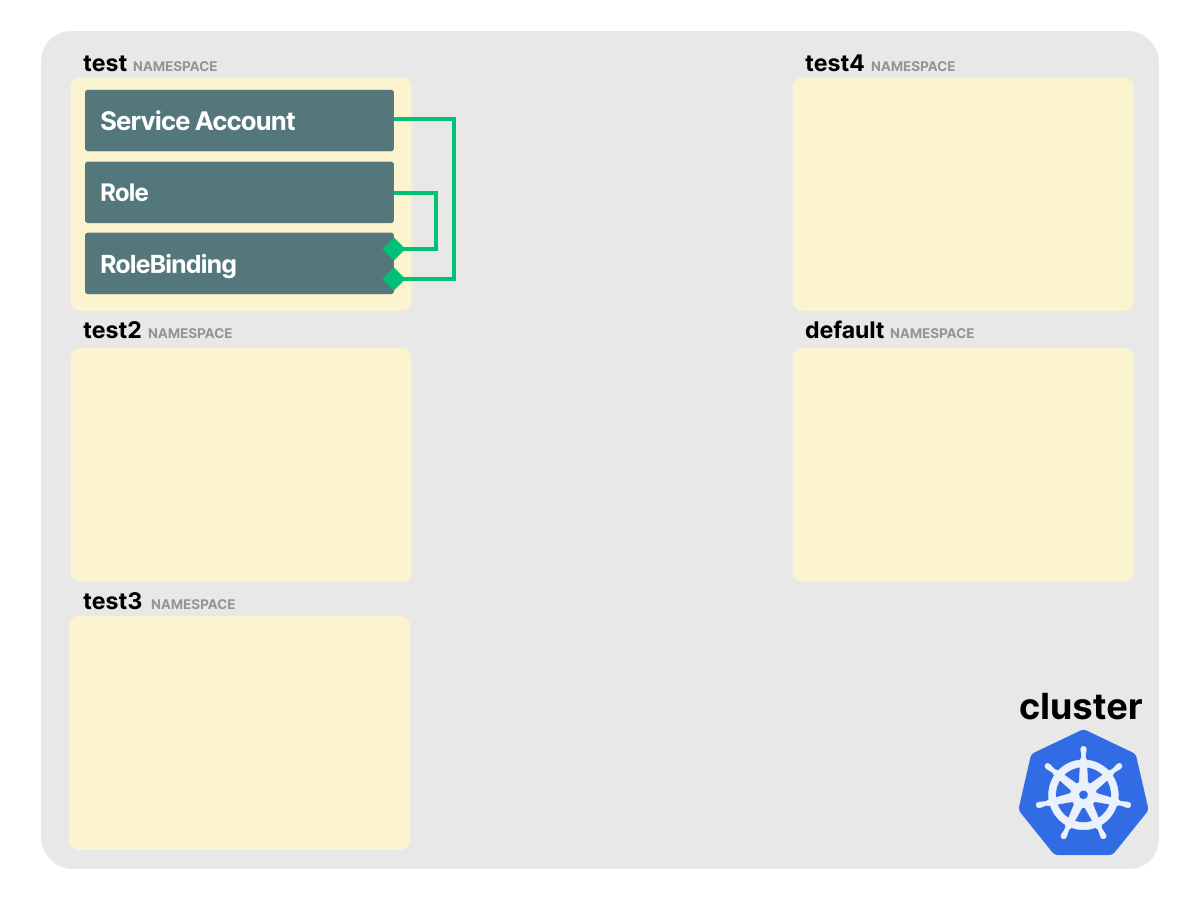
All resources (the Service Account, Role, and RoleBinding) are in the test namespace.
The Role grants access to all namespaced resources in test, and the RoleBinding links the Service Account and the Role.
How do we test that the Service Account has access to the resources?
We can combine two features of kubectl:
- User impersonation with
kubectl <verb> <resource> --as=jenkins. - Verifying API access with
kubectl auth can-i <verb> <resource>.
Please note that our user should have the
impersonateverb as permission for this to work.
To issue a request as the myaccount Service Account and check if we can list Pods in the namespace, we can issue the following command:
bash
kubectl auth can-i get pods -n test --as=system:serviceaccount:test:myaccount

yes
Let's break down the command:
auth can-iis necessary to query the authorization model (RBAC).get podsis theverbandresource.-n testis the namespace where we want to issue the command.--as=system:serviceaccount:test:myaccountis used to impersonate themyaccountService Account.
Note how the --as= flag needs some extra hints to identify the Service Account.
The entire string can be broken down to:
--as=system:serviceaccount:{namespace}:{service-account-name}
     ^^^^^^^^^^^^^^^^^^^^^
     This should always be included for Service Accounts.
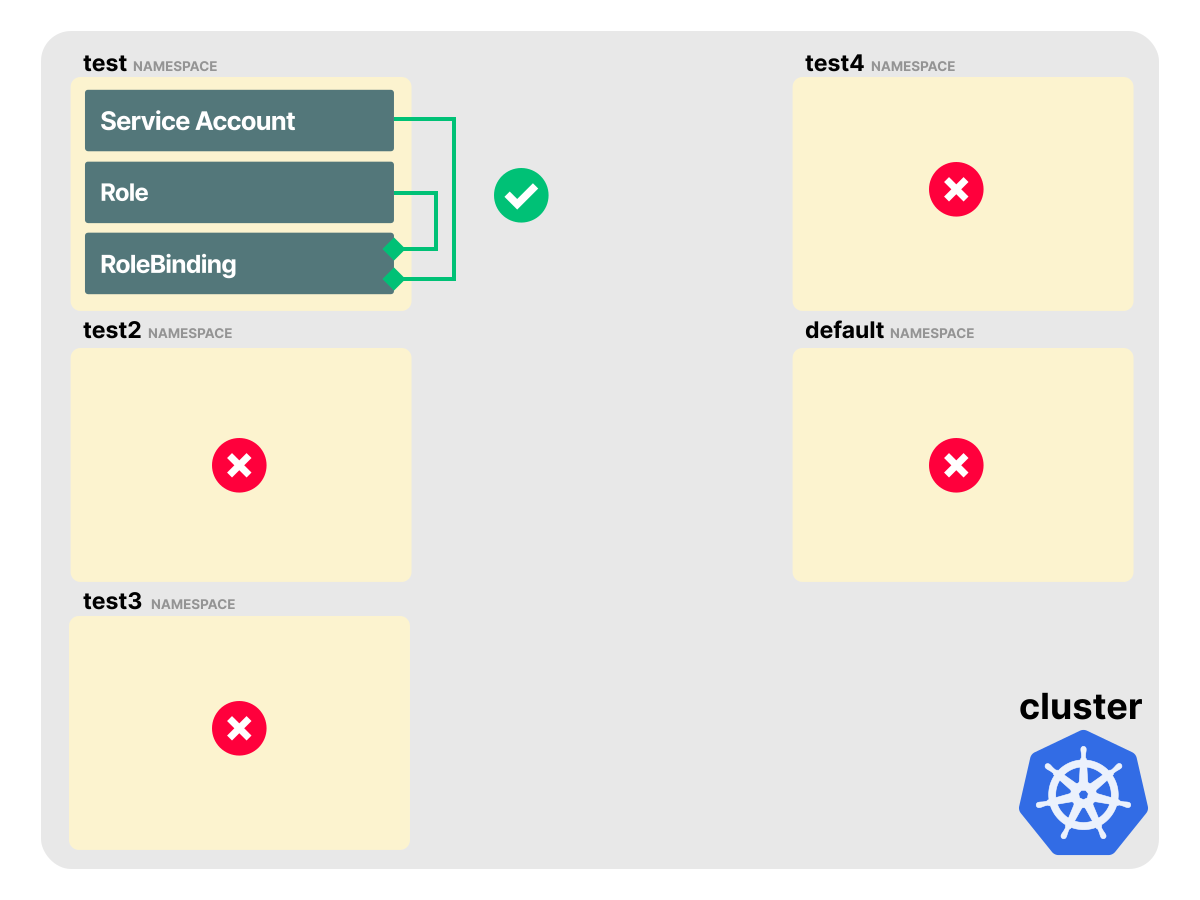
With this Role+ServiceAccount+RoleBinding combination, we can access all namespaced resources in the test namespace.
Excellent!
Let's move on to a more complex example.
Scenario 2: Role and RoleBinding in a different namespace
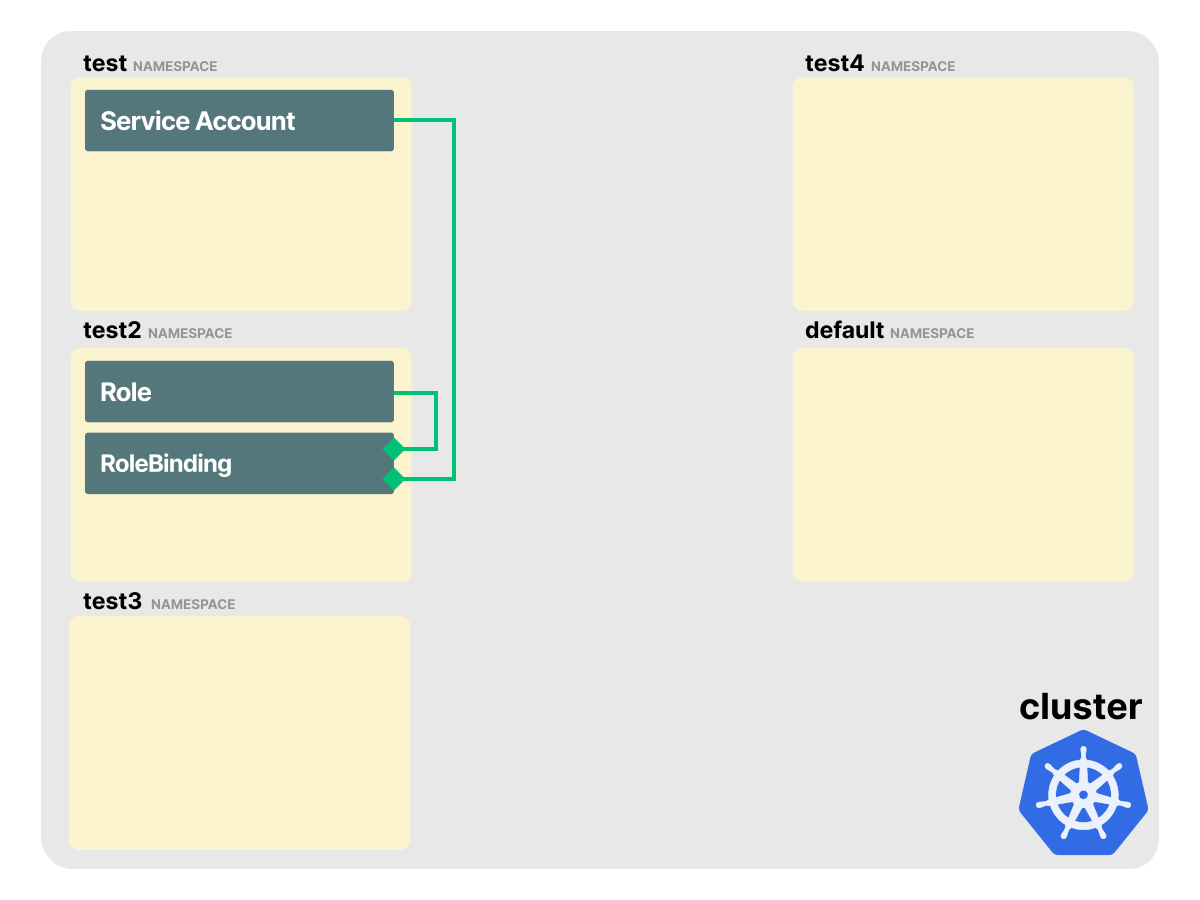
Let's create a new Role and RoleBinding in the test2 namespace.
Notice how the RoleBinding links the role from test2 and the service account from test:
bash
kubectl apply -f - <<'EOF'
kind: Role
apiVersion: rbac.authorization.k8s.io/v1
metadata:
  namespace: test2
  name: testadmin
rules:
  - apiGroups: ['*']
    resources: ['*']
    verbs: ['*']
---
kind: RoleBinding
apiVersion: rbac.authorization.k8s.io/v1
metadata:
  name: testadminbinding
  namespace: test2
subjects:
  - kind: ServiceAccount
    name: myaccount
    namespace: test
roleRef:
  kind: Role
  name: testadmin
  apiGroup: rbac.authorization.k8s.io
EOF

role.rbac.authorization.k8s.io/testadmin created
rolebinding.rbac.authorization.k8s.io/testadminbinding created
Our cluster looks like this:
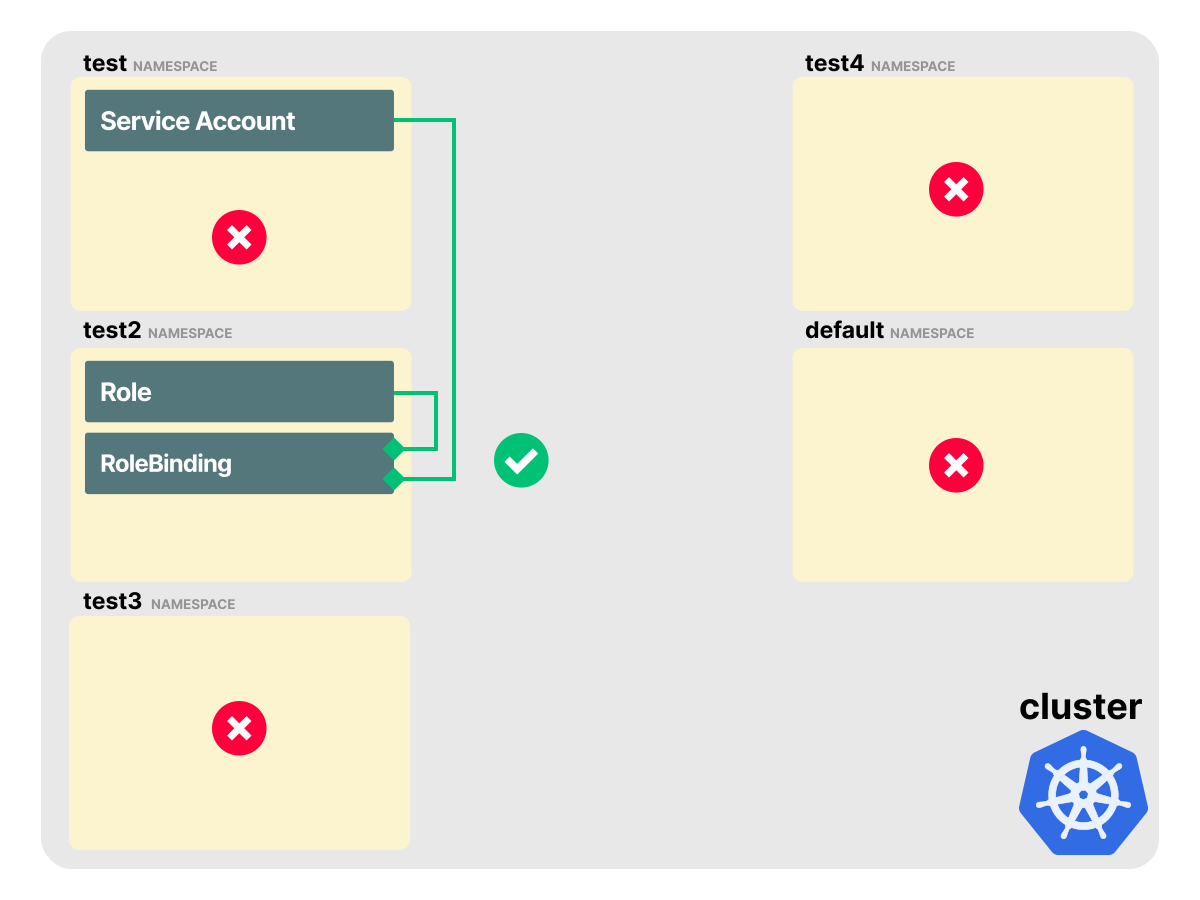
Let's test if the Service Account located in test has access to the resources in test2:
bash
kubectl auth can-i get pods -n test2 --as=system:serviceaccount:test:myaccount
yes
This works, granting the Service Account access to resources outside of the namespace it was created.
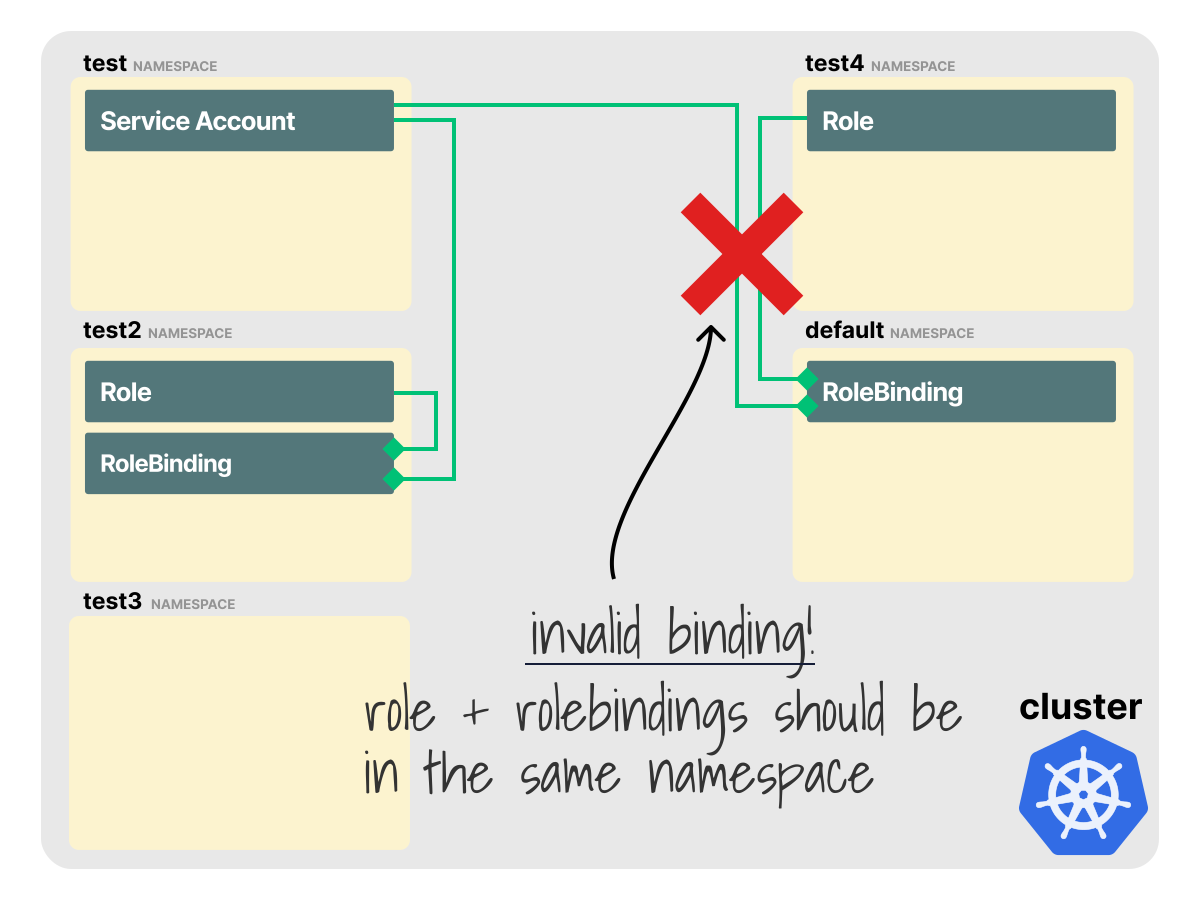
It's worth noting that the roleRef property in the RoleBinding does not have a namespace field.
kind: RoleBinding
apiVersion: rbac.authorization.k8s.io/v1
metadata:
  name: testadminbinding
  namespace: test2
subjects:
  - kind: ServiceAccount
    name: myaccount
    namespace: test
roleRef:
  kind: Role
  name: testadmin
  apiGroup: rbac.authorization.k8s.io
The implication is that a RoleBinding can only reference a Role in the same namespace.
Scenario 3: Using a ClusterRole with a RoleBinding
As noted earlier, ClusterRoles do not belong to a namespace.
This means the ClusterRole does not scope permissions to a single namespace.
However, when a ClusterRole is linked to a Service Account via a RoleBinding, the ClusterRole permissions for namespaced resources only apply to the namespace in which the RoleBinding was created.
Let's have a look at an example.
Create a RoleBinding in namespace test3 and link the Service Account to the ClusterRole cluster-admin:
cluster-adminis one of those built-in ClusterRoles in Kubernetes.
bash
kubectl apply -f - <<'EOF'
kind: RoleBinding
apiVersion: rbac.authorization.k8s.io/v1
metadata:
  name: testadminbinding
  namespace: test3
subjects:
  - kind: ServiceAccount
    name: myaccount
    namespace: test
roleRef:
  kind: ClusterRole
  name: cluster-admin
  apiGroup: rbac.authorization.k8s.io
EOF

rolebinding.rbac.authorization.k8s.io/testadminbinding created
Our cluster looks like this:
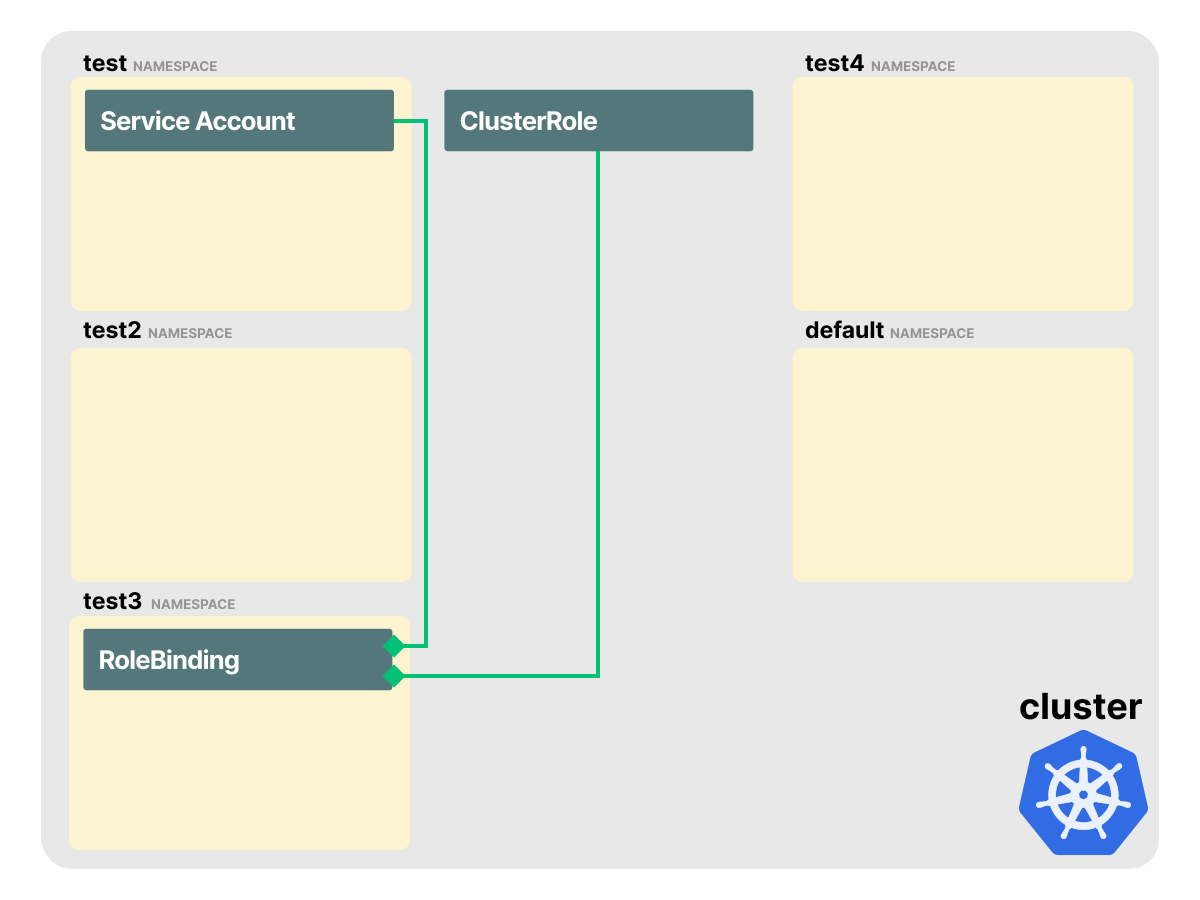
Let's test if the Service Account located in test has access to the resources in test3:
bash
kubectl auth can-i get pods -n test3 --as=system:serviceaccount:test:myaccount
yes
But it does not have access to other namespaces:
bash
kubectl auth can-i get pods -n test4 --as=system:serviceaccount:test:myaccount
no

kubectl auth can-i get pods --as=system:serviceaccount:test:myaccount
no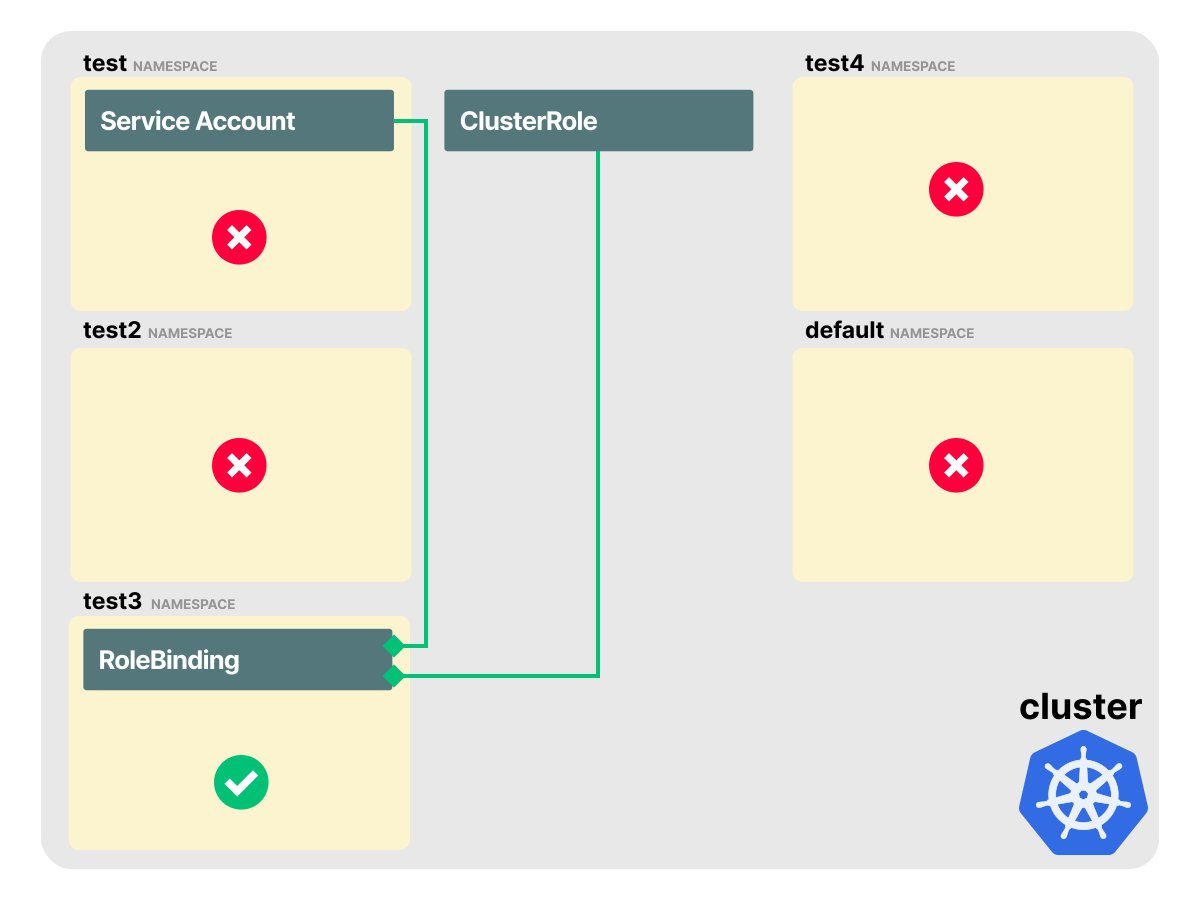
In this scenario, when we use a RoleBinding to link a Service Account to a ClusterRole, the ClusterRole behaves like a regular Role for namespaced resources.
It grants those permissions only to the current namespace where the RoleBinding is located.
Scenario 4: Granting cluster-wide access with ClusterRole and ClusterRoleBinding
In this last scenario, we'll create a ClusterRoleBinding to link the ClusterRole to the Service Account:
bash
kubectl apply -f - <<'EOF'
apiVersion: rbac.authorization.k8s.io/v1
kind: ClusterRoleBinding
metadata:
  name: testadminclusterbinding
subjects:
  - kind: ServiceAccount
    name: myaccount
    namespace: test
roleRef:
  kind: ClusterRole
  name: cluster-admin
  apiGroup: rbac.authorization.k8s.io
EOF

clusterrolebinding.rbac.authorization.k8s.io/testadminclusterbinding created
Note the lack of a namespace field on the roleRef again.
This implies that a ClusterRoleBinding cannot identify a Role to link to because Roles belong in namespaces, and ClusterRoleBindings (along with the ClusterRoles they reference) are not namespaced.
Our cluster looks like this:
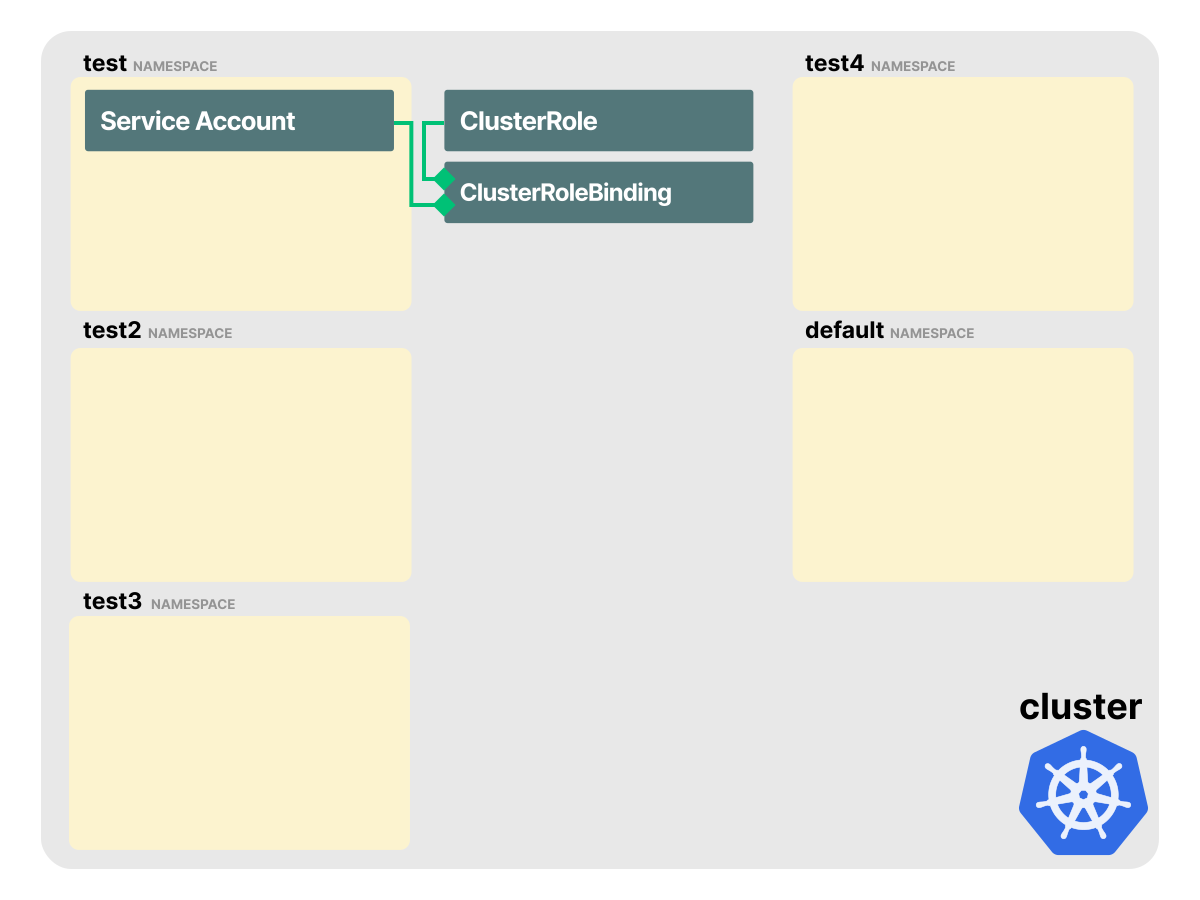
Even though neither the ClusterRole nor the ClusterRoleBinding defined any namespaces, the Service Account now has access to everything:
bash
kubectl auth can-i get pods -n test4 --as=system:serviceaccount:test:myaccount
yes

kubectl auth can-i get namespaces --as=system:serviceaccount:test:myaccount
Warning: resource 'namespaces' is not namespace scoped
yes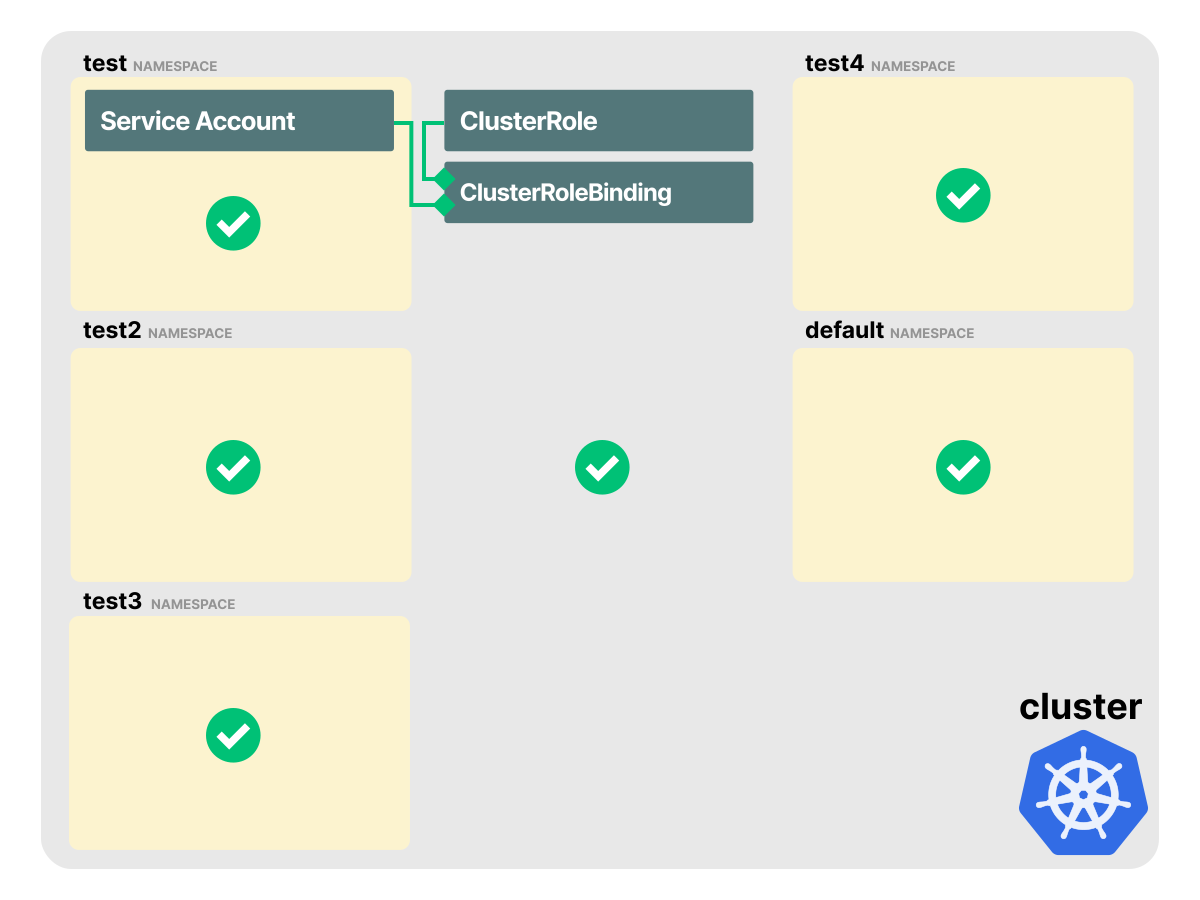
From these examples, we can observe some behaviors and limitations of RBAC resources:
- A RoleBinding can reference a Role in its own namespace, or a ClusterRole.
- RoleBindings can exist in separate namespaces from Service Accounts.
- RoleBindings can link ClusterRoles, but namespaced resource permissions apply only to the namespace of the RoleBinding.
- ClusterRoleBindings link accounts to ClusterRoles and grant those permissions cluster-wide.
- ClusterRoleBindings cannot reference Roles.
Perhaps the most interesting implication here is that a ClusterRole can define common permissions for namespaced resources that are granted in a single namespace when referenced by a RoleBinding.
This removes the need to have duplicated roles in many namespaces.
Bonus #1: Make RBAC policies more concise
The typical rules section of a Role or ClusterRole looks like this:
rules:
  - apiGroups:
      - ''
    resources:
      - pods
      - endpoints
      - services
    verbs:
      - get
      - watch
      - list
      - create
      - delete
However, the above configurations can be re-written using the following format:
rules:
  - apiGroups: ['']
    resources: ['pods', 'endpoints', 'services']
    verbs: ['get', 'list', 'watch', 'create', 'delete']
The alternative notation reduces the number of lines significantly and is more concise.
However, kubectl renders those fields as YAML lists when we retrieve the Role.
We can create a Role with the concise notation:
bash
kubectl create role pod-reader --verb=get,list,watch,create,delete --resource=pods,endpoints,services -n default

role.rbac.authorization.k8s.io/pod-reader created
Kubernetes returns the stored Role as YAML lists:
bash
kubectl get role pod-reader -n default -o yaml

apiVersion: rbac.authorization.k8s.io/v1
kind: Role
metadata:
  name: pod-reader
  namespace: default
# truncated output...
rules:
- apiGroups:
  - ""
  resources:
  - pods
  - endpoints
  - services
  verbs:
  - get
  - list
  - watch
  - create
  - delete
Bonus #2: Using ServiceAccount tokens to access the Kubernetes API
Kubernetes ServiceAccounts provide identities for Pods and other clients that need to authenticate to the API server.
For projected ServiceAccount tokens, three separate components are involved:
- A ServiceAccount admission controller that sets the Pod's Service Account and can inject a token volume into the Pod spec unless automounting is disabled.
- A kubelet that can use the TokenRequest API to fetch a short-lived token for the Pod and refresh it before it expires.
- A ServiceAccount controller creates the default Service Account in every namespace.
For Secret-backed tokens, the Token controller populates kubernetes.io/service-account-token Secrets. For portable RBAC examples, it is enough to know that a Service Account can be represented by a short-lived projected token or by a long-lived Secret-backed token, as described in manual Secret management for ServiceAccounts.
Service Accounts can be used outside the cluster for automation that needs to talk to the Kubernetes API.
For that use case, prefer a short-lived token. The kubectl create token command requests a token from the TokenRequest API:
bash
kubectl create serviceaccount demo-sa
serviceaccount/demo-sa created

kubectl get serviceaccount demo-sa -o yaml
apiVersion: v1
kind: ServiceAccount
metadata:
  creationTimestamp: "2026-05-29T02:58:03Z"
  name: demo-sa
  namespace: default
  resourceVersion: "709"
  uid: b8b9219f-9936-4efb-95d1-50041cea31d1
# truncated output...

kubectl create token demo-sa --duration=10m
eyJhbGciOiJSUzI1NiIsImtpZCI6... # truncated
Notice how this Service Account has no secrets field. Tokens requested through the TokenRequest API are returned to the client and are not referenced from the ServiceAccount.
We can also check whether any ServiceAccount token Secret exists in the namespace:
bash
kubectl get secret --field-selector type=kubernetes.io/service-account-token

No resources found in default namespace.
When a Pod uses that Service Account in a cluster that uses projected ServiceAccount tokens, Kubernetes mounts a projected volume instead.
Use a server-side dry run to verify the Pod mutation without creating the Pod:
bash
kubectl apply --dry-run=server -o yaml -f - <<'EOF'
apiVersion: v1
kind: Pod
metadata:
  name: demo-sa-pod
spec:
  serviceAccountName: demo-sa
  containers:
  - image: registry.k8s.io/pause:3.10
    name: pause
EOF
apiVersion: v1
kind: Pod
metadata:
  name: demo-sa-pod
  namespace: default
# truncated output...
spec:
  containers:
  - image: registry.k8s.io/pause:3.10
    imagePullPolicy: IfNotPresent
    name: pause
    volumeMounts:
    - mountPath: /var/run/secrets/kubernetes.io/serviceaccount
      name: kube-api-access-8t442
      readOnly: true
  serviceAccountName: demo-sa
  volumes:
  - name: kube-api-access-8t442
    projected:
      defaultMode: 420
      sources:
      - serviceAccountToken:
          expirationSeconds: 3607
          path: token
      - configMap:
          items:
          - key: ca.crt
            path: ca.crt
          name: kube-root-ca.crt
      - downwardAPI:
          items:
          - fieldRef:
              apiVersion: v1
              fieldPath: metadata.namespace
            path: namespace
status:
  phase: Pending
The token is a signed JWT that can be used as a bearer token to authenticate against the kube-apiserver.
The expirationSeconds value is selected by Kubernetes for the injected ServiceAccount projected volume. This is the requested lifetime in the Pod's projected volume spec; the API server can still adjust the issued token lifetime based on cluster configuration.
If we need a long-lived token, we can still manually create a Secret.
This is not recommended for most workloads because the token is static and long-lived:
demo-sa-token.yaml
apiVersion: v1
kind: Secret
metadata:
  name: demo-sa-token
  annotations:
    kubernetes.io/service-account.name: demo-sa
type: kubernetes.io/service-account-token
When we create this Secret, the control plane fills in the token, namespace and CA data:
bash
kubectl apply -f - <<'EOF'
apiVersion: v1
kind: Secret
metadata:
  name: demo-sa-token
  annotations:
    kubernetes.io/service-account.name: demo-sa
type: kubernetes.io/service-account-token
EOF

secret/demo-sa-token created

kubectl describe secret demo-sa-token
Name:         demo-sa-token
Namespace:    default
Labels:       <none>
Annotations:  kubernetes.io/service-account.name: demo-sa
              kubernetes.io/service-account.uid: b8b9219f-9936-4efb-95d1-50041cea31d1

Type:  kubernetes.io/service-account-token

Data
====
ca.crt:     1111 bytes
namespace:  7 bytes
token:      <omitted>
Clean up
If we ran the commands in this article, delete the resources with:
bash
kubectl delete pod my-pod
pod "my-pod" deleted

kubectl delete clusterrolebinding testadminclusterbinding
clusterrolebinding.rbac.authorization.k8s.io "testadminclusterbinding" deleted

kubectl delete namespace demo-namespace test test2 test3 test4
namespace "demo-namespace" deleted
namespace "test" deleted
namespace "test2" deleted
namespace "test3" deleted
namespace "test4" deleted

kubectl delete crd crontabs.stable.example.com
customresourcedefinition.apiextensions.k8s.io "crontabs.stable.example.com" deleted

kubectl delete role pod-reader
role.rbac.authorization.k8s.io "pod-reader" deleted

kubectl delete secret demo-sa-token
secret "demo-sa-token" deleted

kubectl delete serviceaccount demo-sa
serviceaccount "demo-sa" deleted
Summary
RBAC in Kubernetes is the mechanism that enables us to configure fine-grained and specific sets of permissions that define how a given user, or group of users, can interact with any Kubernetes object in the cluster or a particular cluster namespace.
In this article, we learned:
- How RBAC decouples permissions from users with a more flexible model.
- How RBAC integrates with the Kubernetes API.
- How to identify subjects for RBAC with Users, Service Accounts and Groups.
- How to map Resources into Rules using Verbs and API groups.
- How to group rules into Roles and link those roles to identities using RoleBindings.
- The relationship between Roles, RoleBindings, ClusterRoles and ClusterRoleBindings.
- How Service Account tokens can be projected, short-lived or manually backed by Secrets.
After the request is authorized, it is passed to the admission module.
You can follow the next part in this article about authentication between microservices using Kubernetes identities.