

Kubernetes Authentication: Users and Workload Identities
May 2026
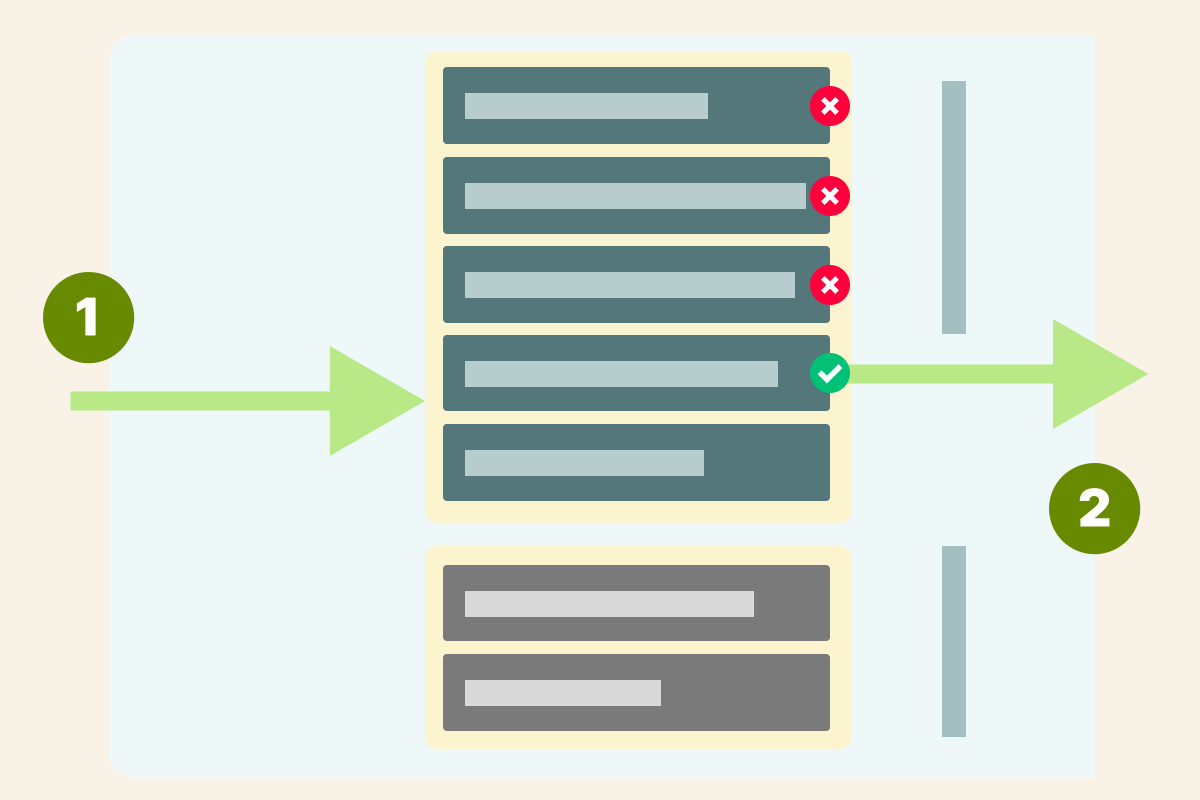
This is part 1 of 4 of the Authentication and authorization in Kubernetes. More
TL;DR: In this article, you will explore how users and workloads are authenticated with the Kubernetes API server.
The Kubernetes API server exposes an HTTP API that lets end-users, different parts of your cluster, and external components communicate with one another.
Most operations can be performed through kubectl, but you can also access the API directly using REST calls.
But how is the access to the API restricted only to authorized users?
This is the first article in a four-part series about how a request travels through the Kubernetes API server.
This part focuses on the first checkpoint: authentication.
Table of content
- Table of content
- Accessing the Kubernetes API with
curl - The Kubernetes API differentiates internal and external identities
- Granting access to the cluster to external users
- Managing Kubernetes internal identities with Service Accounts
- Generating Service Account tokens
- Projected Service Account tokens are JWT tokens
- Workload identities in Kubernetes: how AWS integrates IAM with Kubernetes
- Validating Projected Service Account Tokens with the Token Review API
- Generating Secrets for Service Accounts
- Bonus: which authentication plugin should you use?
- Summary
Accessing the Kubernetes API with curl
Let's start by issuing a request to the Kubernetes API server.
Suppose you want to list all the namespaces in the cluster; you could execute the following commands:
bash
export API_SERVER_URL=$(kubectl config view --minify -o jsonpath='{.clusters[0].cluster.server}')

curl -sS $API_SERVER_URL/api/v1/namespaces
curl: (60) SSL certificate problem: unable to get local issuer certificate
More details here: https://curl.se/docs/sslcerts.html
# truncated output...
The output suggests that the API is serving traffic over https with an unrecognized certificate (e.g. self-signed), so curl aborted the request.
Let's provide the cluster CA and inspect the response:
bash
export CACERT=$(kubectl config view --minify -o jsonpath='{.clusters[0].cluster.certificate-authority}')

curl -sS --cacert ${CACERT} ${API_SERVER_URL}/api/v1/namespaces
{
  "kind": "Status",
  "apiVersion": "v1",
  "metadata": {},
  "status": "Failure",
  "message": "namespaces is forbidden: User \"system:anonymous\" cannot
    list resource \"namespaces\" in API group \"\" at the cluster scope",
  "reason": "Forbidden",
  "details": {
    "kind": "namespaces"
  },
  "code": 403
}
You have a response from the server, but:
- You are forbidden to access the API endpoint (i.e. the status code is
403). - You are identified as the
system:anonymous, and this identity is not allowed to list namespaces.
The above test reveals some important working mechanisms in the kube-apiserver:
- First, it identifies the user of a request (who you are).
- Then, it determines what operations are allowed for this user (what permissions do you have).
Formally,
- The former process (identifying who you are) is called authentication (or AuthN).
- The latter (determining what permissions an authenticated user has) is authorization (or AuthZ).
 1/3
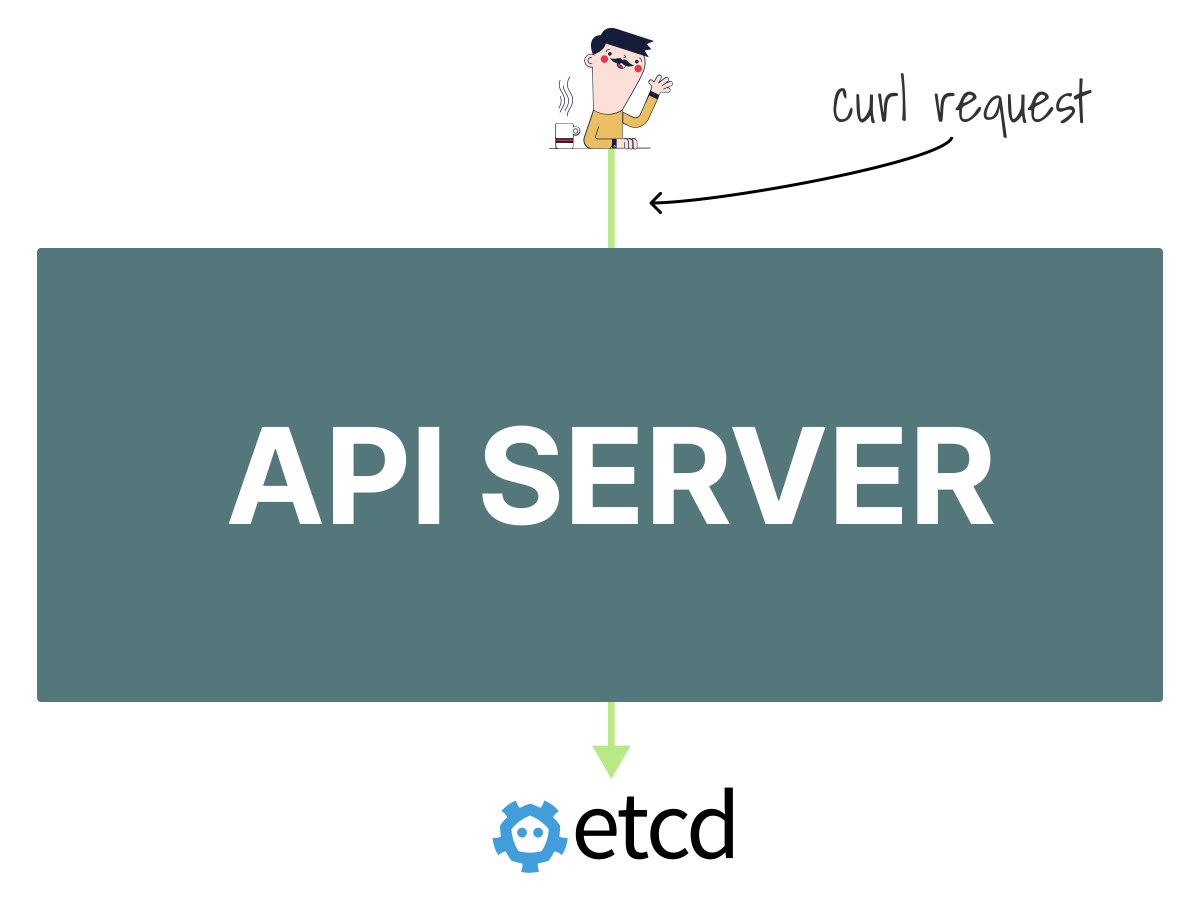
1/3When you issued the
curlrequest, the traffic reached the Kubernetes API server.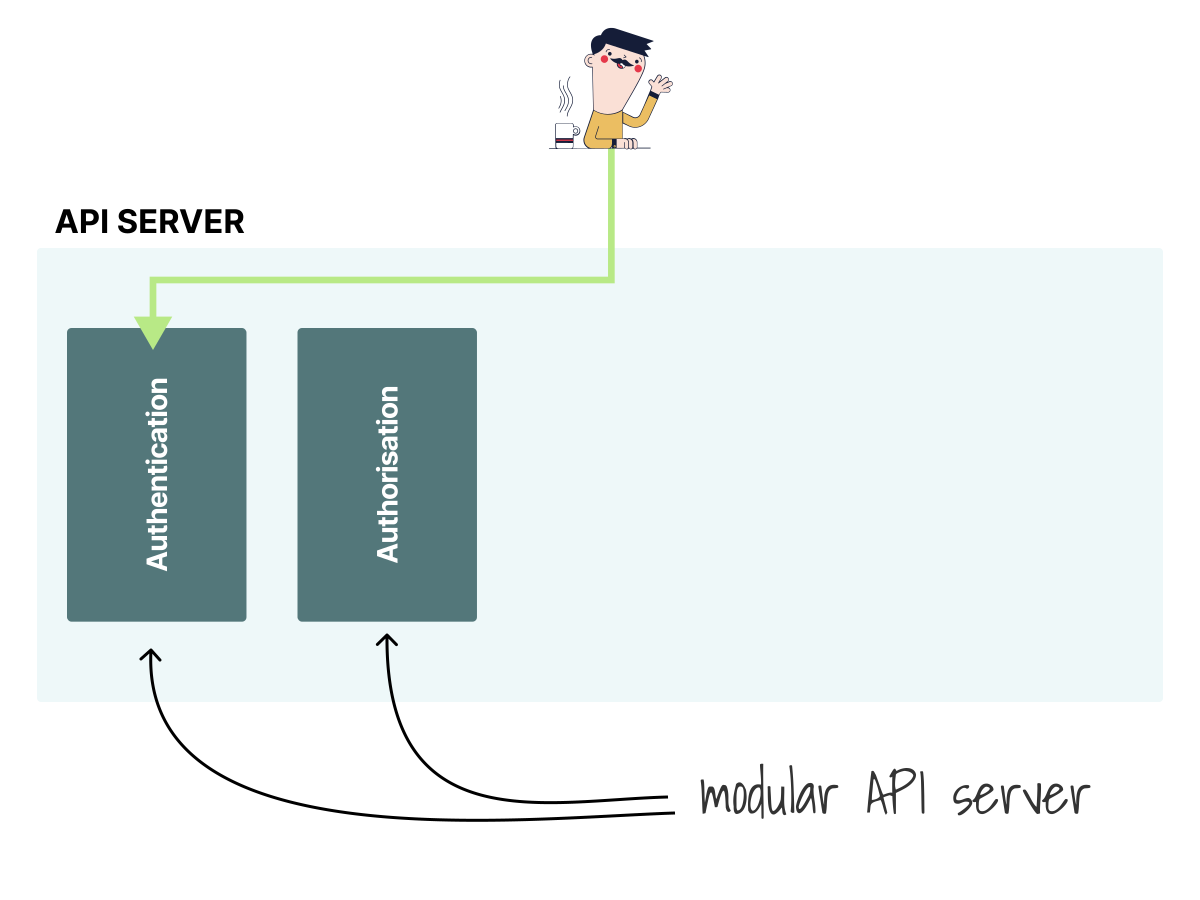 2/3
2/3Inside the API server, one of the first modules to receive your request is the authentication. In this case, the authentication failed, and the request was labelled anonymous.
 3/3
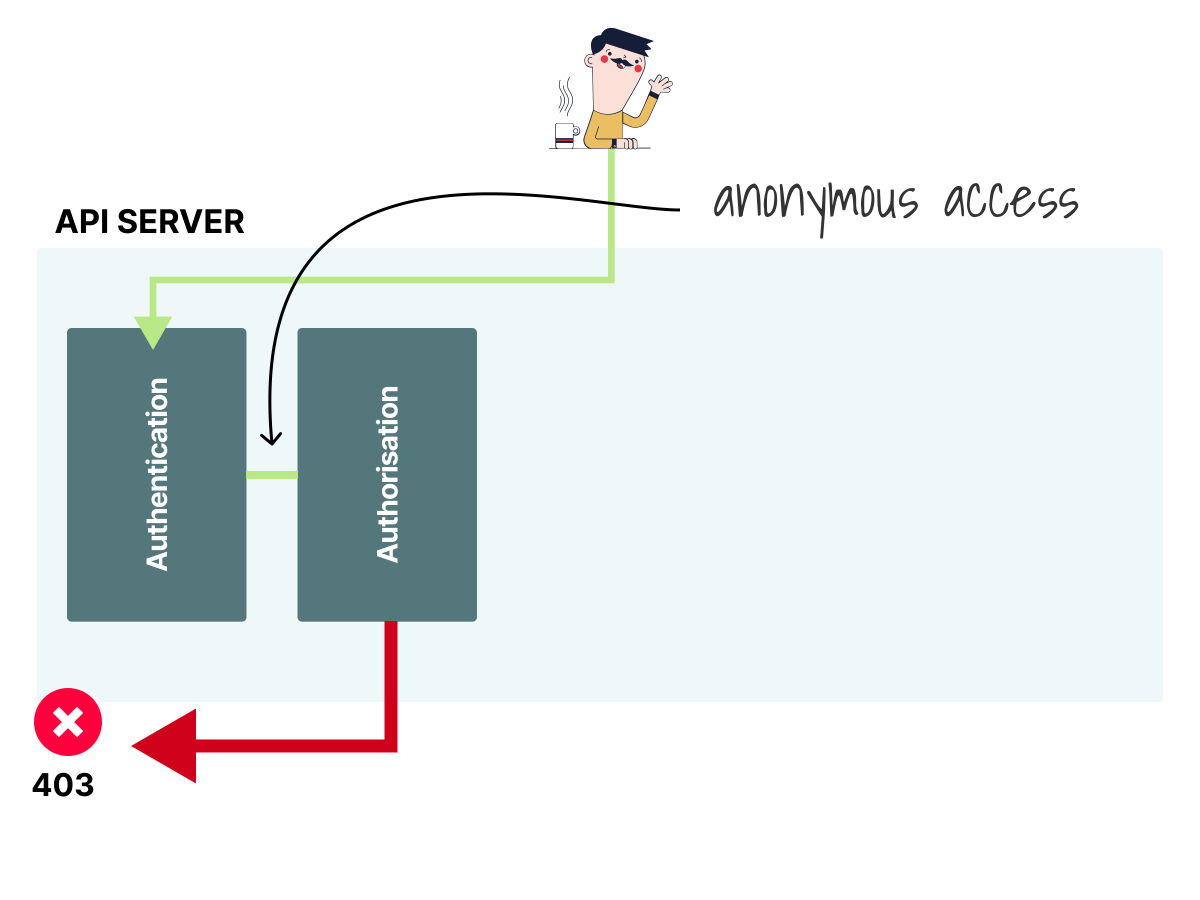
3/3After authentication, there's the authorization module. Anonymous requests have no permissions, so the authorization component rejects the call with a
403status code.
We can reevaluate what happened in the curl request and notice that.
- You did not provide user credentials, so the Kubernetes Authentication module couldn't assign an identity and labelled the request anonymous.
- Depending on how the Kubernetes API server is configured, you could have also received a
401 Unauthorizedcode. - The Kubernetes Authorization module checked if
system:anonymoushas the permission to list namespaces in the cluster. It doesn't, so it returns a403 Forbiddenerror message.
Assuming the identity had rights to access the namespace resource, you would have received the list of namespaces instead.
It's worth noting that you issued a request from outside the cluster, but such requests may come from inside too.
The kubelet, for example, might need to connect to the Kubernetes API to report the status of its node.
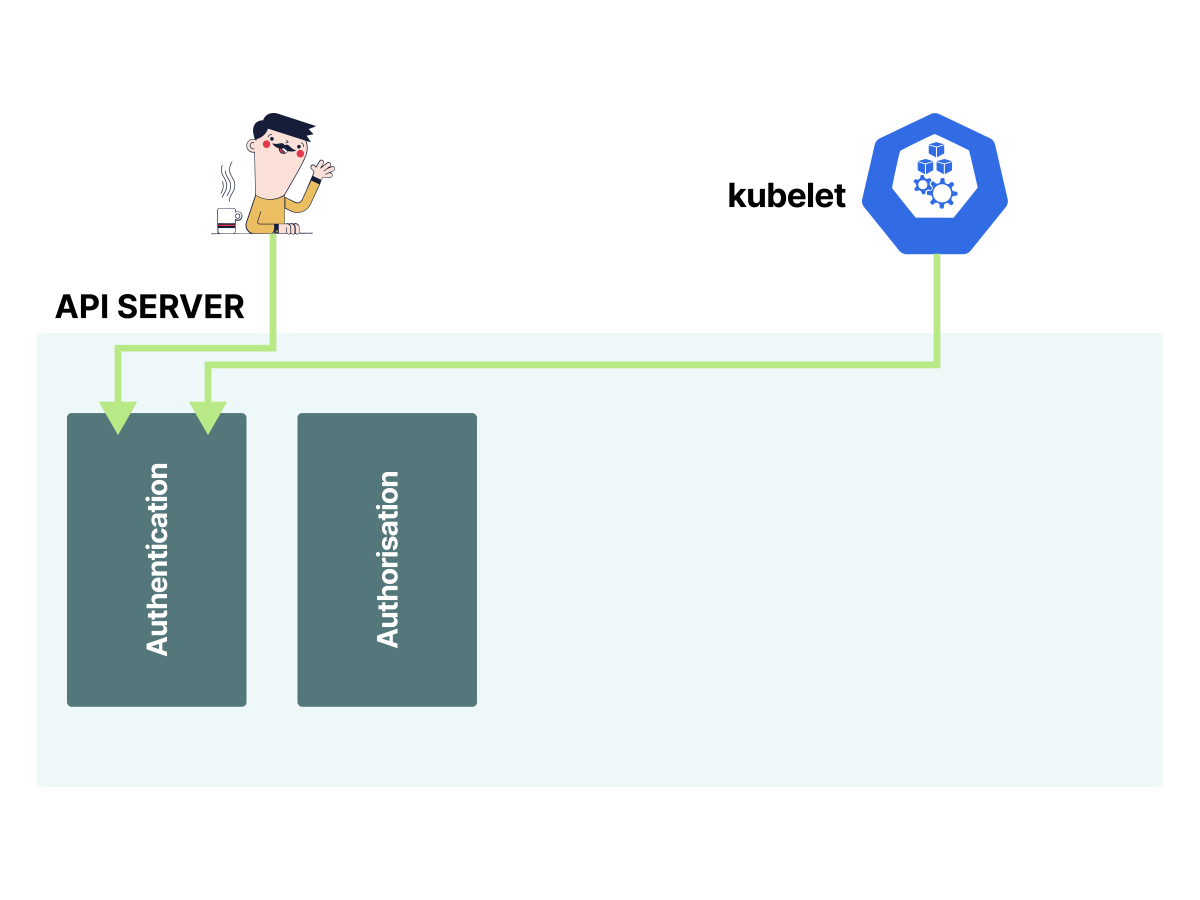
The Authentication module is the first gatekeeper of the entire system and authenticates all of those requests using either a static token, a certificate, or an externally-managed identity.
Kubernetes features an authentication module that has several noteworthy features:
- It supports both human users and program users.
- It supports both external users and Kubernetes-managed workload identities such as Service Accounts.
- It supports standard authentication strategies, such as static token, bearer token, X.509 certificate, OIDC, etc.
- It supports multiple authentication strategies simultaneously.
- You can add authentication strategies or phase out others.
- You can also allow anonymous access to the API.
The rest of the article will investigate how the authentication module works.
Please note that this article focuses on authentication. The next checkpoint is authorization.
Let's start with users.
The Kubernetes API differentiates internal and external identities
The Kubernetes API server supports two kinds of identities: Kubernetes-managed identities and externally managed users.
But why have such a distinction between the two?
If the users are internal to the cluster, we need to define a specification (i.e. a data model) for them.
Instead, when users are external, such specification already exists elsewhere.
We can categorize identities into the following kinds:
- Kubernetes managed identities: Service Accounts created by the Kubernetes cluster itself and used by in-cluster apps.
- Non-Kubernetes managed users: users that are external to the Kubernetes cluster, such as:
- Users with static tokens or certificates provided by cluster administrators.
- Users authenticated through external identity providers using OIDC, webhook token authentication, or an authenticating proxy.
Granting access to the cluster to external users
Consider the following scenario: you have a bearer token and issue a request to Kubernetes.
For this first request, let's use a Service Account token as the bearer token. Later in this section, you will see externally managed users with static tokens.
First, generate a token for the test Service Account in the authn-demo namespace:
bash
kubectl -n authn-demo create token test --duration=10m

eyJhbGciOiJSUzI1NiIs...
Now issue a request using this token:
bash
export APISERVER=$(kubectl config view --minify -o jsonpath='{.clusters[0].cluster.server}')
export CACERT=$(kubectl config view --minify -o jsonpath='{.clusters[0].cluster.certificate-authority}')
export TOKEN=$(kubectl -n authn-demo create token test --duration=10m)
curl -sS --cacert ${CACERT} --header "Authorization: Bearer ${TOKEN}" -X GET ${APISERVER}/api

{
  "kind": "APIVersions",
  "versions": [
    "v1"
  ],
  "serverAddressByClientCIDRs": [
    {
      "clientCIDR": "0.0.0.0/0",
      "serverAddress": "192.168.49.2:8443"
    }
  ]
}
How can the Kubernetes API server associate a token to an identity?
For the Service Account token above, the API server validates a Kubernetes-managed identity. For external users, Kubernetes does not manage user objects, so there should be a mechanism to retrieve information (such as username and groups) from an external resource.
In other words, once the Kubernetes API receives a request with a token, it should be able to retrieve enough information to decide what to do.
Let's explore this scenario with an example.
Create the following CSV with a list of users, tokens and groups:
tokens.csv
token1,arthur,1,"admin,dev,qa"
token2,daniele,2,dev
token3,errge,3,qa
The file format is
token,user,uid, andgroups.
Start a minikube cluster with the --token-auth-file flag:
bash
mkdir -p ~/.minikube/files/etc/ca-certificates

cat > ~/.minikube/files/etc/ca-certificates/tokens.csv <<'EOF'
token1,arthur,1,"admin,dev,qa"
token2,daniele,2,dev
token3,errge,3,qa
EOF

minikube start \
  --extra-config=apiserver.token-auth-file=/etc/ca-certificates/tokens.csv
To issue a request to the Kubernetes API, let's retrieve the IP address and certificate from the cluster:
bash
kubectl config view --minify
apiVersion: v1
clusters:
- cluster:
    certificate-authority: /home/.minikube/ca.crt
    server: https://192.168.49.2:8443
  name: minikube
# truncated output
Next, let's issue a request to the cluster with:
bash
export APISERVER=$(kubectl config view --minify -o jsonpath='{.clusters[0].cluster.server}')
export CACERT=$(kubectl config view --minify -o jsonpath='{.clusters[0].cluster.certificate-authority}')
curl -sS --cacert ${CACERT} -X GET ${APISERVER}/api/v1/namespaces
{
  "kind": "Status",
  "apiVersion": "v1",
  "metadata": {},
  "status": "Failure",
  "message": "namespaces is forbidden: User \"system:anonymous\" cannot
    list resource \"namespaces\" in API group \"\" at the cluster scope",
  "reason": "Forbidden",
  "details": {
    "kind": "namespaces"
  },
  "code": 403
}
The response suggests that we access the API as an anonymous user and don't have any permissions.
Let's issue the same request but with token1 (which, according to our tokens.csv file, belongs to Arthur).
Before we can get a successful response, Arthur must have permissions. Let's create a ClusterRoleBinding first:
bash
kubectl apply -f - <<'EOF'
apiVersion: rbac.authorization.k8s.io/v1
kind: ClusterRoleBinding
metadata:
  name: admin
subjects:
- kind: User
  name: arthur
  apiGroup: rbac.authorization.k8s.io
roleRef:
  kind: ClusterRole
  name: cluster-admin
  apiGroup: rbac.authorization.k8s.io
EOF
clusterrolebinding.rbac.authorization.k8s.io/admin created
Now let's issue the same request with token1:
bash
curl -sS --cacert ${CACERT} \
  --header "Authorization: Bearer token1" \
  -X GET ${APISERVER}/api/v1/namespaces

{
  "kind": "NamespaceList",
  "apiVersion": "v1",
  "metadata": {
    "resourceVersion": "137572"
  },
  "items": [
    {
      "metadata": {
        "name": "default",
        "uid": "f3ec08ed-96cd-4c0d-be79-ed686435017d",
        "creationTimestamp": "2026-05-18T10:06:54Z",
        "labels": { "kubernetes.io/metadata.name": "default" }
      },
      "status": { "phase": "Active" }
    },
    {
      "metadata": {
        "name": "kube-system",
        "uid": "83c3d935-9a1b-46fb-9e68-ee70415ea50a",
        "creationTimestamp": "2026-05-18T10:06:54Z",
        "labels": { "kubernetes.io/metadata.name": "kube-system" }
      },
      "status": { "phase": "Active" }
    }
    # truncated output...
  ]
}
It worked!
Kubernetes identified that the request came from Arthur (via token1 in the CSV) and allowed access.
So what happened?
And what are tokens.csv and the --token-auth-file API server flag?
Kubernetes has different authentication plugins, and the one used in this example is called Static Token File.
This is a recap of what happened:
- When the API server starts, it reads the CSV file and keeps the users in memory.
- A user makes a request to the API server using their token.
- The API server matches the token to the user and extracts the rest of the information (e.g. username, groups, etc.).
- Those details are included in the request context and passed to the authorization module.
- The configured authorization strategy (likely RBAC) uses those details to decide whether Arthur is allowed.
In the example above, we allowed Arthur by creating a ClusterRoleBinding:
admin-binding.yaml
apiVersion: rbac.authorization.k8s.io/v1
kind: ClusterRoleBinding
metadata:
  name: admin
subjects:
- kind: User
  name: arthur
  apiGroup: rbac.authorization.k8s.io
roleRef:
  kind: ClusterRole
  name: cluster-admin
  apiGroup: rbac.authorization.k8s.io
Excellent!
As HTTP requests are made to the kube-apiserver, authentication plugins attempt to associate the following attributes to the request:
Username: a string, e.g.kube-admin,jane@example.com.UID: a string that attempts to be more consistent and unique than username.Groups: e.g.system:masters,devops-team.- Extra fields: a map containing additional information authorizers may find useful.
The details are appended to the request context and available to all subsequent components of the Kubernetes API, but all values are opaque to the authentication plugin.
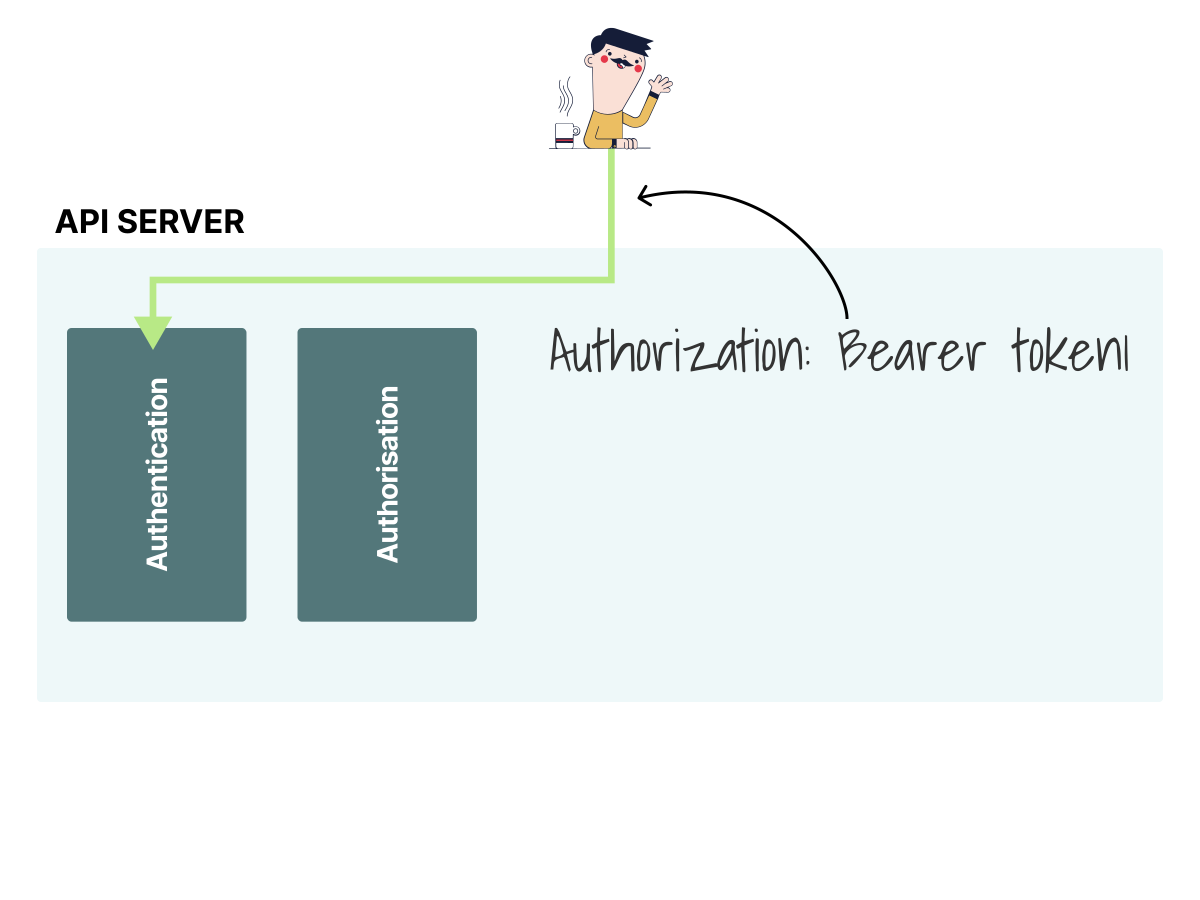 1/3
1/3You can use the token to issue an authenticated request to the cluster.
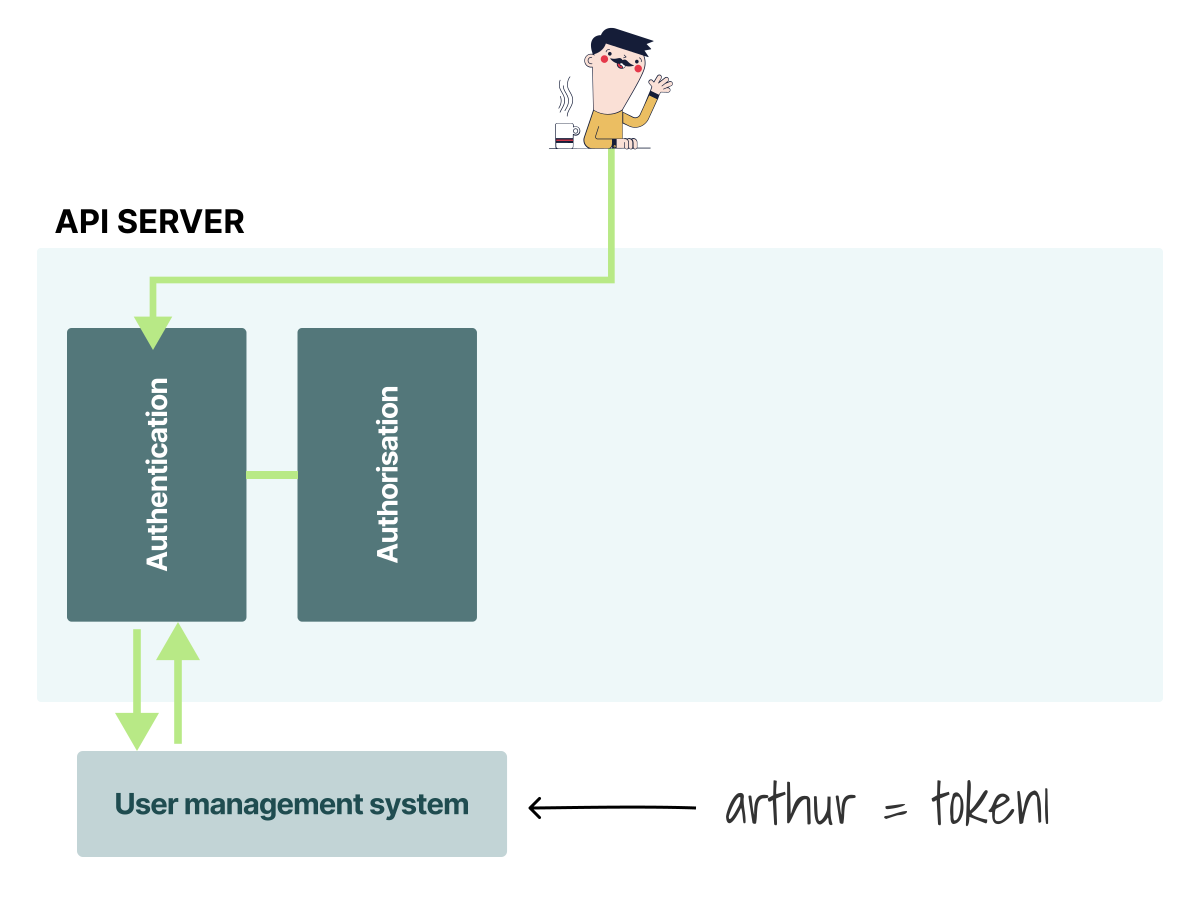 2/3
2/3Kubernetes must match the token to an identity. For an external user, it consults a user management system (in this case, the CSV).
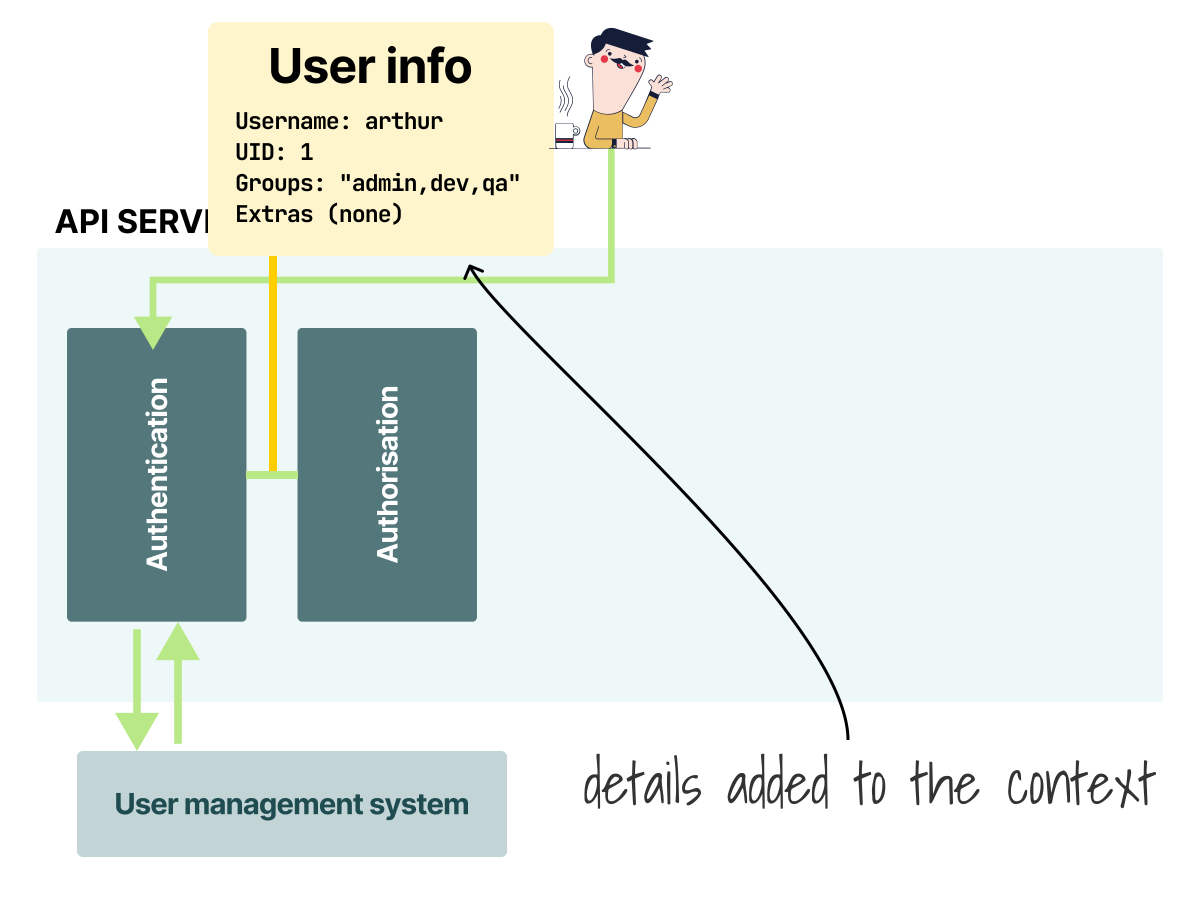 3/3
3/3It retrieves details such as username, id, group, etc. Those are then passed to the authorization module to check permissions.
For example, the authorization module (RBAC) invoked after the authentication can use this data to assign permissions.
In the example, you created a ClusterRoleBinding with the name of the user, but the CSV specifies three groups for Arthur (admin,dev,qa), so you could also write:
admin-binding.yaml
apiVersion: rbac.authorization.k8s.io/v1
kind: ClusterRoleBinding
metadata:
  name: admin
subjects:
- kind: Group
  name: admin
  apiGroup: rbac.authorization.k8s.io
roleRef:
  kind: ClusterRole
  name: cluster-admin
  apiGroup: rbac.authorization.k8s.io
The static token is a simple authentication mechanism where cluster administrators generate an arbitrary string and assign them to users.
But static tokens have a few limitations:
- You need to know the name of all your users in advance.
- Editing the
tokens.csvfile requires restarting the API server. - Tokens do not expire.
Kubernetes offers several other mechanisms to authenticate external users:
- X.509 client certificates.
- JWT/OpenID Connect.
- Authenticating proxy.
- Webhook token authentication.
While they offer different trade-offs, it's worth remembering that the overall workflow is similar to the static tokens:
- An identity is stored or verified outside the cluster.
- A user issues a request to the API server with credentials such as a token, a client certificate, or trusted proxy headers.
- A configured authenticator validates those credentials locally or against an external source (e.g. CSV file, Identity Provider, LDAP, etc.).
- If valid, Kubernetes derives the username and the rest of the metadata. It then proceeds to inject it into the request context.
- The authorization strategy uses this data to decide if the user has permission to access the resource.
Which authentication plugin should you use?
It depends, but you could have all of them.
You can configure multiple authentication plugins, and the request is authenticated when one of the configured authenticators succeeds.
If none do, the API server rejects the request as unauthorized, or treats it as anonymous when anonymous authentication applies.
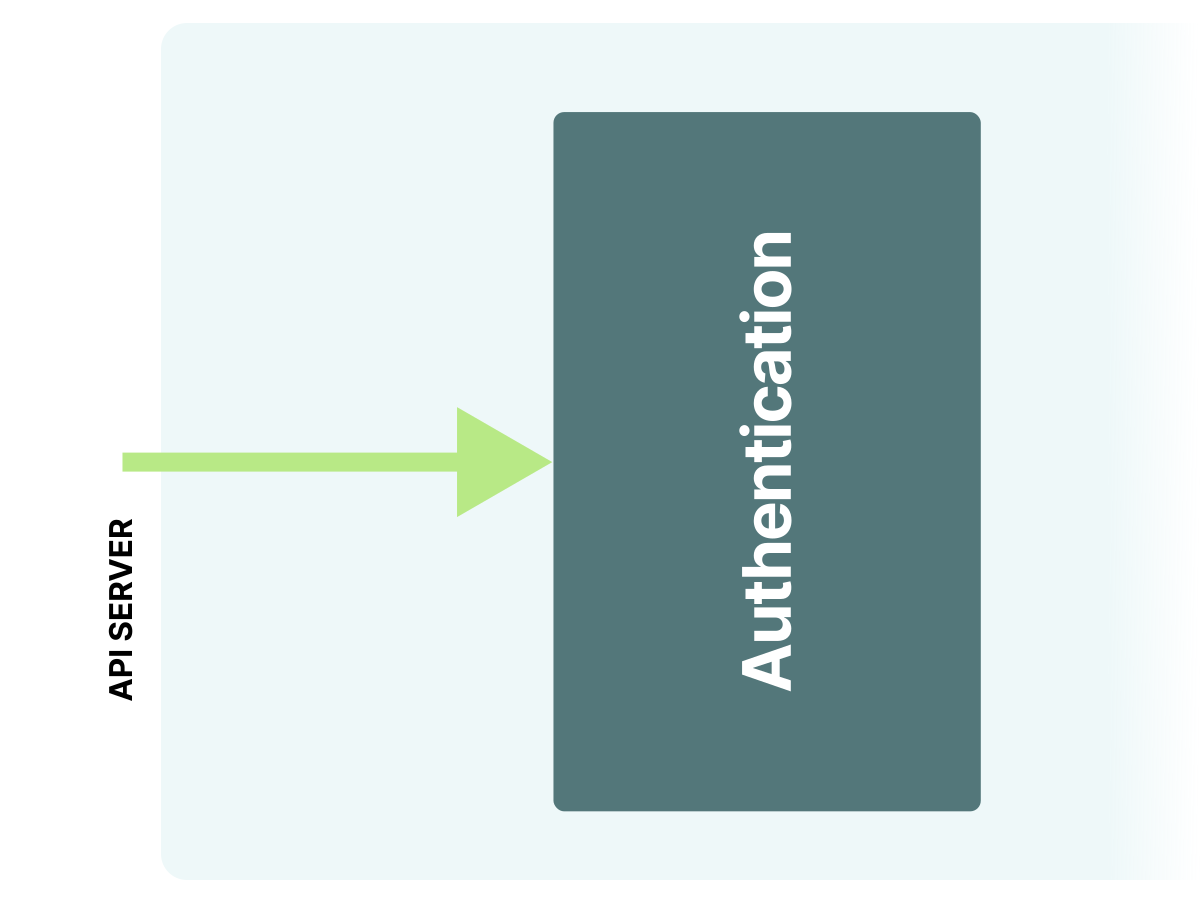 1/4
1/4Even the authentication module isn't a single component.
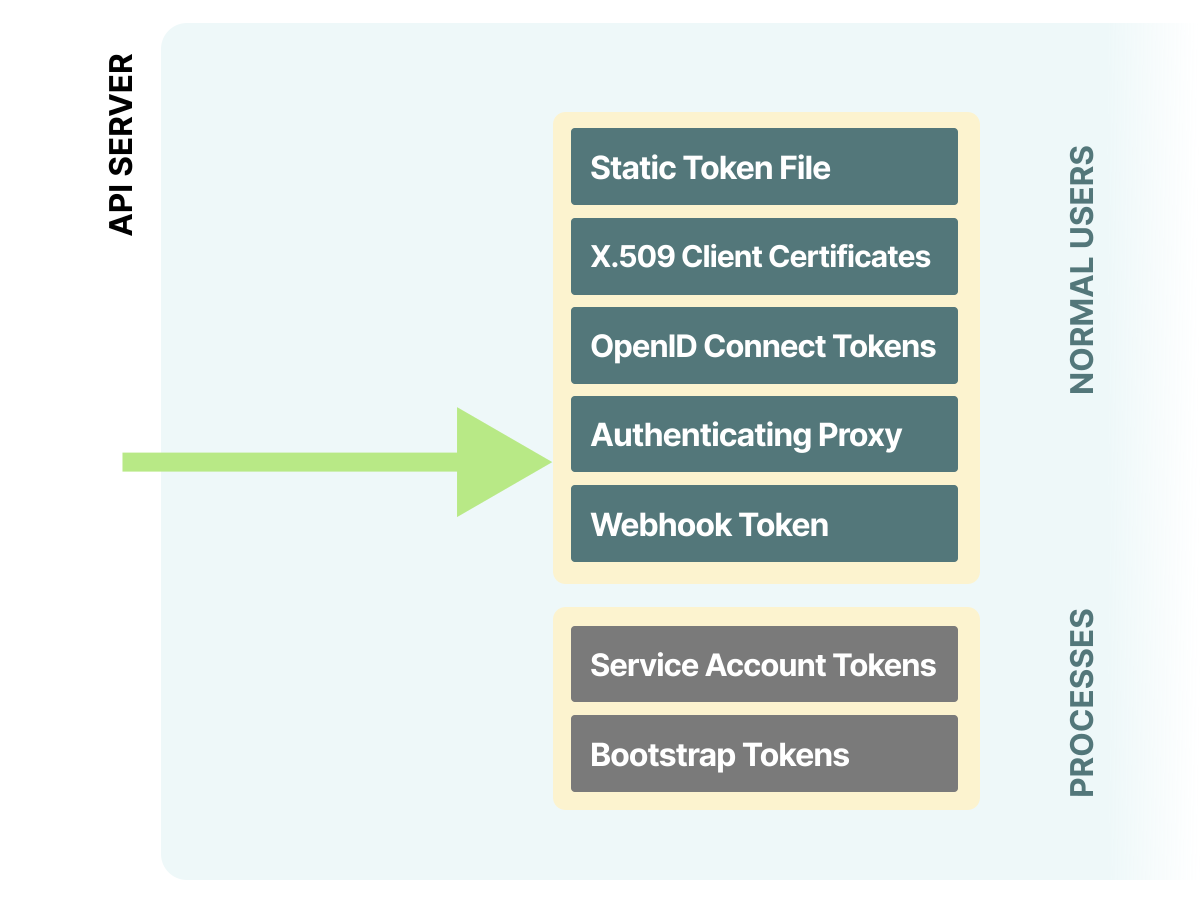 2/4
2/4Instead, the authentication is made of several authentication plugins.
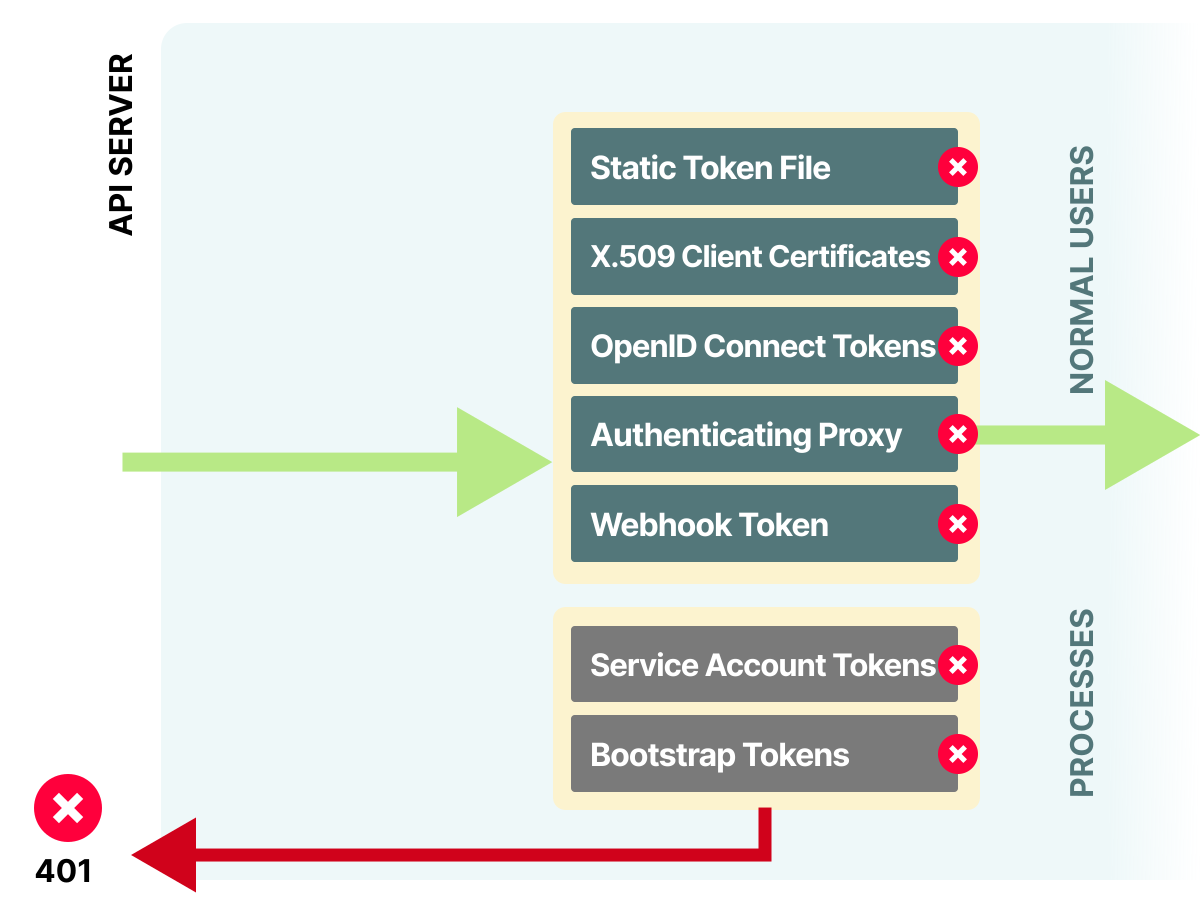 3/4
3/4When a request is received, the configured authenticators try to identify it. If all fail, the request is rejected or treated as anonymous.
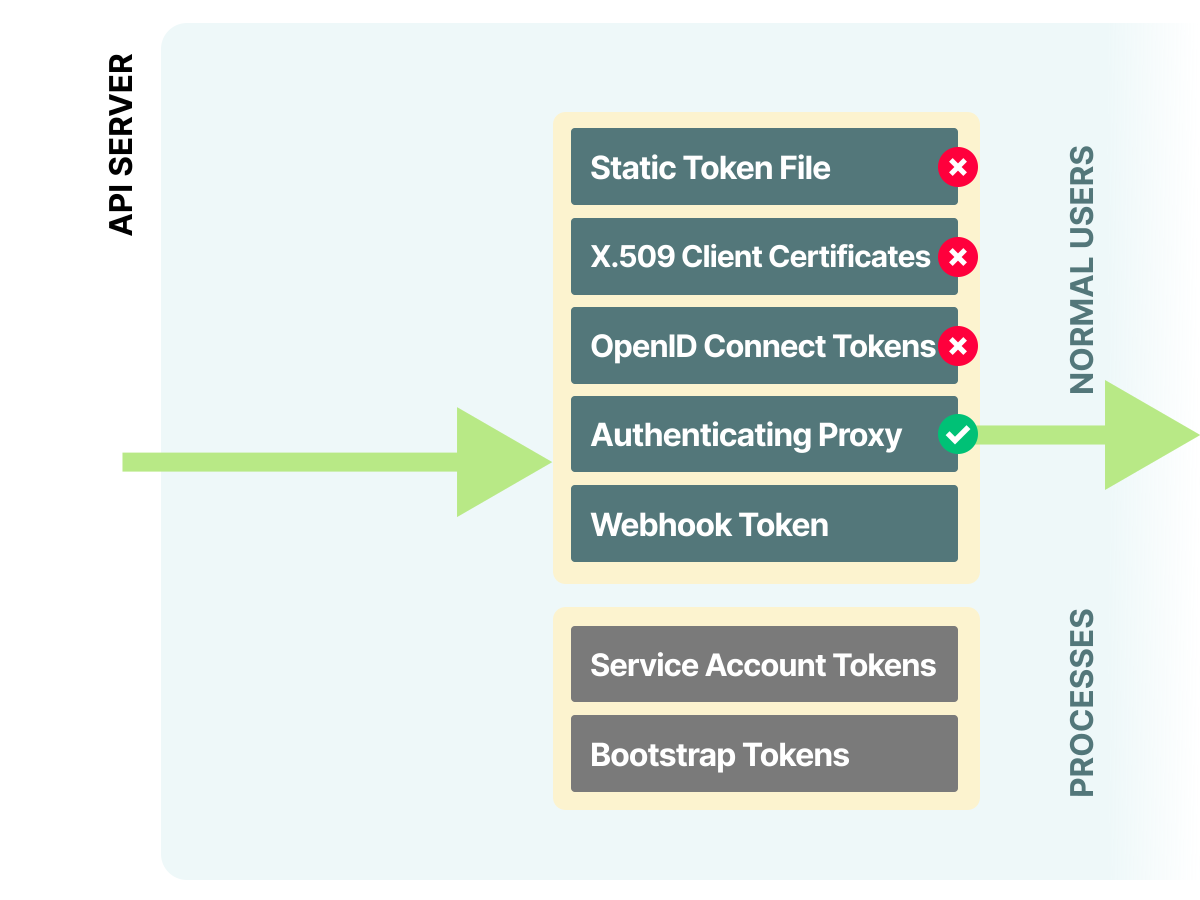 4/4
4/4As long as one succeeds, the request is passed to the authorization module.
Now that you've covered external users, let's investigate how Kubernetes manages workload identities.
Managing Kubernetes internal identities with Service Accounts
In Kubernetes, workloads are assigned identities called Service Accounts.
Those identities are Kubernetes objects and are usually assigned to Pods.
When the app makes a request to the kube-apiserver, it can verify its identity by sharing a signed token linked to its Service Account.
Let's create a namespace and a Service Account:
bash
kubectl create namespace authn-demo

namespace/authn-demo created

kubectl -n authn-demo apply -f - <<'EOF'
apiVersion: v1
kind: ServiceAccount
metadata:
  name: test
EOF
serviceaccount/test created
And inspect the resource with:
bash
kubectl -n authn-demo get serviceaccount test -o yaml
apiVersion: v1
kind: ServiceAccount
metadata:
  annotations:
    kubectl.kubernetes.io/last-applied-configuration: |
      {"apiVersion":"v1","kind":"ServiceAccount","metadata":{"annotations":{},"name":"test","namespace":"authn-demo"}}
  creationTimestamp: "2026-05-24T18:59:22Z"
  name: test
  namespace: authn-demo
  resourceVersion: "137589"
  uid: 2315d113-1659-4233-a757-196b311bfd2f
Let's assign this identity to a pod and try to issue a request to the Kubernetes API.
api-client.yaml
apiVersion: v1
kind: Pod
metadata:
  name: api-client
spec:
  serviceAccountName: test
  containers:
  - image: curlimages/curl:8.20.0
    name: curl
    command: ['sleep', '3600']
You can submit the resource to the cluster with:
bash
kubectl -n authn-demo apply -f - <<'EOF'
apiVersion: v1
kind: Pod
metadata:
  name: api-client
spec:
  serviceAccountName: test
  containers:
  - image: curlimages/curl:8.20.0
    name: curl
    command: ['sleep', '3600']
EOF
pod/api-client created

kubectl -n authn-demo wait --for=condition=Ready pod/api-client --timeout=120s
pod/api-client condition met
Let's issue the request from inside the Pod with:
bash
kubectl -n authn-demo exec api-client -- sh -c '
APISERVER=https://kubernetes.default.svc
SERVICEACCOUNT=/var/run/secrets/kubernetes.io/serviceaccount
CACERT=${SERVICEACCOUNT}/ca.crt
TOKEN=$(cat ${SERVICEACCOUNT}/token)
curl -sS --cacert ${CACERT} --header "Authorization: Bearer ${TOKEN}" -X GET ${APISERVER}/api
'
{
  "kind": "APIVersions",
  "versions": [
    "v1"
  ],
  "serverAddressByClientCIDRs": [
    {
      "clientCIDR": "0.0.0.0/0",
      "serverAddress": "192.168.49.2:8443"
    }
  ]
}
It worked!
Where did the token come from?
Generating Service Account tokens
Kubernetes uses the TokenRequest API and projected volumes for Pod Service Account tokens.
The kubelet requests a token from the API server, mounts it into the Pod, and refreshes it before it expires.
The token is not injected in a Secret; instead, it is mounted in the Pod as a projected volume.
How is the token mounted, though?
Let's inspect the Pod definition:
bash
kubectl -n authn-demo get pod api-client -o yaml
apiVersion: v1
kind: Pod
metadata:
  name: api-client
  namespace: authn-demo
spec:
  containers:
  - image: curlimages/curl:8.20.0
    name: curl
    volumeMounts:
    - mountPath: /var/run/secrets/kubernetes.io/serviceaccount
      name: kube-api-access-n89hp
      readOnly: true
  serviceAccountName: test
  volumes:
  - name: kube-api-access-n89hp
    projected:
      defaultMode: 420
      sources:
      - serviceAccountToken:
          expirationSeconds: 3607
          path: token
      - configMap:
          items:
          - key: ca.crt
            path: ca.crt
          name: kube-root-ca.crt
      - downwardAPI:
          items:
          - fieldRef:
              apiVersion: v1
              fieldPath: metadata.namespace
            path: namespace
A lot is going on here, so let's unpack the definition.
- There's a
kube-api-access-n89hpvolume declared (the suffix is randomly generated by Kubernetes). - The volume is mounted as read-only on
/var/run/secrets/kubernetes.io/serviceaccount.
The Volume declaration is interesting because it uses the projected field.
A projected volume is a volume that combines several volume sources into one directory.
Please note that not all volumes can be combined into a projected volume. Kubernetes supports projected sources such as
secret,downwardAPI,configMap, andserviceAccountToken;clusterTrustBundleandpodCertificateare also available as feature-gated projected sources.In Kubernetes 1.36,clusterTrustBundlerequires theClusterTrustBundleandClusterTrustBundleProjectionfeature gates, plus--runtime-config=certificates.k8s.io/v1beta1/clustertrustbundles=true;podCertificaterequires thePodCertificateRequestfeature gate and--runtime-config=certificates.k8s.io/v1beta1/podcertificaterequests=true.
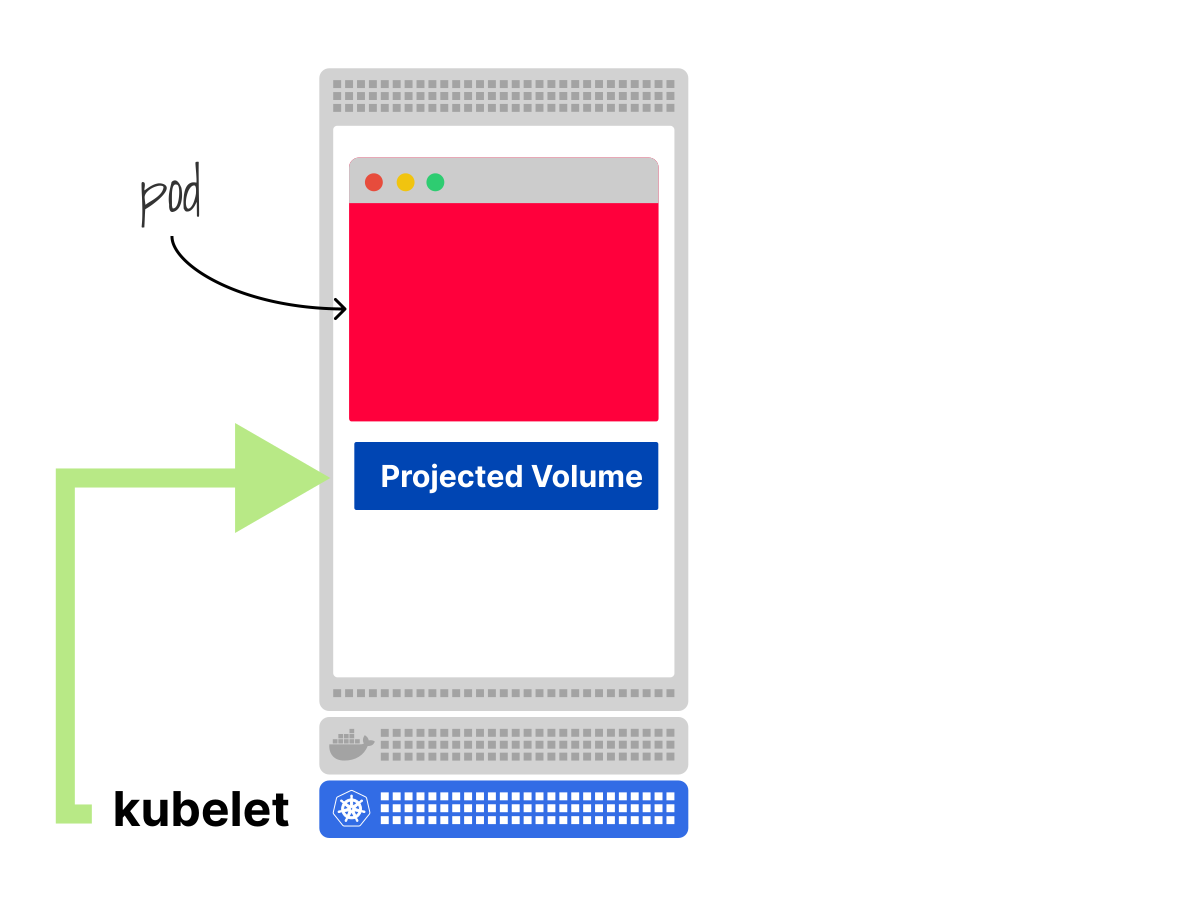 1/2
1/2The kubelet mounts the projected volume in the container.
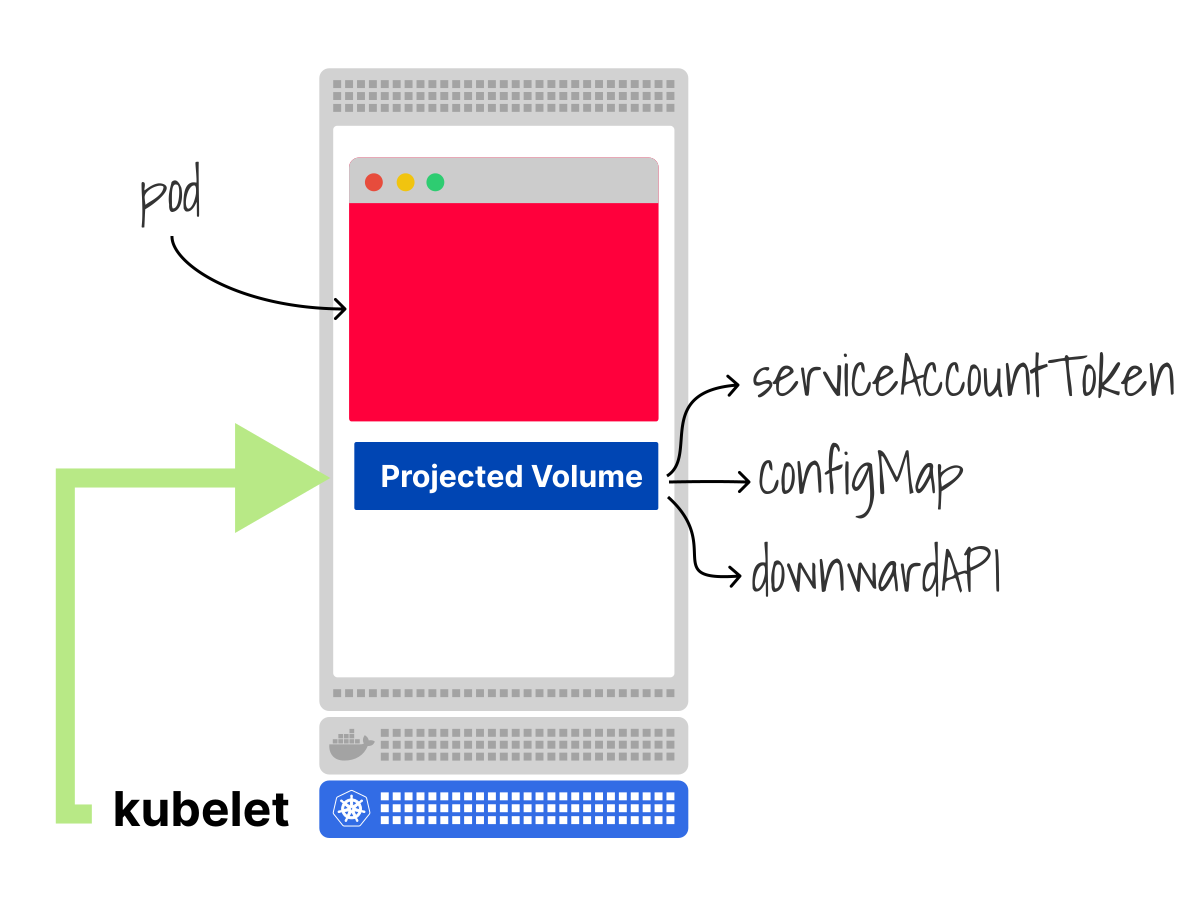 2/2
2/2Projected volumes are a combination of several volumes into one.
In this particular case, the projected volume is a combination of:
- A
serviceAccountTokenvolume mounted on the pathtoken. - A
configMapvolume. - The
downwardAPIvolume is mounted on the pathnamespace.
What are those volumes?
The serviceAccountToken volume is a special volume source that projects a token for the Pod's Service Account.
This is used to populate the file /var/run/secrets/kubernetes.io/serviceaccount/token with the correct token.
The ConfigMap volume is a volume that mounts all the keys in the ConfigMap as files in the mount directory.
The file's content is the value of the corresponding key (e.g. if the key-value is replicas: 1, a replicas file is created with the content of 1).
In this case, the ConfigMap volume mounts the ca.crt certificate necessary to call the Kubernetes API.
The downwardAPI volume is a special volume that uses the downward API to expose information about the Pod to its containers.
In this case, it is used to expose the Pod namespace to the container as a file.
You can verify that it works from within the pod with:
bash
kubectl -n authn-demo exec api-client -- cat /var/run/secrets/kubernetes.io/serviceaccount/namespace

authn-demo
Excellent!
Why use projected tokens instead of token Secrets?
There are a few reasons, but it boils down to:
- Tokens created with a Secret don't expire or rotate automatically.
- Secret token creation is asynchronous. This introduces race conditions in scripts that create a Service Account and immediately retrieve a token from the Secret.
- TokenRequest tokens can be scoped to audiences and bound to objects such as Pods.
But what if you need a token but don't need a pod?
Is there a way to obtain the token without mounting the projected volume?
Kubectl has a command to do just that:
bash
kubectl -n authn-demo create token test --duration=10m

eyJhbGciOiJSUzI1NiIsImtpZCI6Ino3THZRRXk1b083NXdZO...
(truncated)
That token has a bounded lifetime, just like the one mounted by the kubelet. The API server may return a shorter or longer lifetime than the one requested.
You will see a different output if you execute the same command again.
Is the token just a long string?
Projected Service Account tokens are JWT tokens
Those are signed JWT tokens.
To inspect it, you can decode the token or use a JWT debugger.
The output is divided into three parts:
- The header describes how the token was signed.
- The payload — actual data of the token.
- The signature is used to verify that the token wasn't modified.
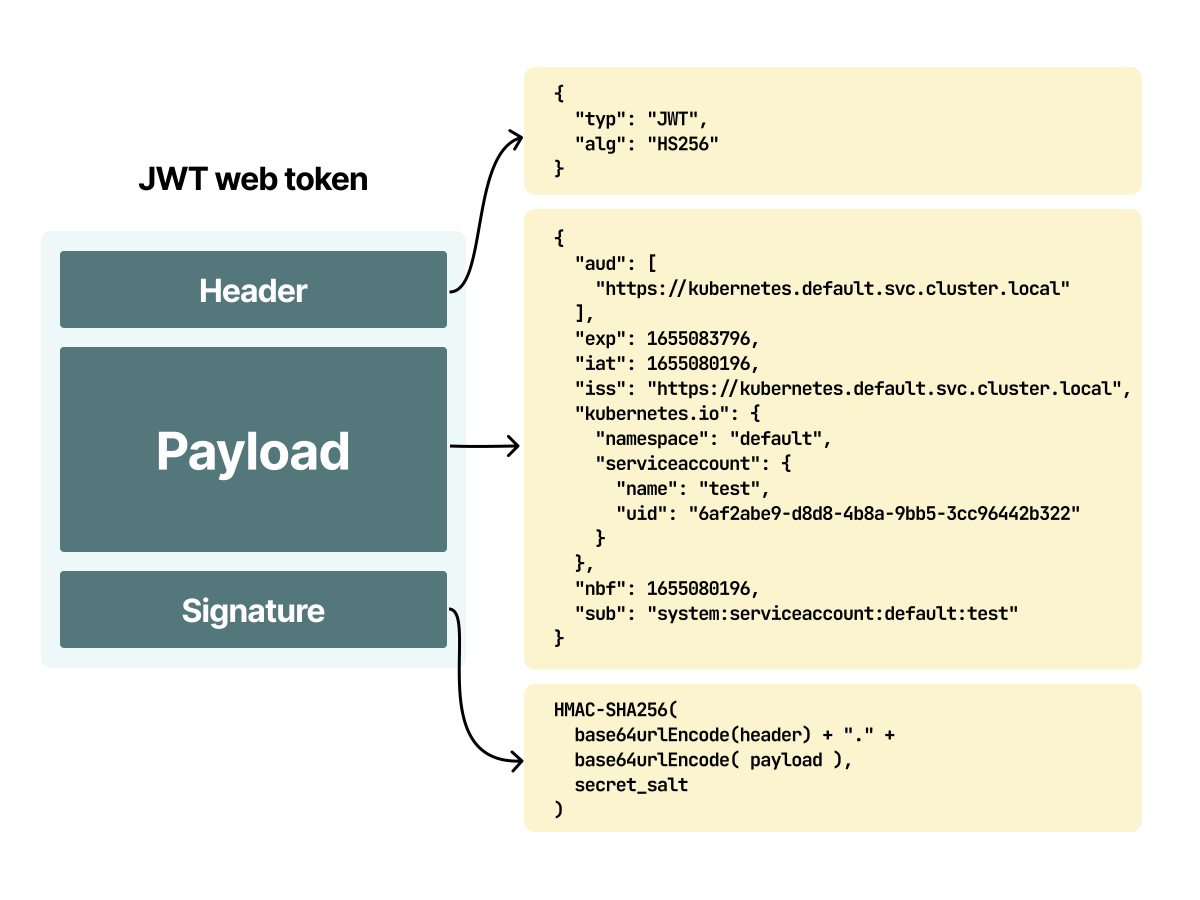
If you inspect the payload for the token, you will find output similar to this:
token.json
{
  "aud": [
    "https://kubernetes.default.svc.cluster.local"
  ],
  "exp": 1779649828,
  "iat": 1779649228,
  "iss": "https://kubernetes.default.svc.cluster.local",
  "jti": "b781a66f-b69b-459c-a7e9-a4f164af3b8c",
  "kubernetes.io": {
    "namespace": "authn-demo",
    "serviceaccount": {
      "name": "test",
      "uid": "2315d113-1659-4233-a757-196b311bfd2f"
    }
  },
  "nbf": 1779649228,
  "sub": "system:serviceaccount:authn-demo:test"
}
There are a few fields worth discussing:
subis the "subject". This token belongs to thetestService Account in theauthn-demonamespace.audis the "audience". This token is intended for the Kubernetes API server.issis the "issuer". Kubernetes created the token, so the URL points to the configured issuer.kubernetes.iois a custom field that contains details for Kubernetes.
It's worth noting that the JWT contains even more details when it's attached to a pod.
If you retrieve the token from the api-client Pod, you can see the following:
api-client-token.json
{
  "aud": [
    "https://kubernetes.default.svc.cluster.local"
  ],
  "exp": 1811185174,
  "iat": 1779649174,
  "iss": "https://kubernetes.default.svc.cluster.local",
  "jti": "0d9fa51e-3438-46cf-8ce7-696bdf0516ba",
  "kubernetes.io": {
    "namespace": "authn-demo",
    "node": {
      "name": "minikube",
      "uid": "8c3d70b6-73d1-4fdc-8da0-9f350b8f2532"
    },
    "pod": {
      "name": "api-client",
      "uid": "2266948c-2852-4edc-8173-db9acabeabbe"
    },
    "serviceaccount": {
      "name": "test",
      "uid": "2315d113-1659-4233-a757-196b311bfd2f"
    },
    "warnafter": 1779652781
  },
  "nbf": 1779649174,
  "sub": "system:serviceaccount:authn-demo:test"
}
The name and UUID of the Pod were included in the payload. The token can also include node details.
But where is this information used, exactly?
Not only can you check if the token is signed and valid, but you can also tell the difference between two identical Pods from the same Deployment.
This is useful because:
- The token can be bound to a specific Pod and invalidated when that Pod is deleted.
- From a single API call, we can retrieve the identity down to the namespace, Service Account and Pod.
- RBAC permissions are still granted to the Service Account, but token validation can include the bound object.
Workload identities in Kubernetes: how AWS integrates IAM with Kubernetes
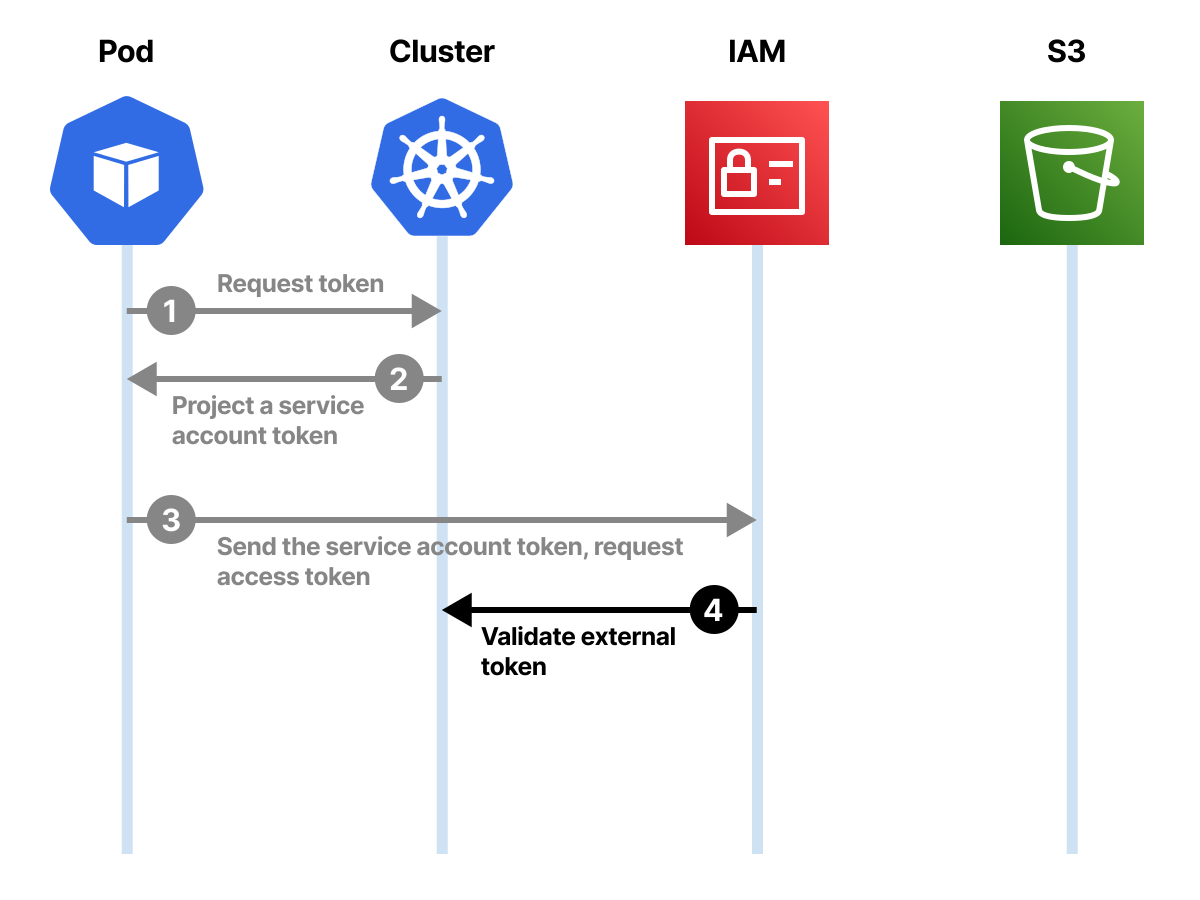
As an example, imagine you host your Kubernetes cluster on Amazon Web Services and want to upload a file to an S3 bucket from your cluster.
Other cloud providers implement similar workload identity patterns, but this section focuses on AWS.
You might need to assign an IAM role to do so, but an IAM role is not a native Kubernetes Pod field.
Amazon EKS provides an integration between Kubernetes and IAM called IAM Roles for Service Accounts (IRSA), which uses federated identities and projected Service Account tokens.
Amazon EKS also provides EKS Pod Identity, which is simpler for many EKS clusters because it doesn't use OIDC providers.
IRSA is still useful to understand because it shows how projected Service Account tokens federate with external systems.
Here's how it works.
- You create an IAM Policy which describes what resources you have access to (e.g. you can upload files to a remote bucket).
- You create an IAM Role with that policy and trust conditions for a Kubernetes Service Account.
- You associate the IAM Role with the Kubernetes Service Account.
- The Pod receives a projected Service Account token with
sts.amazonaws.comas its audience.
On EKS, the admission webhook used for IRSA injects equivalent environment variables and a projected token volume. A simplified Pod after mutation looks like this:
pod-s3.yaml
apiVersion: v1
kind: Pod
metadata:
  name: myapp
spec:
  serviceAccountName: my-serviceaccount
  containers:
  - name: myapp
    image: myapp:1.2
    env:
    - name: AWS_ROLE_ARN
      value: arn:aws:iam::111122223333:role/my-role
    - name: AWS_WEB_IDENTITY_TOKEN_FILE
      value: /var/run/secrets/eks.amazonaws.com/serviceaccount/token
    volumeMounts:
    - mountPath: /var/run/secrets/eks.amazonaws.com/serviceaccount
      name: aws-iam-token
      readOnly: true
  volumes:
  - name: aws-iam-token
    projected:
      defaultMode: 420
      sources:
      - serviceAccountToken:
          audience: sts.amazonaws.com
          expirationSeconds: 86400
          path: token
If your app uses the AWS SDK to upload to S3, this is enough to make it work.
The AWS SDK uses those two environment variables to call AWS STS and retrieve temporary AWS credentials.
But how?
Kubernetes, not AWS, generated the token mounted in the Pod.
How does AWS know that this token is valid?
It doesn't ask the Kubernetes API server directly.
So here is what happens.
The AWS SDK uses the Role ARN and the projected Service Account token and exchanges them for temporary AWS credentials.
Let me explain if you don't use the AWS SDK or want to know what happens.
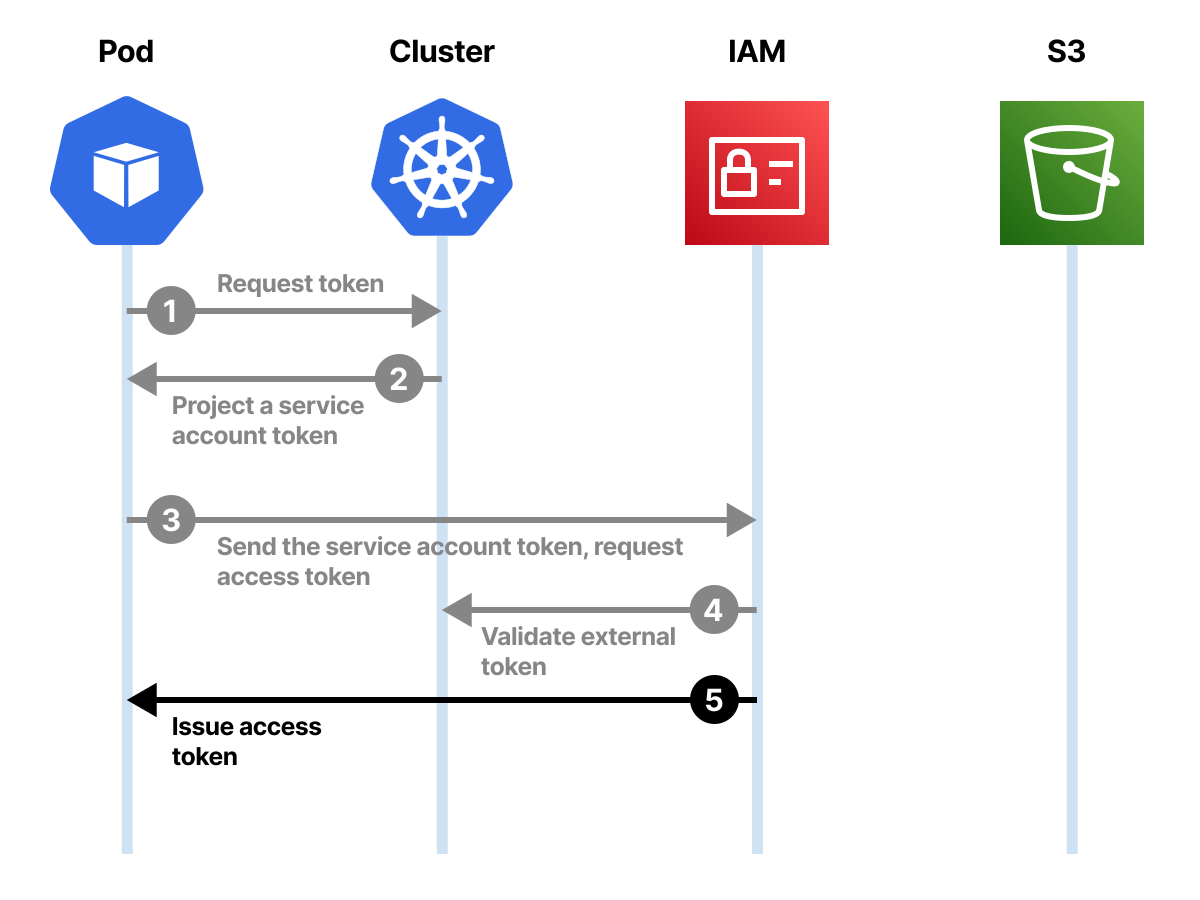
The app makes a request to AWS STS to assume a role with web identity.
When AWS STS receives the token, it verifies that the JWT token is valid using the IAM OIDC provider configured for the cluster.
The issuer (iss), audience (aud), subject (sub), signature, and IAM role trust policy all matter.
On EKS, the issuer is a public OIDC endpoint for the cluster:
eks-token.json
{
  "aud": [
    "sts.amazonaws.com"
  ],
  "iss": "https://oidc.eks.us-east-1.amazonaws.com/id/EXAMPLED539D4633E53DE1B716D3041E",
  "sub": "system:serviceaccount:default:my-serviceaccount"
}
For a self-managed cluster, the issuer URL and JWKS URI must be HTTPS endpoints that AWS can reach. You configure the issuer with the --service-account-issuer flag on the API server, and configure public discovery/JWKS endpoints, for example with --service-account-jwks-uri when the API server address is not externally reachable.
The issuer URL exposes OIDC discovery metadata, and AWS first reads the discovery document:
{Issuer URL}/.well-known/openid-configuration— also known as the OIDC discovery document. This contains metadata about the issuer's configuration.
The discovery document points to a JWKS URI. For Kubernetes API server discovery, the default JWKS endpoint is {Issuer URL}/openid/v1/jwks, unless you override it with --service-account-jwks-uri. This contains the public signing key(s) to verify the authenticity of the Service Account token.
The Kubernetes API server exposes compatible discovery and JWKS endpoints, but external systems can use them only if the issuer URL and JWKS URI are reachable. EKS hosts public OIDC discovery endpoints for this purpose.
Let's inspect the JWKS (JSON Web Key Set) endpoint:
bash
kubectl get --raw /openid/v1/jwks
{
  "keys": [
    {
      "use": "sig",
      "kty": "RSA",
      "kid": "z7LvQEy5oO75wY8z5u3anMypWMAodvEk6vSyNLeJ818",
      "alg": "RS256",
      "n": "s2JWe-uufZ7y...
      "e": "AQAB"
    }
  ]
}
AWS retrieves the public keys and verifies the token signature.
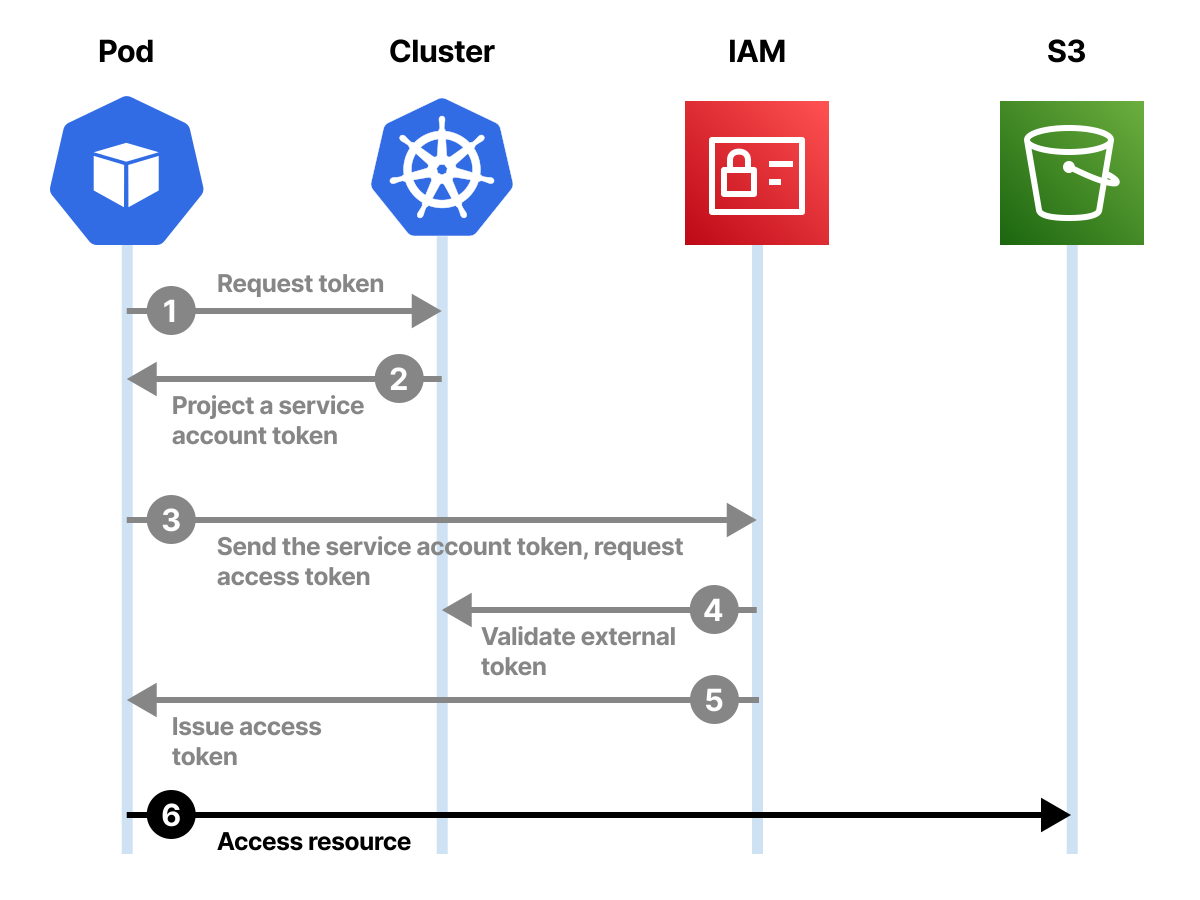
If the token is valid, AWS STS returns temporary credentials that have the permissions of the IAM Role (e.g. uploading a file to an S3 bucket) which looks like this:
sts-response.json
{
    "Credentials": {
        "AccessKeyId": "ASIAWY4CVPOBS4OIBWNL",
        "SecretAccessKey": "02n52u8Smc76…",
        "SessionToken": "IQoJb3JpZ…",
        "Expiration": "<expiration-timestamp>"
    },
    "SubjectFromWebIdentityToken": "system:serviceaccount:default:my-serviceaccount",
    "AssumedRoleUser": {
        "AssumedRoleId": "AROAWY4CVPOBXUSBA5C2B:myapp",
        "Arn": "arn:aws:sts::111122223333:assumed-role/my-role/myapp"
    },
    "Provider": "arn:aws:iam::111122223333:oidc-provider/oidc.eks.us-east-1.amazonaws.com/id/EXAMPLE",
    "Audience": "sts.amazonaws.com"
}
You can use the credentials to access the S3 bucket after that.
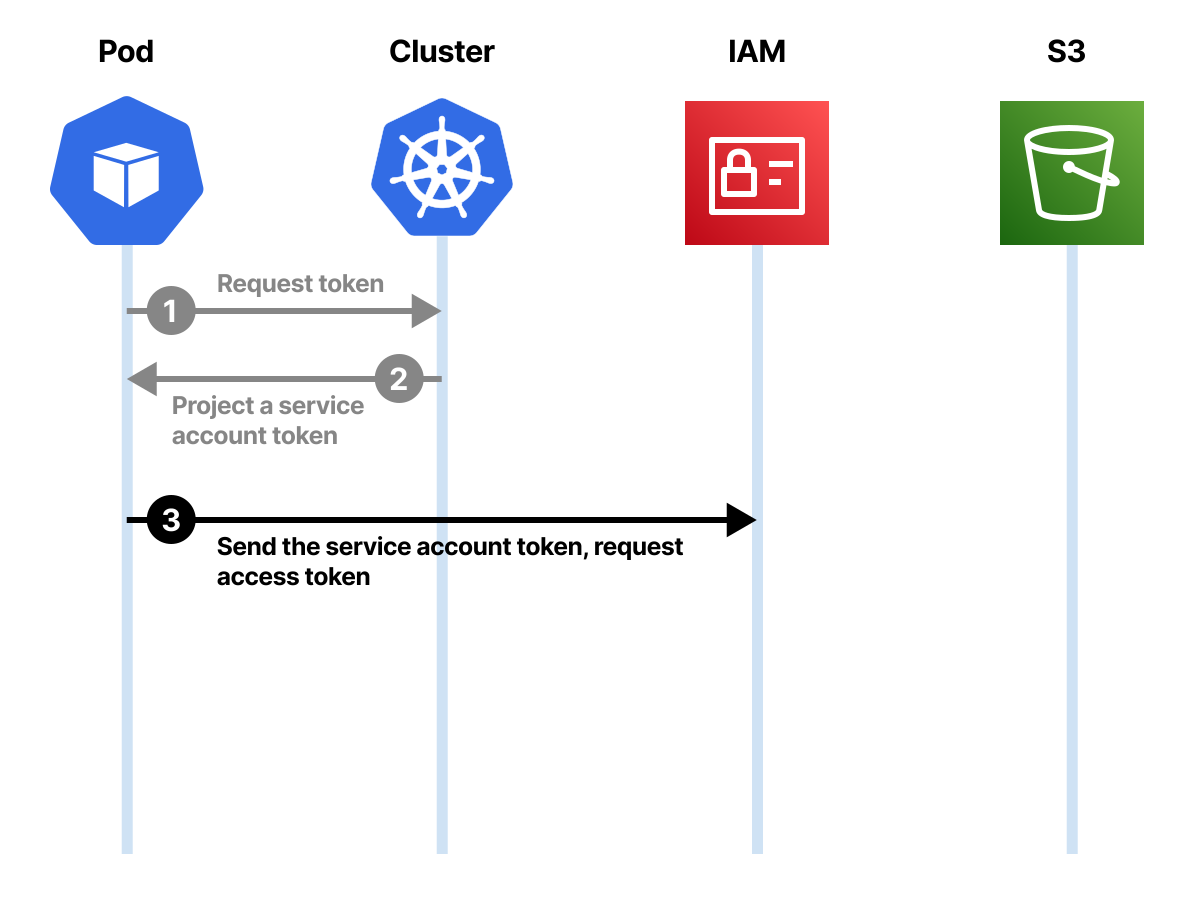 1/4
1/4Projected Service Account tokens are identities valid within a Kubernetes cluster. However, you could exchange them for credentials elsewhere.
 2/4
2/4AWS STS can receive such tokens and verify them with the OIDC issuer and JWKS endpoint.
 3/4
3/4If the identity is valid and the IAM trust policy matches, AWS STS can issue temporary credentials.
 4/4
4/4The temporary credentials can be used to access services in Amazon Web Services.
The managed EKS process is documented in the official IRSA and EKS Pod Identity documentation.
This is great if you need to validate access to resources hosted outside the cluster, but should you go through the same hops when it comes to services in the cluster?
That's not necessary.
Validating Projected Service Account Tokens with the Token Review API
Tokens that are created in the cluster can also be validated from within with the Token Review API.
Let's create a token for the Service Account with:
bash
TOKEN=$(kubectl -n authn-demo create token test --duration=10m)Submit a TokenReview request and include the token:
bash
kubectl create -f - -o yaml <<EOF
apiVersion: authentication.k8s.io/v1
kind: TokenReview
spec:
  token: ${TOKEN}
EOF
apiVersion: authentication.k8s.io/v1
kind: TokenReview
metadata: {}
spec:
  token: eyJhbGciOiJSUzI1NiIsImtpZCI6Ino3THZRRXk1b083NXdZOHo1dTNhbk15cFdNQW9kdkVrNnZTeU5MZUo4MTgifQ...
status:
  audiences:
  - https://kubernetes.default.svc.cluster.local
  authenticated: true
  user:
    extra:
      authentication.kubernetes.io/credential-id:
      - JTI=ebc20555-880d-48d8-bda2-9a6e0894c7fd
    groups:
    - system:serviceaccounts
    - system:serviceaccounts:authn-demo
    - system:authenticated
    uid: 2315d113-1659-4233-a757-196b311bfd2f
    username: system:serviceaccount:authn-demo:test
TokenReview objects are not persisted to etcd; this is a request/response API.
The Token Review API works like the AWS STS integration in the sense that we can verify the identity and retrieve the details from a single token.
However, this is a more straightforward single API call rather than a more complex OIDC flow.
The token can be further customised using audiences to scope where the access can be used.
Generating Secrets for Service Accounts
Kubernetes does not generate long-lived token Secrets automatically for Service Accounts.
However, you can manually create a Service Account token Secret using an annotation.
This is not recommended for most workloads because the token is static and does not expire automatically.
For example, the Service Account test has no token Secret.
But you can create a Secret (and token) with:
bash
kubectl -n authn-demo apply -f - <<'EOF'
apiVersion: v1
kind: Secret
metadata:
  name: test-token
  annotations:
    kubernetes.io/service-account.name: test
type: kubernetes.io/service-account-token
EOF
secret/test-token created
If you inspect the Secret, you can spot the token:
bash
kubectl -n authn-demo describe secret test-token

Name:         test-token
Namespace:    authn-demo
Labels:       <none>
Annotations:  kubernetes.io/service-account.name: test
              kubernetes.io/service-account.uid: 2315d113-1659-4233-a757-196b311bfd2f

Type:  kubernetes.io/service-account-token

Data
====
ca.crt:     1111 bytes
namespace:  10 bytes
token:      eyJhbGciOiJSUzI1NiIsImtpZCI6Ino3THZRRXk1b083NXdZOHo1dTNhbk15cFdNQW9kdkVrNnZTeU5MZUo4MTgifQ...
You can also verify the identity of the token with the Token Review API:
bash
TOKEN=$(kubectl -n authn-demo get secret test-token -o jsonpath='{.data.token}' | base64 -d)

kubectl create -f - -o yaml <<EOF
apiVersion: authentication.k8s.io/v1
kind: TokenReview
spec:
  token: ${TOKEN}
EOF
apiVersion: authentication.k8s.io/v1
kind: TokenReview
metadata: {}
spec:
  token: eyJhbGciOiJSUzI1NiIsImtpZCI6Ino3THZRRXk1b083NXdZOHo1dTNhbk15cFdNQW9kdkVrNnZTeU5MZUo4MTgifQ...
status:
  audiences:
  - https://kubernetes.default.svc.cluster.local
  authenticated: true
  user:
    groups:
    - system:serviceaccounts
    - system:serviceaccounts:authn-demo
    - system:authenticated
    uid: 2315d113-1659-4233-a757-196b311bfd2f
    username: system:serviceaccount:authn-demo:test
Notice that the Secret-based token's TokenReview response does not include the authentication.kubernetes.io/credential-id extra field — that field only appears for short-lived TokenRequest tokens, not static Secret tokens.
If you inspect the token payload, you will notice that this token has no expiry:
{
  "iss": "kubernetes/serviceaccount",
  "kubernetes.io/serviceaccount/namespace": "authn-demo",
  "kubernetes.io/serviceaccount/secret.name": "test-token",
  "kubernetes.io/serviceaccount/service-account.name": "test",
  "kubernetes.io/serviceaccount/service-account.uid": "2315d113-1659-4233-a757-196b311bfd2f",
  "sub": "system:serviceaccount:authn-demo:test"
}
This is a static Service Account token with no expiry claim.
It uses the fixed legacy issuer kubernetes/serviceaccount; TokenRequest and projected Service Account tokens use the configured --service-account-issuer value instead.
Bonus: which authentication plugin should you use?
Kubernetes has the following API server mechanisms for authenticating users:
- Static Token file.
- X.509 certificates.
- JWT/OpenID Connect.
- Authentication proxy.
- Webhook token authentication.
Which one should you use?
Static Tokens have some limitations:
- You need to know the name of all your users in advance.
- Editing the CSV file requires restarting the API server.
- Tokens do not expire.
Static tokens are not the best choice for a production environment.
Another option is to use X.509 client certificates.
With X.509 client certificates:
- The
kube-apiserveris configured to point to a Certificate Authority (CA) file with--client-ca-file=FILE. - The admin issues client certificates to external users. Those X.509 client certificates are self-contained and include the username and, optionally, groups.
- Users identify with the API server using a TLS client certificate.
- The
kube-apiserververifies the client certificate against the root CA. Then, it proceeds to extract the username and groups.
The workflow is similar to the static token, but there are some crucial differences:
- You can set an expiry date for the certificates.
- Creating new certificates doesn't require changing the flags of the API server.
- There is no CSV file. Certificates are issued outside the API server, or through the Kubernetes CertificateSigningRequest API.
However, X.509 client certificates have operational drawbacks:
- X.509 client certificates are often valid for long periods.
- Group membership is embedded in the certificate, so changing groups means issuing a new certificate.
- Rotating and distributing client certificates is usually more work than using an external identity provider.
Certificates are a good solution for emergencies where any other authentication mechanism is (temporarily unavailable).
You can use the X.509 certificate to access the cluster as a last resort.
Kubeadm configures client certificates for administrative kubeconfigs such as admin.conf.
Other than that, you'd be probably better off using OIDC as an authentication mechanism.
OpenID Connect is especially useful if you already have an OpenID Connect infrastructure where you manage your users — in that case, you can keep managing your Kubernetes users in the same way you manage all the other users in your organisation.
OpenID Connect providers issue JSON Web Tokens (JWTs).
That means they can be verified autonomously, without contacting the token's issuer for every request, and they also expire.
The remaining options to discuss are:
- Authentication proxy.
- Webhook token authentication.
- Exec credential plugins.
The Authenticating Proxy authentication plugin allows users to authenticate to Kubernetes through an external authenticating proxy transparently.
When users make a request to the Kubernetes cluster, the request is first intercepted by the authenticating proxy.
This authentication plugin is helpful if you already use an authenticating proxy in your organisation or if you want to implement a custom authentication method that is not supported by any of the other authentication plugins — this is because the authenticating proxy can implement any authentication method you like.
The Webhook Tokens authentication plugin allows users to authenticate to Kubernetes with an HTTP bearer token that is verified by an external custom authentication service.
The Webhook Token Authentication plugin is helpful if you want to implement a custom authentication method that is not provided by any other authentication plugins.
Exec credential plugins are different: they run on the client side. kubectl or client-go executes an external command that returns credentials, and the API server still validates those credentials using one of its configured authenticators, commonly OIDC or webhook token authentication.
Summary
In this article, you learned how the Kubernetes API server authenticates users in the cluster.
In particular:
- The difference between externally managed users and Kubernetes-managed workload identities.
- How the Kubernetes API server implements different authentication plugins to authenticate users, such as static token, bearer token, X.509 certificate, OIDC, etc.
- How Kubernetes assigns identities for workloads with Service Accounts.
- The difference between non-expiring tokens created through Secrets and bounded Service Account tokens created through the TokenRequest API.
- How the Projected volume combines several volumes into a single one.
- How to inspect Service Account tokens with a JWT inspector.
- How federated OIDC works and how it can be integrated with a cloud provider such as Amazon Web Services.
- How to use the Token Review API to verify Service Account tokens' validity within the cluster.
After the request is authenticated, it is passed to the authorization module.
You can follow the next part in this article about limiting access to Kubernetes resources with RBAC.