

Authentication between microservices using Kubernetes identities
June 2026
This is part 4 of 4 of the Authentication and authorization in Kubernetes. More
TL;DR: In this article, we will use Kubernetes Service Accounts and the TokenReview API to authenticate requests between two in-cluster services, then improve the setup with audience-bound projected Service Account tokens.
This is the third article in a four-part series about how a request travels through the Kubernetes API server.
When our infrastructure consists of several applications interacting with each other, we might run into the issue of securing communications between services to prevent unauthenticated requests.
Imagine having two apps:
- An API
- A data store
We might want the data store only to reply to requests to the API and reject requests from anywhere else.
How would the data store decide to allow or deny the request?
A popular approach is to request and pass identity tokens to every call within services.
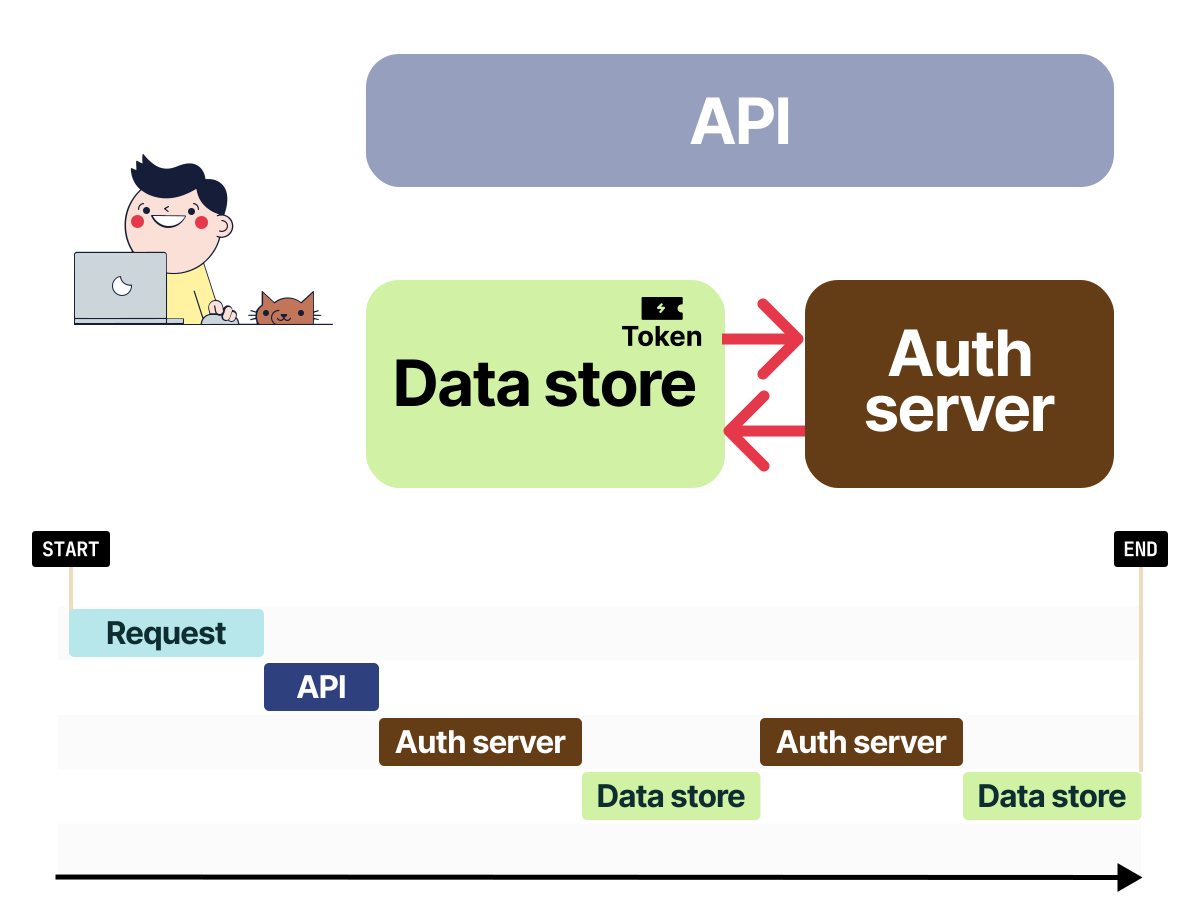
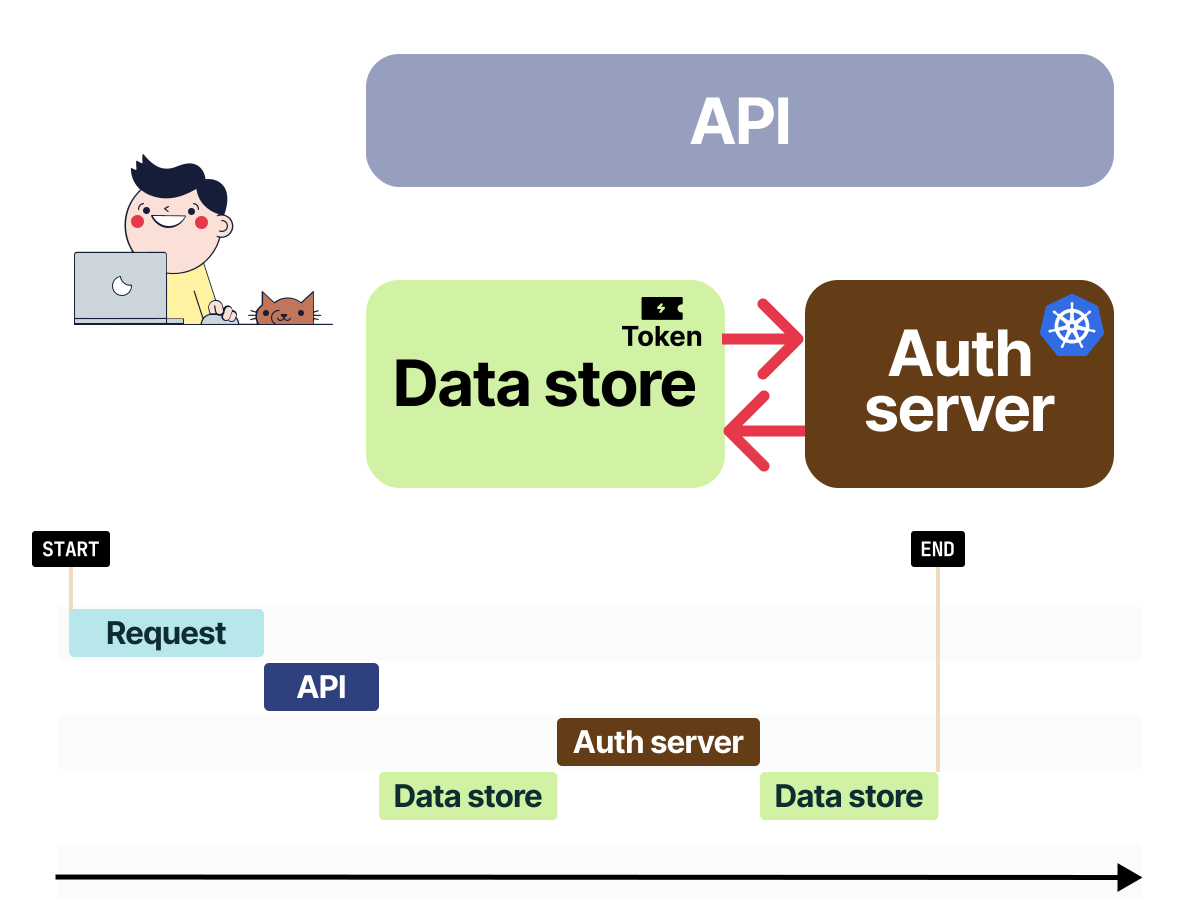
So instead of issuing a request to the data store directly, we might need to go through an Authentication service first, retrieve a token and use that to authenticate the request to the data store.
There is a specific context associated with the token that allows the data store to accept a token from the API service and to reject it from elsewhere.
This context is used to permit or deny the request.
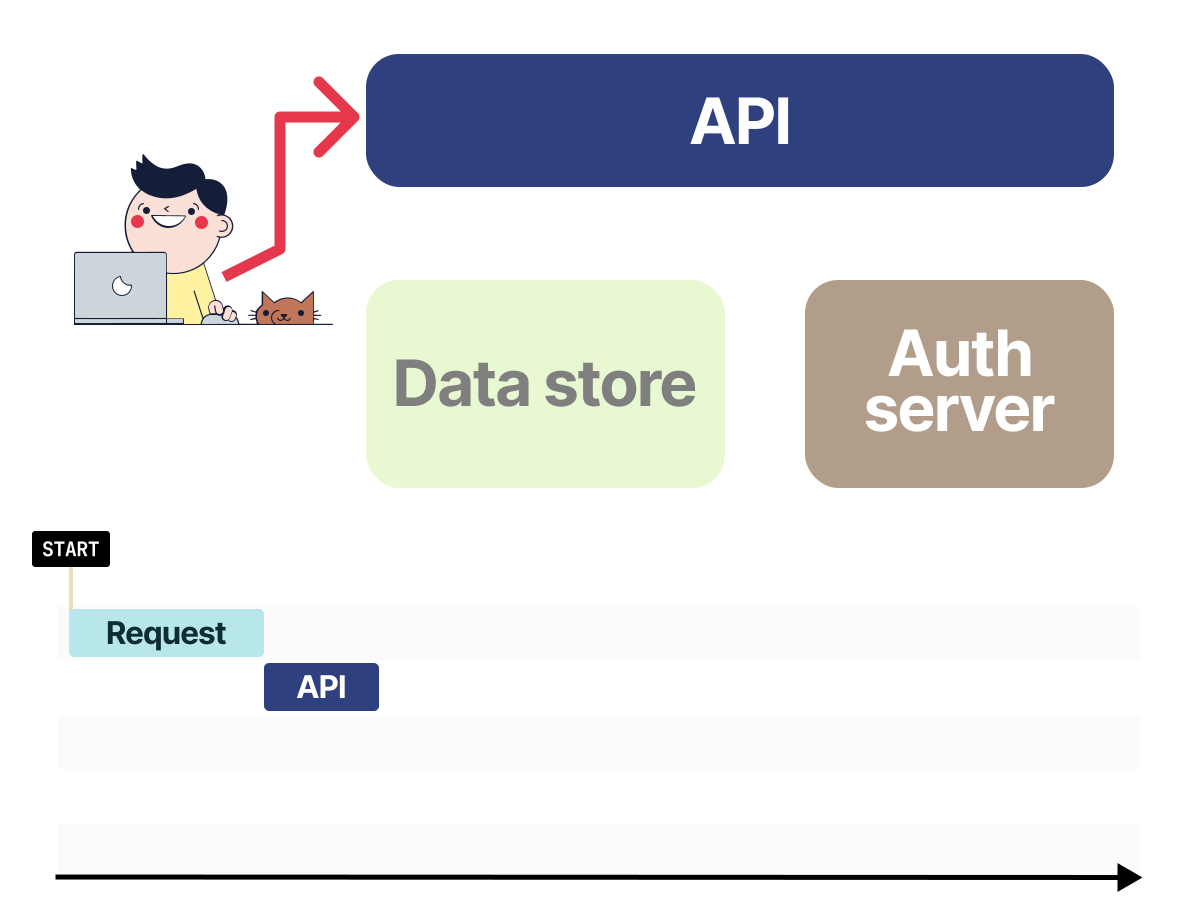 1/4
1/4Imagine making a request to the API component.
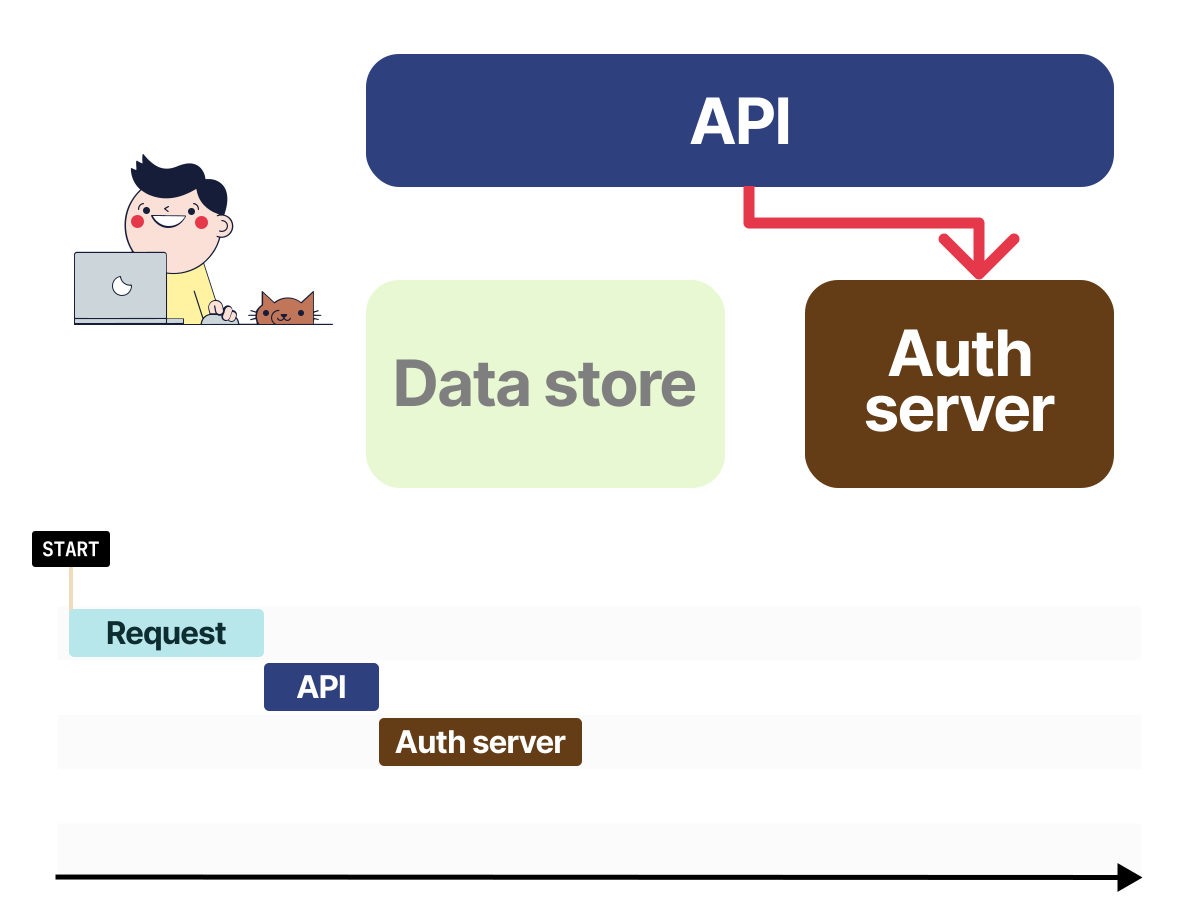 2/4
2/4The only way for the API to authenticate with the Data store is if it has a valid token. The API requests the token from the authorization server using its credentials.
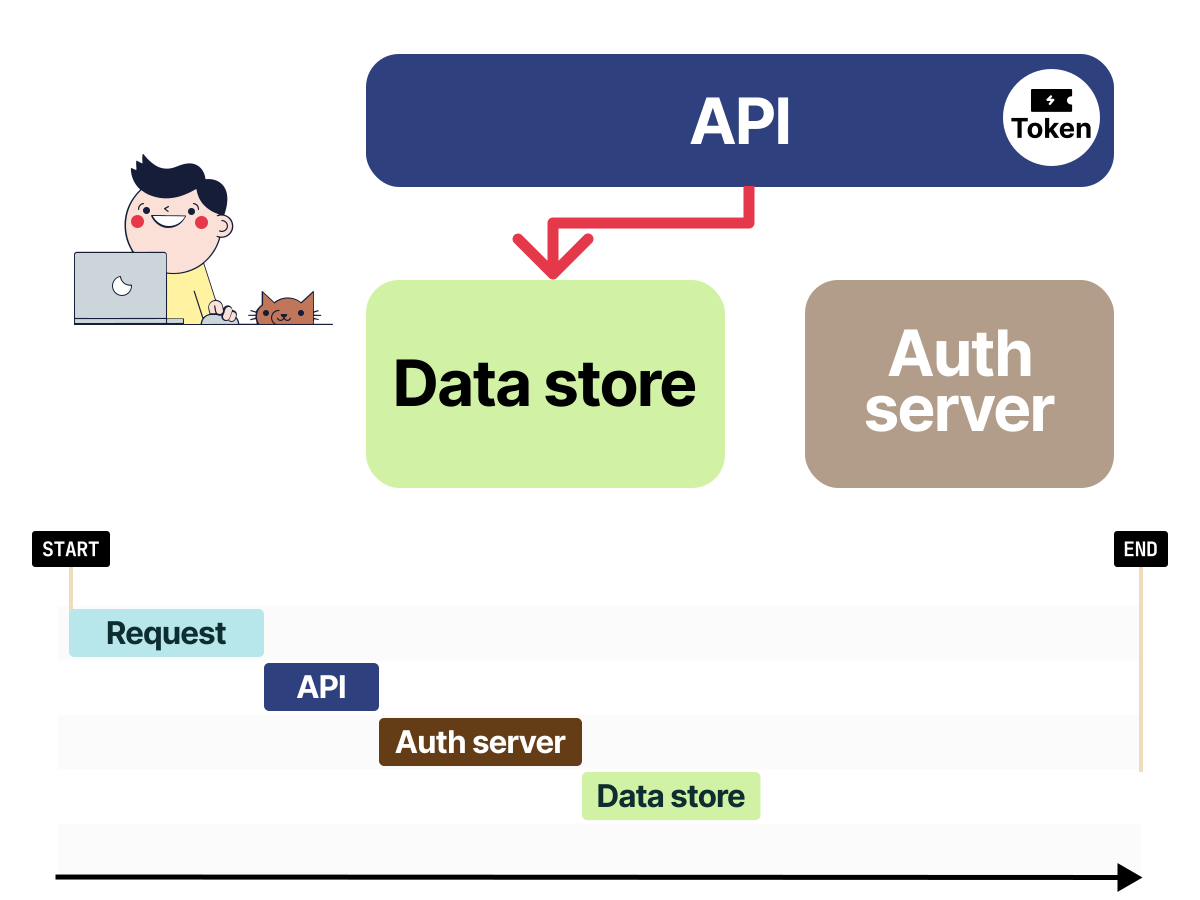 3/4
3/4The API makes a request to the data store and attaches the token as a proof of a valid identity.
 4/4
4/4The Data store validates the token with the authorization server before replying to the request.
We have several options when it comes to implementing this authentication mechanism:
- We could use static tokens that don't expire. In this case, there is no need for running a dedicated authentication server.
- We could set up an OAuth server.
- We could roll out our authentication and authorisation mechanism such as mutual TLS certificates.
All the authentication and authorisation servers have to do is to:
- Authenticate the caller - The caller should have a valid and verifiable identity.
- Generate a token with a limited scope, validity and the desired audience.
- Validate a token - Service to service communication is allowed only if the token is legit and the caller is accepted by the destination service.
Examples of dedicated software that lets us implement authentication and authorisation infrastructure are tools such as Keycloak or Dex.
When we use Keycloak, we first:
- Log in using our email and password — our identity is verified.
- A valid session is created for our user. The session might describe what groups we belong to.
- Every request is validated and we will be asked to log in again when it's invalid.
The same applies to two apps within our infrastructure.
- A backend component makes a request to Keycloak with its API key and secret to generate a session token.
- The backend makes a request to the second app using the session token.
- The second app retrieves the token from the request and validates it with Keycloak.
- If the token is valid, it replies to the request.
What we might not have noticed is that Kubernetes offers primitives for implementing authentication and authorization to the Kubernetes API with Service Accounts, Roles and RoleBindings.
Kubernetes as a token issuer and validator
In Kubernetes, we assign identities using Service Accounts.
Pods can use those identities as a mechanism to authenticate to the API and issue requests.
Service Accounts are then linked to Roles that grant access to resources.
If a Role grants access to create and delete Pods, we won't be able to amend Secrets, or create ConfigMaps — for example.
Could we use Service Accounts as a mechanism to authenticate requests between apps in the cluster?
What if the Kubernetes API could be used as a token issuer and validator?
Let's try that.
Creating the cluster
We need access to a Kubernetes cluster where Pods can use Service Account Token Volume projection.
If Service Account token volumes sound unfamiliar, don't worry, the article explains them later.
Kubernetes mounts Pod Service Account tokens through projected volumes. The demo configures the API-server audience as api so the TokenReview examples return deterministic output.
The support for changing API-server audiences varies across managed Kubernetes providers.
We can start a local cluster in minikube with the audience used in this article:
bash
minikube start \
  --extra-config=apiserver.service-account-signing-key-file=/var/lib/minikube/certs/sa.key \
  --extra-config=apiserver.service-account-key-file=/var/lib/minikube/certs/sa.pub \
  --extra-config=apiserver.service-account-issuer=kubernetes/serviceaccount \
  --extra-config=apiserver.api-audiences=api
The demo source code is available in the kubernetes-service-account-auth-demo repository.
The manifests used in this article pull public images from api and data-store, so no local image build is required.
We will now deploy two services:
- We will refer to these services as the API service and the Data store.
- They are written in the Go programming language, and they communicate via HTTP.
- Each service runs in its own namespace and uses dedicated Service Account identities.
- The data store replies to requests successfully only when the caller has a valid and allowed identity, else it rejects the request with an error.
The example focuses on authenticating the caller identity; it doesn't replace TLS for encrypting traffic between services.
Deploying the API component
The API service is a web application listening on port 8080.
When we make a request to it, the API component:
- Issues an HTTP GET request to the Data store with its Service Account identity.
- Forwards the response.
We can deploy the app, expose it as a Service in the cluster and wait for it to roll out with:
bash
BASE=https://raw.githubusercontent.com/learnk8s/kubernetes-service-account-auth-demo/master
kubectl apply -f "${BASE}/service_accounts/api/deployment.yaml"

namespace/api created
serviceaccount/api created
deployment.apps/app created
service/app created

kubectl --namespace api rollout status deployment/app

deployment "app" successfully rolled out
We can retrieve the URL of the API service with:
bash
API_URL=$(minikube --namespace api service app --url)
printf '%s\n' "${API_URL}"

http://192.168.49.2:31796
If we issue a request to that app, will we get a successful response?
Let's try that:
bash
curl -sS "${API_URL}"

Get "http://app.data-store.svc.cluster.local": dial tcp: \
  lookup app.data-store.svc.cluster.local on 10.96.0.10:53: no such host
The error is expected since we haven't deployed the data store yet.
We keep the terminal open.
In a new terminal, we will carry out the next set of steps.
Deploying the Data store
The Data store service is another web application listening on port 8081.
When a client makes any request to it, the Data store:
- Looks for a token in the request header. If there isn't one, it replies with an HTTP 401 error response.
- Checks the token with the Kubernetes API for its validity. If it's invalid, it replies with an HTTP 403 response.
- Finally, when the token is valid and belongs to an allowed identity, it replies to the original request.
We can create the data store and wait for it to roll out with:
bash
BASE=https://raw.githubusercontent.com/learnk8s/kubernetes-service-account-auth-demo/master
kubectl apply -f "${BASE}/service_accounts/data-store/deployment.yaml"

namespace/data-store created
serviceaccount/data-store created
clusterrolebinding.rbac.authorization.k8s.io/role-tokenreview-binding created
deployment.apps/app created
service/app created

kubectl --namespace data-store rollout status deployment/app

deployment "app" successfully rolled out
Now, we use curl to make a request to the API service again:
bash
curl -sS "${API_URL}"

Hello from data store. You have been authenticated
The data store service successfully verified the token and replied to the API.
The API forwards the request back to us.
What if we make a request directly to the Data store?
The data store service is ClusterIP type, so we expose it locally with port-forward:
bash
kubectl port-forward --namespace data-store service/app 8081:80

Forwarding from 127.0.0.1:8081 -> 8081
Forwarding from [::1]:8081 -> 8081
Let's use curl to make a request to it:
bash
curl -sS http://127.0.0.1:8081

X-Client-Id not supplied
It does not work.
But we could supply an invalid X-Client-Id header:
bash
curl -sS -H 'X-Client-Id: invalid-token' http://127.0.0.1:8081

Invalid token
Excellent!
It does not work!
We protected the data store from unauthenticated access using Kubernetes and Service Accounts.
We can only make requests to it if we have a valid and accepted token.
But how does all of that work? Let's find out.
Under the hood
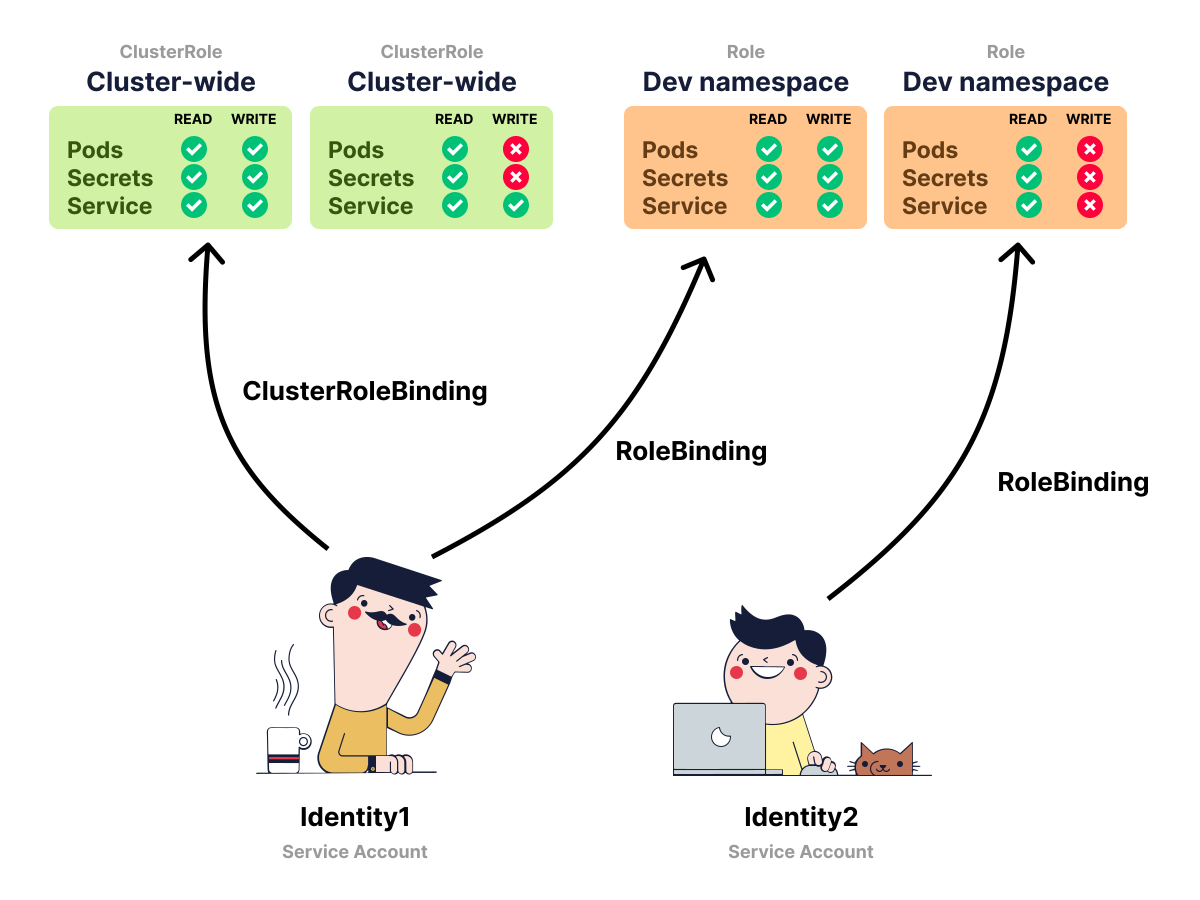
Service Accounts are a way to associate our Kubernetes workloads with an identity.
We can combine a Service Account with a Role and a RoleBinding to define what or who can access what resources in a cluster.
For example, when we want to restrict reading Secrets only to admin users in the cluster, we can do so using RBAC.
 1/4
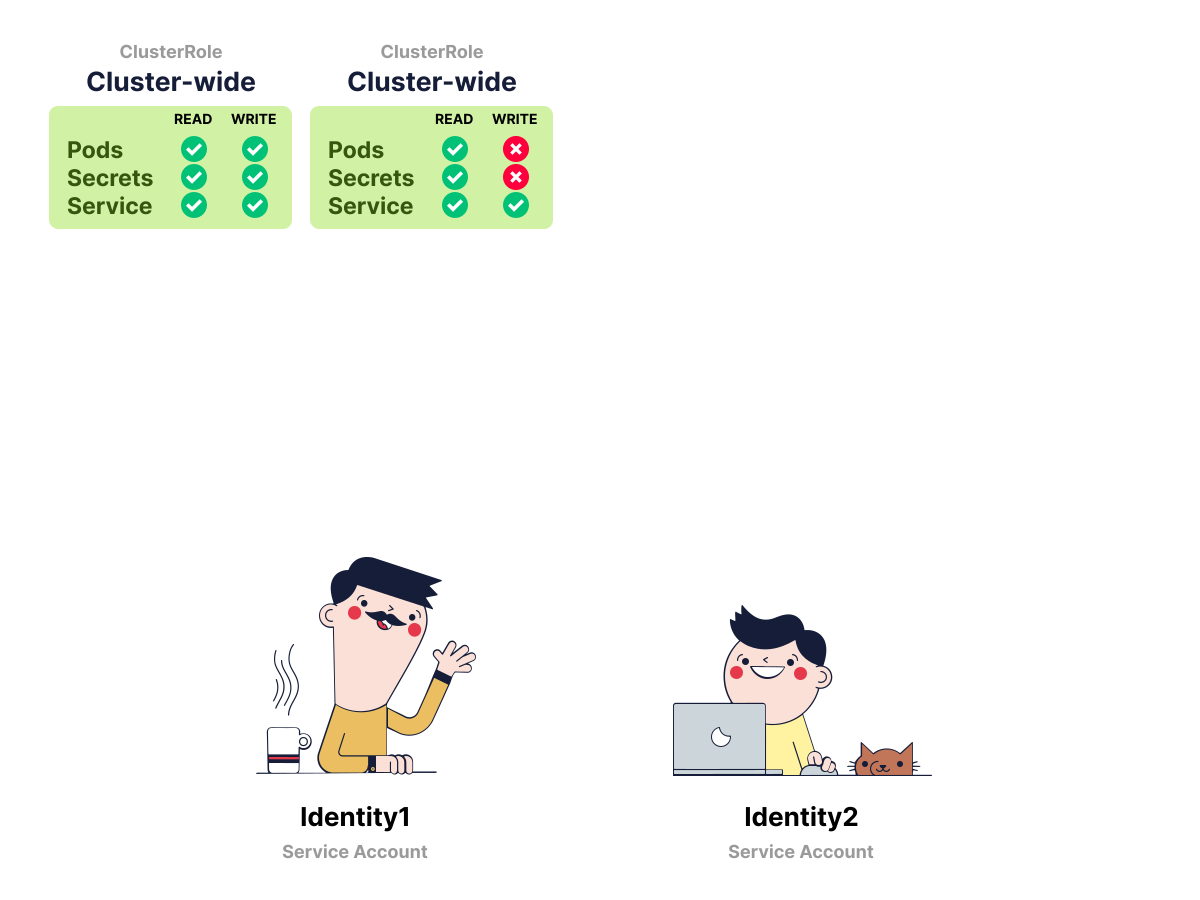
1/4Service Accounts are workload identities. They are usually assigned to Pods.
 2/4
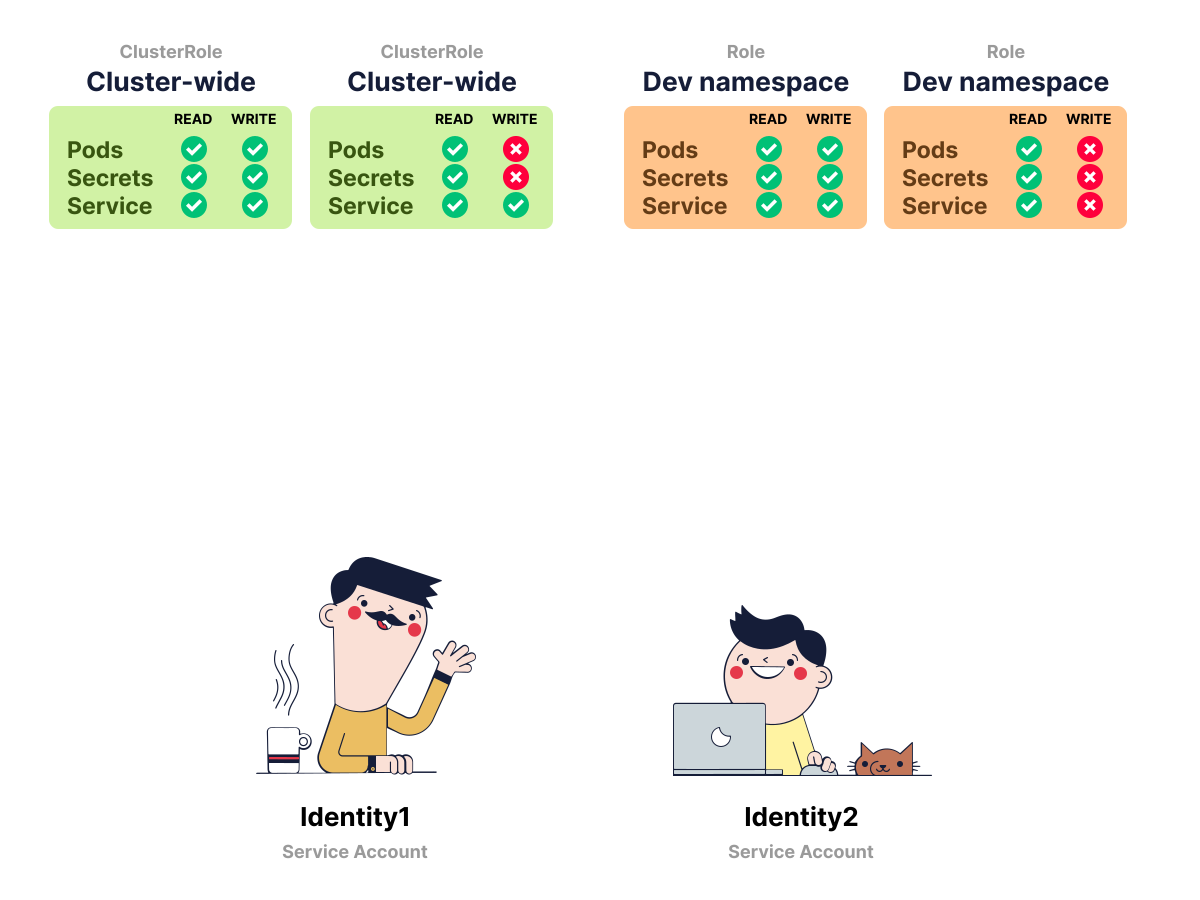
2/4Roles are a list of permissions linked to a namespace. ClusterRoles are a list of permissions available cluster-wide.
 3/4
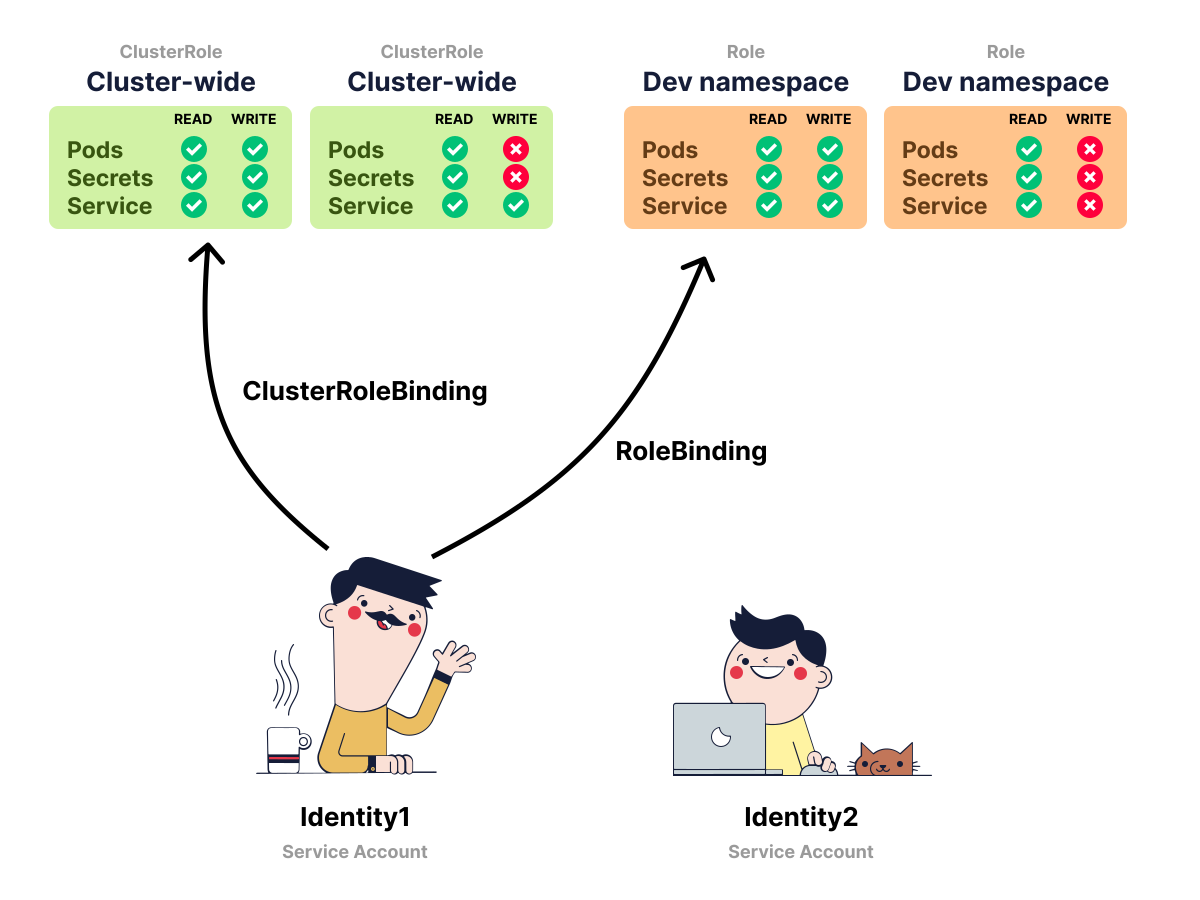
3/4Identities don't have any permissions unless we link them to a Role. We can use ClusterRoleBindings to link identities to a ClusterRole.
 4/4
4/4We can use RoleBindings to link identities to a Role.
Service Accounts aren't for human users, though.
We can authenticate humans with user credentials and applications with Service Accounts.
If we want our applications to list all the available Pods in the cluster, we need to create a Service Account that is associated with read-only access to the Pod API.
When we deployed two apps earlier, we also created two Service Accounts:
bash
kubectl get serviceaccount --namespace api

NAME      SECRETS   AGE
api       0         62s
default   0         62s

kubectl get serviceaccount --namespace data-store

NAME         SECRETS   AGE
data-store   0         47s
default      0         47s
Those Service Accounts are the identities associated with the apps, but they don't define what permissions are granted.
For that, we can inspect the demo ClusterRoleBinding:
bash
kubectl get clusterrolebinding role-tokenreview-binding \
  -o custom-columns=\
'KIND:kind,BINDING:metadata.name,ROLE:roleRef.name,SERVICE_ACCOUNTS:subjects[?(@.kind=="ServiceAccount")].name'

KIND                 BINDING                    ROLE                    SERVICE_ACCOUNTS
ClusterRoleBinding   role-tokenreview-binding   system:auth-delegator   data-store
The command above uses kubectl custom columns to filter the output of
kubectl get.
The table shows that the ClusterRoleBinding is linked to a ClusterRole, as well as the Service Account listed as its subject.
The only component that has any RBAC binding is the Data store.
There's no RoleBinding or ClusterRoleBinding for the API.
How come we can have a Service Account without a Role and RoleBinding?
The API app has a Service Account without any application-specific permissions.
However, we can use that Service Account identity to authenticate the request to the Kubernetes API (but we can't create, update, delete, etc. resources).
What about the Data store?
What kind of access does it have?
Let's review the ClusterRoleBinding with:
bash
kubectl describe clusterrolebinding role-tokenreview-binding

Name:         role-tokenreview-binding
Labels:       <none>
Annotations:  <none>
Role:
  Kind:  ClusterRole
  Name:  system:auth-delegator
Subjects:
  Kind            Name        Namespace
  ----            ----        ---------
  ServiceAccount  data-store  data-store
From the output above, we can tell that the ClusterRoleBinding links the data-store Service Account to the system:auth-delegator ClusterRole.
What permissions grants the ClusterRole?
Let's find out with:
bash
kubectl describe clusterrole system:auth-delegator

Name:         system:auth-delegator
Labels:       kubernetes.io/bootstrapping=rbac-defaults
Annotations:  rbac.authorization.kubernetes.io/autoupdate: true
PolicyRule:
  Resources                                  Non-Resource URLs  Resource Names  Verbs
  ---------                                  -----------------  --------------  -----
  tokenreviews.authentication.k8s.io         []                 []              [create]
  subjectaccessreviews.authorization.k8s.io  []                 []              [create]
The system:auth-delegator ClusterRole has the permissions to call the Token Review API and the SubjectAccessReview API.
What kind of permission is that?
We can use kubectl with the can-i subcommand and the impersonation --as flag to test permissions:
bash
kubectl auth can-i create deployments --as=system:serviceaccount:data-store:data-store --namespace data-store

no

kubectl auth can-i list pods --as=system:serviceaccount:data-store:data-store --namespace data-store

no

kubectl auth can-i delete services --as=system:serviceaccount:data-store:data-store --namespace data-store

no
We can keep querying all Kubernetes resources, but the Service Account has only the delegated authentication and authorization review permissions.
bash
kubectl auth can-i create tokenreviews --as=system:serviceaccount:data-store:data-store --all-namespaces

yes
What's a TokenReview?
Issuing requests to the Kubernetes API
The Kubernetes API verifies Service Account identities.
In particular, there's a specific component in charge of validating and rejecting them: the Token Review API.
The Token Review API accepts tokens and returns if they are valid or not — yes, it's that simple.
Let's manually validate the identity for the API component against the Token Review API.
It's the Token Review API, so we might need a token.
What token, though?
When a Pod uses a Service Account, Kubernetes mounts a token for that Service Account into the Pod.
That's the token that should be validated against the Token Review API.
The demo image does not include shell utilities such as cat, so instead of reading the mounted file with kubectl exec, we generate an equivalent token for the same Service Account and keep it in a shell variable:
bash
TOKEN=$(kubectl create token api --namespace api --audience api)
test -n "${TOKEN}"
The token is a signed JSON Web Token.
It's time to verify the token.
To verify the validity of the token, we create a TokenReview resource and print the fields we care about:
bash
TOKEN=$(kubectl create token api --namespace api --audience api)

kubectl create -f - \
  -o jsonpath='{.status.authenticated}{"\n"}{.status.user.username}{"\n"}{.status.audiences[0]}{"\n"}' \
  <<EOF
apiVersion: authentication.k8s.io/v1
kind: TokenReview
spec:
  token: ${TOKEN}
EOF

true
system:serviceaccount:api:api
api
Notice the
-o jsonpathflag that displays only the status fields returned by thekubectl createcommand.
The critical information in the response is in the status object with the following fields:
- Authenticated: the field is set to
true, which means the token was successfully validated. - In user object we can find the following properties:
- The username corresponding to the service account used by the Pod -
system:serviceaccount:api:api. - The uid of the authenticated Service Account.
- The username corresponding to the service account used by the Pod -
- Groups includes the groups that the user belongs to.
- Audiences contains the audiences accepted for this TokenReview. Since this request doesn't set
spec.audiences, Kubernetes validates the token for the API-server audience, which isapiin this cluster.
Excellent, we just verified the Service Account token!
We know that:
- The token is valid.
- The identity of the caller (the API Service Account).
- The groups that the caller belongs to.
Since we can validate the token, we could leverage the mechanism in the Data Store component to authenticate requests!
The Data Store still has to decide which identities it accepts.
Let's have a look at how we could include the above logic in our apps using the Kubernetes Go client.
Implementation of the services
Here's how the two services interact with each other and the Kubernetes API:
- Before each outbound request, an API component reads the current Service Account token from disk.
- The API component calls the data store passing the token as an HTTP header — i.e.
X-Client-Id. - When the data store receives a request, it reads the token from the
X-Client-Idheader and issues a request to the Token Review API to check its validity. - If the response is authenticated and the identity is allowed, the data store component replies with a successful message, otherwise an error.
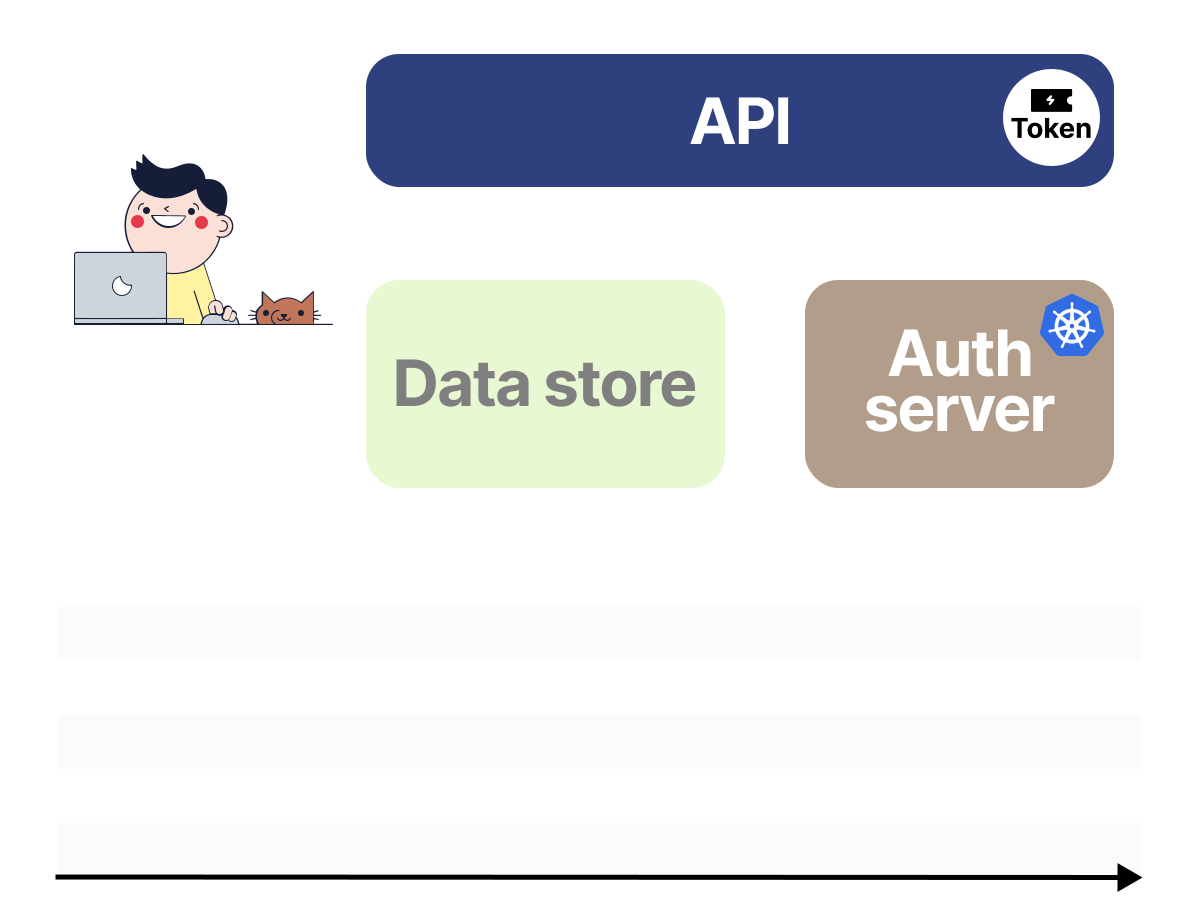
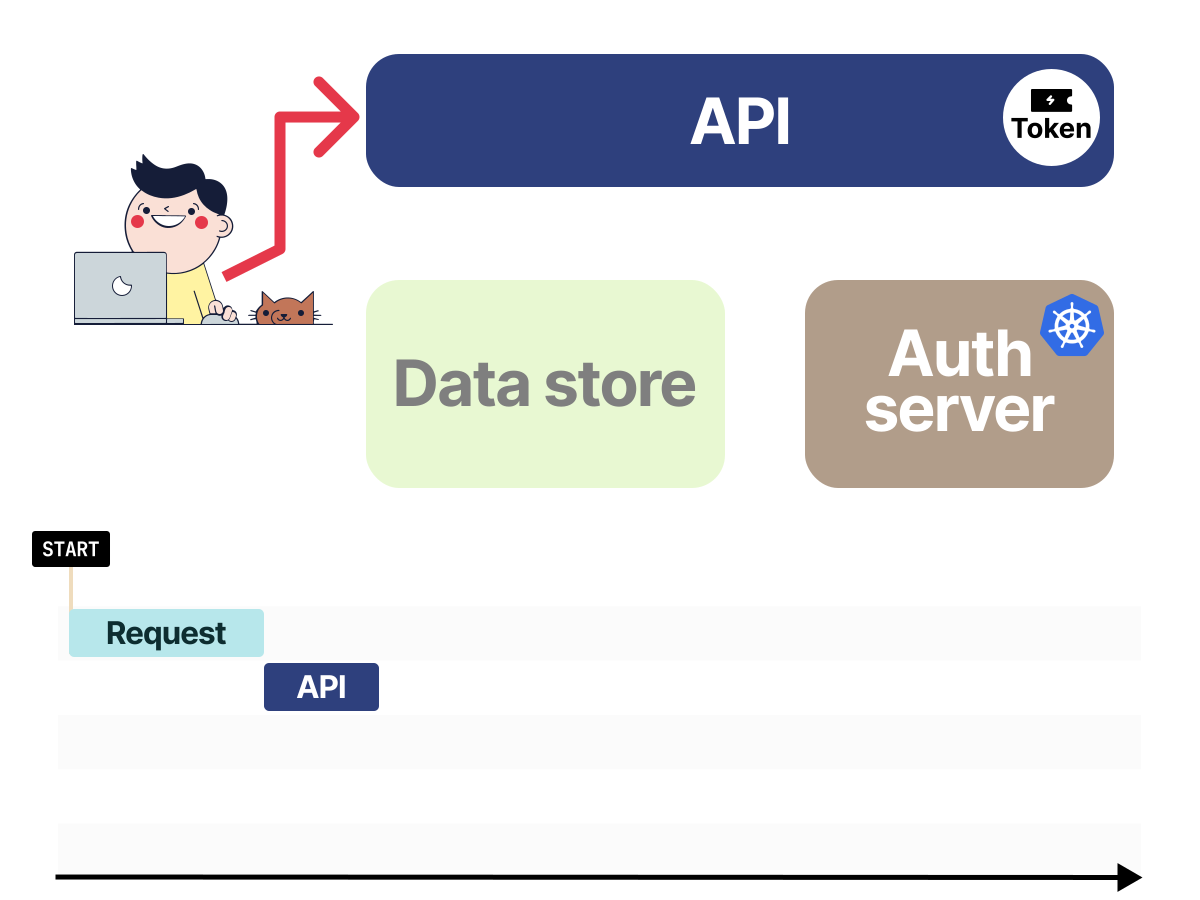
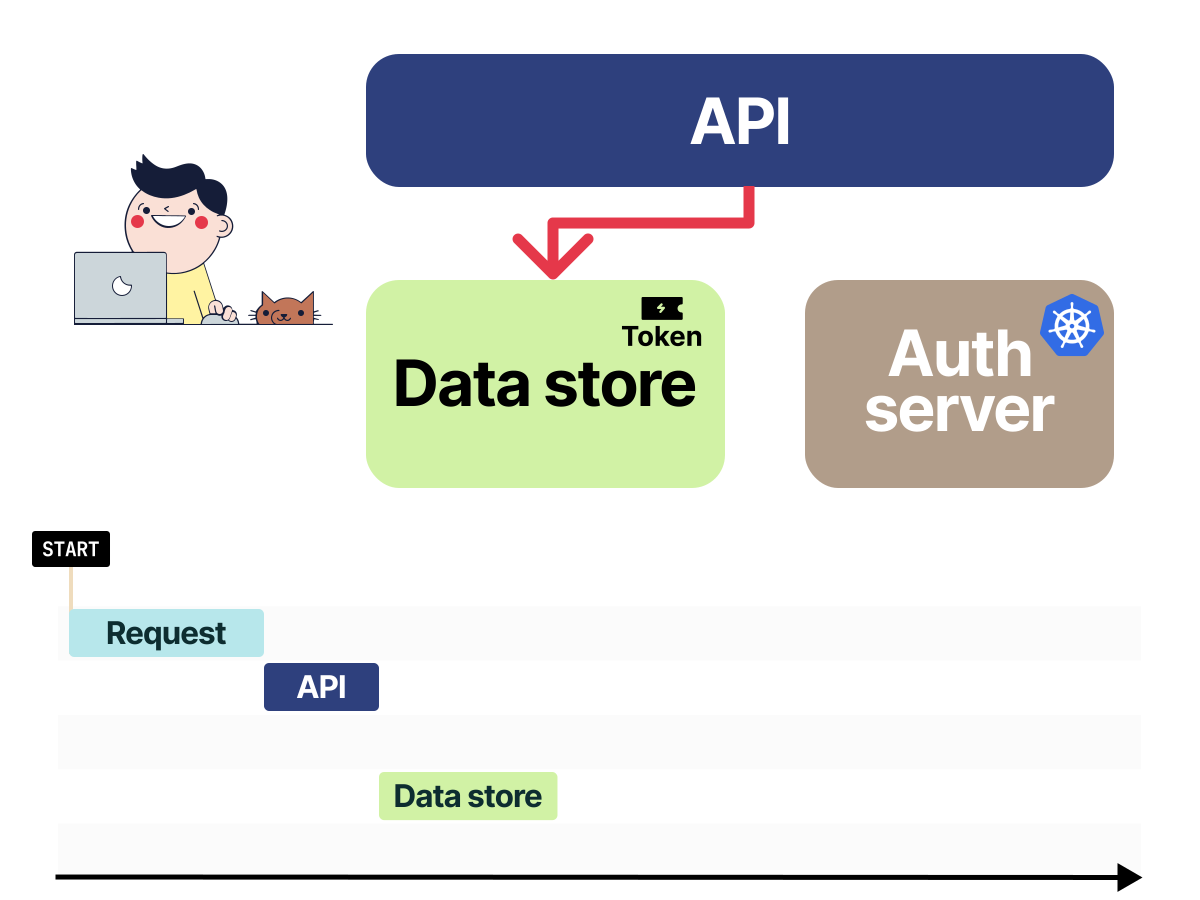
The following diagram represents the above call flow:
 1/4
1/4The API component has the Service Account token assigned.
 2/4
2/4When we make a request to the API, the token is passed in all subsequent requests.
 3/4
3/4The Data store will retrieve the token from the request.
 4/4
4/4The Data store validates the identity with the Token Review API.
First, let's look at the implementation of the API service.
We can find the application code in the file service_accounts/api/main.go.
The Service Account Token is automatically mounted in /var/run/secrets/kubernetes.io/serviceaccount/token and we could read its value with:
main.go
func readToken() (string, error) {
  b, err := os.ReadFile("/var/run/secrets/kubernetes.io/serviceaccount/token")
  if err != nil {
    return "", err
  }
  return string(b), nil
}
With the default bound Service Account token volume behavior, Kubernetes mounts short-lived Service Account tokens, so the example reads the token from disk before each request instead of caching it forever.
Then, the Service Token is passed on to the call to the Data store service in the X-Client-Id HTTP header:
main.go
func handleIndex(w http.ResponseWriter, r *http.Request) {
  serviceConnstring := os.Getenv("DATA_STORE_CONNSTRING")
  if len(serviceConnstring) == 0 {
    panic("DATA_STORE_CONNSTRING expected")
  }

  serviceToken, err := readToken()
  if err != nil {
    http.Error(w, err.Error(), http.StatusInternalServerError)
    return
  }

  client := &http.Client{Timeout: 10 * time.Second}
  req, err := http.NewRequestWithContext(r.Context(), http.MethodGet, serviceConnstring, nil)
  if err != nil {
    http.Error(w, err.Error(), http.StatusInternalServerError)
    return
  }
  req.Header.Add("X-Client-Id", serviceToken)
  resp, err := client.Do(req)
  if err != nil {
    http.Error(w, err.Error(), http.StatusInternalServerError)
    return
  }
  defer resp.Body.Close()
}
As soon as the reply from the Data store is received, it is then sent back as a response:
main.go
w.WriteHeader(resp.StatusCode)
io.Copy(w, resp.Body)
The following YAML manifest is used to deploy the API service:
bash
kubectl apply -f - <<'EOF'
apiVersion: v1
kind: Namespace
metadata:
  name: api
---
apiVersion: v1
kind: ServiceAccount
metadata:
  name: api
  namespace: api
---
apiVersion: apps/v1
kind: Deployment
metadata:
  name: app
  namespace: api
spec:
  replicas: 1
  selector:
    matchLabels:
      app: api
  template:
    metadata:
      labels:
        app: api
    spec:
      serviceAccountName: api
      containers:
      - name: app
        image: ghcr.io/learnk8s/api:sa-1
        env:
        - name: LISTEN_ADDR
          value: ":8080"
        - name: DATA_STORE_CONNSTRING
          value: "http://app.data-store.svc.cluster.local"
        ports:
        - containerPort: 8080
---
apiVersion: v1
kind: Service
metadata:
  name: app
  namespace: api
spec:
  type: NodePort
  selector:
    app: api
  ports:
    - port: 8080
      targetPort: 8080
EOF

namespace/api created
serviceaccount/api created
deployment.apps/app created
service/app created
We should notice that there is nothing special about the Deployment manifest above apart from having a Service Account associated with it.
Let's move onto the data store service.
We can find the complete application in service_accounts/data-store/main.go.
The data store service does two key things:
- It retrieves the value of the
X-Client-Idheader from the incoming request. - It then invokes the Kubernetes Token Review API to check if the token is valid.
Step (1) is performed by the following code:
main.go
clientId := r.Header.Get("X-Client-Id")
if len(clientId) == 0 {
  http.Error(w, "X-Client-Id not supplied", http.StatusUnauthorized)
  return
}
Then, step (2) is performed using the Kubernetes Go client.
First, we create a ClientSet object:
main.go
config, err := rest.InClusterConfig()
clientset, err := kubernetes.NewForConfig(config)
The InClusterConfig() function automatically reads the Service Account Token for the Pod, and hence we do not have to specify the path manually.
Then, we construct a TokenReview object specifying the token we want to validate in the Token field:
main.go
tr := authv1.TokenReview{
  Spec: authv1.TokenReviewSpec{
    Token: clientId,
  },
}
Since this first TokenReview does not set Audiences, it validates the token for the Kubernetes API-server audience rather than an application-specific Data store audience.
Finally, we can create a TokenReview request with:
main.go
result, err := clientset.AuthenticationV1().TokenReviews().Create(ctx, &tr, metav1.CreateOptions{})The Data store should then check both the authentication result and the identity:
main.go
if !result.Status.Authenticated || result.Status.User.Username != allowedUsername {
  http.Error(w, "Invalid token", http.StatusForbidden)
  return
}
In the demo, allowedUsername is system:serviceaccount:api:api, so a valid token from another Service Account is still rejected.
The following YAML manifest will create the various resources needed for the data store service:
bash
kubectl apply -f - <<'EOF'
apiVersion: v1
kind: Namespace
metadata:
  name: data-store
---
apiVersion: v1
kind: ServiceAccount
metadata:
  name: data-store
  namespace: data-store
---
apiVersion: rbac.authorization.k8s.io/v1
kind: ClusterRoleBinding
metadata:
  name: role-tokenreview-binding
roleRef:
  apiGroup: rbac.authorization.k8s.io
  kind: ClusterRole
  name: system:auth-delegator
subjects:
- kind: ServiceAccount
  name: data-store
  namespace: data-store
---
apiVersion: apps/v1
kind: Deployment
metadata:
  name: app
  namespace: data-store
spec:
  replicas: 1
  selector:
    matchLabels:
      app: data-store
  template:
    metadata:
      labels:
        app: data-store
    spec:
      serviceAccountName: data-store
      containers:
      - name: app
        image: ghcr.io/learnk8s/data-store:sa-1
        env:
        - name: LISTEN_ADDR
          value: ":8081"
        ports:
        - containerPort: 8081
---
apiVersion: v1
kind: Service
metadata:
  name: app
  namespace: data-store
spec:
  selector:
    app: data-store
  ports:
    - protocol: TCP
      port: 80
      targetPort: 8081
EOF

namespace/data-store created
serviceaccount/data-store created
clusterrolebinding.rbac.authorization.k8s.io/role-tokenreview-binding created
deployment.apps/app created
service/app created
Compared to the API service, the data store service requires a ClusterRoleBinding resource to be created, which associates the data-store Service Account to the system:auth-delegator ClusterRole.
We can go back to the terminal session where we deployed the data store service and inspect the logs:
bash
kubectl --namespace data-store logs deploy/app

2026/06/01 11:28:01 {
	"authenticated": true,
	"user": {
		"username": "system:serviceaccount:api:api",
		"uid": "8897c869-71f4-4025-a55c-3842ae78c96a",
		"groups": [
			"system:serviceaccounts",
			"system:serviceaccounts:api",
			"system:authenticated"
		],
		"extra": {
			"authentication.kubernetes.io/credential-id": [
				"JTI=9cf5ca37-c300-440f-b228-9db979441bca"
			],
			"authentication.kubernetes.io/node-name": [
				"minikube"
			],
			"authentication.kubernetes.io/node-uid": [
				"225825b2-6831-4a69-a1a3-8b80e93ca843"
			],
			"authentication.kubernetes.io/pod-name": [
				"app-854bbcc84c-xf6vk"
			],
			"authentication.kubernetes.io/pod-uid": [
				"81f57562-568e-45a8-8c98-de3f74cea3e5"
			]
		}
	},
	"audiences": [
		"api"
	]
}
2026/06/01 11:28:24 {
	"user": {},
	"error": "invalid bearer token"
}
The output is a formatted JSON representation of the TokenReview status. If we followed the invalid-token test, we will also see the rejected TokenReview response.
Thus, we see how the API component reads the Service Account Token and passes it to the Data store as a way to authenticate itself.
The Data store service retrieves the token and checks it with the Kubernetes API.
When valid and allowed, the Data store component allows the request from the API service to be processed.
The implementation works, but it still has two constraints:
The default automounted token is meant for the Kubernetes API
With the default bound Service Account token volume behavior, the default Service Account token mounted in a Pod is already a short-lived projected token rather than a long-lived Secret-backed token.
However, the default token is primarily meant for calling the Kubernetes API.
We can pass it to another service and have that service validate it with the Token Review API.
But the token is not specific to the Data store.
In other words, the Data store can verify who presented the token, but it cannot verify that the token was minted specifically for the Data store.
Also, anyone who can read the token from the API Pod can replay it while it is valid.
If the Service Account has permissions to call the Kubernetes API, the same token can be used for those permissions too.
So it's still a good idea to keep Service Account permissions minimal and avoid sharing the same Service Account across unrelated workloads.
No application-specific audience binding
The destination service should verify that the token was intended for itself.
As an example, imagine buying a ticket for a flight from London to New York.
If we buy a ticket from British Airways, we can't use the ticket to board a Virgin Atlantic flight.
Our ticket is bound to a particular audience (British Airways).
But if the Data store accepts any valid Service Account token without an audience check, the same ticket can be used with any airline.
We could solve both challenges by implementing solutions such as mutual TLS or using a JWT based solution with a central authority server.
However, in Kubernetes, we can explicitly project an additional Service Account token with a path, lifetime and application-specific audience of our choice.
The Kubernetes API server acts as the central authority server, and the kubelet takes care of refreshing the token on disk.
In the next section, we will re-implement the same code for authenticating apps using Service Account Token Volume Projection.
It's a good idea to clean up the two namespaces with:
bash
kubectl delete namespace api

namespace "api" deleted

kubectl delete namespace data-store

namespace "data-store" deleted

kubectl delete clusterrolebinding role-tokenreview-binding

clusterrolebinding.rbac.authorization.k8s.io "role-tokenreview-binding" deleted
Inter-Service authentication using Service Account Token Volume Projection
Explicit Service Account tokens made available to workloads via a serviceAccountToken projected volume source are time-limited, audience bound and are not associated with secret objects.
If a Pod is deleted or the Service Account is removed, these tokens become invalid, thus preventing reuse after that point.
A serviceAccountToken volume projection is one of the projected volume types.
A projected volume is a volume that mounts several existing volumes into the same directory.
When this volume type is added to a Pod, the Service Account Token is mounted on the filesystem.
There's a difference though.
The kubelet automatically rotates the token when it's about to expire.
In addition, we can configure the path at which we want this token to be available.
Let's see how we can amend the API component to include the Service Account Token Volume Projection.
The API component
We can read the Service Account Token mounted via volume projection with:
main.go
func readToken() (string, error) {
  b, err := os.ReadFile("/var/run/secrets/tokens/api-token")
  if err != nil {
    return "", err
  }
  log.Print("Refreshing service account token")
  return string(b), nil
}
Note how the path to the Service Account Token is different from the previous case (i.e. it used to be /var/run/secrets/kubernetes.io/serviceaccount/token).
Since the kubelet refreshes the token on disk, the app should not cache it for the whole process lifetime.
The demo re-reads the token before each outbound request:
main.go
serviceToken, err := readToken()
if err != nil {
  http.Error(w, err.Error(), http.StatusInternalServerError)
  return
}

req.Header.Add("X-Client-Id", serviceToken)
The readToken() function reads /var/run/secrets/tokens/api-token and returns the current token value.
We can find the entire application code in service_accounts_volume_projection/api/main.go.
Now, let's deploy this service.
We will use that image in the deployment manifest (service_accounts_volume_projection/api/deployment.yaml):
bash
kubectl apply -f - <<'EOF'
apiVersion: v1
kind: Namespace
metadata:
  name: api
---
apiVersion: v1
kind: ServiceAccount
metadata:
  name: api
  namespace: api
---
apiVersion: apps/v1
kind: Deployment
metadata:
  name: app
  namespace: api
spec:
  replicas: 1
  selector:
    matchLabels:
      app: api
  template:
    metadata:
      labels:
        app: api
    spec:
      serviceAccountName: api
      volumes:
        - name: api-token
          projected:
            sources:
            - serviceAccountToken:
                path: api-token
                expirationSeconds: 600
                audience: data-store
      containers:
      - name: app
        image: ghcr.io/learnk8s/api:sa-2
        env:
        - name: LISTEN_ADDR
          value: ":8080"
        - name: DATA_STORE_CONNSTRING
          value: "http://app.data-store.svc.cluster.local"
        ports:
        - containerPort: 8080
        volumeMounts:
          - mountPath: /var/run/secrets/tokens
            name: api-token
---
apiVersion: v1
kind: Service
metadata:
  name: app
  namespace: api
spec:
  type: NodePort
  selector:
    app: api
  ports:
    - port: 8080
      targetPort: 8080
EOF

namespace/api created
serviceaccount/api created
deployment.apps/app created
service/app created
A volume named api-token of projected type will be created with the source being serviceAccountToken.
The volume defines three additional properties:
- The
pathwhere the token will be available inside the configured volume. - The
audiencefield specifies what the intended audience for the token is. - The
expirationSecondsindicate how long a token is valid for - the minimum is 600 seconds or 10 minutes.
Notice how the audience field specifies that this Service Account Token is intended for a service that accepts the data-store audience.
If the Data store asks the Token Review API to validate the data-store audience and the token doesn't include it, the token won't be accepted — it's not its audience!
Note that if our cluster enforces Pod Security Standards, make sure the workload policy allows the projected volume we are using.
We can create a new API deployment with:
bash
BASE=https://raw.githubusercontent.com/learnk8s/kubernetes-service-account-auth-demo/master
kubectl apply -f "${BASE}/service_accounts_volume_projection/api/deployment.yaml"

namespace/api created
serviceaccount/api created
deployment.apps/app created
service/app created

kubectl --namespace api rollout status deployment/app
deployment "app" successfully rolled out
We retrieve the URL of the API service with:
bash
API_URL=$(minikube --namespace api service app --url)
printf '%s\n' "${API_URL}"

http://192.168.49.2:32687
We can issue a request with:
bash
curl -sS "${API_URL}"

Get "http://app.data-store.svc.cluster.local": dial tcp: \
  lookup app.data-store.svc.cluster.local on 10.96.0.10:53: no such host
This is expected as the data store is not yet deployed.
We keep the terminal open.
Next, let's modify and deploy the data store service.
Data Store
The token review payload for the data store will now be as follows:
main.go
tr := authv1.TokenReview{
  Spec: authv1.TokenReviewSpec{
    Token:     clientId,
    Audiences: []string{"data-store"},
  },
}
Now, in the TokenReview object, the Data store explicitly passes data-store as the audience.
If the token doesn't include data-store as an audience, the Token Review API will not authenticate the token for that audience.
The Data store should also check that the TokenReview response includes data-store in status.audiences.
In other words, the Data store service can assert the identity of the caller and validate that the incoming request token was meant for the data store service.
The identity check from the previous section still applies: the Data store should only accept the Service Account identities that are allowed to call it.
We can find the entire application code in service_accounts_volume_projection/data-store/main.go.
Next, let's deploy this service.
We can create the deployment and wait for it to roll out with:
bash
BASE=https://raw.githubusercontent.com/learnk8s/kubernetes-service-account-auth-demo/master
kubectl apply -f "${BASE}/service_accounts_volume_projection/data-store/deployment.yaml"

namespace/data-store created
serviceaccount/data-store created
clusterrolebinding.rbac.authorization.k8s.io/role-tokenreview-binding created
deployment.apps/app created
service/app created

kubectl --namespace data-store rollout status deployment/app
deployment "app" successfully rolled out
Let's check if the service is up and running correctly:
bash
kubectl --namespace data-store describe service app

Name:                     app
Namespace:                data-store
Labels:                   <none>
Annotations:              <none>
Selector:                 app=data-store
Type:                     ClusterIP
IP Family Policy:         SingleStack
IP Families:              IPv4
IP:                       10.108.238.76
IPs:                      10.108.238.76
Port:                     <unset>  80/TCP
TargetPort:               8081/TCP
Endpoints:                10.244.0.29:8081
Session Affinity:         None
Internal Traffic Policy:  Cluster
Events:                   <none>
The value of Endpoints in the output above tells us that app is now up and running.
Now, we use curl to make a request to the API service again:
bash
curl -sS "${API_URL}"

Hello from data store. You have been authenticated
We should inspect the logs of the Data store with:
bash
kubectl --namespace data-store logs deploy/app

2026/06/01 14:46:55 {
	"authenticated": true,
	"user": {
		"username": "system:serviceaccount:api:api",
		"uid": "9e92ce88-8695-4f60-bc03-fbbc5fac1bc7",
		"groups": [
			"system:serviceaccounts",
			"system:serviceaccounts:api",
			"system:authenticated"
		],
		"extra": {
			"authentication.kubernetes.io/credential-id": [
				"JTI=f343c40a-bf08-4304-ae76-37f85d420723"
			],
			"authentication.kubernetes.io/node-name": [
				"minikube"
			],
			"authentication.kubernetes.io/node-uid": [
				"225825b2-6831-4a69-a1a3-8b80e93ca843"
			],
			"authentication.kubernetes.io/pod-name": [
				"app-7c9b54c8db-lwrfr"
			],
			"authentication.kubernetes.io/pod-uid": [
				"4d882fae-13d2-44aa-b441-6c5b08d2d4fe"
			]
		}
	},
	"audiences": [
		"data-store"
	]
}
If we switch to the logs of the API service, we should see lines that demonstrate when the Service Account Token is re-read from the filesystem:
bash
kubectl --namespace api logs deploy/app

2026/06/01 14:46:37 Refreshing service account token
2026/06/01 14:46:55 Refreshing service account token
Summary
Service Account Token Volume projection allows us to associate non-global, time-bound and audience-bound service tokens to our Kubernetes workloads.
In this article, we saw an example of using it for authentication between our services and how an explicit application-specific audience is safer than accepting any default Kubernetes API token.
Kubernetes-native software such as Linkerd and Istio use Kubernetes workload identity primitives for internal communication, and managed Kubernetes service providers such as GKE and AWS EKS use projected Service Account tokens to enable more robust pod identity systems.
In the final article of this series, we will continue with enforcing policies and governance for Kubernetes workloads.