
How does the Kubernetes controller manager work?
April 2026
This is part 5 of 6 of the How the Kubernetes control plane works. More
When you delete a Pod in a Deployment, Kubernetes creates a replacement.
But who creates it?
It's not the API server.
The API server stores resources and notifies watchers, but it doesn't decide what should run.
It's not the scheduler either.
The scheduler assigns Pods to nodes, but it doesn't create them.
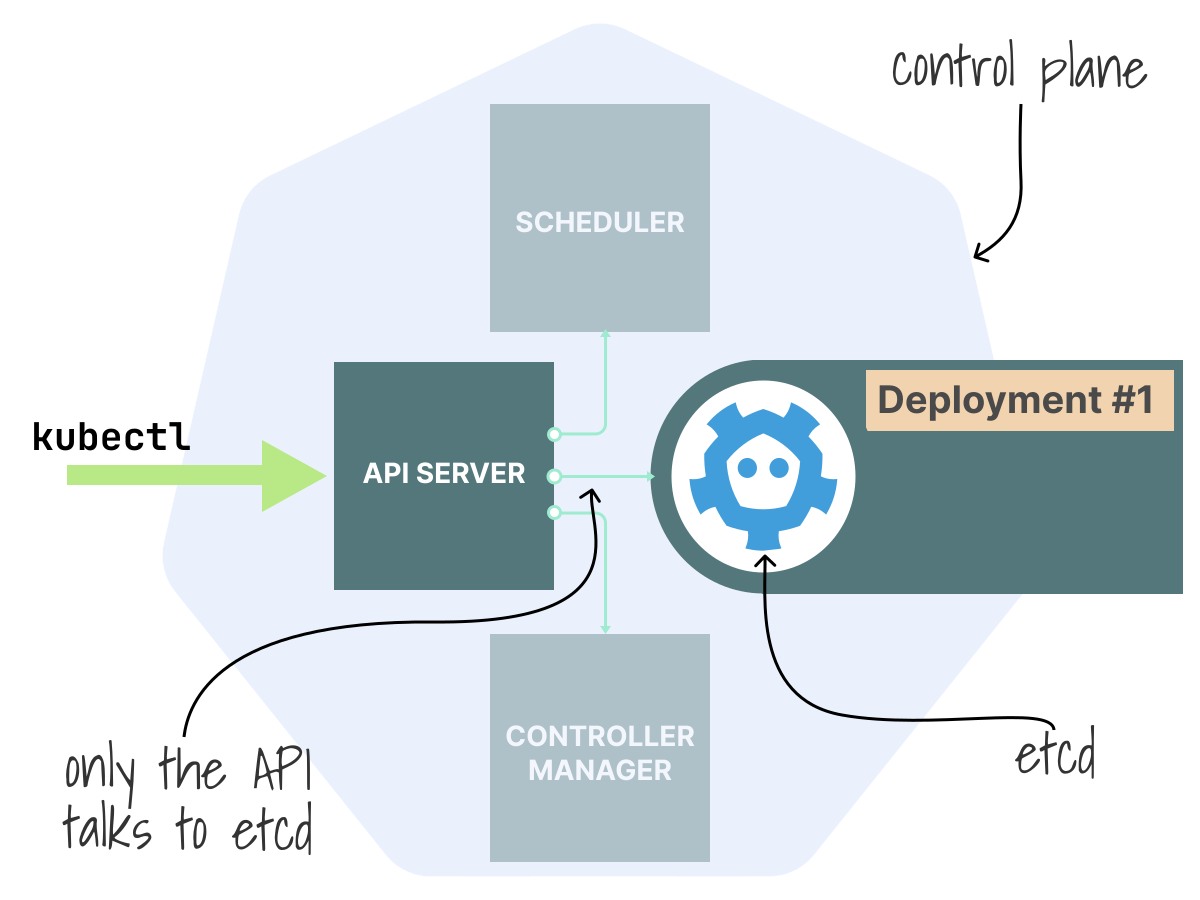
The answer is a controller: a loop that watches for changes in the cluster and takes action to move the current state closer to the desired state.
Kubernetes runs many of these loops inside one process called the controller manager.
Together, these loops handle most of what people call "self-healing."
Pods don't come back on their own
Try this yourself.
Create a Deployment with three replicas:
bash
kubectl create deployment demo --image=nginx --replicas=3
deployment.apps/demo created
List the Pods:
bash
kubectl get pods -l app=demo
NAME                    READY   STATUS
demo-54d7464888-grktq   1/1     Running
demo-54d7464888-kjsjh   1/1     Running
demo-54d7464888-shpxv   1/1     Running
You should see three Pods.
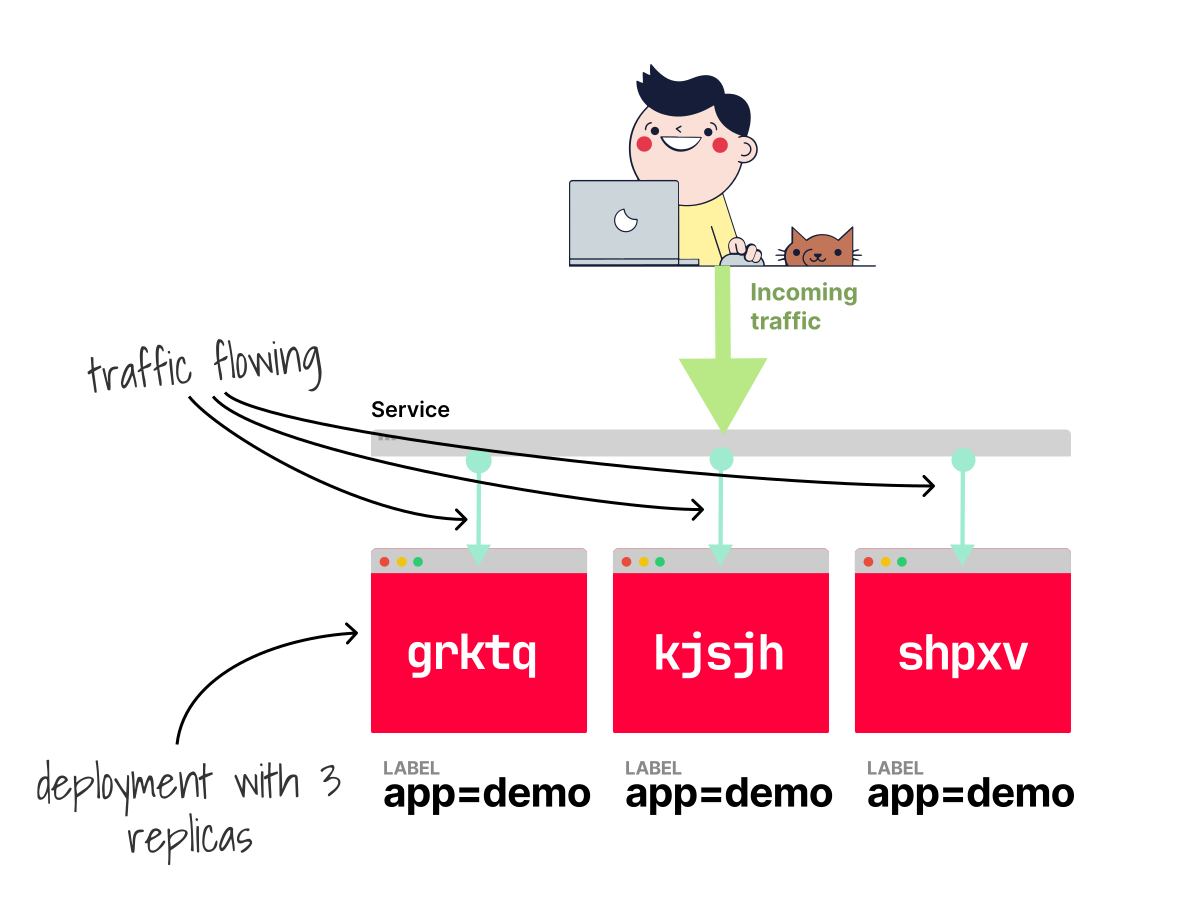
Now delete one of them (replace the name with one from your output):
bash
kubectl delete pod demo-54d7464888-grktq
pod "demo-54d7464888-grktq" deleted from default namespace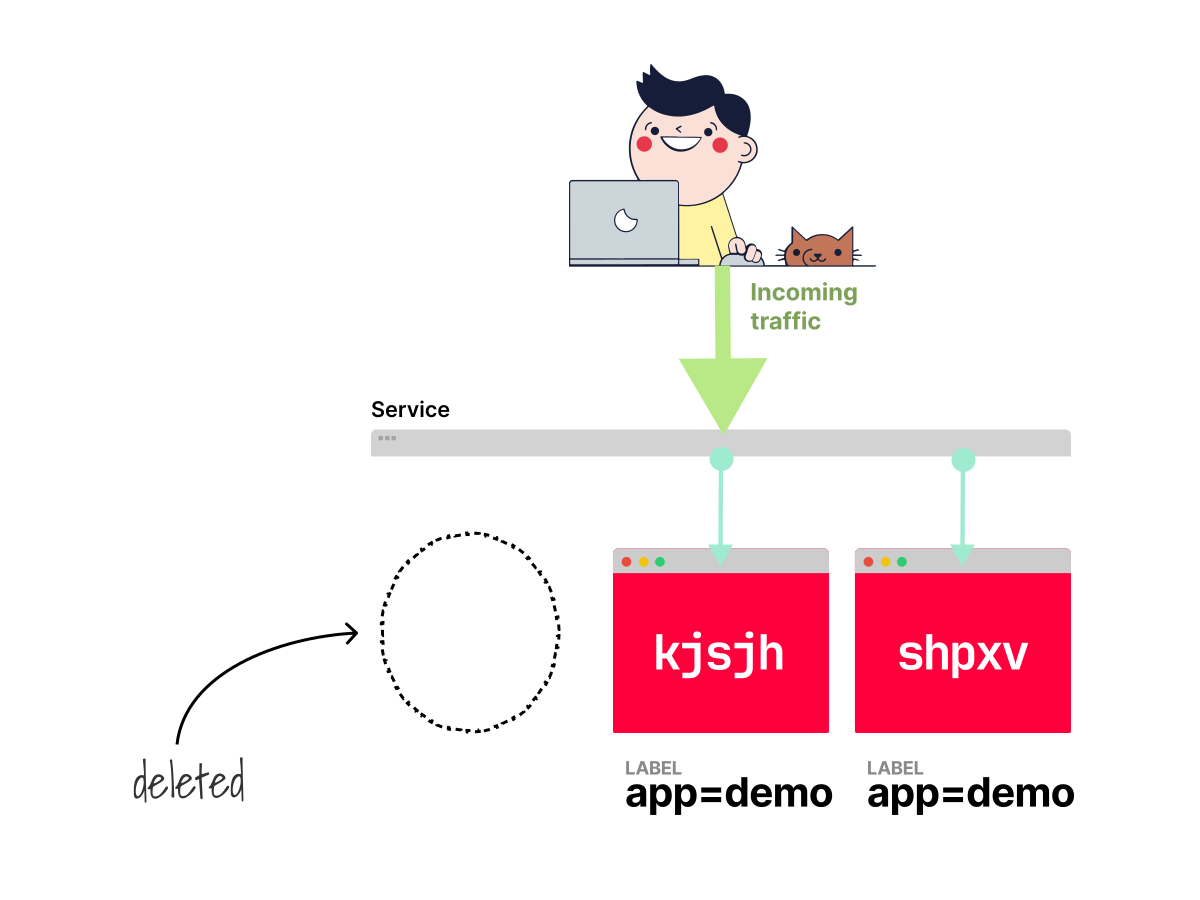
List the Pods again:
bash
kubectl get pods -l app=demo
NAME                    READY   STATUS
demo-54d7464888-8vpzn   1/1     Running
demo-54d7464888-kjsjh   1/1     Running
demo-54d7464888-shpxv   1/1     Running
There are still three Pods.
A new one appeared, replacing the one you deleted.
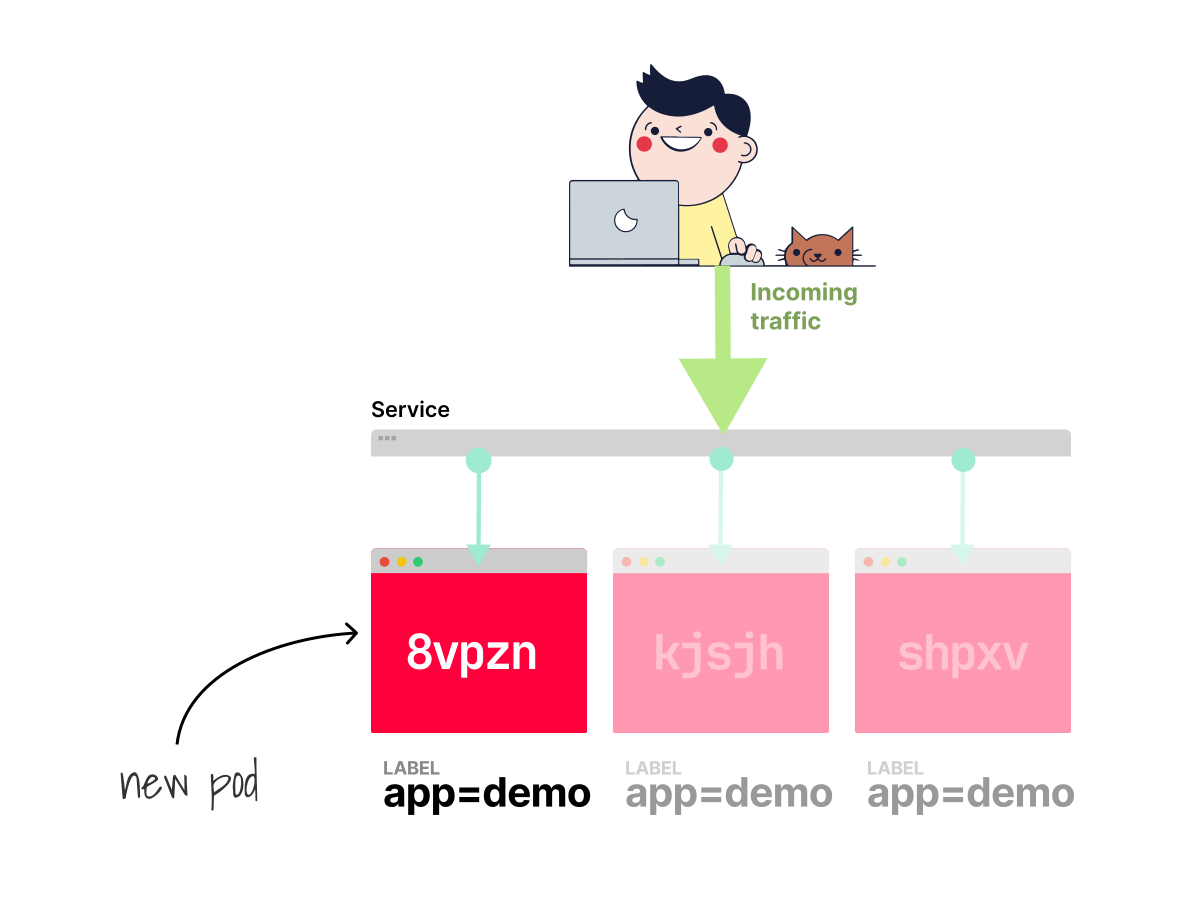
So what happened?
When you created the Deployment, the Deployment controller created a ReplicaSet object.
That ReplicaSet says: "There should be 3 Pods matching this template."
When you deleted one Pod, the ReplicaSet controller noticed the actual count (2) didn't match the desired count (3).
So it created a new Pod.
The difference between what you want and what actually exists is at the heart of how Kubernetes works.
Every controller in Kubernetes follows this same pattern.
Declaring intent, not issuing commands
Before Kubernetes, managing workloads usually meant writing scripts:
- SSH into machine A.
- Start process X.
- If it fails, restart it.
- If the machine dies, pick another machine and do it all again.
This is imperative control: you tell the system exactly what to do, step by step.
Kubernetes takes a different approach: you do not give step-by-step instructions.
You declare what you want, and the system figures out how to get there.
deployment.yaml
apiVersion: apps/v1
kind: Deployment
metadata:
  name: demo
spec:
  replicas: 3
  selector:
    matchLabels:
      app: demo
  template:
    metadata:
      labels:
        app: demo
    spec:
      containers:
        - name: nginx
          image: nginx
This YAML does not tell Kubernetes to "create Pod A on node-1, then Pod B on node-2, then retry if node-2 is full."
Instead, it simply says: "I want three replicas of this template running."
One of the best analogies to understand this comes from this KubeCon talk by Saad Ali, one of the original Kubernetes engineers.
Imperative control is like flying a plane manually.
You constantly adjust the throttle, the ailerons, and the rudder.
Every second requires a decision and a correction.
Declarative control is like setting the autopilot.
You specify the heading, the altitude, and the speed.
The autopilot continuously adjusts to keep the plane on course, even during turbulence.
Your Deployment YAML is the autopilot setting.
The controllers are the autopilot software that makes continuous adjustments.
This difference matters in practice.
If the autopilot software restarts, it doesn't need a log of every adjustment it ever made.
It reads the current instruments (altitude, speed, heading) and compares them to the target.
Then it makes one correction.
It's not a full flight plan from here to the destination, but just the next adjustment.
After that adjustment, it reads the instruments again and makes another correction.
Kubernetes controllers work the same way.
A common misconception is that when you create a Deployment with 3 replicas, Kubernetes computes all the steps upfront.
It does not plan "First create a ReplicaSet, then create 3 Pods, then schedule them to nodes A, B, and C."
That's not what happens.
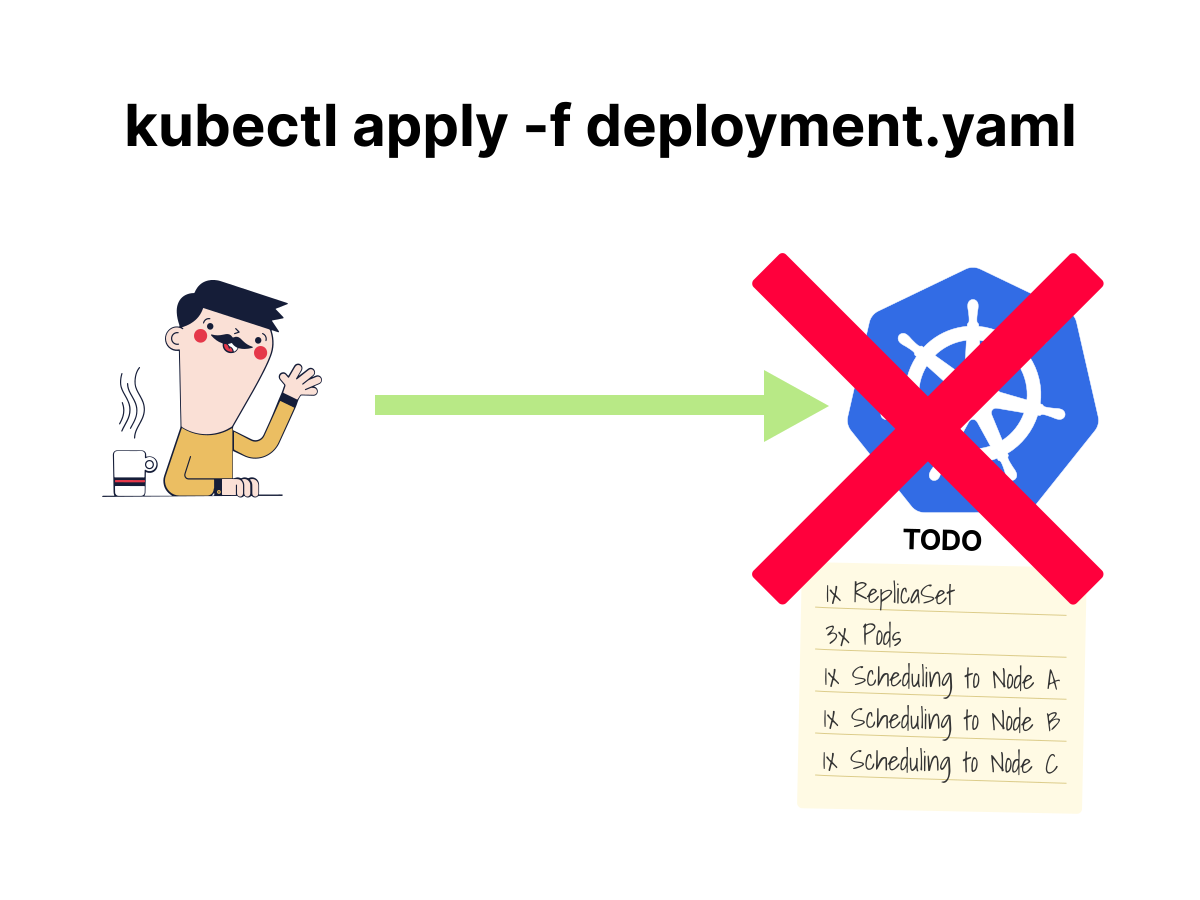
Each controller only computes the next step.
The Deployment controller sees "there's no ReplicaSet for this Deployment" and creates one.
It doesn't think about Pods or scheduling.
Then the ReplicaSet controller wakes up, sees "desired 3, actual 0," and creates a Pod.
Then another.
There is no master plan, no orchestration script, no coordinator that maps out the full sequence in advance.
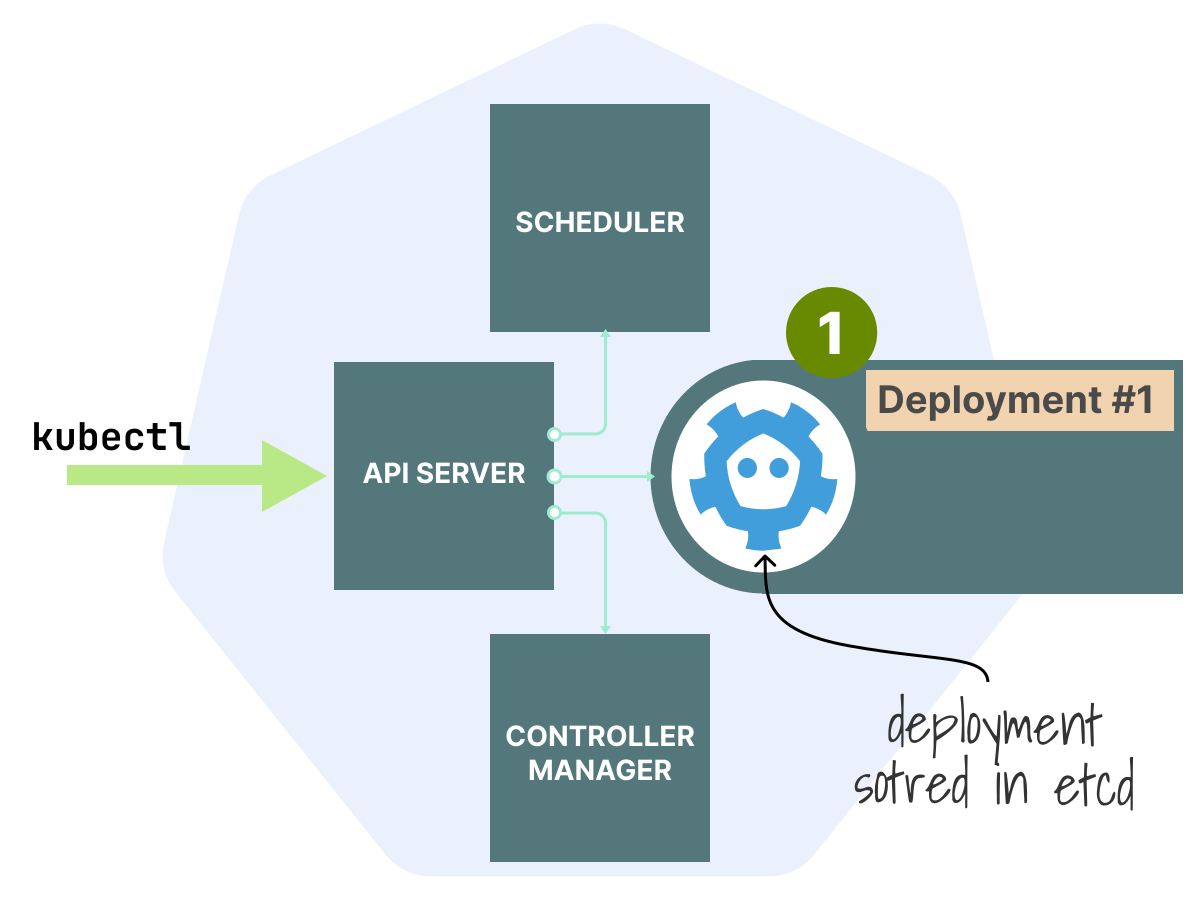 1/4
1/4Step 1: kubectl submits the Deployment to the API server, which stores it in etcd. The Deployment object (Deployment #1) now exists in the cluster.
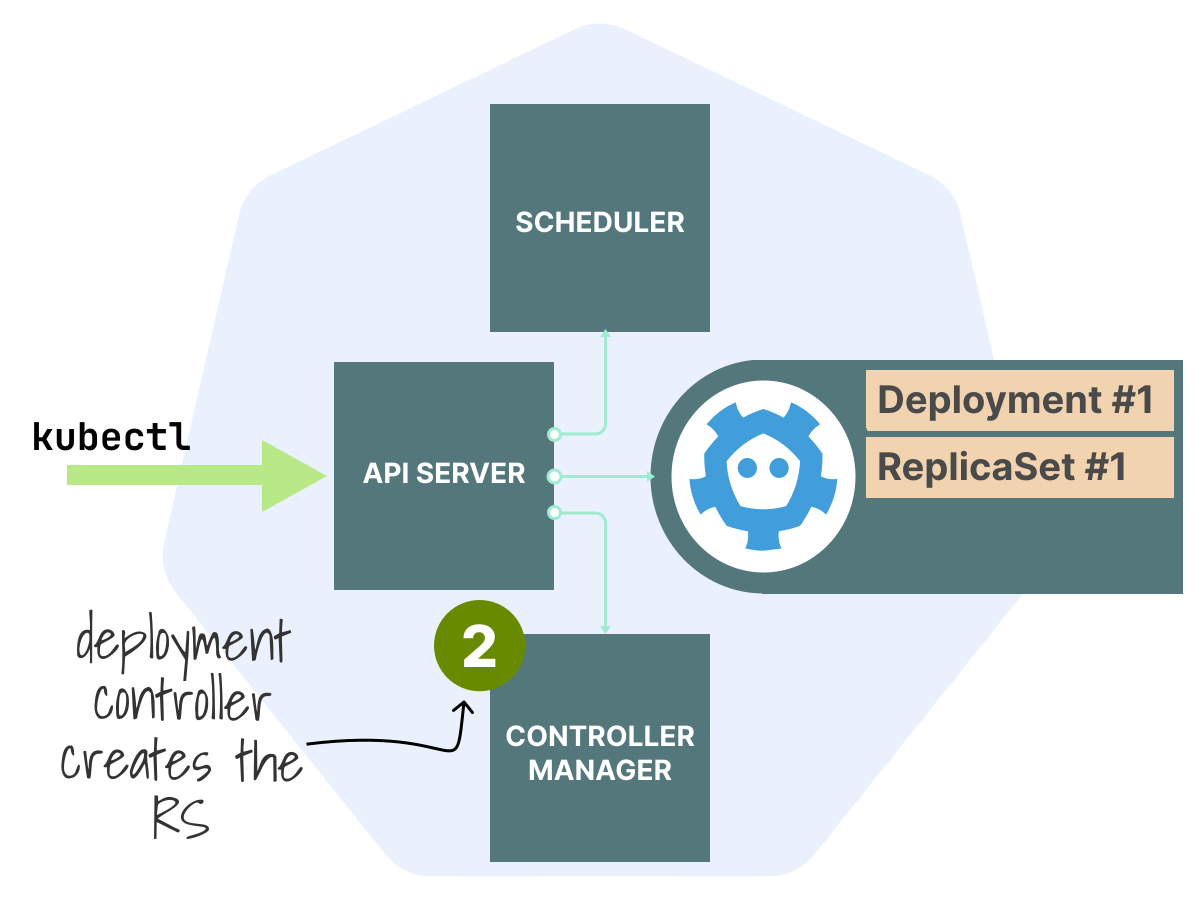 2/4
2/4Step 2: The Deployment controller inside the controller manager notices the new Deployment and creates a ReplicaSet. Both Deployment #1 and ReplicaSet #1 now exist in etcd.
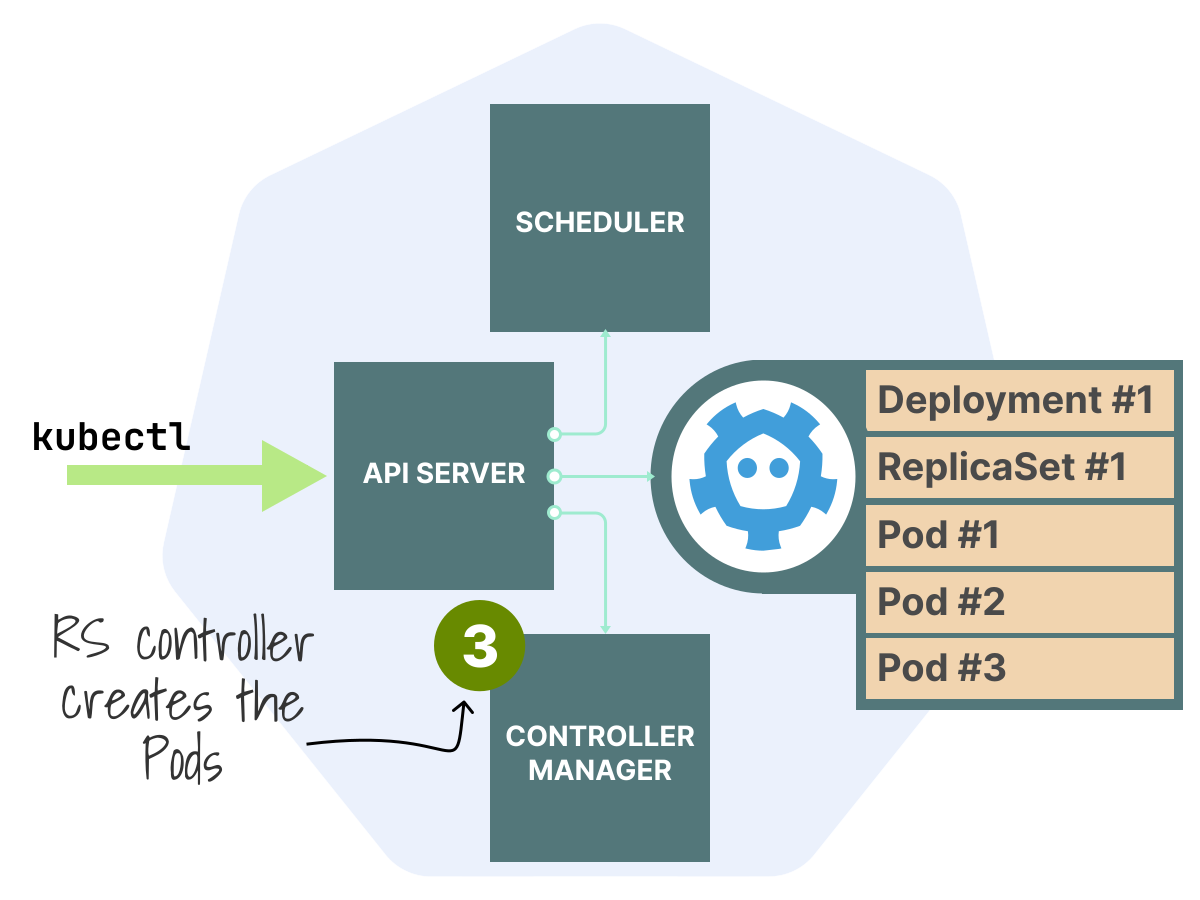 3/4
3/4Step 3: The ReplicaSet controller notices the new ReplicaSet, sees 0 Pods where 3 are desired, and creates Pod #1, Pod #2, and Pod #3 in etcd.
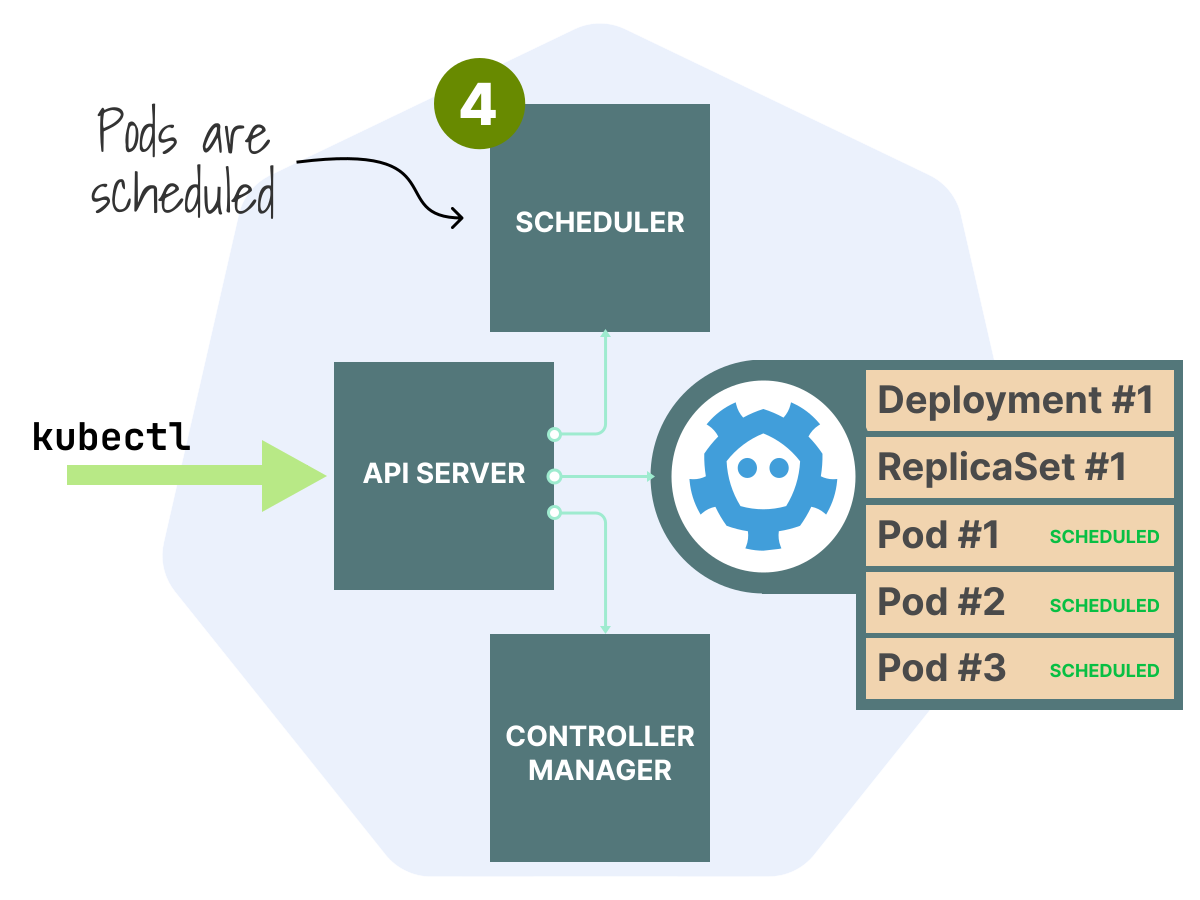 4/4
4/4Step 4: The scheduler notices the three unscheduled Pods and assigns each to a node. Pod #1, Pod #2, and Pod #3 are now marked as SCHEDULED in etcd.
Convergence isn't planned, but comes from many small, independent steps working together.
Each controller only knows the gap between the desired and actual states of the resources it manages.
The fact that the system eventually reaches the right state is a consequence of many simple loops running independently, each closing its own gap.
The controller loop
Every controller in Kubernetes follows the same pattern:
- Observe the current state of the cluster (through the API).
- Compare it to the desired state.
- Act to close the gap.
- Repeat.
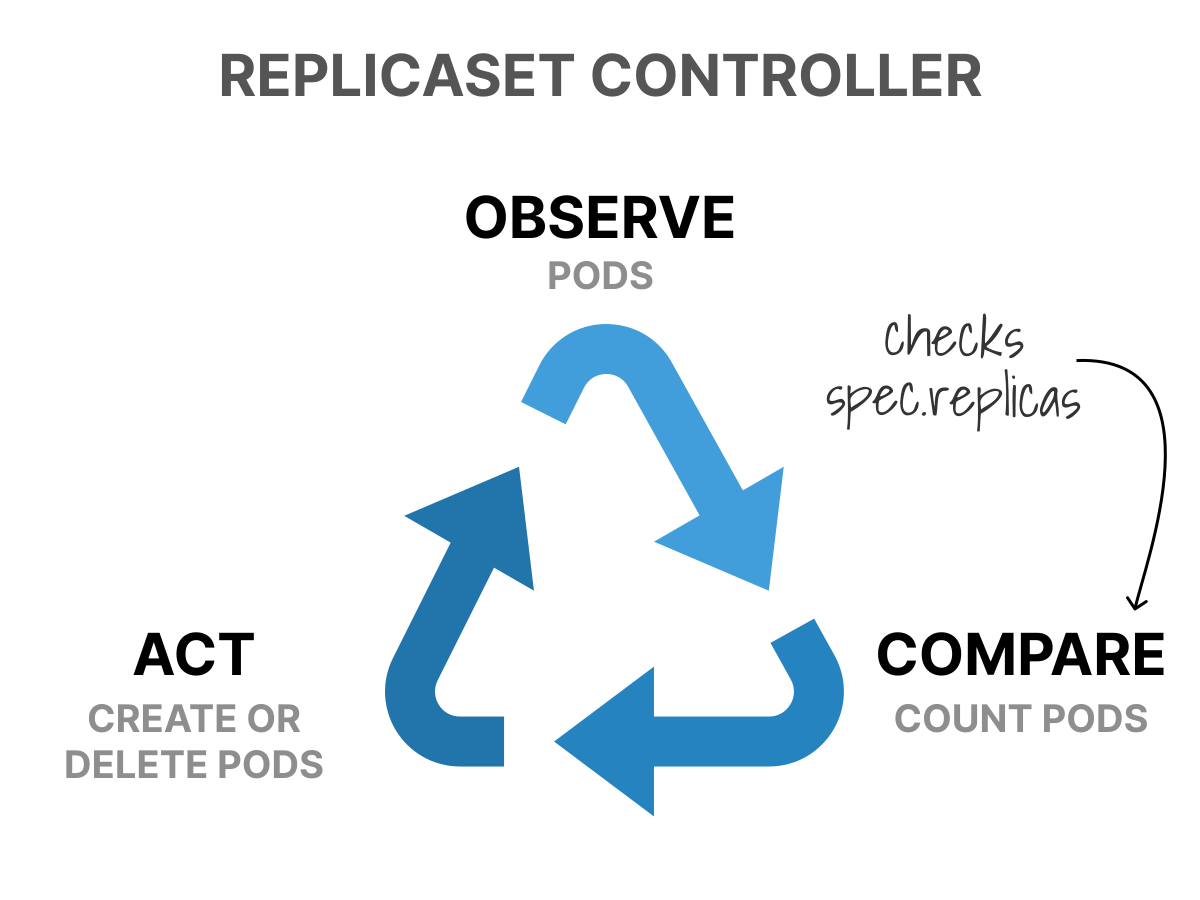
The ReplicaSet controller, for example:
- Observes how many Pods exist with matching labels.
- Compares that count to
spec.replicas. - Acts by creating or deleting Pods.
- Repeats forever.
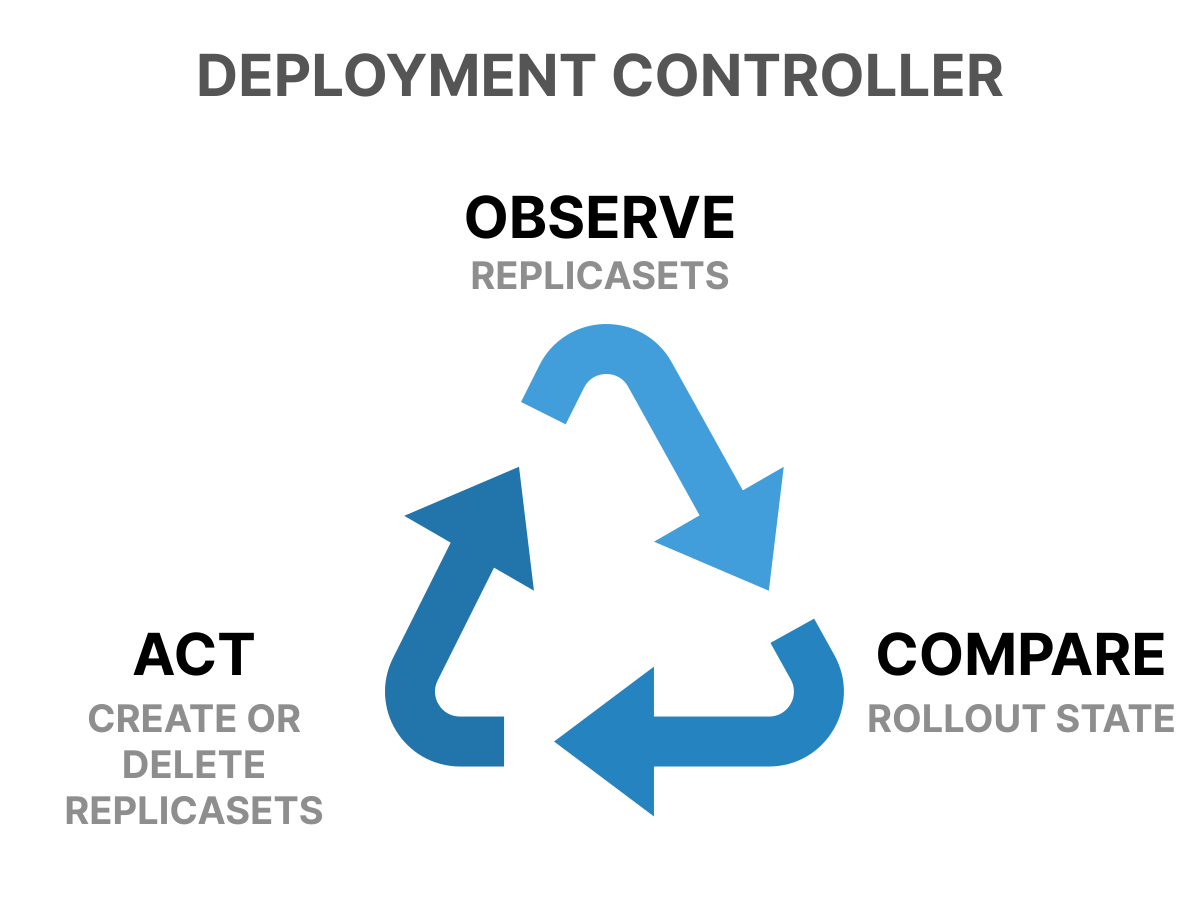
The Deployment controller:
- Observes the current ReplicaSet and its Pod template.
- Compares it to the Deployment's desired template.
- Acts by creating a new ReplicaSet (for rolling updates) or scaling the existing one.
- Repeats forever.
The resources and actions may change, but the loop stays the same.
How does a controller know that something changed?
Controllers do not poll the API server in a tight loop, asking "anything new?"
Instead, they use the Watch API.
A controller opens a long-lived HTTP connection to the API server and says: "Tell me every time a ReplicaSet changes."
The API server keeps the connection open and sends an event whenever a ReplicaSet is created, modified, or deleted.
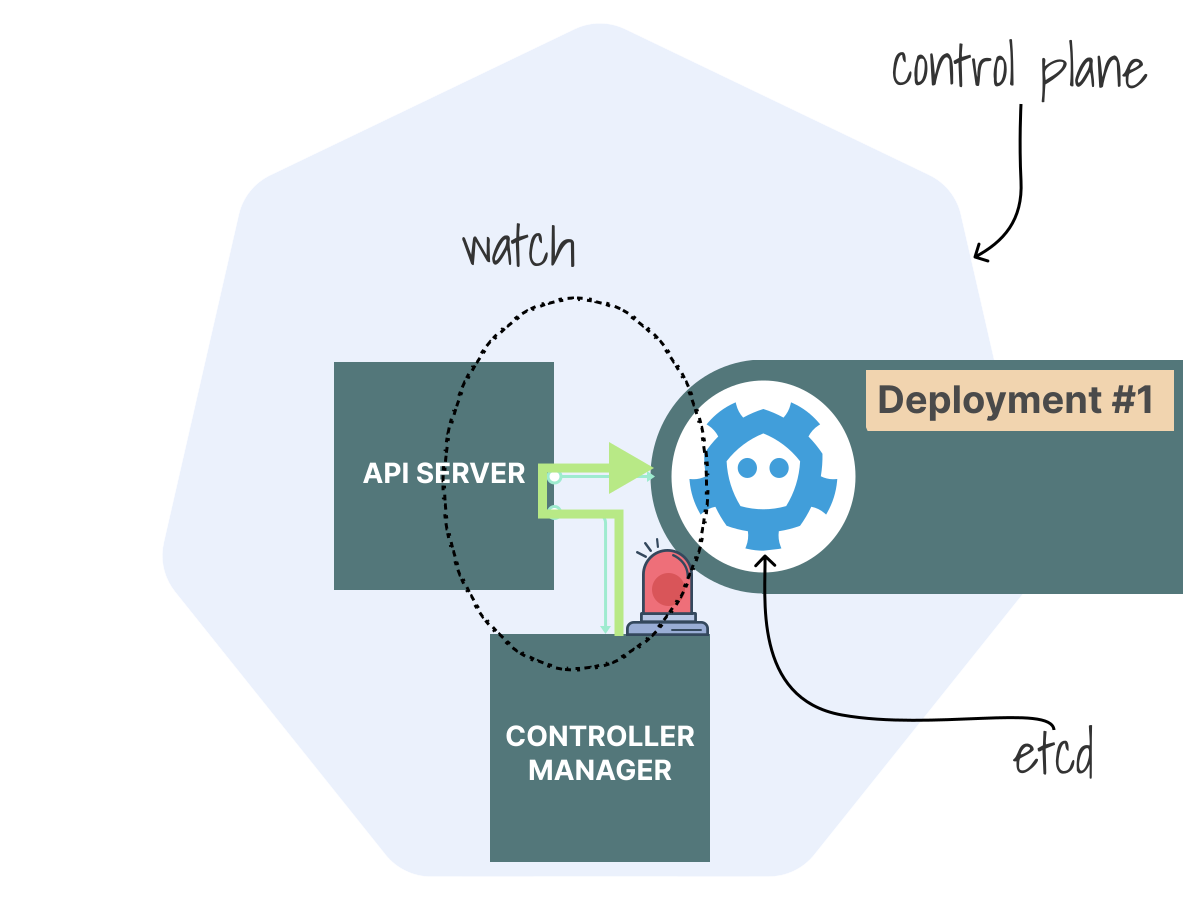
This approach is efficient.
Instead of asking repeatedly, the controller listens.
If the connection drops or the controller restarts, it reconnects and says: "Tell me everything that changed since this resourceVersion."
The API server picks up right where it left off.
This combination of listing resources, watching for changes, and tracking the resource version is handled by a component called the Shared Informer.
Internally, the informer is a pipeline of smaller components:
- A Reflector opens the watch connection to the API server and receives events.
- A DeltaFIFO queue buffers the raw changes (additions, updates, deletions) in order.
- An Indexer stores each object in a thread-safe local cache, keyed by namespace and name.
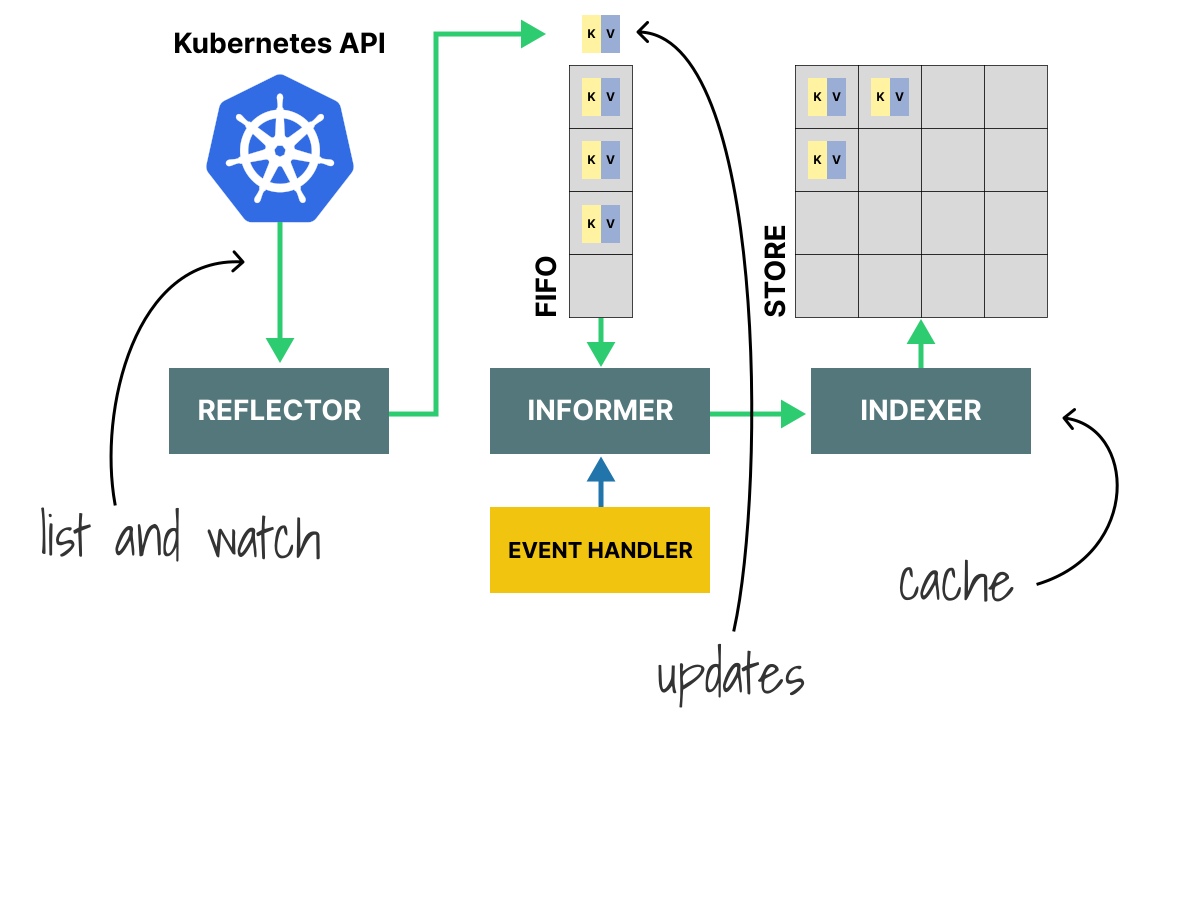
When a new event arrives, the Reflector pushes it into the DeltaFIFO.
The informer pops items from the queue, updates the Indexer, and then dispatches the event to any registered event handlers.
This is all part of client-go, the Go library that every Kubernetes controller is built on.
Controllers don't implement this machinery, but they get it for free.
Why "shared"?
Without sharing, each controller maintains its own full copy of every object it watches.
Five controllers watching Pods means five copies of every Pod in memory, and five separate list requests on startup.
The Shared Informer solves this by keeping one Reflector and one cache per resource type and fanning out events to all controllers that registered a handler.
If the Deployment controller and the HPA both need to watch ReplicaSets, they share a single informer rather than each running its own.
From events to reconciliation
Everything described so far (e.g., the Reflector, the DeltaFIFO, the Indexer, and the event dispatch) is shared infrastructure provided by client-go.
What happens next is up to each individual controller.
When the Shared Informer dispatches an event, the controller doesn't process it immediately.
Instead, the controller's event handler extracts the resource's key (its namespace and name, like default/demo) and adds it to the controller's own work queue.
The work queue stores keys, not full objects.
When a worker picks up the key, it looks up the full object from the informer's cache (the Indexer).
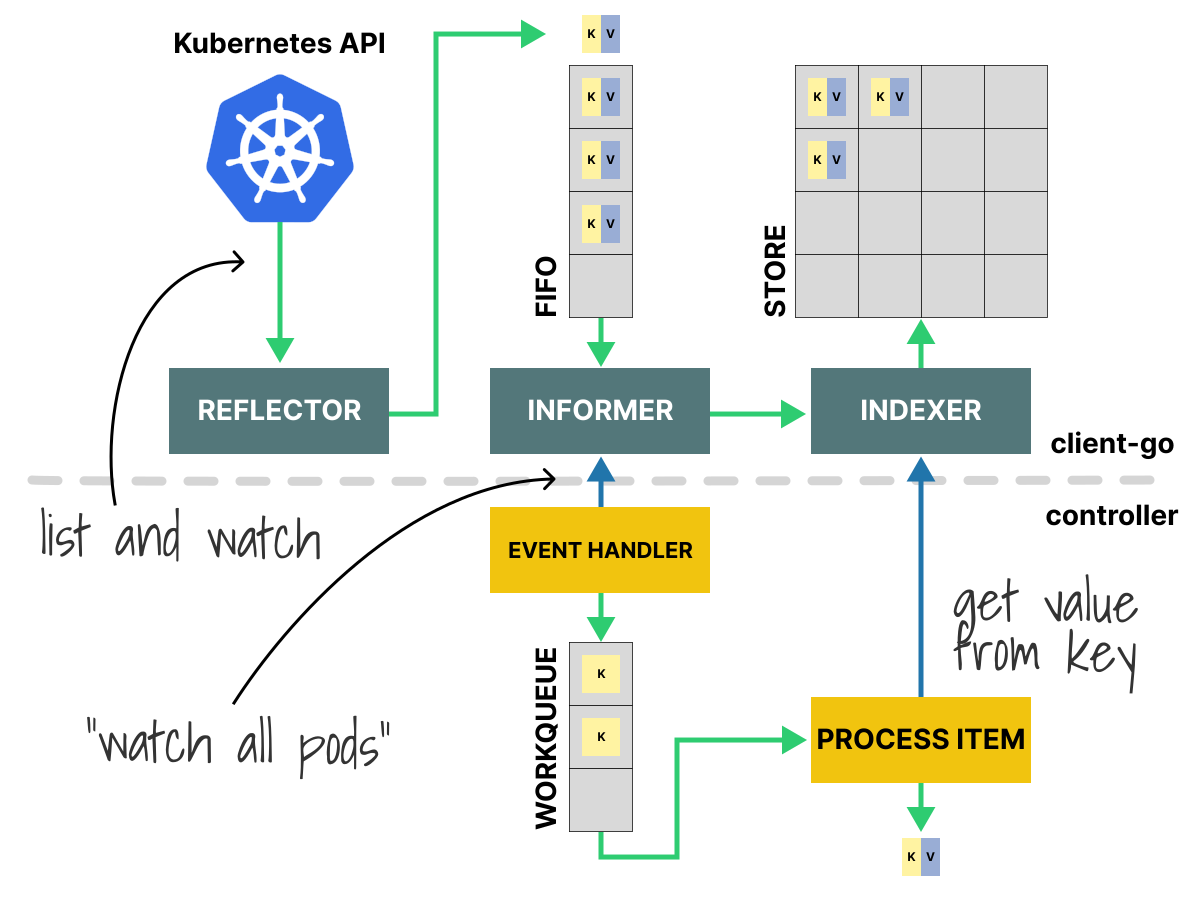
Why not process the event directly?
There are several reasons for this.
- Rate limiting: if 500 Pods change at once (say, during a rolling update), you don't want the controller to fire 500 concurrent reconciliation loops. The queue lets the controller process them one at a time, at a sustainable pace.
- Deduplication. If the same ReplicaSet changes three times in quick succession, the queue can collapse those into a single key. When the controller picks up the key, it reads the latest state from the Indexer, which already reflects all three changes.
- Retry. If processing fails (perhaps due to a conflict with another controller writing to the same object), the controller puts the key back in the queue with a delay. It will try again later.
The actual reconciliation then looks like this:
- Pick a key from the queue (e.g.,
default/demo). - Look up the resource from the Indexer.
- Read the desired state and the actual state.
- Compute the difference.
- Take action (create, update, or delete resources through the API).
- If something goes wrong, requeue the key.
This process is at the heart of every Kubernetes controller.
Level-triggered, not edge-triggered
This pattern includes a subtle design choice.
Most event-driven systems are edge-triggered: they react to transitions.
"A Pod was deleted" is an edge.
If you miss the edge (because you crashed or your connection dropped), you might never know it happened.
Kubernetes controllers are level-triggered: they react to the current state, not to the history of transitions.
What does this mean in practice?
When a controller picks up a key from the queue, it doesn't ask "what event happened to this resource?"
It asks: "What is the desired state right now? What is the actual state right now? What needs to change?"
If a controller crashes and restarts, it re-lists all resources, rebuilds its cache, and reconciles from the current state.
It doesn't need a perfect log of every event that happened while it was down.
This is the same principle as the autopilot: read the instruments, compare to the target, and make one correction.
Because each controller only computes the next step (not the full sequence), Kubernetes is eventually consistent.
It does not guarantee that every intermediate state is observed.
It guarantees that, with repeated small corrections, the system will eventually reach the desired state.
This is why controllers must be idempotent: running the same reconciliation twice with the same input should always give the same result.
"Create a Pod if one doesn't exist" is idempotent.
"Create a Pod" is not (it would create duplicates on every retry).
A chain reaction inside the control plane
When you apply a Deployment, no single controller handles all the work.
It's a chain reaction in which multiple controllers each handle a single piece.
Let's trace what happens when you run:
bash
kubectl apply -f deployment.yaml
deployment.apps/demo created- The API server stores the Deployment object in etcd. (Here's how that works.)
- The Deployment controller is watching for Deployment changes. It notices the new Deployment and creates a ReplicaSet with the same Pod template and a replica count of 3.
- The ReplicaSet controller is watching for ReplicaSet changes. It notices the new ReplicaSet, compares desired (3) to actual (0), and creates 3 Pods.
- The scheduler is watching for Pods with no
spec.nodeName. It picks up each unscheduled Pod and assigns it to a node. - The kubelet on each assigned node is watching for Pods scheduled to its node. It starts the containers.
- The EndpointSlice controller is watching for Pod readiness changes. As each Pod becomes ready, it updates the EndpointSlice so that Services can route traffic to the new Pods.
You can see the pattern here.
No component calls the next one directly.
Each controller writes to the API, and the next controller in the chain picks up the change through its own watch.
The Deployment controller has no idea the scheduler exists.
The scheduler has no idea the kubelet exists.
They are completely separate and only communicate through the shared API.
But if the Deployment controller creates a ReplicaSet, and the ReplicaSet controller creates Pods, what happens when you delete the Deployment?
Do you have to clean up the ReplicaSet and Pods yourself?
No.
When the Deployment controller creates a ReplicaSet, it sets an owner reference on it, pointing back to the Deployment.
When the ReplicaSet controller creates Pods, it sets owner references on those Pods that point back to the ReplicaSet.
This creates a chain of ownership: Deployment → ReplicaSet → Pods.
This chain is also how rolling updates work: the Deployment controller creates a new ReplicaSet with the updated template while scaling down the old one. Both ReplicaSets point back to the same Deployment. This article covers how Deployments use ReplicaSets for rolling updates and rollbacks.
When you delete the Deployment, Kubernetes follows this chain and garbage collects everything below it.
You can see these references in any resource:
bash
kubectl get replicaset -l app=demo -o yaml | grep -A5 ownerReferences
    ownerReferences:
    - apiVersion: apps/v1
      blockOwnerDeletion: true
      controller: true
      kind: Deployment
      name: demo
Owner references tell Kubernetes which resources belong to which.
Without them, deleting a Deployment would leave behind orphaned ReplicaSets and Pods that no one manages.
This setup also makes Kubernetes easy to extend.
You can add new controllers that react to the same events without modifying any existing component.
You can watch this chain reaction happen.
In one terminal, start watching events:
bash
kubectl get events --watch
REASON             OBJECT                              MESSAGE
ScalingReplicaSet  deployment/chain-test               Scaled up replica set chain-test-…7 from 0 to 2
SuccessfulCreate   replicaset/chain-test-555c978787    Created pod: chain-test-555c978787-jzzb5
SuccessfulCreate   replicaset/chain-test-555c978787    Created pod: chain-test-555c978787-mcwtq
Scheduled          pod/chain-test-555c978787-jzzb5     Successfully assigned default/c…5 to minikube
Scheduled          pod/chain-test-555c978787-mcwtq     Successfully assigned default/c…q to minikube
Pulling            pod/chain-test-555c978787-jzzb5     Pulling image "nginx"
Pulling            pod/chain-test-555c978787-mcwtq     Pulling image "nginx"
Pulled             pod/chain-test-555c978787-jzzb5     Successfully pulled image "nginx"
Created            pod/chain-test-555c978787-jzzb5     Container created
Started            pod/chain-test-555c978787-jzzb5     Container started
Pulled             pod/chain-test-555c978787-mcwtq     Successfully pulled image "nginx"
Created            pod/chain-test-555c978787-mcwtq     Container created
Started            pod/chain-test-555c978787-mcwtq     Container started
In another terminal, create a Deployment:
bash
kubectl create deployment chain-test --image=nginx --replicas=2
deployment.apps/chain-test created
Back in the first terminal, you'll see events arriving in sequence: the Deployment being created, the ReplicaSet being scaled up, Pods being scheduled, containers being pulled and started.
Each event comes from a different component, but together they form the chain.
The same principle applies to other operations.
When you create a Namespace, the ServiceAccount controller notices and creates a default ServiceAccount in that Namespace.
You created one resource, and another appeared automatically.
The controller manager
Where do all these controllers run?
Most of the built-in controllers run inside a single process called kube-controller-manager.
This is one of the control plane components, alongside the API server, etcd, and the scheduler.
If the API server is the heart of Kubernetes, pumping data to every component, then the controller manager is the brain: it monitors the cluster's state and decides what to do next.
More precisely, the controller manager itself doesn't make those decisions.
It hosts the individual controllers that do.
You can picture it as an office building where all the controllers have their own desks.
Why run them all in one process?
- Efficiency. Many controllers watch the same resource types. By running inside the same process, they share Shared Informers, work queues, and connections to the API server. If each controller were a separate binary, you'd multiply the memory usage and the number of API connections.
- Simplicity. A single binary is easier to deploy, configure, and monitor than 30 separate ones.
Leader election
If you're running Kubernetes in high availability mode with three control plane nodes, you have three API servers, three controller managers, three schedulers, and so on.
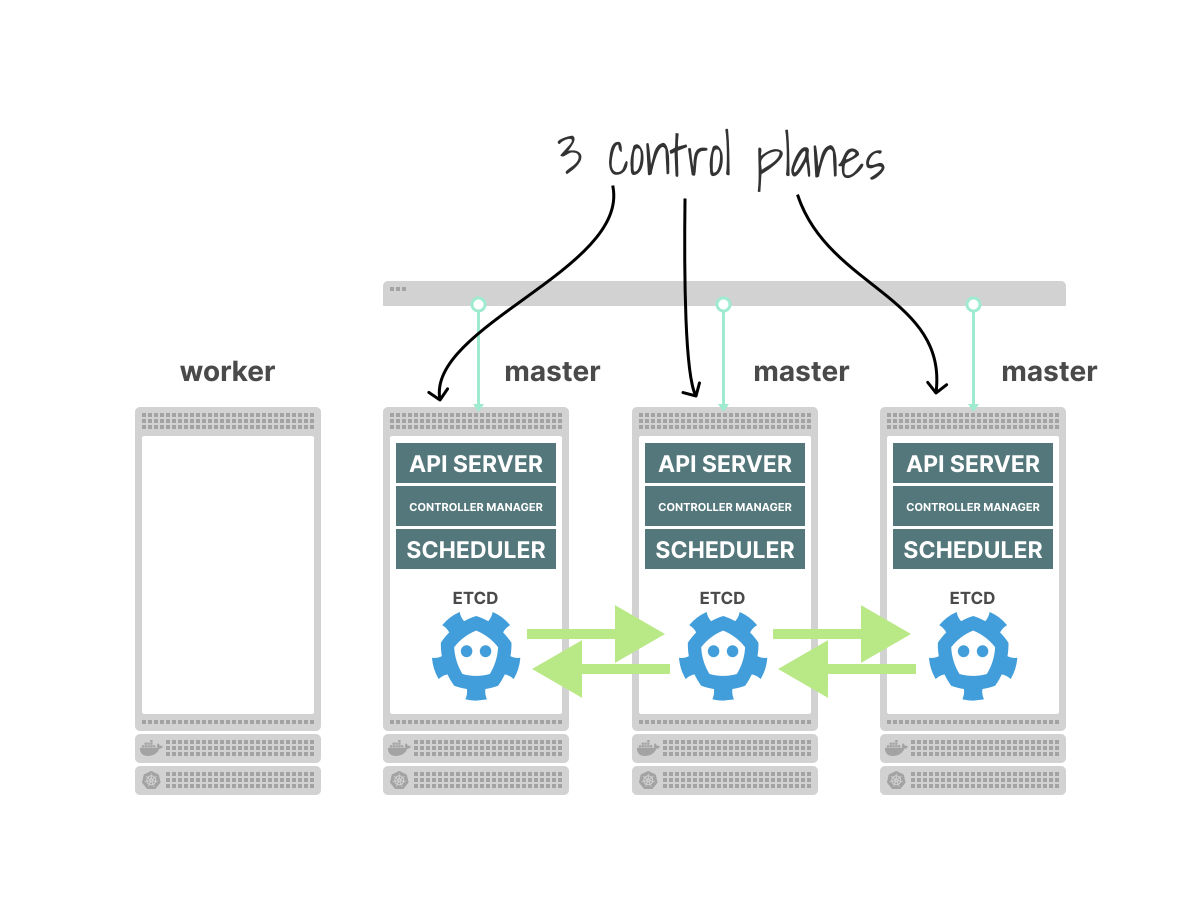
The API servers can all serve requests concurrently, because they share a single etcd cluster as the source of truth.
But what about the controller managers?
Imagine all three controller managers are running their controllers simultaneously.
You create a Deployment with 3 replicas.

One API server receives the request and writes the Deployment to etcd.
All three Deployment controllers see the new Deployment and each one creates a ReplicaSet.
Now you have three ReplicaSets.
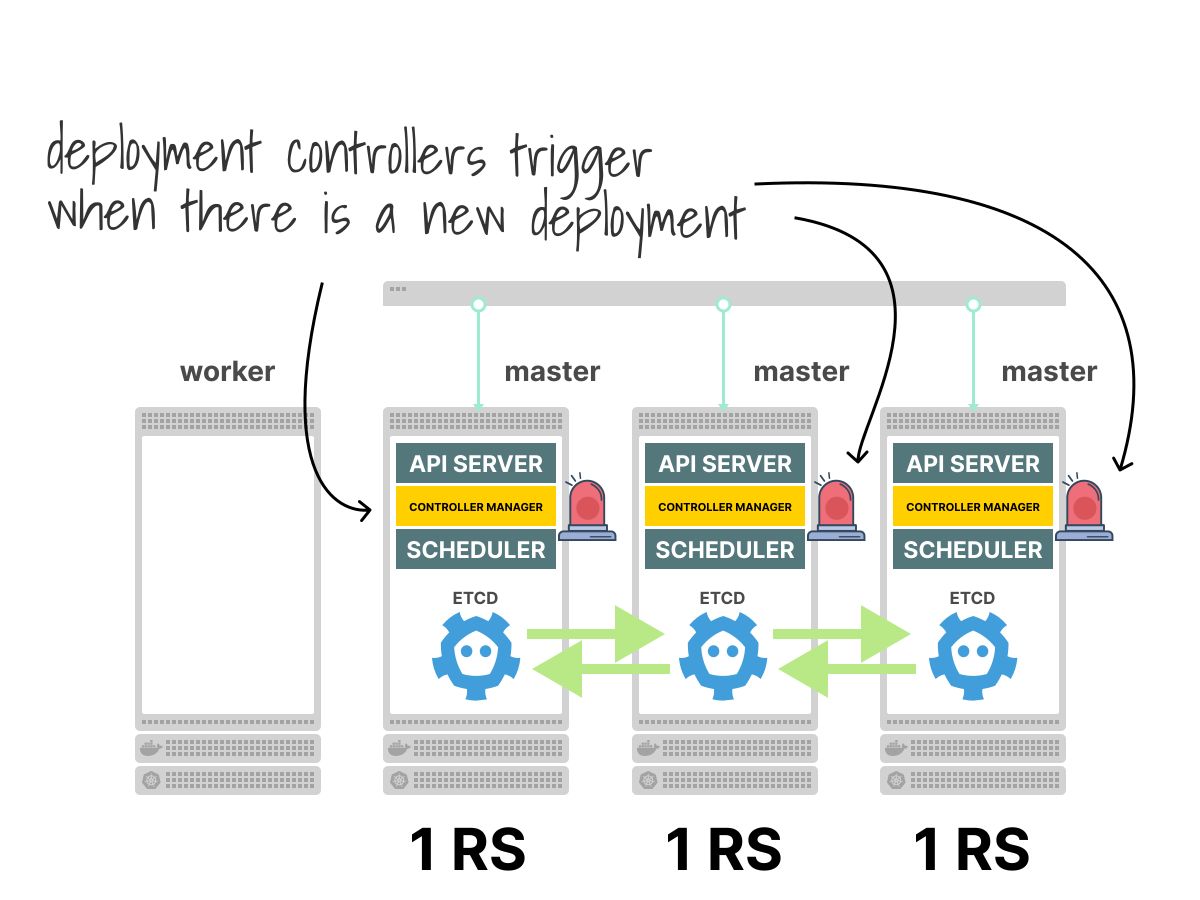
Each of the three ReplicaSet controllers sees its ReplicaSet with a desired count of 3 and an actual count of 0, so each creates 3 Pods.
You now have 9 Pods instead of 3.

What happens next?
Each ReplicaSet controller reads the current state: desired 3, actual 9.
All three controllers try to delete 6 Pods each.
If you're lucky, they each delete different Pods, leaving you with 3.
If they overlap (two controllers try to delete the same Pod, but only one succeeds), you might end up with 4 or 5 Pods after this round.
So the controllers run again: desired 3, actual 5—delete 2. And again. And again.
Eventually, after several rounds of deleting and creating, the system ends up with 3 Pods.
This teaches two important lessons.
First, Kubernetes really does converge.
Even in chaotic conditions, the reconciliation loops will eventually reach the desired state.
Second, multiple controller managers acting simultaneously is wasteful and slow.
Every correction creates unnecessary work, and convergence takes more rounds than it should.
Can we do better?
Yes: run only one controller manager at a time.
This is handled through leader election: the three instances compete for a lease object in the API, and only the winner runs the controllers.
The other two are on standby, watching but not acting.
If the leader crashes, one of the standbys takes over.

You can check which instance is the current leader:
bash
kubectl get lease kube-controller-manager -n kube-system -o yaml
apiVersion: coordination.k8s.io/v1
kind: Lease
metadata:
  creationTimestamp: "2026-04-13T02:37:36Z"
  name: kube-controller-manager
  namespace: kube-system
  resourceVersion: "1651"
  uid: c5159aac-1aee-481b-a3bb-f624df2244ea
spec:
  acquireTime: "2026-04-13T02:49:24.315070Z"
  holderIdentity: minikube-ha-le-m02_89d9e89c-3944-4fd3-b804-4e8eb874b83f
  leaseDurationSeconds: 15
  leaseTransitions: 5
  renewTime: "2026-04-13T02:51:30.932984Z"
On a highly available control plane, the holderIdentity field shows the name of the active instance.
This leader election is independent of etcd's Raft leader election.
etcd elects its own leader using the Raft consensus protocol, and that leader can be on a completely different node.
The controller manager, leader, and the etcd leader serve different purposes, use different mechanisms, and do not need to be co-located.
Self-healing and its limits
When people say Kubernetes is "self-healing," they mean the combination of the declarative API and the controller loops that continuously reconcile desired state against reality.
You declare what you want.
Controllers observe the world.
When reality drifts, they push it back.
This works well for common failures:
- A Pod crashes. The ReplicaSet controller sees fewer Pods than desired and creates a replacement.
- A node goes offline. The node controller detects missing heartbeats and evicts the Pods. The ReplicaSet controller then creates replacements on other nodes.
- A Deployment is updated. The Deployment controller creates a new ReplicaSet with the updated template and gradually shifts Pods over.
In each case, no human intervention is needed.
The system fixes itself over time.
But self-healing doesn't mean things recover instantly.
Consider what happens when a node fails.
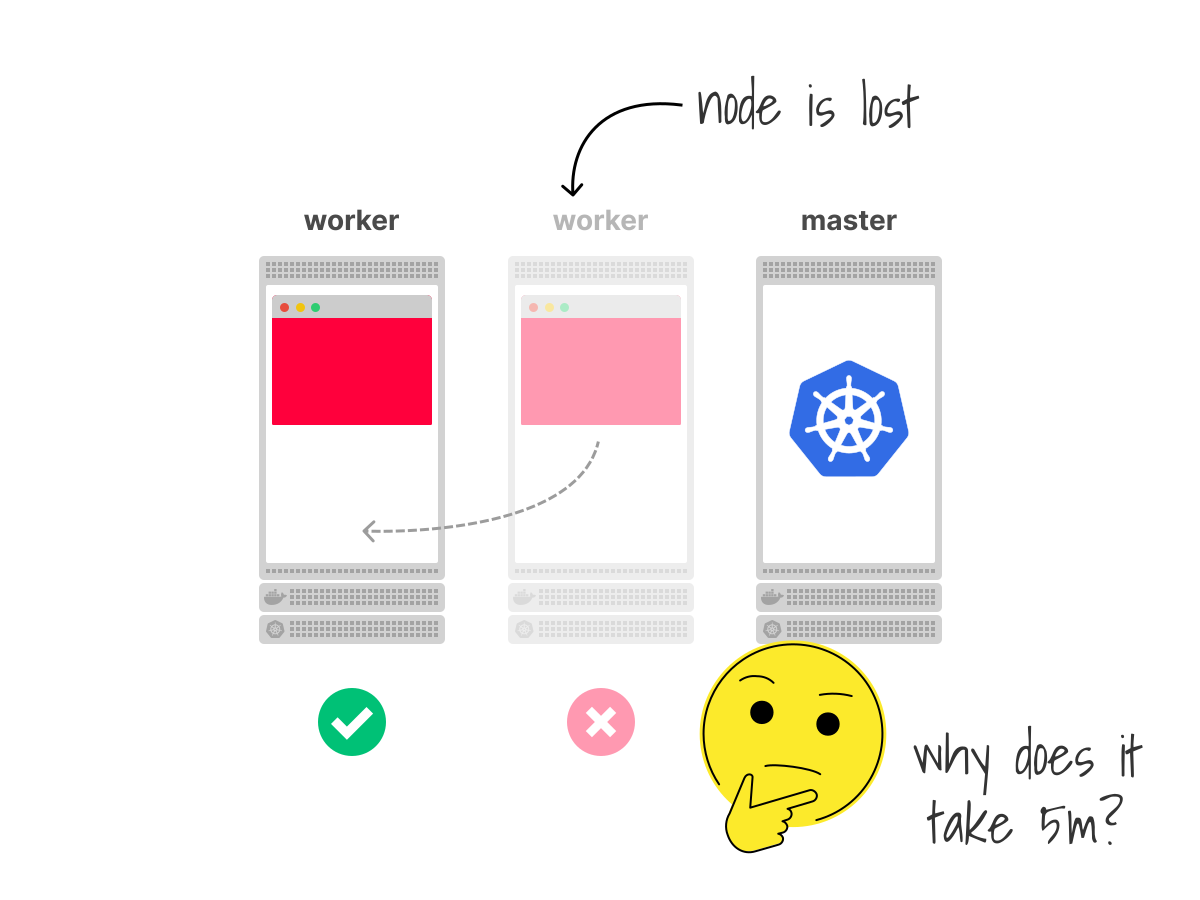
Detection takes time. The node controller monitors heartbeats.
If a node stops responding, the controller doesn't immediately assume it's dead: it waits.
The default timeout is 5 minutes.
Why so long?
Because a brief network hiccup shouldn't trigger mass Pod evictions.
If the controller reacted after 10 seconds, a minor network glitch could cause dozens of Pods to be killed and rescheduled unnecessarily, creating a bigger disruption than the original problem.
Volume safety adds more time: if the failed node had Pods with persistent volumes attached, the system can't just mount those volumes on a new node immediately.
Attaching a volume to two nodes at once risks data corruption.
The attach/detach controller handles this.
It maintains its own cache of which volumes are attached to which nodes, and it won't allow a volume to be reattached to a new node until it's confident the old attachment is no longer in use.
In practice, this means the controller may wait an additional 6 minutes before considering the old attachment invalid.
Total recovery time: over 10 minutes.
That is a deliberate safety choice to prevent data corruption.
It's important to remember: Kubernetes gives you automatic recovery, but not high availability.
These are not the same thing:
- Automatic recovery means the system will eventually fix itself without human intervention. You don't need to SSH into a server and restart a process at 3 AM. The controllers will handle it.
- High availability means the service stays up during the failure. Users don't experience downtime.
Kubernetes gives you automatic recovery by default.
If you want high availability, you need to design your workloads for it:
- Run multiple replicas so that losing one Pod doesn't take down the service.
- Use readiness probes so that traffic stops reaching Pods that aren't ready.
- Set Pod Disruption Budgets so that voluntary disruptions (like drains and upgrades) don't remove too many Pods at once.
- Spread Pods across nodes (using topology spread constraints) so that a single node failure doesn't take out all your replicas.
If you only have one replica, self-healing is fragile.
With multiple replicas and good distribution, self-healing becomes much more reliable.
The controller loops are the engine, but the workload design determines whether users notice the failure.
When the cache drifts from reality
Controllers make decisions based on caches rather than querying the real world directly.
The ReplicaSet controller reads from its informer cache to count Pods.
The attach/detach controller maintains its own cache of volume attachments.
What happens if the cache is wrong?
It can happen.
A volume might have been forcefully detached at the infrastructure level (say, by a cloud provider), but the controller's cache still shows it as attached.
A Pod might have been terminated by the kubelet, but the API server hasn't been updated yet.
When the cache drifts from reality, the controller makes decisions based on stale information.
It might wait to detach a volume that's already gone, or skip creating a Pod because the cache still lists one that no longer exists.
This is why controllers periodically re-list all resources (a full resync) and why some controllers have mechanisms to verify their caches against the real world.
This is also why Kubernetes is designed to fix itself over time, rather than always being correct at every moment.
Usually, the next reconciliation pass will fix any mistakes from the last one.
Custom controllers
Once you understand the pattern, building your own controller is easier than it might seem.
Every built-in controller follows the same shape:
- Input: A Kubernetes resource (Deployment, ReplicaSet, Job, ...).
- Output: Other Kubernetes resources (ReplicaSets, Pods, ...) or side effects (volume attachments, endpoint updates).
- Logic: Compare desired to actual, act to close the gap.
A custom controller does the same thing with your own resources.
Say you define a Custom Resource Definition (CRD) called BackupPolicy:
backuppolicy-crd.yaml
apiVersion: apiextensions.k8s.io/v1
kind: CustomResourceDefinition
metadata:
  name: backuppolicies.example.com
spec:
  group: example.com
  names:
    kind: BackupPolicy
    plural: backuppolicies
  scope: Namespaced
  versions:
    - name: v1
      served: true
      storage: true
      schema:
        openAPIV3Schema:
          type: object
          properties:
            spec:
              type: object
              properties:
                schedule:
                  type: string
                retainCount:
                  type: integer
Now you can create BackupPolicy objects just like any built-in resource:
my-backup.yaml
apiVersion: example.com/v1
kind: BackupPolicy
metadata:
  name: database-backup
spec:
  schedule: "0 * * * *"
  retainCount: 7
The CRD extends the API.
Kubernetes stores and serves it like any built-in resource.
A custom controller extends the behavior.
It watches for BackupPolicy objects and acts on them:
- Observes all BackupPolicy resources using a Shared Informer.
- Compares the desired state (a backup should run hourly, keep 7 copies) to the actual state (how many backups exist, when the last one ran).
- Acts by creating a Job to run the next backup, or deleting old backups that exceed the retain count.
- Repeats forever.
The combination of a CRD and a custom controller is called an operator.
This is how tools like cert-manager (which provisions TLS certificates when you create a Certificate resource), Prometheus Operator (which configures monitoring when you create a ServiceMonitor resource), and Argo CD (which deploys applications when you create an Application resource) all work.
The inputs and outputs may change, but the loop stays the same.
If Custom Resource Definitions had existed when Kubernetes was first designed, even the built-in types (Deployments, Services, ConfigMaps) would likely have been implemented as CRDs.
The API server would have been a generic store, and everything else would have been an extension of it.
The built-in resources are not special; they just existed before the extension mechanism.
Recap
Let's trace the full picture:
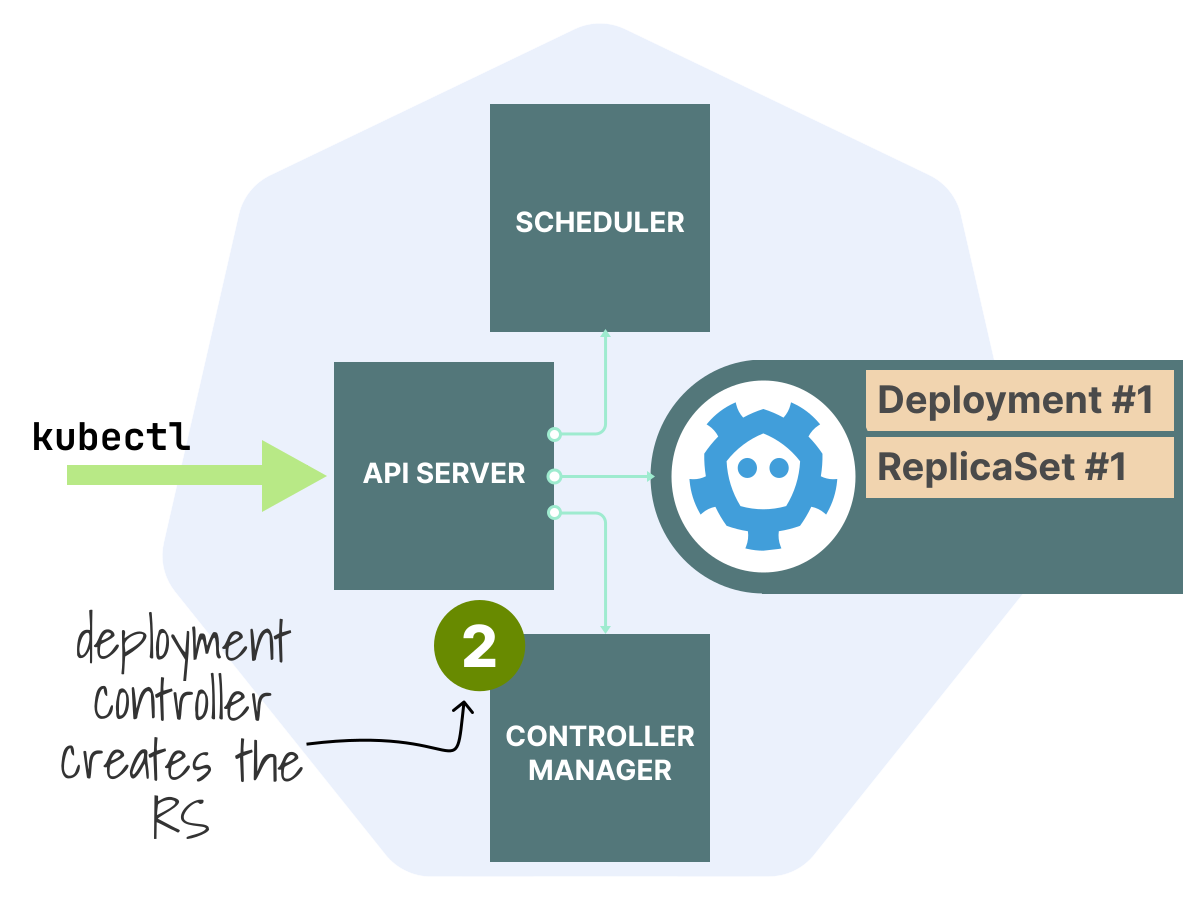 2/6
2/6The Deployment controller picks up the change and creates a ReplicaSet.
 3/6
3/6The ReplicaSet controller picks up the new ReplicaSet, sees 0 Pods where 3 are desired, and creates 3 Pods.
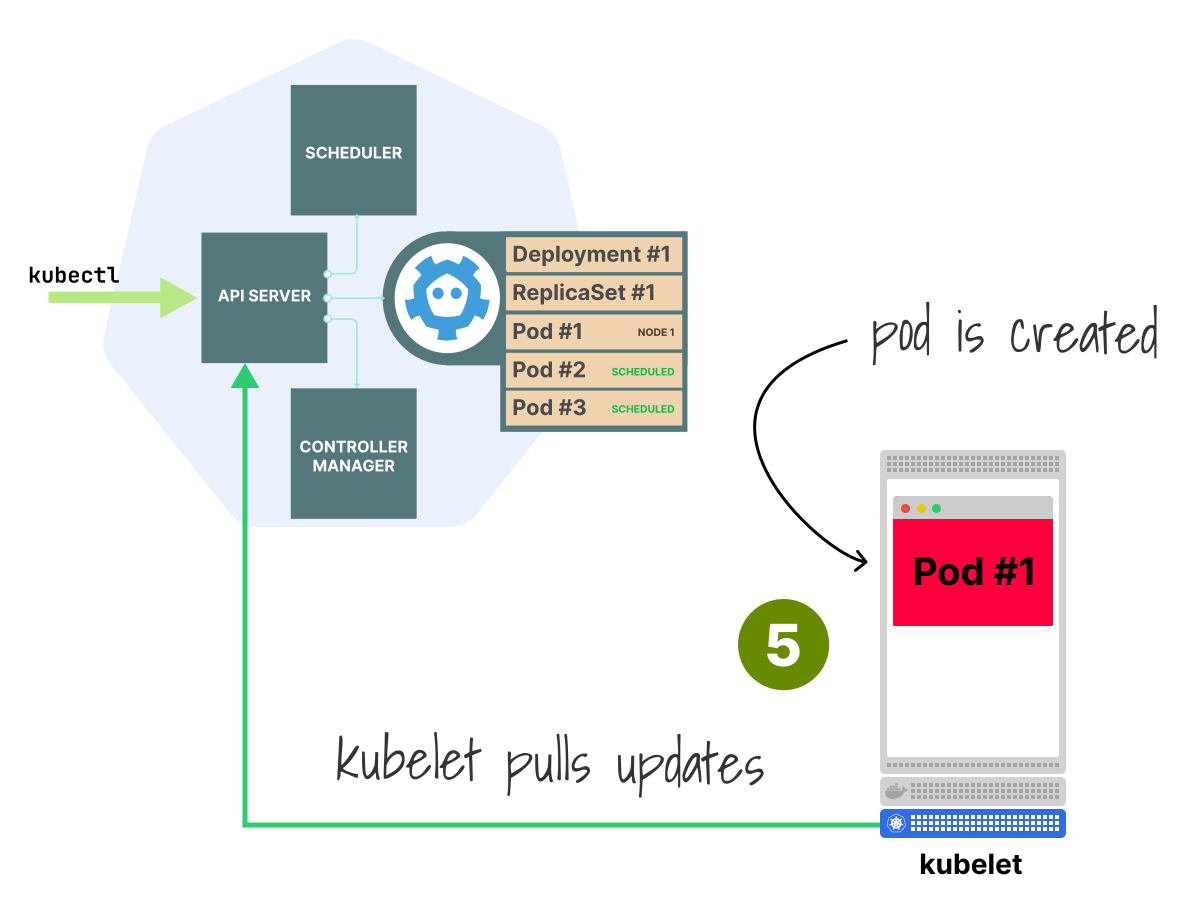 5/6
5/6The kubelet on each node picks up the Pods assigned to it and starts the containers.
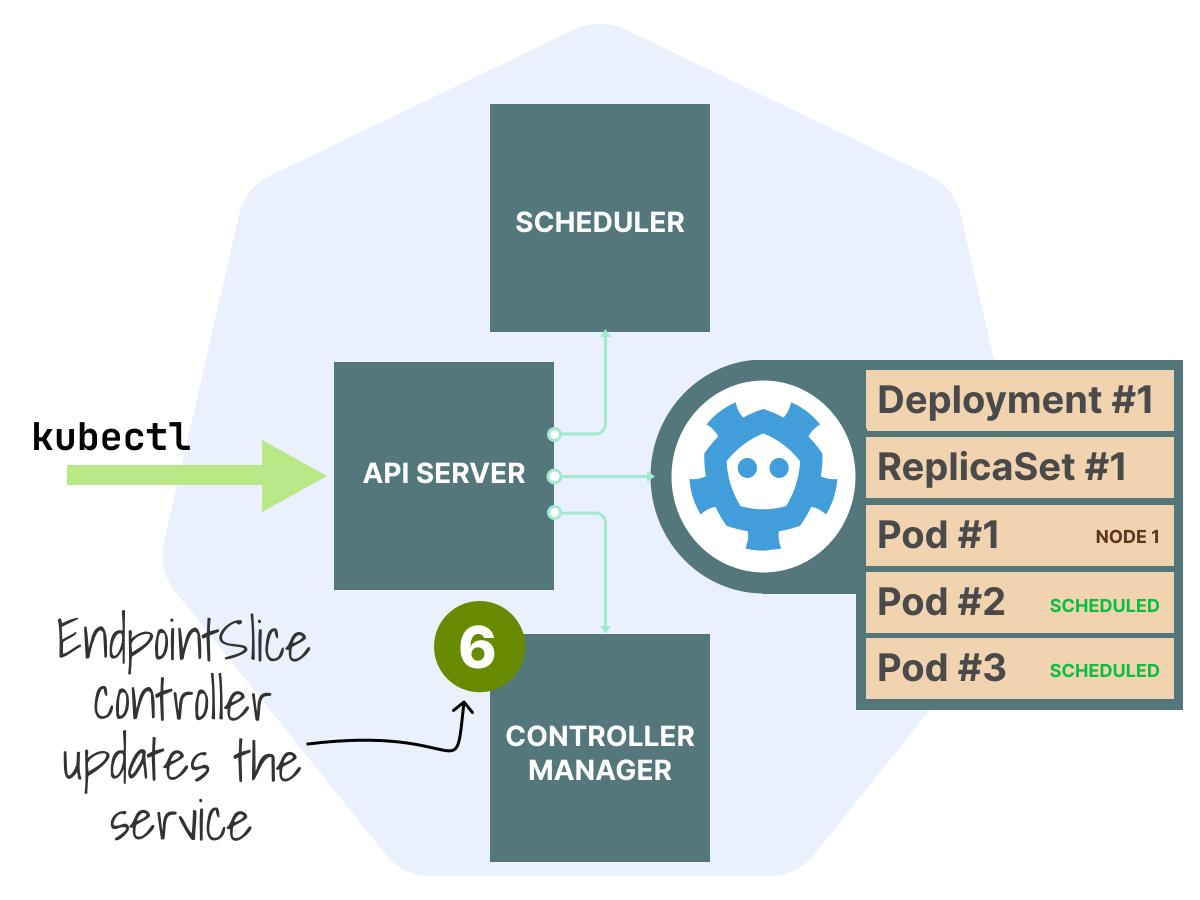 6/6
6/6The EndpointSlice controller picks up the Pod readiness changes and updates the routing table for the Service.
 and notifies all watchers.You create a Deployment. The API server stores it in etcd and notifies all watchers.](https://static.learnkube.com/df46f874163a97f7e8bd690d97616e32.svg)
.The scheduler picks up the unscheduled Pods and assigns each to a node.](https://static.learnkube.com/6b88ee2230ea6cc9ba3169c2af107752.svg)
Every step uses the same pattern: observe the current state, compare it to what you want, and act to close the gap.
These controllers run inside the kube-controller-manager, a single process in the control plane that hosts all the built-in control loops.
When something breaks (a Pod crashes, a node goes down), the same loops detect the drift and reconcile.
This is what "self-healing" means.
If you need high availability (where users don't notice failures), you still need to design your workloads with multiple replicas, readiness probes, disruption budgets, and topology spread.
The controller loops handle recovery, but how you design your workloads decides how much users notice any problems.
The pattern extends beyond built-in resources.
You define a CRD (extending the API) and write a controller (extending the behavior).
Different resources, same loop.